New See exactly what you're overpaying AWS in under 60 seconds. Try the Calculator for free

RDS Oracle EE vs SE2: When Standard Edition 2 Is Enough — and When It Is Not

Updated June 4, 2026
18 min read
RDS Oracle EE vs SE2: When Standard Edition 2 Is Enough -- and When It Is Not
On this page

Oracle Enterprise Edition is the default choice for production Oracle databases in most organizations. It was the right default when on-premises licensing included EE in site licenses and ULAs at negligible marginal cost per additional deployment. On AWS RDS, the licensing math is different. Every database deployment stands on its own, and EE BYOL requires enough processor licenses to cover the vCPU count of the RDS instance at Oracle’s cloud licensing policy rates.

Oracle EE lists at $47,500 per processor license. SE2 lists at $17,500 per socket. For a db.r6i.xlarge with 4 vCPUs running BYOL: 2 Oracle processor licenses are required. EE BYOL: 2 x $47,500 = $95,000 in license cost. SE2 BYOL: depends on socket counting (typically 1 socket on virtualized instances), so potentially $17,500. The license cost difference is $77,500 per instance, before AWS compute charges or SULS fees.

That $77,500 per-instance difference is the reason the EE vs SE2 question deserves a structured answer rather than a default assumption that EE is required. For many Oracle OLTP workloads — transactional applications, reporting databases, backend data stores — the EE-only features are not used and SE2 is technically sufficient. The assessment is the job.

See exactly what you’re overpaying in under 60 seconds. Try the Calculator for free →

Oracle EE vs SE2 on RDS: The Complete Feature and Cost Comparison

Verdict first: EE is required if your workload uses any of the features marked below as EE-only. If none of those features apply, SE2 is sufficient and significantly cheaper. The AWS compute rate is identical for both editions on the same instance class — the difference is entirely in the Oracle license.

Feature or Constraint SE2 EE
Max vCPUs (concurrent CPU threads) 16 vCPUs (hard limit) Unlimited
AWS compute charge (same instance class) Identical to EE Identical to SE2
License Included (LI) available on RDS Yes No — BYOL only
Bare metal BYOL on RDS Yes (Jan 2026) Yes (Sep 2025)
Size-flexible Reserved Instances Yes (BYOL) Yes (BYOL)
Basic CRUD, SQL, PL/SQL Included Included
Automated backups, point-in-time recovery Included (AWS managed) Included (AWS managed)
Multi-AZ high availability Supported Supported
Read replicas Supported Supported
Real Application Clusters (RAC) Not available Not available on RDS (EC2 only for RAC)
Table and Index Partitioning Not available Included
Advanced Security Option (Network Encryption, Data Masking, Label Security) Not available Included
Transparent Data Encryption (TDE) at tablespace level Not in SE2 Included
Diagnostics Pack (AWR, ADDM, Active Session History) Requires separate license Included
Tuning Pack (SQL Tuning Advisor, SQL Access Advisor) Requires separate license Included
Database Vault Not available Optional add-on
Oracle In-Memory Not available Optional add-on
Oracle Multitenant (PDBs) Max 3 PDBs Unlimited PDBs
Real Application Testing (Workload Replay) Not available Optional add-on
Oracle Spatial and Graph Not available Optional add-on
Oracle Advanced Analytics Not available Optional add-on
Oracle list price (processor/socket) ~$17,500/socket ~$47,500/processor
Annual SULS (support) ~22% of net license/year ~22% of net license/year

All rates: US East (N. Virginia), May 2026. Verify at aws.amazon.com/rds/oracle/pricing — rates change.

Sources: Redress Compliance (April 2026), AWS Prescriptive Guidance (docs.aws.amazon.com/prescriptive-guidance/latest/evaluate-downgrading-oracle-edition/welcome.html), CloudBurn (April 2026), AWS official RDS Oracle announcements (September 2025, January 2026). Oracle list prices are approximate and subject to volume discounts. Verify with your Oracle account team and at aws.amazon.com/rds/oracle/pricing.

Note on RAC: Real Application Clusters is not available on Amazon RDS for either SE2 or EE. RAC requires direct access to shared storage and Oracle Clusterware, which RDS does not support. If your on-premises Oracle workload runs RAC, migration to RDS requires re-architecting the HA strategy to use Multi-AZ instance deployment instead. EC2 with custom Oracle installation supports RAC, but requires self-managed licensing and infrastructure.

The Three-Way Cost Comparison: EE BYOL vs SE2 LI vs SE2 BYOL

The cost of running Oracle on RDS has three distinct permutations. The right comparison depends on whether you have existing Oracle licenses, which edition you need, and how you want to handle Oracle support.

Component EE BYOL SE2 License Included SE2 BYOL
AWS compute rate/hr ~$0.50/hr ~$0.952/hr ~$0.50/hr
AWS monthly (on-demand, 730 hrs) ~$365 ~$695 ~$365
Oracle license cost (on AWS) Existing BYOL licenses required (EE ~$47,500/processor) $0 — bundled into AWS rate Existing SE2 licenses required (~$17,500/socket)
Oracle SULS obligation ~22%/year on licenses used None — AWS handles Oracle support ~22%/year on licenses used
Oracle Support access Your CSI / My Oracle Support AWS Premium Support only Your CSI / My Oracle Support
EE features available Yes No — SE2 only No — SE2 only
SE2 16-vCPU cap applies No Yes Yes
Hosting/SaaS use permitted With appropriate EE entitlements No (AWS Service Terms 10.3.1) With appropriate SE2 entitlements
Best for Workloads requiring EE features with existing EE license pool New Oracle deployments with no existing licenses, SE2 features sufficient Existing SE2 licenses, want Oracle Support access

All AWS compute rates: db.r6i.xlarge, US East (N. Virginia), May 2026. Verify at aws.amazon.com/rds/oracle/pricing — rates change.

AWS compute rates: db.r6i.xlarge (4 vCPU, 32 GB RAM), US East, May 2026. SE2 LI rate approximately $0.952/hr, BYOL compute approximately $0.50/hr verified from oneuptime.com (February 2026) and Vantage.sh (May 2026). Oracle list prices approximate — verify with Oracle. Rates change.

The table makes one key decision visible: when you have no existing Oracle licenses and SE2 features are sufficient, License Included SE2 is the simplest and most predictable path. When you have existing licenses (either EE or SE2 with active SULS), BYOL is almost always cheaper on the AWS infrastructure component. The trade-off is Oracle support obligation and compliance management versus simplicity.

Also read: RDS Optimized Reads (NVMe Cache): What It Actually Costs and When It Pays Off

The Diagnostics Pack and Tuning Pack Trap: An EE-Only Feature Most Teams Use Accidentally

This is the most common reason organizations incorrectly believe they require EE — and the most common compliance risk for teams that have already migrated to SE2.

Oracle’s Diagnostics Pack includes: Automatic Workload Repository (AWR), Automatic Database Diagnostic Monitor (ADDM), Active Session History (ASH), and related performance monitoring features. The Tuning Pack includes: SQL Tuning Advisor, SQL Access Advisor, and Automatic SQL Tuning.

Both are separate Oracle options that require Enterprise Edition plus an additional license fee per processor. They are not included in the base EE license. They are definitely not included in SE2. Yet both are frequently used without awareness because AWR reports and SQL Tuning Advisor are easily accessible from Oracle Enterprise Manager (OEM) and are a standard part of DBA workflows.

The compliance risk: if a DBA runs AWR reports on an SE2 database — even accidentally through Oracle Enterprise Manager — Oracle considers this usage of the Diagnostics Pack. In an Oracle audit, AWR data found on an SE2 database is treated as unlicensed Diagnostics Pack usage. This creates a compliance exposure on top of the edition misuse if the database is supposedly SE2. The correct approach: disable the Diagnostics Pack parameter on SE2 databases: ALTER SYSTEM SET control_management_pack_access = ‘NONE’; Source: AWS Prescriptive Guidance (docs.aws.amazon.com/prescriptive-guidance/latest/evaluate-downgrading-oracle-edition/welcome.html, October 2022, current).

Before evaluating a downgrade from EE to SE2, query whether AWR data collection is active: SELECT VALUE FROM V$PARAMETER WHERE NAME = ‘control_management_pack_access’; If the result is DIAGNOSTIC+TUNING or DIAGNOSTIC, the database is actively collecting data that requires Diagnostics Pack licensing. AWR retention and any reports generated from it are subject to Oracle’s licensing requirements.

In practice: many Oracle EE databases on AWS have the Diagnostics Pack active not because they need it, but because no one changed the default parameter. Turning it off does not require EE. The question is whether your DBA workflows — performance troubleshooting, capacity planning, SQL optimization — depend on AWR data. If yes: either keep EE (with proper licensing) or build equivalent monitoring through other means (Oracle’s free AWR Alternative Tool, pg_activity equivalent, or AWS Performance Insights which is not subject to Oracle licensing).

Oracle database parameter query output showing the SQL statement SELECT VALUE FROM V$PARAMETER WHERE NAME equals control_management_pack_access returning the value DIAGNOSTIC+TUNING, displayed in a SQL client or AWS RDS Performance Insights interface, with an annotation overlay in orange text stating This value indicates active Diagnostics Pack and Tuning Pack usage which requires Oracle Enterprise Edition plus separate pack licensing fees -- this database cannot be migrated to SE2 without disabling AWR collection and replacing the performance monitoring workflow

The SE2 16-vCPU Limit: When It Actually Becomes a Constraint

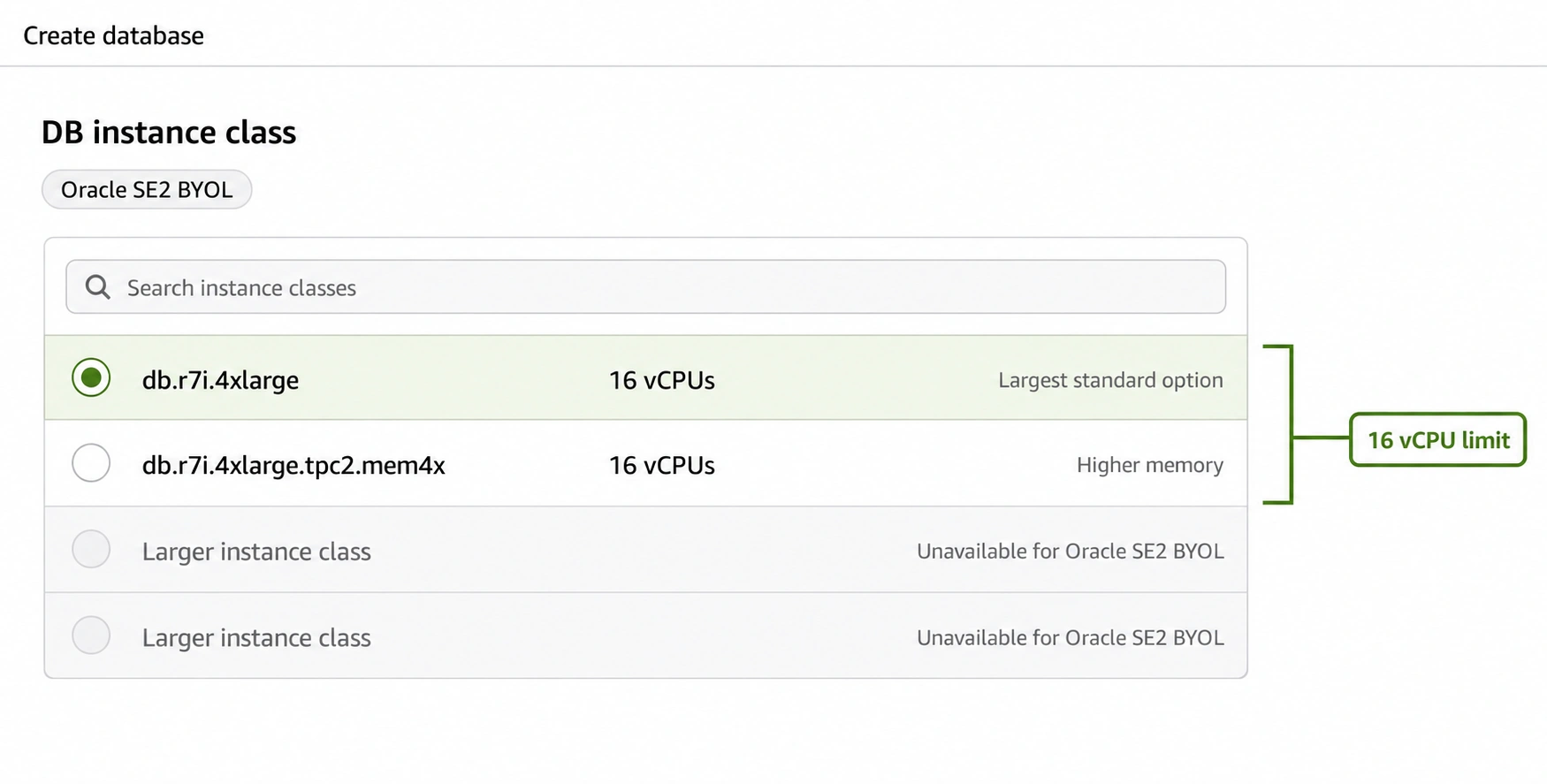
Oracle Standard Edition 2 limits the database instance to a maximum of 16 concurrent CPU threads. On AWS RDS, this translates to a hard limit of 16 vCPUs per instance. The largest SE2-eligible instance classes are those with exactly 16 vCPUs: db.r6i.4xlarge, db.r8g.4xlarge, db.m6i.4xlarge, and similar.

In practice, most OLTP Oracle databases on RDS do not saturate 16 vCPUs. A transactional Oracle database processing thousands of concurrent transactions per second typically runs comfortably on 4-8 vCPUs with adequate indexing and query optimization. The 16-vCPU limit becomes a real constraint for:

High-concurrency databases with hundreds of simultaneous active sessions that cannot be reduced through connection pooling. Analytics workloads running complex aggregations that require sustained CPU from multiple parallel query processes. Batch processing workloads with aggressive parallelism settings (PARALLEL hint, parallel DML). Databases that have been growing organically and have reached the point where 16 vCPUs is genuinely insufficient at steady state.

The diagnostic: pull CPUUtilization from CloudWatch for the past 30 days. If P95 CPU utilization consistently exceeds 70% on a 16-vCPU instance, SE2 is likely insufficient on the current instance class. If P95 CPU is below 50% on the current instance class (even if it is a large EE instance), SE2 on a smaller or equivalent instance would handle the load.

The Optimize CPU workaround for SE2: on db.m7i and db.r7i instance classes, the Optimize CPU feature allows reducing active vCPUs below the instance’s physical count. A db.r7i.8xlarge has 32 vCPUs, but with Optimize CPU set to 16, only 16 vCPUs are active — staying within SE2’s thread limit while accessing 256 GB of RAM. This unlocks higher memory capacity under SE2 than standard instance sizes would allow. Source: CloudBurn (April 2026). Note: verify that SE2 licensing treats the Optimize CPU configuration as 16 active threads for compliance purposes with your Oracle licensing counsel.

Also read: RDS Extended Support Pricing: Oracle and MySQL version costs (live)

The AWS Prescriptive Guidance EE-to-SE2 Assessment: What to Actually Check

AWS published a Prescriptive Guidance document specifically on evaluating EE-to-SE2 downgrades (docs.aws.amazon.com/prescriptive-guidance/latest/evaluate-downgrading-oracle-edition/welcome.html). It was published in October 2022 and remains current. No competitor guide links to or summarizes it. It is the most authoritative methodology available for this decision.

The assessment has five stages. First: identify which EE-only features are installed in the database. Second: determine which of those features are actually active and in use. Third: assess whether each active feature has a viable alternative at the SE2 level. Fourth: evaluate whether the 16-vCPU limit constrains the workload. Fifth: plan the migration sequence.

Stage 1: Query Installed EE Options

Run this query on the target database to identify which EE options are installed: SELECT COMP_NAME, VERSION, STATUS FROM DBA_REGISTRY ORDER BY COMP_NAME; The output lists all database components. Any component with a status of VALID that corresponds to an EE-only option (Partitioning, Advanced Security, Spatial and Graph, OLAP, etc.) is installed.

Stage 2: Query Active EE Feature Usage

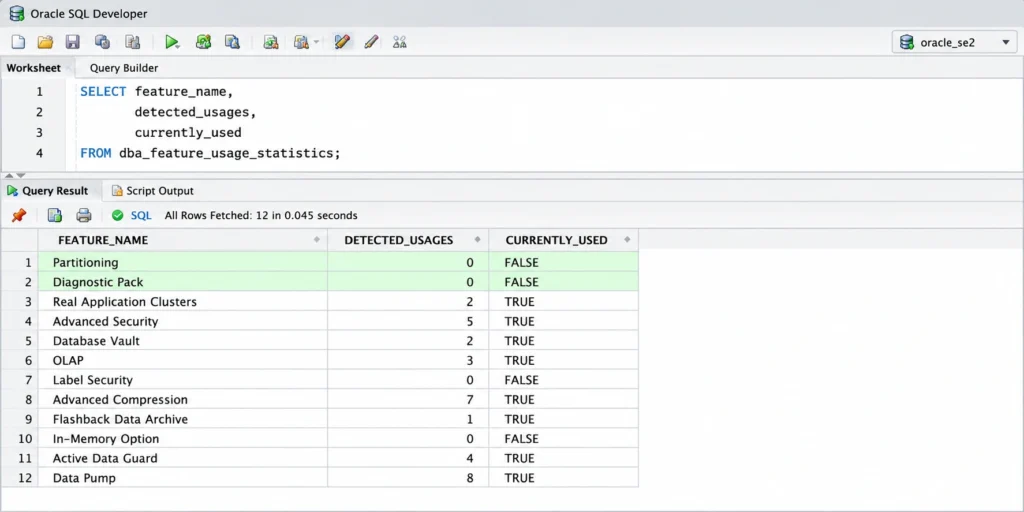
Oracle provides a built-in view called DBA_FEATURE_USAGE_STATISTICS that tracks which features have been used within the database. Run: SELECT NAME, DETECTED_USAGES, CURRENTLY_USED, FIRST_USAGE_DATE, LAST_USAGE_DATE FROM DBA_FEATURE_USAGE_STATISTICS WHERE DETECTED_USAGES > 0 ORDER BY LAST_USAGE_DATE DESC; Pay specific attention to: Partitioning (any non-zero DETECTED_USAGES means partitioned tables exist), Diagnostics Pack (any AWR-related features), Advanced Security Option (any non-zero usage), Oracle Label Security, Oracle Database Vault, and In-Memory Column Store.
Stage 3: Assess Partitioning Usage

Partitioning is the most commonly-used EE option that blocks SE2 migration. If DBA_FEATURE_USAGE_STATISTICS shows Partitioning usage, run: SELECT COUNT(*) FROM DBA_TAB_PARTITIONS; and SELECT COUNT(*) FROM DBA_IND_PARTITIONS; to count partitioned objects. If partitioned tables exist, evaluate whether they can be converted to non-partitioned tables with equivalent performance using range filtering, composite indexes, or materialized views. For large tables (hundreds of millions of rows) where partitioning provides critical pruning for query performance, SE2 may genuinely be insufficient. For tables where partitioning was added for architectural reasons rather than performance necessity, conversion is often feasible.

Stage 4: Assess the 16-vCPU Constraint

Pull the maximum concurrent active sessions from the target database: SELECT MAX(VALUE) FROM V$SYSMETRIC_HISTORY WHERE METRIC_NAME = ‘Active Sessions’; Compare this against the number of vCPUs available. Oracle’s rule of thumb: active sessions should not consistently exceed 2x vCPU count for good performance. If the database regularly has 40+ active sessions, 16 vCPUs may be tight.

Stage 5: Plan the Migration

If the assessment confirms SE2 eligibility: create a new RDS Oracle SE2 instance. Disable control_management_pack_access before data migration. Use Oracle Data Pump (expdp/impdp) or AWS Database Migration Service to move data. Validate queries against the new instance. Perform load testing. Cut over during a maintenance window. Source: AWS Prescriptive Guidance (docs.aws.amazon.com/prescriptive-guidance/latest/evaluate-downgrading-oracle-edition/welcome.html).

Oracle SQL Developer query results panel showing the output of the SELECT NAME DETECTED_USAGES CURRENTLY_USED LAST_USAGE_DATE FROM DBA_FEATURE_USAGE_STATISTICS WHERE DETECTED_USAGES greater than 0 ORDER BY LAST_USAGE_DATE DESC query, with the results table showing rows for core database features like SQL Plus SQL Developer and PL/SQL with non-zero detected usages, and specifically showing Partitioning with DETECTED_USAGES of 0 and CURRENTLY_USED of FALSE, and Diagnostic Pack with DETECTED_USAGES of 0 and CURRENTLY_USED of FALSE, with an annotation overlay in green text stating Both Partitioning and Diagnostics Pack show zero usage confirming this database is eligible for Standard Edition 2 migration

The 2026 SE2 BYOL Bare Metal Option: 25% Cheaper Compute

AWS extended bare metal instance support to Oracle SE2 BYOL in January 2026. Bare metal RDS Oracle instances cost 25% less than equivalent virtualized instances.

For SE2 BYOL deployments on large instance classes where Oracle licensing is a significant cost, bare metal provides two potential savings: the 25% AWS compute cost reduction, and the possibility of Oracle license optimization based on physical core and socket visibility.

Most bare metal instances in the RDS Oracle catalog have 2 CPU sockets. SE2 licensing is socket-based at $17,500 per socket. On a 2-socket bare metal instance, the SE2 license cost is 2 x $17,500 = $35,000 (versus the per-processor model that applies on virtualized instances). Depending on the vCPU count of the virtualized instance you were previously running, bare metal may result in the same or lower SE2 license count. Consult your Oracle licensing counsel before assuming any specific license reduction.

The SE2 16-vCPU limit applies to bare metal instances as well. You cannot run more than 16 concurrent CPU threads under SE2 even on a bare metal instance with more physical cores. The value of bare metal for SE2 is the 25% compute discount and potential license consolidation for multiple SE2 databases running as pluggable databases on a single instance — not lifting the 16-vCPU per-database thread cap.

Also read: RDS Reserved Instances: 1-Year vs 3-Year Break-Even (live)

When EE Is Genuinely Unavoidable on RDS

Based on the feature comparison table and the assessment methodology above, EE is genuinely required on RDS in the following scenarios:

Your database has partitioned tables that are too large or too query-critical to convert to non-partitioned equivalents. Oracle Partitioning is heavily used for range/interval partitioning on time-series data, for partition pruning on very large tables, and for online partition maintenance (ADD/DROP PARTITION with no downtime). No SE2 workaround exists for partitioned objects — they must be converted.

Your compliance or security posture requires Advanced Security Option features beyond basic database access controls. Oracle Label Security, Oracle Database Vault, and the network encryption component of Advanced Security Option are EE-only. Basic OS-level encryption and SSL/TLS connections to RDS are available in SE2; Oracle’s application-level label-based security controls are not.

Your database requires more than 3 pluggable databases (PDBs) in a multitenant configuration. SE2 supports up to 3 PDBs. If you are consolidating multiple databases into a single CDB for management simplification and the count exceeds 3, EE is required.

Your workload genuinely requires more than 16 vCPUs at steady state and cannot be addressed through Optimize CPU on M7i/R7i instances, connection pooling improvements, query optimization, or instance redesign. Databases with sustained 90%+ CPU utilization at 16 vCPUs that cannot be reduced are legitimate EE candidates on scale.

How Usage.ai Handles Oracle EE vs SE2 RI Optimization

The EE vs SE2 decision has a direct implication for Reserved Instance purchasing. SE2 LI RIs are exact-size (no size flexibility). SE2 BYOL and EE BYOL RIs are size-flexible, allowing a single RI to cover multiple smaller instances through normalization units. This asymmetry means the RI purchasing strategy differs based on which edition and licensing model is in use.

Usage.ai identifies Oracle BYOL instances separately from LI instances and applies size-flexible RI purchasing to BYOL instances. For LI instances, the platform surfaces right-sizing opportunities before RI purchase since LI RIs are not size-flexible — a wrong-sized LI RI cannot adjust via normalization.

For organizations evaluating the EE-to-SE2 transition, Usage.ai surfaces the compute cost delta between current EE BYOL instances and equivalent SE2 instances, comparing all three permutations (EE BYOL, SE2 LI, SE2 BYOL) at the actual running instance sizes with 2026 verified rates. The analysis accounts for the SE2 16-vCPU limit: any instance currently running at more than 16 vCPUs in EE is flagged as not SE2-eligible by default, with a recommendation to assess actual CPU utilization before drawing conclusions.

If a Reserved Instance becomes underutilized following an edition downgrade or an instance resize, Usage.ai provides cashback on the unused commitment in real money. Fee: percentage of realized savings only.

See exactly what you’re overpaying in under 60 seconds. Try the Calculator for free →

See how Usage.ai optimizes Oracle RDS EE and SE2 RI purchasing


You’re Overpaying AWS. See by How Much in 60 Seconds.Upload your AWS bill and get your exact overspend number for free. No account access, or commitment required.FIND MY SAVINGS


Frequently Asked Questions

1. What is the difference between Oracle Enterprise Edition and Standard Edition 2 on RDS?

Oracle EE on RDS: available as BYOL only, no vCPU cap, includes or optionally adds Partitioning, Diagnostics Pack, Advanced Security Option, In-Memory, Database Vault, Real Application Testing, and unlimited PDBs. Oracle SE2 on RDS: available as License Included (SE2 LI) or BYOL, hard limit of 16 vCPUs, no Partitioning, no Diagnostics Pack or Tuning Pack, no Advanced Security Option, maximum 3 PDBs. AWS compute charges are identical for both editions on the same instance class. The difference is in Oracle licensing cost and feature availability.


2. How much cheaper is Oracle SE2 than EE on RDS?

The AWS compute rate is identical. The Oracle license cost difference: SE2 at approximately $17,500/socket versus EE at approximately $47,500/processor. On a db.r6i.xlarge (4 vCPUs, 2 Oracle processor licenses): EE BYOL = $95,000 in Oracle license cost. SE2 BYOL = approximately $17,500 (1 socket typically on virtualized instance). SE2 License Included eliminates the Oracle license cost entirely but bundles it into the AWS hourly rate (~$0.952/hr for db.r6i.xlarge vs ~$0.50/hr BYOL). Source: Oracle list prices and Vantage.sh (May 2026).


3. Can I use AWR reports on an Oracle SE2 database?

No. AWR (Automatic Workload Repository) is part of Oracle’s Diagnostics Pack, which requires Enterprise Edition plus a separate Diagnostics Pack license. Running AWR on an SE2 database creates a compliance violation. Disable the parameter: ALTER SYSTEM SET control_management_pack_access = ‘NONE’; on all SE2 databases. Alternative: AWS Performance Insights provides query-level performance analysis for RDS Oracle without Oracle licensing implications. Source: AWS Prescriptive Guidance (docs.aws.amazon.com/prescriptive-guidance/latest/evaluate-downgrading-oracle-edition/welcome.html).


4. What is the 16-vCPU limit for Oracle SE2 on RDS?

Oracle Standard Edition 2 limits the database to a maximum of 16 concurrent CPU threads per instance. On AWS RDS, this means SE2 instances cannot exceed 16 vCPUs. The largest supported SE2 instance classes are db.r6i.4xlarge, db.r8g.4xlarge, and db.m6i.4xlarge (all with 16 vCPUs). Instances above 16 vCPUs require Enterprise Edition. On db.m7i and db.r7i, the Optimize CPU feature allows running a larger instance class at 16 active vCPUs while accessing higher memory capacity.


5. Can I downgrade from Oracle EE to SE2 on RDS?

Yes, if your database does not use EE-only features. The assessment requires: (1) querying DBA_FEATURE_USAGE_STATISTICS to confirm no Partitioning, Diagnostics Pack, or other EE features are in active use; (2) verifying CPU utilization does not exceed SE2’s 16-vCPU limit; (3) disabling control_management_pack_access; (4) creating a new SE2 RDS instance and migrating data. AWS provides official Prescriptive Guidance for this assessment at docs.aws.amazon.com/prescriptive-guidance/latest/evaluate-downgrading-oracle-edition/welcome.html.


6. Is Oracle Partitioning available in SE2?

No. Oracle Partitioning (table and index partitioning) is an Enterprise Edition option only. SE2 databases cannot have partitioned tables or indexes. If your database has partitioned objects, you cannot migrate to SE2 without converting those objects to non-partitioned equivalents. Query DBA_TAB_PARTITIONS and DBA_IND_PARTITIONS to count existing partitioned objects and assess the migration scope.


7. What is the SE2 BYOL bare metal option on RDS?

AWS launched bare metal instances for Oracle SE2 BYOL in January 2026. Bare metal instances cost 25% less than equivalent virtualized RDS Oracle instances. Bare metal provides full visibility into physical CPU cores and sockets, which may allow Oracle license optimization. SE2 bare metal supports M7i, R7i, M6i, R6i, and X-series instance families. The SE2 16-vCPU thread limit still applies on bare metal. Source: AWS official announcement, January 20, 2026.


8. Can I use Oracle Real Application Clusters (RAC) on RDS?

No. Oracle RAC is not supported on Amazon RDS for either SE2 or EE. RAC requires direct access to shared storage and Oracle Clusterware, which RDS’s managed service architecture does not support. RDS uses Multi-AZ instance deployment for high availability instead of RAC — this provides automatic failover in approximately 60 seconds but does not provide the continuous availability characteristics of a live RAC cluster. If RAC is required, Oracle must be self-managed on EC2.

Cut cloud cost with automation
Latest from our blogs