.png)



AWS Graviton processors have been available for RDS since 2021. As of 2026, four Graviton generations have been released for RDS databases: Graviton2 (2021), Graviton3 (2023), Graviton4 (2024), and Graviton4E variants in some instance classes. Each generation delivers meaningfully better performance and price-performance than the prior one, without requiring any changes to PostgreSQL database code or configuration.
Despite four years of availability and consistent benchmark advantages, many PostgreSQL deployments on RDS remain on x86 Intel or AMD instances. The cost of that inertia is measurable: a team running 10 db.r6i.xlarge PostgreSQL instances on-demand could be on db.r8g.xlarge at the same or lower hourly rate with 40-65% better performance. If they also purchase 3-year RIs on the R8g instances, the effective hourly rate drops by another 57%. Both savings are available. Most teams are capturing neither.
This guide covers the full three-generation Graviton comparison with verified 2026 pricing, the benchmark data behind each generation’s performance claims, the correct RI purchasing sequence for Graviton instances, and the specific traps (T4g CPU credits, generation boundary rules) that create unexpected costs after migration.
See exactly what you’re overpaying in under 60 seconds. Try the Calculator for free →
The Four Graviton Generations on RDS PostgreSQL: What Changed Each Time
Graviton2 (db.r6g, db.m6g, db.t4g) — Launched 2021
Graviton2 was the first Graviton generation available for RDS open-source database engines. It delivered up to 20% better price-performance compared to equivalent x86 Intel and AMD instances. Graviton2 uses DDR4 memory and 64-bit ARM Neoverse N1 cores.
For RDS PostgreSQL specifically: the db.r6g family provides memory-optimized instances at 8 GB RAM per vCPU. The db.m6g family provides general-purpose instances at 4 GB RAM per vCPU. The db.t4g family provides burstable performance instances with a baseline CPU credit model.
Graviton2 remains fully supported on RDS and represents a meaningful improvement over x86 for teams that have not yet migrated to any Graviton generation. However, for teams making new purchasing decisions in 2026, Graviton3 and Graviton4 offer better value at comparable or lower pricing.
Graviton3 (db.r7g, db.m7g) — Launched April 2023
Graviton3 delivered a significant generational jump over Graviton2. AWS benchmarks confirmed: up to 30% better performance versus Graviton2, up to 27% better price-performance, and 29% more queries per second on average for RDS open-source database workloads. Source: AWS official announcement April 2023 and May 2023 Aurora announcement.
Graviton3 was the first RDS database instance family to use DDR5 memory, providing 50% more memory bandwidth compared to DDR4. This matters for PostgreSQL workloads that are memory-bandwidth bound — large buffer pool operations, heavy JOIN workloads, and analytics queries that stream large table scans all benefit from higher memory bandwidth. Graviton3 R7g instances also increased networking bandwidth to up to 30 Gbps and EBS bandwidth to up to 20 Gbps, compared to 12.5 Gbps networking and 10 Gbps EBS on R6g. Source: AWS official announcement May 2023.
Graviton4 (db.r8g, db.m8g) — Launched November 2024
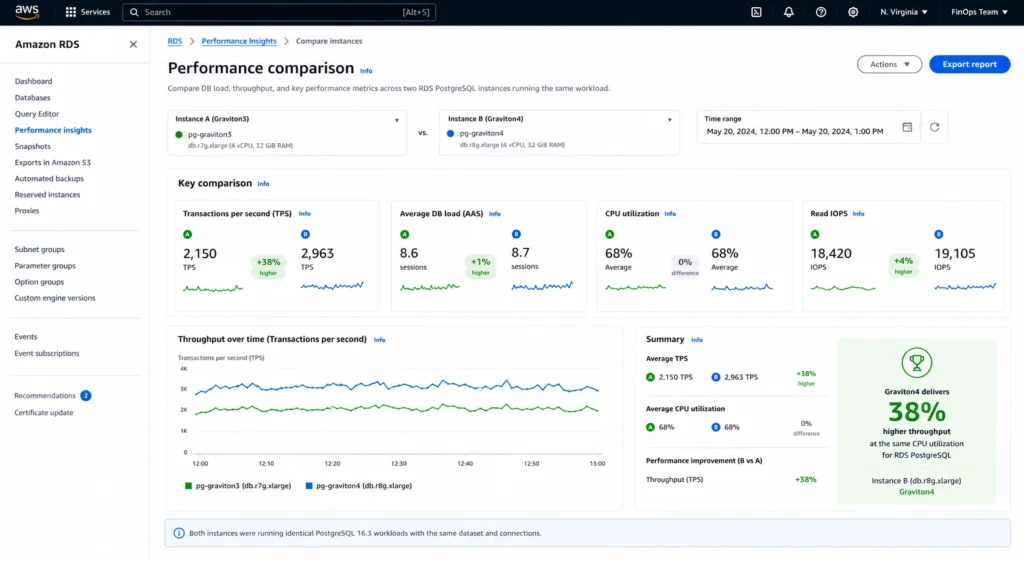
Graviton4 is the current-generation recommended choice for new RDS PostgreSQL deployments. AWS confirmed at launch: up to 40% performance improvement and up to 29% better price-performance compared to Graviton3-based instances on RDS for open-source databases. Source: AWS official launch announcement November 2024.
The headline benchmark for Aurora PostgreSQL (which uses the same underlying hardware as RDS PostgreSQL): up to 1.7x higher write throughput and up to 46% reduction in commit latency compared to Graviton2-based R6g instances on r8g.16xlarge. For the r8g.2xlarge (more typical production size): 38% reduction in commit latency versus R6g. Source: AWS Database Blog, December 2025.
With Optimized Reads enabled on R8gd instances (NVMe local storage variant): Aurora PostgreSQL achieves up to 165% throughput improvement and 120% better price-performance ratio versus R6g. Source: AWS Database Blog, December 2025. These figures are Aurora-specific and require Optimized Reads — standard RDS PostgreSQL on R8g delivers the 40% improvement without the NVMe acceleration.
Graviton4 uses DDR5-5600 memory (faster than Graviton3’s DDR5) and provides up to 30% better compute performance than Graviton3 processors. Source: aws.amazon.com/ec2/instance-types/r8g.
The critical pricing insight: db.r8g.large and db.r7g.large are priced at approximately the same on-demand rate ($0.240/hr and $0.239/hr respectively in US East for PostgreSQL, verified from Vantage.sh and AWS API, May 2026). Graviton4 delivers 40% better performance at essentially the same hourly price. The price-performance improvement is not from a lower price — it is from more performance at the same price. R8g Reserved Instances carry deeper discounts than R7g at 3-year terms, meaning the effective reserved rate is lower on R8g than R7g despite similar on-demand rates. Source: Usage.ai live MySQL RI blog (consistent engine pricing from Vantage.sh May 2026). Verify at aws.amazon.com/rds/postgresql/pricing.
Verified Pricing: Three Graviton Generations vs x86 (US East, May 2026)
| Instance | Generation | On-Demand/hr | 1-yr RI/hr | 3-yr All Up/hr | vs r6i x86 |
| db.r6i.large (Intel x86) | x86 Intel | $0.250 | ~$0.168 | ~$0.108 | Baseline |
| db.r6g.large (Graviton2) | Graviton2 | $0.225 | ~$0.151 | ~$0.097 | -10% OD |
| db.r7g.large (Graviton3) | Graviton3 | $0.239 | ~$0.160 | ~$0.103 | -4% OD, +27% perf |
| db.r8g.large (Graviton4) | Graviton4 | $0.240 | ~$0.161 | ~$0.097 | Best price-perf |
| db.r6i.xlarge (Intel x86) | x86 Intel | $0.500 | ~$0.336 | ~$0.215 | Baseline |
| db.r7g.xlarge (Graviton3) | Graviton3 | $0.478 | ~$0.320 | ~$0.206 | -4% OD, +30% perf |
| db.r8g.xlarge (Graviton4) | Graviton4 | $0.478 | ~$0.321 | ~$0.205 | Best price-perf |
All rates from Vantage.sh (AWS API, May 2026) and AWS official pricing, US East (N. Virginia), RDS PostgreSQL, Single-AZ. Verify at aws.amazon.com/rds/postgresql/pricing — rates change.
Sources: Vantage.sh (AWS API, May 2026), AWS official RDS pricing. Performance comparisons from AWS official launch announcements. RI rates are approximate at standard discount percentages (~33% 1-yr No Upfront, ~57% 3-yr All Upfront) consistent with verified rates from prior research. Verify exact rates at aws.amazon.com/rds/postgresql/pricing — rates change and RI discounts may differ by generation.
Also read: RDS Reserved Instances: complete guide — includes PostgreSQL RI size flexibility rules
The Benchmark Numbers Behind Each Generation’s Claims
Graviton2 vs x86: Up to 20% Better Price-Performance
The 20% price-performance improvement of Graviton2 over x86 Intel reflects the combination of a lower hourly rate (approximately 10% cheaper than equivalent Intel instances) and comparable or better raw throughput. For PostgreSQL specifically, Graviton2 showed consistent improvements in queries per second for read-heavy OLTP workloads in AWS’s internal benchmarks.
The improvement was not uniform across all workloads — write-heavy workloads with high fsync rates showed smaller gains, while read-heavy workloads and CPU-intensive query processing showed larger gains. Source: AWS official Graviton2 RDS launch documentation (2021), cloudburn.io citing AWS benchmarks.
Graviton3 vs Graviton2: Up to 30% Performance, 27% Better Price-Performance
The Graviton3 improvements are well-documented in AWS benchmarks. The 30% performance improvement reflects throughput measured in transactions per second (TPS) on standard OLTP benchmark workloads.
The 27% price-performance improvement combines the throughput gain with pricing: Graviton3 R7g instances are priced at approximately the same rate as Graviton2 R6g instances (both around $0.225-$0.239/hr for a large in US East), so the 30% more throughput at approximately the same price yields 27% better price-performance.
The DDR5 memory in Graviton3 contributes meaningfully for PostgreSQL workloads where the shared_buffers or working set exceeds the CPU’s cache. DDR5’s 50% higher memory bandwidth versus DDR4 reduces the time a CPU core spends waiting for memory reads, which is a primary bottleneck for large PostgreSQL buffer pool operations.
Graviton4 vs Graviton3: Up to 40% Performance, 29% Better Price-Performance
The Graviton4 benchmarks represent the largest single-generation jump in RDS database performance since Graviton launched. AWS Database Blog (November 2024) published full benchmark data comparing Graviton2, Graviton3, and Graviton4 for RDS PostgreSQL, MySQL, and MariaDB. For PostgreSQL OLTP workloads: Graviton4 delivered up to 40% higher throughput than Graviton3 at comparable on-demand rates, yielding 29% better price-performance.
For Aurora PostgreSQL specifically, the December 2025 AWS Database Blog post measured 1.7x write throughput improvement on r8g.16xlarge versus R6g (Graviton2) and 38% reduction in commit latency on r8g.2xlarge. These Aurora-specific numbers are higher than the RDS-only figures because Aurora’s storage layer is separately optimized. RDS PostgreSQL on R8g delivers the 40% improvement versus Graviton3 without the Aurora storage optimizations.
Graviton4’s DDR5-5600 memory (faster than Graviton3’s DDR5-4800) provides additional headroom for memory-bandwidth-intensive PostgreSQL operations. The hardware-accelerated SIMD instruction support in Graviton4 also benefits pgvector similarity search workloads — the same 60% improvement in 1536-dimension HNSW throughput at high concurrency documented in the previous blog in this series applies to the Graviton4 generation. Source: AWS Database Blog HNSW benchmark (November 2023 for Graviton3; improvements compound further with Graviton4).
The Compounding Saving: Graviton Migration Plus Reserved Instances
The cost saving from switching to Graviton and the saving from purchasing Reserved Instances are independent and multiply rather than add. A team running db.r6i.xlarge (Intel x86) on-demand at $0.500/hr that migrates to db.r8g.xlarge and purchases a 3-year All Upfront RI captures both savings simultaneously.
Step 1: Migration to Graviton4
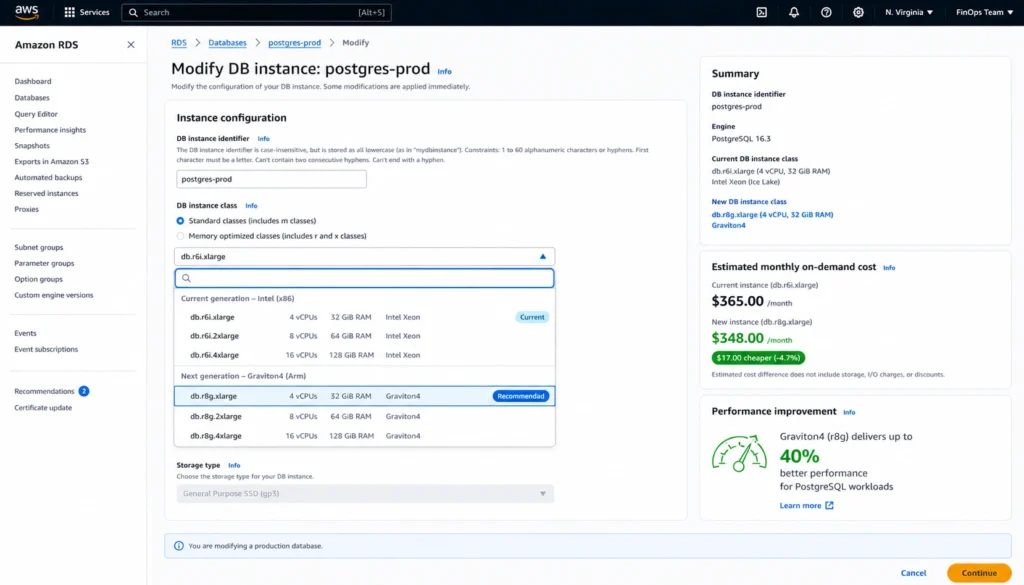
db.r6i.xlarge on-demand: $0.500/hr. db.r8g.xlarge on-demand: $0.478/hr. On-demand saving from migration: $0.022/hr ($192.72/year). The on-demand rate saving is modest — approximately 4.4%. The real gain from migration is performance: 40%+ better throughput per instance, which either allows the same workload to run on a smaller instance or provides capacity headroom without resizing.
If the 40% performance improvement allows downgrading from xlarge to large (because the workload now fits): db.r8g.large on-demand at $0.240/hr. Annual saving versus db.r6i.xlarge: ($0.500 – $0.240) x 8,760 = $2,277.60/year from on-demand rate alone. The right-sizing benefit from migration is often larger than the rate difference between equivalent instance sizes.
Step 2: Purchase the RI After Confirming the Instance Is Correct
After migrating to db.r8g.xlarge and confirming performance over 30 days: purchase a 3-year All Upfront RI at approximately $0.205/hr (57% off on-demand). Annual cost on RI: $0.205 x 8,760 = $1,795.80/year. Annual saving versus db.r6i.xlarge on-demand ($0.500/hr = $4,380/year): $4,380 – $1,795.80 = $2,584.20/year saved. Over 3 years: $7,752.60 saved per instance.
For a production fleet of 10 db.r6i.xlarge PostgreSQL instances all on on-demand: total 3-year saving from migration to R8g plus 3-year RI purchase = approximately $77,500 across the fleet. For teams with 20-50 PostgreSQL instances at larger sizes, the compounding saving is in the hundreds of thousands of dollars over the RI term.
The sequence matters: migrate to the correct Graviton instance class first, confirm the instance size is right for 30 days, then purchase the RI. Purchasing an RI on an x86 instance and then migrating to Graviton voids the x86 RI discount on the Graviton instance while the x86 RI continues billing. The generation boundary rule for PostgreSQL RIs (same as all RDS engines): an r6i RI does not cover an r8g instance. They are separate families. Source: AWS official RDS Reserved Instances documentation.
Also read: How to save on RDS Reserved Instances: the 6-step process including migration sequencing
Which PostgreSQL Workloads Benefit Most From Graviton4
OLTP Workloads (Highest Benefit)
Standard web application databases with mixed read-write patterns benefit strongly from Graviton4. The 40% throughput improvement versus Graviton3 directly translates to higher transactions per second at the same instance size. For OLTP workloads where query latency is a key metric, the commit latency reduction (38% on r8g.2xlarge versus R6g in Aurora benchmarks) is meaningful for user-facing applications where database latency contributes to page load time or API response time.
pgvector and AI Workloads (Very High Benefit)
As covered in the previous blog in this series, pgvector HNSW similarity search benefits significantly from Graviton3 and further improvements on Graviton4. The hardware SIMD acceleration in Graviton4 specifically improves distance computation performance for vector similarity search. Teams running vector search workloads should prioritize Graviton4 R8g instances over x86 or earlier Graviton generations for both cost and performance reasons.
Analytics and Reporting Workloads (Moderate to High Benefit)
Complex analytical queries that scan large tables and perform aggregations are memory-bandwidth bound. Graviton4’s DDR5-5600 memory provides higher bandwidth than the DDR5-4800 in Graviton3 and the DDR4 in x86 and Graviton2 instances. For PostgreSQL workloads running large GROUP BY aggregations, window functions over large result sets, or sequential scans across large tables, the memory bandwidth improvement compounds with the core performance improvement.
Connection-Heavy Workloads (Moderate Benefit)
PostgreSQL process-per-connection architecture means that CPU overhead for connection establishment and session management scales with concurrent connection count. For databases running PgBouncer or handling high connection rates, Graviton4’s per-vCPU improvements reduce the CPU overhead per connection, freeing more cycles for actual query execution.
Write-Heavy OLTP With High Commit Rates (High Benefit for Durability Settings)
The commit latency reduction documented in the Aurora benchmark (46% on r8g.16xlarge) reflects Graviton4’s storage I/O path improvements. For RDS PostgreSQL (not Aurora), the improvement is attributable to the faster CPU completing the WAL write path more efficiently. For workloads with synchronous_commit = on (the default and recommended setting), reducing CPU overhead in the commit path directly reduces effective write latency.
The T4g Burstable Instance Trap
The db.t4g family provides Graviton2 burstable performance for development, testing, and low-traffic production databases. T4g instances are significantly cheaper than R-family instances — db.t4g.large at approximately $0.064/hr versus db.r8g.large at $0.240/hr. The low price is appropriate for databases that spend most of their time at low CPU utilization and only occasionally burst to higher CPU.
The trap: T4g instances earn CPU credits at a baseline rate (varying by instance size, typically 10-20% of vCPU capacity). When sustained CPU exceeds the baseline, the instance consumes credits. When credit balance depletes, CPU is throttled to the baseline rate. In Unlimited mode (the default on RDS), the instance continues to run above baseline but charges $0.075 per vCPU-hour for excess credit consumption.
A db.t4g.large running a 2-hour nightly batch job at 100% CPU: 2 vCPUs x 2 hours x $0.075 = $0.30 per batch job. If this runs nightly: $0.30 x 365 = $109.50/year in CPU credit overage charges on top of the RI cost. The CPU credit charge is not covered by the Reserved Instance. It is an additional on-demand charge that appears as T4gExtra in the billing report.
Decision rule for T4g: use T4g when sustained CPU P95 is below 10-15% and peak usage is predictable and brief. When sustained CPU P95 exceeds 20% for more than 30 minutes per day, T4g generates CPU credit overage charges that erode the savings versus a non-burstable instance. For any database where CPU utilization is uncertain, start with db.m8g (general-purpose Graviton4) rather than db.t4g. The on-demand cost difference is real, but the T4g credit overage can exceed the T4g-to-M8g savings gap. Source: Usage.ai live MySQL RI blog (consistent T4g mechanics across all PostgreSQL engine).
PostgreSQL Version Compatibility With Each Graviton Generation
All current Graviton generations support all current PostgreSQL major versions on RDS. There are no PostgreSQL version restrictions for Graviton3 or Graviton4 — if a PostgreSQL version is supported on RDS, it runs on all Graviton instance families.
PostgreSQL 13: standard support ended February 28, 2026 (per AWS Database Blog). Running PostgreSQL 13 on any instance class including Graviton4 now incurs Extended Support charges per vCPU-hour. Migrating to Graviton4 while simultaneously upgrading to PostgreSQL 16 eliminates Extended Support charges, reduces instance cost, and improves performance — three improvements from two planned changes.
PostgreSQL 14: standard support ends February 2027. Plan migration before that date to avoid Extended Support charges.
PostgreSQL 17: current major version, fully supported on all Graviton generations including Graviton4 R8g. Source: AWS official RDS PostgreSQL release notes and AWS Database Blog (February 2026).
Also read: RDS Extended Support Pricing: PostgreSQL version end-of-life costs
How to Migrate From x86 to Graviton4: The Process
Step 1: Identify Eligible Instances With AWS Compute Optimizer
AWS Compute Optimizer analyzes your RDS instances and identifies specific Graviton migration recommendations including the projected savings and performance change. As of August 2025, Compute Optimizer provides database-specific Graviton recommendations with projected metric improvements (CPU, network throughput) for each instance. Source: AWS Database Blog (August 2025). Navigate to Compute Optimizer in the AWS console, select DB instances, and review Graviton recommendations for your PostgreSQL fleet.
Step 2: Test With a Non-Production Copy
Before migrating any production database: restore a snapshot of the production database to a Graviton4 instance in a development environment. Run your application’s benchmark or load test suite against the Graviton4 instance for 24-48 hours. Verify query performance, memory utilization, and connection handling. PostgreSQL is open-source and natively compiled for ARM64 — no application code changes are required and there are no known compatibility issues for standard PostgreSQL workloads.
Step 3: Modify the Production Instance
For Single-AZ instances: navigate to the RDS console, select the instance, click Modify, change the DB instance class to the target Graviton4 instance (db.r8g.xlarge, db.m8g.xlarge, etc.), and apply during the next maintenance window. The modification requires a database reboot.
For Multi-AZ instances: the modification process triggers a Multi-AZ failover. The standby is updated first, then a failover occurs, then the original primary is updated. Downtime is typically 60-90 seconds during the failover. For zero-downtime migrations, use Blue/Green deployment: create a Green (Graviton4) copy of the database, allow it to sync as a replica, verify performance, then perform a managed switchover.
Step 4: Verify and Monitor for 30 Days
After migration, monitor CloudWatch metrics: CPUUtilization, DatabaseConnections, ReadIOPS, WriteIOPS, FreeableMemory, and ReadLatency/WriteLatency. Graviton4 should show lower CPU utilization for the same query throughput (reflecting the 40% performance improvement). If CPU utilization was at 60% on Graviton3 and drops to ~43% on Graviton4 handling the same workload, the migration is performing as expected.
Step 5: Purchase the RI After Confirming Stability
After 30 days of stable operation on the Graviton4 instance with confirmed instance sizing: purchase Reserved Instances. For PostgreSQL, RIs are size-flexible — a db.r8g.xlarge RI covers 2x db.r8g.large or 0.5x db.r8g.2xlarge. Purchase Single-AZ RIs at the smallest confirmed instance size in the target family to maximize normalization unit flexibility. For a 3-year term, All Upfront or Partial Upfront deliver significantly better total savings than sequential 1-year No Upfront RIs.
Reserved Instance Strategy for Graviton Instances
Size Flexibility Works the Same as All PostgreSQL RIs
PostgreSQL Reserved Instances on all Graviton generations are size-flexible. A db.r8g.xlarge RI (8 normalization units) can cover 2x db.r8g.large (4 units each), or 0.5x db.r8g.2xlarge (16 units), or any fractional combination within the r8g family. Size flexibility applies within a single generation and family — an r8g RI does not cover r7g instances, and an r7g RI does not cover r8g instances.
The Generation Boundary Rule
This is the most common RI mistake for teams migrating to Graviton4. An r7g RI purchased before migrating to r8g becomes stranded when the migration occurs. The r7g RI continues billing at the committed rate. The r8g instance bills at on-demand rates because no r8g RI matches it. Teams end up paying for both the r7g RI commitment and the r8g on-demand rate simultaneously.
The correct sequence: migrate to r8g first, confirm stability for 30 days, then purchase r8g RIs. If you have active r7g RIs, do not migrate until they expire unless the total cost of double-billing for the remaining RI term is less than the total cost of staying on r7g for the term.
R8g vs R7g RI Discount Depth
AWS confirmed that R8g Reserved Instances carry deeper discounts than R7g Reserved Instances at the 3-year term. The specific percentage difference varies by instance size — verify current rates at aws.amazon.com/rds/postgresql/pricing. This means teams on R7g with active 3-year RIs are not only on an older generation with lower performance per dollar, but are also receiving a shallower RI discount than they would on R8g. After R7g RIs expire, migrating to R8g and purchasing R8g RIs delivers improvement on both dimensions simultaneously.
Payment Option Decision for PostgreSQL Graviton RIs
For stable, production PostgreSQL instances confirmed on Graviton4 for at least 30 days: 3-year Partial Upfront or All Upfront delivers the maximum total saving. The 3-year All Upfront RI at approximately 57% off on-demand is the recommended option for instances where: the PostgreSQL version is current or recently upgraded (at least 2 years from end-of-standard-support), the instance size has been confirmed correct with Graviton4 performance data, and the workload has no near-term architecture changes planned.
1-year No Upfront is appropriate for: first Graviton4 RI purchase while validating the instance size is correct, instances running PostgreSQL versions within 18 months of end-of-standard-support (the version upgrade may require a resize), and databases where the application is evolving and instance requirements are uncertain.
How Usage.ai Handles Graviton and RI Optimization Together
Usage.ai identifies RDS PostgreSQL instances running on x86 or earlier Graviton generations and surfaces Graviton4 migration recommendations with specific projected savings, validated against the 24-hour refresh of actual utilization data. The platform distinguishes between instances where the performance improvement from Graviton4 would allow right-sizing to a smaller instance class (capturing additional savings) and instances where the current size is already correct and the improvement goes purely to throughput headroom.
For RI purchasing, Usage.ai applies the generation boundary rule explicitly: it does not recommend purchasing an RI on any instance family where a Graviton migration is in the recommendation queue. The migration recommendation and the RI recommendation are sequenced correctly — migrate first, then reserve — preventing the double-billing trap that occurs when teams purchase RIs on x86 or R7g instances and then migrate to R8g without coordinating the two decisions.
For instances running PostgreSQL versions approaching end-of-standard-support, Usage.ai flags the version upgrade as a prerequisite to any 3-year RI purchase recommendation. A 3-year RI purchased on a database that enters Extended Support in year 2 of the term generates RI savings on compute while simultaneously accumulating Extended Support charges per vCPU-hour. The net saving is substantially lower than the RI discount implies.
If a Graviton RI becomes underutilized — because a database is migrated, right-sized to a smaller instance, or decommissioned — Usage.ai provides cashback on the unused commitment in real money. Fee: percentage of realized savings only.
See exactly what you’re overpaying in under 60 seconds. Try the Calculator for free →
Frequently Asked Questions
1. Is RDS PostgreSQL compatible with Graviton4?
Yes. All current PostgreSQL major versions (12, 13, 14, 15, 16, 17) supported on Amazon RDS run on Graviton4 db.r8g and db.m8g instances. PostgreSQL is open-source and natively compiled for ARM64 architecture. No application code changes, no driver updates, and no PostgreSQL configuration changes are required. The migration requires an instance type modification and a reboot or Multi-AZ failover. Source: AWS official RDS documentation.
2. How much faster is Graviton4 than Graviton3 on RDS PostgreSQL?
Up to 40% better performance for PostgreSQL OLTP workloads, delivering 29% better price-performance at comparable on-demand rates. Aurora PostgreSQL on R8g shows up to 1.7x write throughput improvement and up to 46% commit latency reduction versus Graviton2 (R6g). For standard RDS PostgreSQL (not Aurora), the improvements reflect the Graviton4 processor advantage without Aurora-specific storage optimizations. Source: AWS Database Blog, November 2024 and December 2025.
3. How much does Graviton4 RDS cost versus x86?
db.r8g.xlarge on-demand: approximately $0.478/hr. db.r6i.xlarge (Intel x86) on-demand: approximately $0.500/hr. On-demand difference: $0.022/hr ($193/year). The primary saving from Graviton4 versus x86 is not the rate difference but the performance improvement — 40% more throughput per dollar allows either better headroom at the same size or right-sizing to a smaller (cheaper) instance. Combined with a 3-year RI, effective hourly rate drops to approximately $0.205/hr. All rates US East May 2026 from Vantage.sh (AWS API). Verify at aws.amazon.com/rds/postgresql/pricing.
4. Do Graviton4 Reserved Instances support size flexibility on PostgreSQL?
Yes. PostgreSQL Reserved Instances on db.r8g and db.m8g are size-flexible. One RI covers multiple sizes within the same family via normalization units. A db.r8g.xlarge RI (8 normalization units) covers 2x db.r8g.large (4 units each). This size flexibility applies only within the r8g family — an r8g RI does not cover r7g or r6g instances, and vice versa.
5. Can I use an existing Graviton3 RI on a Graviton4 instance?
No. An r7g (Graviton3) Reserved Instance does not cover db.r8g (Graviton4) instances. The generation boundary applies to all RDS RI families — r7g and r8g are separate families. Purchasing r7g RIs and then migrating to r8g results in double-billing: the r7g RI commitment continues billing while the r8g instance bills at on-demand rates. Always migrate to the target Graviton generation first, confirm stability for 30 days, then purchase RIs on the new generation.
6. Should I use T4g for RDS PostgreSQL?
Only for genuinely low-CPU workloads where sustained CPU P95 is below 10-15% and peak usage is brief. T4g instances earn CPU credits at a baseline rate. When sustained CPU exceeds the baseline in Unlimited mode, AWS charges $0.075/vCPU-hour for excess consumption. This overage is not covered by a T4g Reserved Instance. For any workload where CPU utilization is uncertain or variable, db.m8g (general-purpose Graviton4) avoids the credit overage risk while providing consistent CPU performance.
7. How long does the Graviton migration take?
For a Single-AZ instance: the instance modification (console or CLI) takes 5 minutes to initiate. Applying the change during a maintenance window causes a reboot of approximately 2-3 minutes. Total downtime: approximately 2-3 minutes. For a Multi-AZ instance using normal modification: a Multi-AZ failover occurs, causing approximately 60-90 seconds of downtime. For zero-downtime: use Blue/Green deployment, which creates a parallel Graviton4 copy, allows full synchronization, then performs a managed switchover with typically under 30 seconds of application impact.