.png)



- High coverage and high utilization can still hide real financial risk.
- Duration is the risk most buyers skip. Longer terms mean less room to adapt.
- Exit fees can charge you for savings you already banked, not just future ones.
- Most automation stops at compute. RDS, ElastiCache, Redshift, and OpenSearch often go uncovered.
- Capture rate (realized savings ÷ AWS-estimated potential) is a better performance signal.
That question doesn’t have a dashboard answer. Coverage just checks if a commitment exists. Utilization checks if you’re using it. Both are surface-level, and neither tells you what happens if your usage changes tomorrow.
Commitments are bets on the future. A company can show 85% coverage and 95% utilization today, and still be one layoff, one migration, or one product pivot away from an expensive mismatch.
This guide looks past the snapshot. Is your commitment a 1-year bet or a 3-year one? What does it cost to unwind if you’re wrong? Does the platform adjust automatically when usage shifts, or does your fee structure change depending on how the vendor calculates it?
Dashboard numbers won’t tell you any of that.
Why Coverage & Utilization Fall Short
Coverage and utilization became the default scorecard for a simple reason: they’re easy to measure. AWS surfaces both numbers directly in Cost Explorer, with zero extra setup. That ease of access is exactly why buyers lean on them and exactly why they miss the risk sitting underneath.
- Coverage answers: "did you sign up for a discount?"
- Utilization answers: "are you using what you signed up for?"
- Neither asks: "what happens if your usage changes?"
Usage always changes eventually. A commitment isn’t a one-time purchase, it’s a multi-year bet on your infrastructure staying roughly the same shape it is today.
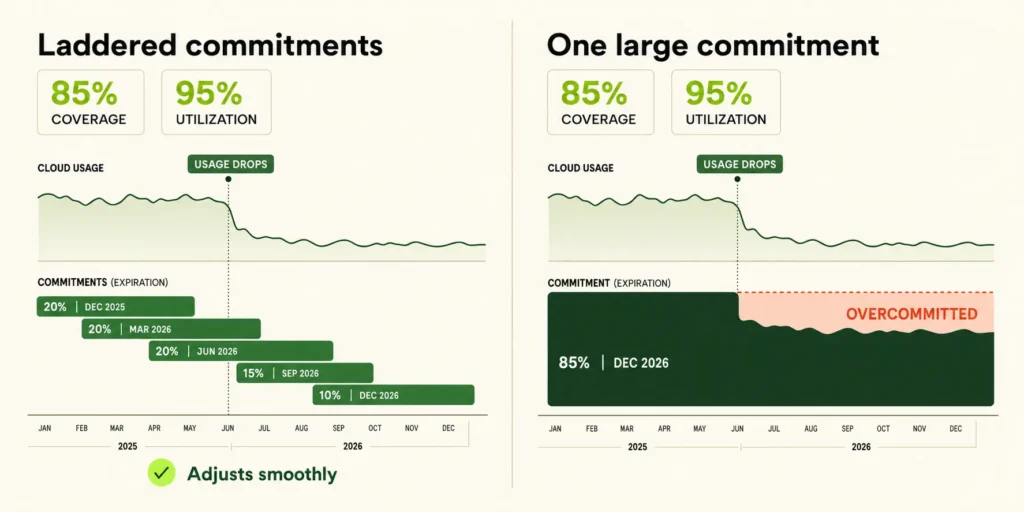
Picture two companies, both sitting at 85% coverage and 95% utilization. The dashboards may look identical at the start, but the financial outcomes won’t.
That’s because both metrics only describe what already happened. AWS itself notes that its Savings Plans recommendations are based on historical consumption and don’t forecast future demand.
That means the tool generating your “recommended” commitment size has no visibility into the retirement, the re-org, or the pivot that hasn’t happened yet.
The 10 Dimensions That Actually Predict Commitment Risk
Knowing your coverage and utilization numbers gets you in the room. It doesn’t tell you what you’re signing up for. What follows is deeper diligence.
Here are ten dimensions covering how long you’re locked in, what leaving actually costs, and how the platform behaves when your usage stops cooperating.
AWS prices commitments based on how long you lock in: roughly 28% off on-demand for a 1-year no-upfront Savings Plan, and 50%+ off for a 3-year plan. That extra ~20 points of discount is AWS compensating you for a longer, more certain commitment.
Learn how to choose between 1-year and 3-year AWS commitments.
The risk shows up when your infrastructure doesn’t hold still for that long. A single large, multi-year commitment made during a busy quarter can become dead weight the moment a product gets retired or usage drops. You’re still paying for capacity you no longer need, with years left on the term.
This is exactly why laddering exists as a strategy.
Instead of one large, single-term purchase, laddering staggers multiple smaller commitments across different start and end dates. If your infrastructure shrinks, only the piece maturing soonest is exposed, not your entire position at once. If it grows, you can ladder in new commitments sized to the new reality, without waiting years for an existing one to expire.
Buyer’s Ask: Do you ladder commitments with staggered terms, or default to one large purchase per contract cycle?
Think about a family that tracks its spending as one single number, like “we spent $4,000 this month.” Compare that to a family that breaks it down as groceries, gas, subscriptions, eating out, etc. The first family never sees what’s buried inside the total.
Cloud commitment management works the same way, with one important caveat: once a Savings Plan or Reserved Instance is purchased, it can’t be modified or returned. The only narrow exception is a Standard EC2 RI, which can be resold on the AWS RI Marketplace.
So “granularity” here isn’t about adjusting what you already bought. It’s about how precisely the platform sizes and ladders your next purchase.
One number that looks healthy on average.
The blended approach can genuinely hide problems. You might be sitting at 85% coverage overall, while one instance family underneath is only 40% covered.
Only granular tracking catches it, so your next purchase actually closes the gap instead of adding to an already-lopsided position.
Think about a gym membership again, specifically, the day you try to cancel it. Most people don’t read the cancellation clause when they sign up, excited about the discount. They read it the day they want to leave, and that’s usually when the surprise shows up.
Some gyms are fair about it: if you leave early, you simply stop getting the discount going forward. Other gyms are far more aggressive. They charge a penalty calculated on the value you already received, as if clawing back a benefit you already banked.
Cloud commitment automation vendors work the same way, using the same underlying mechanics as any savings-share pricing model.
| Fee structure | How it works |
|---|---|
| Forward-looking termination fee | You forfeit future savings you'll no longer generate for them once you leave. |
| Clawback with true-up | Fees are recalculated on savings you've already realized, applied over whatever term remains on your active commitments. |
Contract check
Before signing, confirm whether early termination only ends future savings or also triggers a true-up on savings you have already realized.
Most vendors build for compute first, EC2, and Fargate, because it’s the largest, most homogeneous layer to automate.
Database services (RDS, ElastiCache, Redshift, OpenSearch) are structurally harder: more instance types, more engine-specific licensing, more manual reconciliation. So they often get left as a manual process, or worse, marketed as “supported” when it’s actually on the roadmap.
Flexera’s 2026 report ties continued underutilization of commitment discounts partly to the operational overhead of managing them manually. That overhead concentrates almost entirely in the database layer, which is exactly where automation coverage still lags furthest behind compute.
If your database spend is 25% of your AWS bill and sits at 0% commitment coverage while compute sits at 90%, your blended coverage number will look strong.
But you’re fully exposed on a quarter of your bill, paying on-demand rates on services where RDS Reserved Instances or Savings Plans typically run 40–69% off.
Usage.ai tip
Review commitment coverage by service, not as one blended percentage. Strong EC2 coverage can hide database workloads that remain entirely on-demand.
A platform might genuinely automate commitments on AWS while Azure and GCP support exists only as a slide in the sales deck “coming soon,” “in beta,” or quietly absent from the actual product.
Since AWS, Azure, and GCP each have completely different commitment mechanics, Savings Plans on AWS, Reservations on Azure, Committed Use Discounts (CUDs) on GCP, genuinely supporting all three isn’t a checkbox, it’s three separate engineering efforts.
Annual compute spend: $2M
Assumed average discount: 40%
1. What is cloud commitment automation?
Cloud commitment automation is software that manages your AWS, Azure, or GCP discount instruments, like Savings Plans, Reserved Instances, and Committed Use Discounts on your behalf. Instead of manually choosing term lengths and instance types, the platform continuously analyzes your usage and adjusts commitments to maximize savings while minimizing lock-in risk.