.png)


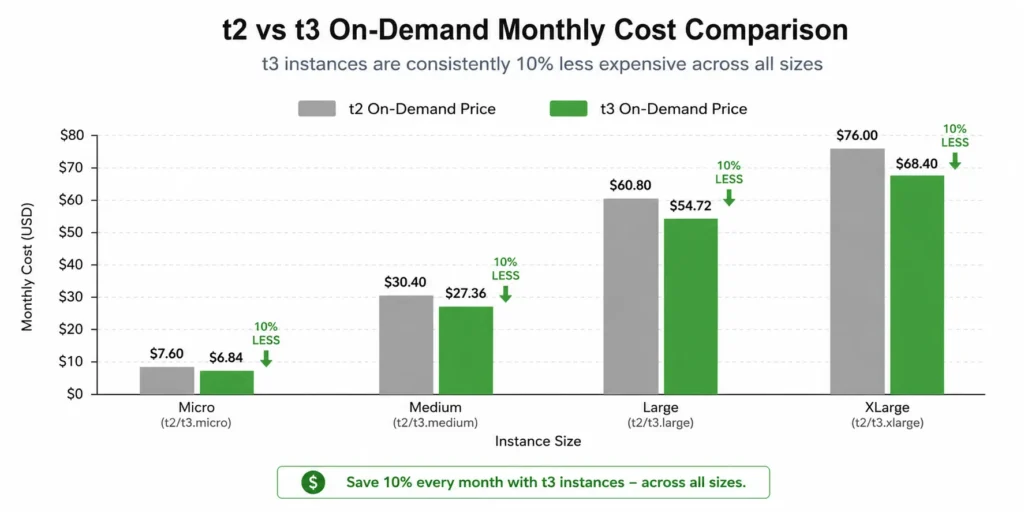
If you are still running EC2 T2 instances, you are paying more than you need to. T3 costs approximately 10% less at every equivalent size, runs on the AWS Nitro hypervisor, delivers better network throughput, and has a larger CPU credit bank.
The T2 generation is not discontinued — AWS still sells it — but there is no pricing or performance reason to choose it over T3 for new deployments or existing workloads. This guide shows you exactly what the difference costs in dollars, where T3 can surprise you with unexpected charges, and what to check before you make the switch.
| Size | T2 vCPU/RAM | T2/hr | T2/month | T3/hr | T3/month | T3 1-yr RI | T3 Cheaper? |
| nano | 2 vCPU / 0.5 GB | n/a | n/a | $0.0052 | $3.80 | Verify | T3 only |
| micro | 1 vCPU / 1 GB | $0.0116 | $8.47 | $0.0104 | $7.59 | ~$4.92 | T3 10% cheaper |
| small | 1 vCPU / 2 GB | $0.0230 | $16.79 | $0.0208 | $15.18 | ~$8.76 | T3 10% cheaper |
| medium | 2 vCPU / 4 GB | $0.0464 | $33.87 | $0.0416 | $30.37 | ~$17.75 | T3 10% cheaper |
| large | 2 vCPU / 8 GB | $0.0928 | $67.74 | $0.0832 | $60.74 | ~$35.04 | T3 10% cheaper |
| xlarge | 4 vCPU / 16 GB | $0.1856 | $135.49 | $0.1664 | $121.47 | ~$70.08 | T3 10% cheaper |
| 2xlarge | 8 vCPU / 32 GB | $0.3712 | $270.98 | $0.3328 | $242.94 | ~$140.16 | T3 10% cheaper |
T2 nano does not exist — T3 nano is the smallest in the T3 family. T3 1-yr RI (No Upfront) shown for reference — verify exact rates at aws.amazon.com/ec2/pricing/reserved-instances. T2 reserved instances also available but at higher base rates. Rates change.
Also read: How Compute Savings Plans work and how to apply them to T3 instances
What Is the Performance Difference Between T2 and T3?
The price gap is consistent. The performance gap is equally important — and it favors T3 more broadly than just cost.
| Feature | T2 | T3 | T3a (AMD variant) | Winner |
| Processor | Intel Xeon (older gen) | Intel Xeon Platinum 8000 (Skylake/Cascade Lake) | AMD EPYC 7000 series | T3/T3a |
| Hypervisor | Xen (legacy) | AWS Nitro | AWS Nitro | T3/T3a |
| Price-performance | Baseline | Up to 30% better than T2 | ~10% cheaper than T3 | T3a cheapest overall |
| AVX-512 support | No | Yes | No | T3 |
| Network bandwidth | Low to moderate (up to 1 Gbps) | Up to 5 Gbps | Up to 5 Gbps | T3/T3a |
| EBS bandwidth | Up to 1,750 Mbps | Up to 2,085 Mbps | Up to 2,085 Mbps | T3/T3a |
| CPU credit default mode | Standard | Unlimited (can incur extra charges) | Unlimited (can incur extra charges) | T2 Standard = predictable cost |
| Max credit bank | 24 hours of earned credits | 7 days of earned credits | 7 days of earned credits | T3/T3a |
| Regional availability | Limited (older regions only) | Broad (all current regions) | Most current regions | T3/T3a |
| Free Tier eligible | t2.micro (750 hrs/month, 12 months) | t3.micro (750 hrs/month, 12 months) | No | Tie (T2 or T3 micro) |
Sources: aws.amazon.com/ec2/instance-types/t2/, aws.amazon.com/ec2/instance-types/t3/, AWS documentation May 2026.
The T3 Unlimited Mode CPU Credit Trap
T3 runs in Unlimited CPU credit mode by default. This is better for performance — the instance can sustain CPU above baseline indefinitely without throttling. But if your workload consistently runs above the baseline CPU level, you will be charged $0.05 per vCPU-hour of CPU credit consumed beyond what the instance earns.
T3 baseline CPU percentages by size: t3.micro = 10%, t3.small = 20%, t3.medium = 20%, t3.large = 30%, t3.xlarge = 40%, t3.2xlarge = 40%.
Example: a t3.medium (2 vCPUs, 20% baseline) running a web server that regularly pegs at 60% CPU. Excess CPU = (60% – 20%) x 2 vCPUs = 0.8 vCPU-hours of excess per hour. At $0.05/vCPU-hr: $0.04/hour in CPU credit charges. Running 730 hours/month: $29.20/month in CPU credit charges on top of the $30.37/month on-demand rate. Your effective monthly cost becomes $59.57 — nearly double what the on-demand rate implied.
If your workload sustains CPU above the T3 baseline for extended periods, switch to a non-burstable instance family (m-series, c-series, r-series). The T-family is designed for variable workloads with occasional bursts, not sustained CPU-intensive processes (Source: aws.amazon.com/ec2/instance-types/t3).
T2, by contrast, runs in Standard mode by default. When credits are exhausted, the instance throttles to the baseline CPU rather than charging extra. For strictly cost-predictable workloads where hitting the billing surprise is worse than hitting a performance ceiling, T2 Standard mode is the safer choice.
You can configure T3 to Standard mode to avoid the Unlimited charges: aws ec2 modify-instance-credit-specification –instance-credit-specifications InstanceId=[id],CpuCredits=standard
The T3a: 10% Cheaper Than T3 at Every Size
AWS offers a third variant: T3a, powered by AMD EPYC 7000 series processors. T3a costs approximately 10% less than T3 at equivalent sizes. This means T3a is roughly 20% cheaper than T2 at the same memory and vCPU configuration.
T3a trade-offs: no AVX-512 support (matters for specific vectorized workloads), AMD processor instead of Intel (relevant for licensed software tied to Intel), same Nitro hypervisor and similar network performance as T3. For most web serving, application backend, and development workloads, T3a is the cheapest burstable option available.
If your team is running T2 today and evaluating a migration, T3a is worth benchmarking alongside T3 before committing to an instance family. The 10% additional saving over T3 on a fleet of 50 t3.medium instances is: 50 x ($30.37 – ~$27.33) = approximately $152/month, $1,824/year — for the same effective compute capacity.
Verify T3a pricing at aws.amazon.com/ec2/pricing/on-demand — rates change.
Should You Migrate From T2 to T3?
For almost every workload: yes. The migration is a single instance type change, takes approximately 2-5 minutes with a brief restart, and requires no application changes. The 10% on-demand cost reduction is immediate and permanent.
The migration path
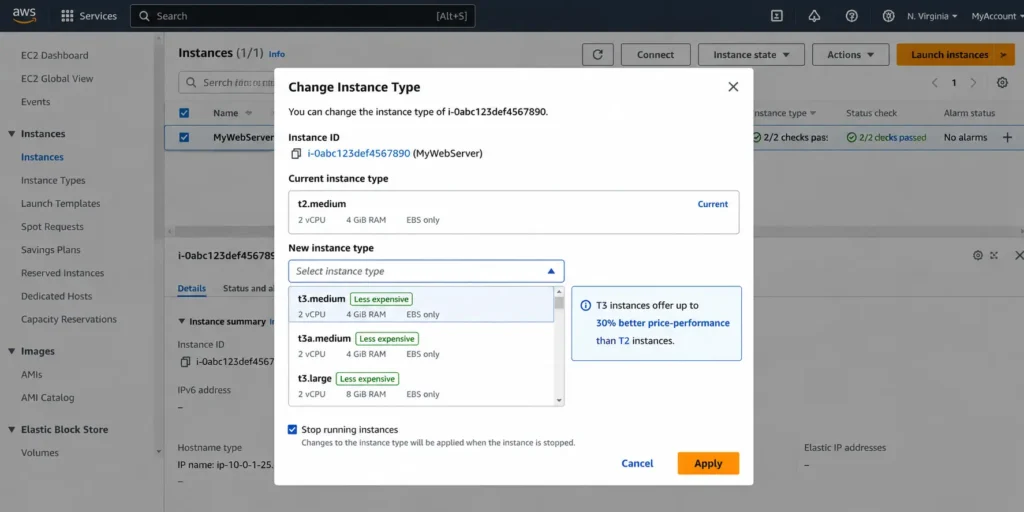
Stop the instance. Change the instance type via the EC2 console (Actions > Instance Settings > Change Instance Type) or CLI: aws ec2 modify-instance-attribute –instance-id [id] –instance-type t3.medium. Start the instance. The entire process takes under 5 minutes per instance. For fleets, use AWS Systems Manager or a configuration management tool to automate the change across multiple instances.
What to check before migrating
Check if any installed software checks for the processor type or Intel-specific instructions. Applications using AVX-512 can stay on T3 (or T3 is actually better than T2 for these). Applications licensed per-processor model should verify AMD compatibility before using T3a. Check if the Unlimited credit mode is appropriate for your workload or if you should set Standard mode on T3.
After migration: watch the CPU credit charges
After migrating to T3, monitor CPUCreditBalance and CPUSurplusCreditsCharged in CloudWatch for the first 30 days. If CPUSurplusCreditsCharged is non-zero and growing, your workload is sustaining CPU above the T3 baseline. Either switch to Standard mode or upgrade to a non-burstable instance family.
Choose T2 When… Choose T3 When…
Choose T2 only when: you need the Free Tier t2.micro and are using accounts created before July 2025, you explicitly need Standard CPU credit mode for cost predictability and do not want to configure Standard mode on T3, or your application has a hard requirement for the older Xen hypervisor (extremely rare).
Choose T3 in every other situation: lower on-demand cost at every size, Nitro hypervisor, better network performance, larger CPU credit bank, broader regional availability, and 30% better price-performance. If cost is the primary concern, evaluate T3a (AMD) for an additional 10% reduction.
For any workload that already runs continuously and benefits from a commitment discount: a T3 instance with a Compute Savings Plan delivers 30-66% savings over T2 on-demand. Switching to T3 AND applying a Savings Plan compounds the savings — the Savings Plan discount applies to the already-cheaper T3 rate. Source: Usage.ai verified Compute Savings Plans documentation.
Also read: All Upfront, Partial, or No Upfront: The EC2 Savings Plan
How Usage.ai Handles T2-to-T3 Migration and Savings Plans
Usage.ai identifies instances still running on older generation families — including T2 — as part of its fleet analysis. The platform surfaces the generation upgrade opportunity before recommending any Compute Savings Plan purchase, because buying a Savings Plan commitment on T2 when T3 is available locks in savings on the wrong (more expensive) base rate.
The correct sequence: upgrade T2 instances to T3 (or T3a) first. Then apply a Compute Savings Plan on the T3 fleet. The combined effect — 10% cheaper base rate from T3, plus 30-66% discount from the Savings Plan — produces a lower effective hourly rate than a Savings Plan on T2 alone. Usage.ai’s 24-hour analysis refresh means that after a T3 migration, the platform recalculates the optimal Savings Plan commitment within 24 hours based on the new T3 baseline rather than waiting for the next quarterly review cycle.
See how Usage.ai analyzes your EC2 fleet and recommends the right commitment strategy
Frequently Asked Questions
1. Is t2 or t3 cheaper?
T3 is consistently 10% cheaper than T2 at every equivalent size in US East (N. Virginia). Verified May 2026: t3.micro $7.59/month vs t2.micro $8.47/month; t3.medium $30.37/month vs t2.medium $33.87/month; t3.large $60.74/month vs t2.large $67.74/month. There is no size where T2 is cheaper than T3. Source: economize.cloud (AWS API data, May 2026). Verify at aws.amazon.com/ec2/pricing/on-demand — rates change.
2. What is the difference between EC2 t2 and t3?
T3 is the newer generation: Intel Xeon Platinum 8000 (Skylake/Cascade Lake), AWS Nitro hypervisor, up to 5 Gbps network, 30% better price-performance, larger CPU credit bank (7 days vs 24 hours), and broader regional availability. T2 uses older Intel Xeon, legacy Xen hypervisor, and slower networking. T3 costs 10% less on-demand at every size. T3 runs in Unlimited CPU credit mode by default; T2 runs in Standard mode by default.
3. Should I switch from t2 to t3?
Yes, for almost all workloads. The migration is a 2-5 minute instance type change with a brief restart and no application changes required. You get 10% lower on-demand cost immediately, better network performance, and a newer processor. The only reason not to switch: software with explicit Xen hypervisor requirements (rare), Intel-only licensed software (use T3, not T3a), or applications that require Standard CPU credit mode (configurable on T3 after migration).
4. What is T3 Unlimited mode and when does it cost extra?
T3 Unlimited mode (the default) allows the instance to burst above CPU baseline indefinitely. When accumulated CPU credits are exhausted and the workload continues above baseline, AWS charges $0.05 per vCPU-hour of excess credit consumed. A t3.medium consistently running at 60% CPU (vs 20% baseline) generates approximately $29/month in CPU credit charges on top of the $30.37/month instance cost. Set Standard mode (aws ec2 modify-instance-credit-specification) if you need cost predictability and can accept CPU throttling at credit exhaustion.
5. What is t3a and is it better than t3?
T3a uses AMD EPYC 7000 series processors and costs approximately 10% less than T3. It has the same Nitro hypervisor and similar network performance but does not support AVX-512 instructions. For most web serving, application backend, and development workloads, T3a is the cheapest burstable instance option available — roughly 20% cheaper than T2 at equivalent sizes. Verify T3a pricing at aws.amazon.com/ec2/pricing/on-demand.
6. Can I apply a Compute Savings Plan to T3 instances?
Yes. Compute Savings Plans cover all EC2 instance families including T3, T3a, and T2. The discount applies automatically across all EC2 families and sizes, so a single Compute Savings Plan commitment covers your T3 fleet regardless of size or region. Migrating from T2 to T3 and then applying a Compute Savings Plan captures both the 10% T3 on-demand savings and the 30-66% Savings Plan discount on the already-cheaper T3 base rate.
7. Does t3 support the AWS Free Tier?
Yes. Both t2.micro and t3.micro are eligible for the AWS Free Tier: 750 hours per month of Linux or Windows for 12 months on new accounts. For accounts created before July 2025, the Free Tier applies to both t2.micro and t3.micro. After the 12-month Free Tier period, t3.micro billed at $7.59/month on-demand is slightly cheaper than t2.micro at $8.47/month. Verify current Free Tier eligibility at aws.amazon.com/free.