What is Cloud Cost Management? A Comprehensive Guide (2026)

Updated May 22, 2026
19 min read
On this page

Cloud cost management is the practice of monitoring, controlling, and optimizing an organization’s spending on cloud infrastructure across AWS, GCP, and Azure. Unlike on-premises hardware where costs are capital expenses billed once, cloud spend is dynamic and pay-as-you-go, meaning costs compound daily based on real usage. Without active management, waste accretes through oversized instances, forgotten environments, idle resources, and missed commitment discounts. Studies from multiple cloud billing platforms consistently put unmanaged cloud waste at 30–35% of total spend.

This guide covers everything a FinOps engineer or engineering leader needs to build a cost management program that actually works: the core strategies, the tools, where native solutions fall short, and how to structure a program that scales.

What Does Cloud Cost Management Actually Involve?

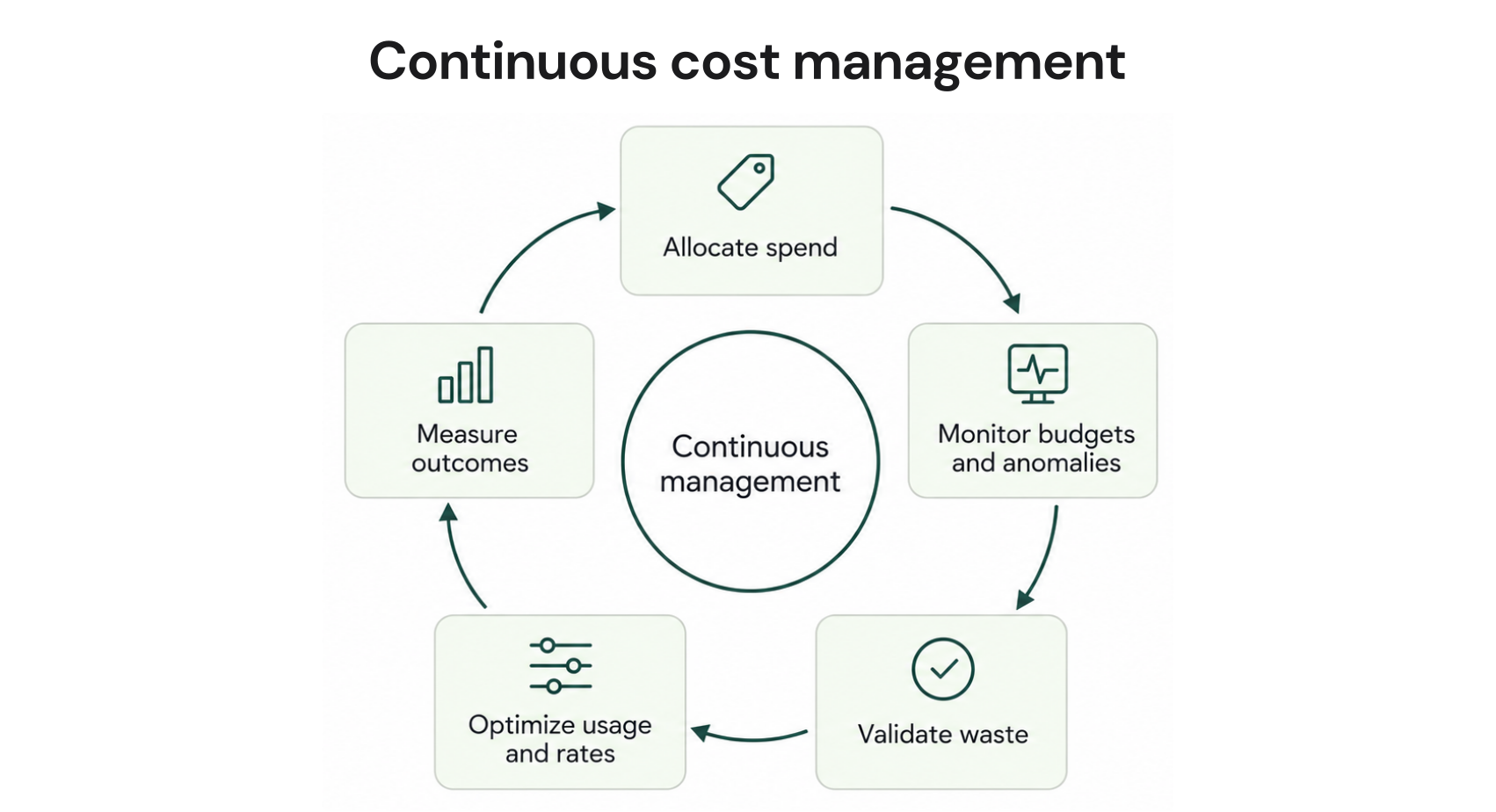
Cloud cost management is not a single tool or a one-time audit. It is an ongoing operational discipline with four distinct layers:

Visibility:knowing what you are spending, on what, and where the waste is. This requires tagging, cost allocation, and dashboards that break down spend by team, service, environment, and account.

Rightsizing: matching compute resources to actual workload requirements. Oversized instances are the most common form of cloud waste. A VM provisioned for peak capacity running at 12% average CPU utilization is paying for 88% of capacity it does not use.

Commitment purchasing: buying Reserved Instances (RIs) or Savings Plans (SPs) on AWS, Committed Use Discounts (CUDs) on GCP, or Reserved VM Instances on Azure. These commitment structures offer 30–72% discounts over on-demand pricing (verify at aws.amazon, rates change), in exchange for committing to a usage level for 1–3 years.

Anomaly detection and governance: catching cost spikes before they compound, enforcing tagging policies, and setting budget alerts that trigger before overage, not after.

Most teams focus heavily on visibility and underinvest in commitment purchasing, which is typically where the largest savings live. A $1M/month AWS bill with 60% on-demand spend and no SPs or RIs is leaving $180,000–$360,000 per month on the table. Also see: What Is the Difference Between Cloud Cost Optimization and Cloud Cost Management?

AWS Cost Explorer dashboard showing on-demand vs. reserved spend breakdown by service, with a coverage gap visible in EC2 spend.

What Are the Core Strategies in Cloud Cost Management?

Rightsizing: The Fastest Way to Stop Overpaying on Compute

Rightsizing means analyzing utilization data and scaling instances to match actual demand. The process involves pulling CPU, memory, network, and disk I/O metrics over a representative window (30–90 days is standard), then comparing to the next smaller instance type.

On AWS, an m5.2xlarge (8 vCPU, 32 GB RAM) running at 15% average CPU should likely be a m5.large or m5.xlarge. The cost difference: m5.2xlarge on-demand in us-east-1 costs approximately $0.384/hour; m5.large costs approximately $0.096/hour (verify at aws.amazon, rates change). That is a 75% reduction for the same application with no performance impact.

Rightsizing blockers in practice:

  • Teams provision for peak load and never revisit the sizing
  • Fear of underpowering production leads to perpetual over-provisioning
  • No established process for reviewing utilization metrics at scale
  • Multiple teams share accounts with no single owner for rightsizing decisions

The most effective approach is to start with the highest-spend instance families and work down, using utilization data from the past 90 days rather than 7-day snapshots, which overweight peak usage.

Reserved Instances and Savings Plans: The Commitment Discount Layer

Reserved Instances (RIs) and Savings Plans (SPs) are the highest-leverage lever in cloud cost management for organizations running consistent workloads. They operate by exchanging usage commitment for a discount. You agree to a usage level; the cloud provider applies the discount automatically.

AWS Savings Plans come in two variants. Compute Savings Plans apply to EC2, Fargate, and Lambda regardless of instance family, region, or OS, which is also the most flexible structure. EC2 Instance Savings Plans are less flexible but offer higher discounts, tied to a specific instance family and region.

AWS Reserved Instances offer deeper discounts than Savings Plans for specific services: RDS, ElastiCache, OpenSearch, Redshift, and DynamoDB do not have Savings Plans coverage, so Reserved Instances are the only commitment discount path for these services. Also see AWS Savings Plans vs Reserved Instances.

GCP Committed Use Discounts (CUDs) apply to Compute Engine VMs, GKE clusters, and Cloud SQL instances. GCP also offers Sustained Use Discounts (SUDs) automatically for VMs that run more than 25% of a month, no purchase required.

Azure Reserved VM Instances apply to virtual machines, Azure SQL Database, Azure Cosmos DB, and other services.

Discount ranges by commitment type (approximate, verify at each cloud provider’s pricing page, rates change):

Commitment Type Discount vs On-Demand Lock-In
AWS Compute Savings Plan (1-year, no upfront) ~25–27% 1 year
AWS Compute Savings Plan (3-year, no upfront) ~38–41% 3 years
AWS EC2 Instance RI (1-year, all upfront) ~40–43% 1 year
AWS EC2 Instance RI (3-year, all upfront) ~57–60% 3 years
GCP CUD Compute Engine (1-year) ~37% 1 year
GCP CUD Compute Engine (3-year) ~55% 3 years
Azure Reserved VM (1-year) ~36–40% 1 year
Azure Reserved VM (3-year) ~52–56% 3 years

The financial risk in commitment purchasing is underutilization. If you commit to $50,000/month and only use $30,000 worth of covered compute, you pay the commitment price on the unused portion with no refund. This is why many teams leave commitment discounts on the table entirely, the risk of waste feels worse than the cost of foregone savings.

Cost Allocation and Tagging: Knowing Who Owns What

Cost allocation is the process of assigning cloud spend to the teams, products, and environments that generated it. Without tagging, all spend is visible at the account level but unattributable to specific owners, which means no one is accountable for overruns.

Effective tagging strategies include:

  • Tagging every resource with team, environment (prod/staging/dev), project, and cost-center
  • Enforcing tags at resource creation via AWS Service Control Policies (SCPs) or GCP Organization Policies
  • Using AWS Cost Allocation Tags or GCP Labels to generate team-level billing reports
  • Implementing showback (visibility only) before chargeback (actual billing to teams) to build buy-in

The FinOps Foundation estimates that organizations without a tagging strategy misattribute or cannot attribute 20–40% of cloud spend.

Anomaly Detection: Catching Waste Before It Compounds

Cloud cost anomalies like an S3 bucket generating unexpected egress, a Lambda function in a runaway loop, a forgotten dev environment left running over a long weekend are common and expensive. The question is not whether they will happen, but how quickly they are caught.

Native tools like AWS Cost Anomaly Detection and Azure Cost Alerts can flag unusual spending patterns. The limitation is that these tools work on historical data and refresh on multi-day cycles. A cost spike on Monday may not appear in a budget alert until Wednesday or Thursday.

What Tools Are Used for Cloud Cost Management?

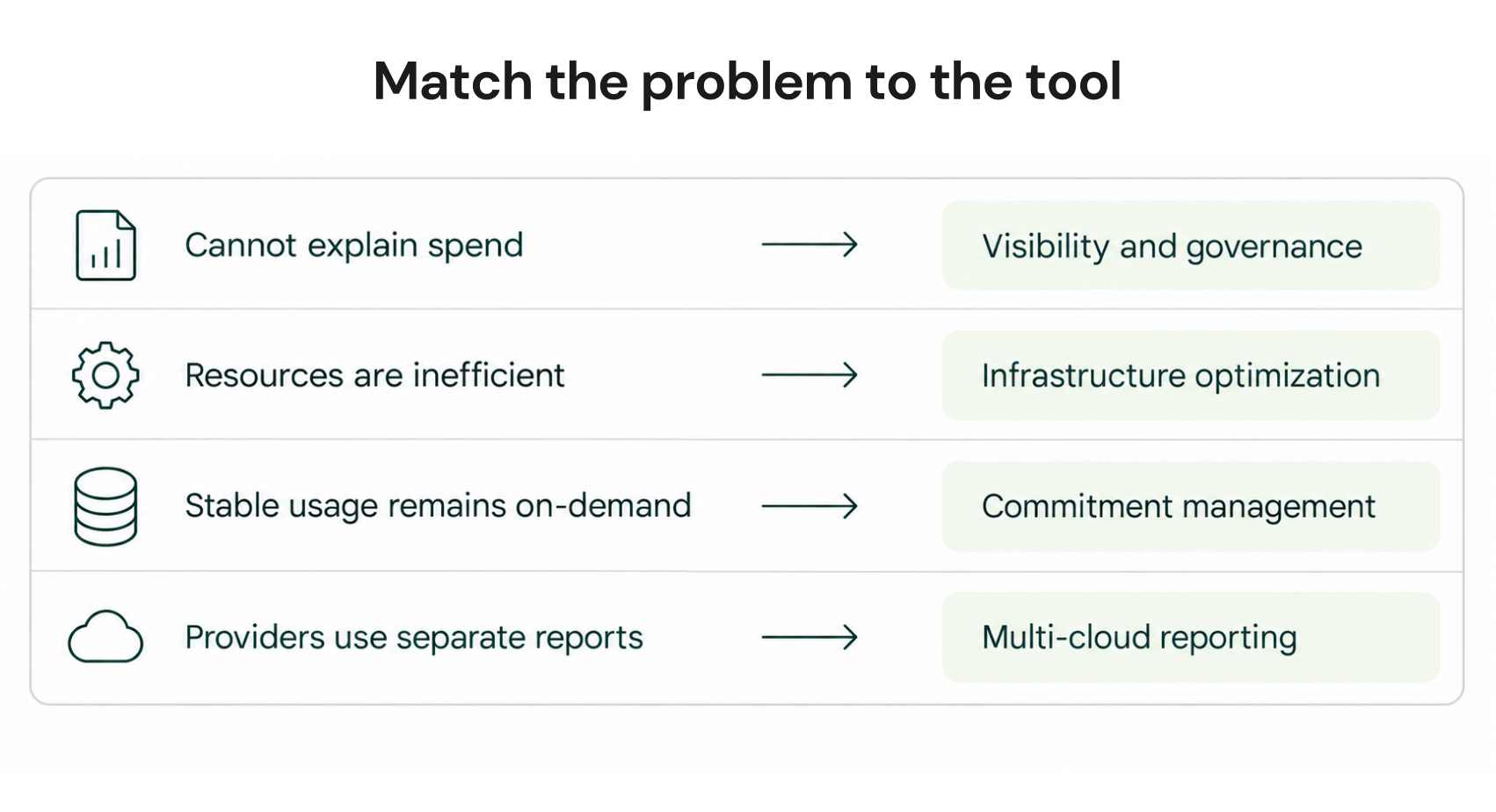
There are three categories of cloud cost management tools: native platform tools, third-party observability platforms, and automated commitment platforms. Each solves a different problem.

Native Cloud Cost Tools

Every major cloud provider ships a native cost management suite:

  • AWS Cost Explorer provides spend visualization, RI and Savings Plan recommendations, and usage trend analysis. Recommendations refresh every 72+ hours. Cost Explorer is included for AWS customers (verify at aws amazon cost management,Β  rates change for detailed query features). It is useful for understanding historical spend but requires significant manual effort to act on recommendations at scale.
  • AWS Budgets allows setting spend, usage, or coverage thresholds with email and SNS alerts. Alerts trigger after the threshold is crossed, not before.
  • Azure Cost Management and Billing (formerly Cloudyn) provides spend analysis, budgets, and RI recommendations for Azure resources. Available at no additional charge for Azure customers.
  • Google Cloud Billing provides cost breakdowns, budget alerts, and CUD recommendations. GCP’s sustained use discounts apply automatically, reducing the manual commitment purchasing burden compared to AWS.

Limitations shared across all native tools: They provide visibility into what happened but limited automation for what to do next. Commitment recommendations require manual review and execution. Recommendations are typically based on 30-day lookback windows and refresh on multi-day cycles. None provide a buyback mechanism if commitments go underutilized.

Third-Party Observability Platforms

Platforms like Datadog Cloud Cost Management, IBM Turbonomic, and CloudHealth by Broadcom (now part of Broadcom VMware) provide cost visibility across multiple clouds in a single pane of glass. These are strong choices for organizations needing unified multi-cloud reporting, chargeback automation, or infrastructure observability alongside cost data.

These platforms are primarily observability and recommendation tools. They surface where waste exists and what actions to take, but they do not execute commitment purchases on your behalf or carry financial risk on commitment underutilization.

Automated Commitment Platforms

Automated commitment platforms go a layer deeper: they purchase, manage, and adjust commitment discounts on your behalf and carry financial accountability for those commitments.

The distinction matters. A recommendation tool tells you to buy a 1-year Compute Savings Plan for $18,000/month; you then own that commitment and absorb any underutilization risk. An automated commitment platform purchases the commitment, monitors utilization, adjusts coverage as your usage changes, and, in the case of Usage.ai returns cashback in real money (not credits) if a commitment goes underutilized.

Usage.ai operates across AWS, GCP, and Azure. Setup takes 30 minutes via billing-layer access only, no infrastructure changes required. The platform refreshes commitment recommendations every 24 hours, compared to the 72+ hour refresh cycle of AWS Cost Explorer. At $6–12K/day in uncovered spend, that 3-day lag compounds to $18,000–$36,000 in delayed optimization per refresh cycle. Usage.ai’s fee is a percentage of realized savings only; if the platform saves nothing, you pay nothing.

Comparison diagram showing AWS Cost Explorer's 72-hour recommendation lag versus Usage.ai's 24-hour refresh cycle.

How Does FinOps Fit Into Cloud Cost Management?

FinOps (Cloud Financial Management) is the cultural and operational framework that makes cloud cost management sustainable at scale. The FinOps Foundation defines FinOps as “an evolving cloud financial management discipline and cultural practice that enables organizations to get maximum business value by helping engineering, finance, and technology teams to make data-driven spending decisions.”

The core problem FinOps solves is organizational: engineering teams make decisions that generate costs, but finance teams are responsible for those costs, and the two teams historically have had no shared language or shared visibility.

FinOps addresses this through three operating phases:

  • Inform: giving every team real-time visibility into what they are spending and what it is mapped to. This phase is predominantly tagging, showback dashboards, and unit economics (cost per transaction, cost per user, cost per API call).
  • Optimize: identifying and acting on waste. This is where rightsizing, commitment purchasing, and idle resource elimination happen. The FinOps Foundation’s maturity model describes organizations at the “Crawl” stage as doing ad-hoc optimization and teams at the “Run” stage as having automated, policy-driven optimization that adjusts in real time.
  • Operate: building continuous improvement processes, governance policies, and cross-functional accountability. At this stage, cloud cost is a first-class engineering metric alongside latency and availability.

Organizations that reach the “Run” stage of FinOps maturity typically show 20–40% lower cloud bills than peers with equivalent workloads, according to FinOps Foundation survey data (verify at finops.org, data changes with annual surveys).

Why Do Most Companies Struggle with Cloud Cost Management?

Why organizations with full knowledge of these strategies still fail to execute them. There are five structural reasons:

  1. Skills gap and complexity. Managing AWS pricing, RI families, Savings Plan types, coverage calculations, and CUD structures requires specialized expertise that most engineering teams do not have and do not want to develop. The decisions are high-stakes and reversible only with financial loss.
  2. 72-hour recommendation lag. AWS Cost Explorer and similar native tools refresh recommendations every 72+ hours. By the time a recommendation surfaces, the usage pattern may have already shifted. This is particularly acute for teams scaling infrastructure for product launches or traffic spikes.
  3. Time and competing priorities. Cloud cost optimization is not a feature and does not ship to customers. Engineering teams under delivery pressure consistently deprioritize cost work. “We’ll clean it up next quarter” is the default and next quarter the bill has grown.
  4. Fear of commitment lock-in. The single largest reason teams leave commitment discounts on the table is the risk of over-committing. A 3-year RI purchased for a workload that gets migrated or decommissioned is a stranded cost with no exit. This fear is rational. AWS and GCP do not provide buyback options on their native commitment structures.
  5. Velocity of cloud growth outpacing governance. Engineering teams spin up resources faster than cost governance processes can track them. Dev and test environments multiply. Storage accumulates. By the time an audit happens, months of waste have already been paid.

Usage.ai’s internal analysis of 300+ enterprise customers found that the gap between first identifying a commitment opportunity and acting on it averages 6–9 months using manual processes. The platform reduces that to 60 days to full coverage (see how Usage.ai automates commitment coverage here).

How Do You Build a Cloud Cost Management Program From Scratch?

Building a functional cost management program requires sequencing the work correctly. Organizations that jump directly to commitment purchasing without visibility in place end up with commitments they cannot track and waste they cannot explain.

Phase 1: Establish Visibility (Weeks 1–4)

Before optimizing, you need to see the data clearly. This means:

  • Enabling AWS Cost Explorer or equivalent in all accounts
  • Implementing a tagging strategy: team, environment, project, cost-center at minimum
  • Setting up budget alerts at 80% and 100% of monthly forecast by account and service
  • Generating a baseline: what did you spend last month, by service, by team, by environment?

Phase 2: Eliminate Obvious Waste (Weeks 4–8)

With visibility in place, the first optimization pass focuses on waste that has zero risk of impacting production:

  • Identify and delete unattached EBS volumes (AWS charges for allocated, not used)
  • Identify and terminate idle RDS instances and dev databases with zero connections
  • Right-size development and staging environments (no reason a dev RDS instance is db.r5.2xlarge)
  • Identify S3 buckets with storage that has not been accessed in 90+ days and apply lifecycle policies

A typical cloud bill audit at this phase recovers 10–15% of total spend in the first 30–60 days.

Phase 3: Commitment Purchasing (Weeks 8–16)

Commitment discounts should be layered on after rightsizing and waste elimination, for one reason: you want to commit to your real steady-state usage, not to the oversized, wasteful baseline.

Commitment purchasing strategy:

  • Start with Compute Savings Plans (most flexible structure) before EC2 Instance Savings Plans or RIs
  • Target 70–80% coverage, not 100%; the last 20% of on-demand provides flex capacity for spikes
  • Purchase in tranches rather than all at once; buy 3 months of data, then commit; buy 3 more months of data, adjust, then add more coverage
  • For RDS, ElastiCache, Redshift, and OpenSearch on AWS, Reserved Instances are the only commitment vehicle

Dashboard showing commitment coverage percentage, on-demand overspend, and projected savings at 70%, 80%, and 90% coverage targets.

Phase 4: Automation and Continuous Optimization (Ongoing)

Manual commitment management does not scale. An engineering team managing a $3M/month AWS bill across 12 accounts cannot review and act on commitment recommendations every 72 hours. This is where automated platforms provide compounding value.

The four dimensions of automation that matter:

  1. Recommendation refresh rate: 24 hours vs 72 hours means faster response to usage changes
  2. Commitment adjustment: as usage patterns shift, commitments should adjust, not lock in at a static level
  3. Underutilization protection: if commitments go unused, some mechanism should exist to recover value
  4. Multi-cloud coverage: commitment structures across AWS, GCP, and Azure follow different rules; managing them manually across clouds multiplies complexity

Cloud Cost Management Tools Compared: Native vs Third-Party vs Automated

Dimension AWS/GCP/Azure Native Observability Platforms (Datadog, Turbonomic, CloudHealth) Automated Commitment Platforms (Usage.ai)
Visibility Yes; per-cloud only Yes; multi-cloud unified Yes;Β  multi-cloud unified
Rightsizing recommendations Yes; manual action required Yes; manual action required Yes
Commitment purchasing Manual; you own the risk Recommendations only Automated; platform manages commitments
Recommendation refresh 72+ hours (AWS) Varies by platform 24 hours (Usage.ai)
Underutilization protection None None Cashback guarantee (real money, not credits)
Lock-in terms 1–3 year native commitments, no buyback N/A Quarterly adjustments, cancel anytime, buyback guarantee
Fee model Included (some advanced features paid) Subscription or % of spend % of realized savings only; zero fee if no savings
Setup time Immediate (built-in) Days to weeks 30 minutes
Multi-cloud No, one cloud per tool Yes Yes; AWS, GCP, Azure

The right answer depends on where your organization sits in the cost management maturity curve. Native tools are sufficient for teams at the Inform phase. Third-party observability platforms add value at the Optimize phase when multi-cloud visibility or infrastructure observability alongside cost is required. Automated commitment platforms become the highest-ROI layer once a team is ready to act on commitments at scale.

Cloud Cost Management Decision Tree

Use this framework to identify where to focus first:

START: What is your monthly cloud bill?Under $50K/monthΒ Β –> Use native tools (AWS Cost Explorer, GCP Billing, Azure Cost Management)–> Focus: tagging + waste elimination + basic budget alerts

–> Commitment purchasing: manual Savings Plans, 1-year term


$50K–$500K/month

–> Native tools + begin commitment automation

–> Focus: rightsizing + 70-80% commitment coverage + tagging enforcement

–> Consider: automated commitment platform if engineering time is constrained


Over $500K/month

–> Automated commitment platform + multi-cloud observability

–> Focus: full commitment automation + anomaly detection + chargeback

–> Consider: dedicated FinOps engineer or team


Are you buying commitments manually today?

YES –> Are you reviewing and adjusting them at least monthly?

YES –> Are you protected against underutilization?

YES –> You have a mature commitment program

NO –> Evaluate platforms with buyback guarantees

NO –> Manual commitment management is a risk at your scale; evaluate automation

NO –> What is your on-demand coverage rate?

Under 50% commitment coverage on stable workloads –> High-priority savings opportunity

Over 80% commitment coverage –> Focus on rightsizing and waste elimination first


Are you running on multiple clouds (AWS + GCP or AWS + Azure)?

YES –> Single-pane visibility is a priority; evaluate multi-cloud platforms

NO –> Native tools may be sufficient at lower spend levels

How Does Usage.ai Differ From Traditional Cloud Cost Management Approaches?

Usage.ai is an automated cloud commitment platform, not a visibility tool. The distinction is operational: where native tools and observability platforms surface recommendations and leave execution to the team, Usage.ai purchases, manages, and insures commitments on the customer’s behalf.

  • Insured Flex Commitment: an SP/RI-equivalent discount structure that delivers savings of 30–60% without requiring multi-year lock-in or upfront payment. Every commitment is fully insured, underutilized portions are returned as cashback (real money), not credits.
  • Zero Lock-In Guarantee: Usage.ai’s Insured Flex Commitments carry no multi-year obligation. Commitments adjust quarterly. If usage patterns shift, scale down with no penalty. A buyback guarantee covers any underutilized commitments, paid in cashback.
  • Buyback Guarantee: If a commitment purchased through Usage.ai goes underutilized, Usage.ai buys it back, returning the value as cashback.

This directly addresses the commitment lock-in fear that prevents most organizations from reaching target coverage rates. AWS and GCP native commitments carry 1–3 year lock-in with no third-party buyback. Usage.ai commitments adjust quarterly and carry a buyback guarantee.

Usage.ai Insured Flex Commitments carry no multi-year lock-in. Commitments adjust quarterly. Scale down? No penalty. Underutilized? Cashback paid.

AWS product coverage: Usage Flex Savings Plan (EC2, Fargate, Lambda, 40–60% savings), Usage Flex DB Savings Plan (RDS, ElastiCache, DocumentDB, 20–35% savings), Usage Flex Reserved Instances (RDS, ElastiCache, OpenSearch, Redshift, DynamoDB, 30–40% savings).

Full details at usage.ai. A 15-minute savings assessment shows projected savings before any commitment is made.


Set up Usage AI in 30 minutes. Save from day one.No infrastructure changes. No lock-in. If Usage.ai doesn’t save you money, you pay nothing.FIND MY SAVINGS


Frequently Asked Questions

1. What is cloud cost management?

Cloud cost management is the ongoing practice of monitoring, controlling, and optimizing spending on cloud infrastructure across providers like AWS, GCP, and Azure. It covers four layers: visibility (knowing what you spend), rightsizing (matching resources to actual demand), commitment purchasing (buying discounted capacity commitments), and anomaly detection (catching cost spikes early). Effective programs typically reduce cloud bills by 30–50% compared to unmanaged baselines.


2. What are the most common causes of cloud waste?

The most common causes of cloud waste are oversized instances (paying for peak capacity on workloads running at 10–20% average CPU), idle resources (dev/test environments left running, unattached EBS volumes, unused load balancers), missed commitment discounts (running 60–80% of compute on-demand with no Savings Plans or Reserved Instances), and excessive data transfer costs (inter-region or internet egress that could be routed differently). Together these typically account for 30–40% of a mid-market cloud bill.


3. How do AWS Savings Plans work?

AWS Savings Plans automatically apply a discount to EC2, Fargate, and Lambda usage in exchange for a commitment to a specific dollar-per-hour usage level for 1 or 3 years. Compute Savings Plans are the most flexible as they apply across all instance families, regions, and operating systems. EC2 Instance Savings Plans lock to a specific instance family and region but offer higher discounts. Discounts range from approximately 17–66% depending on term, payment type, and instance family.


4. What is the difference between Reserved Instances and Savings Plans?

Reserved Instances (RIs) are commitment discounts tied to a specific service and instance type, while Savings Plans are dollar-per-hour commitments that apply flexibly across compute services. For EC2, Fargate, and Lambda, Savings Plans are generally preferred for their flexibility. Reserved Instances are the only commitment discount vehicle for RDS, ElastiCache, OpenSearch, Redshift, and DynamoDB on AWS.


5. What happens if I over-commit on Reserved Instances or Savings Plans?

If you purchase more commitment capacity than your workload uses, you pay the committed rate on the unused portion with no refund from AWS or GCP. This is the primary financial risk in commitment purchasing. Third-party automated commitment platforms like Usage.ai address this with a buyback guarantee: if a commitment goes underutilized, Usage.ai buys it back and returns the value as cashback, real money, not credits.


6. What is FinOps and how does it relate to cloud cost management?

FinOps (Cloud Financial Management) is the organizational framework for making cloud cost management a shared discipline across engineering, finance, and business teams. Cloud cost management is the technical and operational work; FinOps is the cultural and process layer that makes that work sustainable at scale. The FinOps Foundation’s maturity model runs from Crawl (ad-hoc optimization) to Walk (structured processes) to Run (automated, policy-driven optimization).


7. How long does it take to implement cloud cost management?

Initial visibility (tagging, dashboards, budget alerts) can be set up in 1–2 weeks. The first wave of waste elimination (idle resources, obvious oversizing) takes 4–6 weeks. Commitment purchasing, done manually, typically takes 6–9 months to reach target coverage. Automated platforms like Usage.ai compress the commitment coverage timeline to approximately 60 days. A full FinOps program with chargeback, governance policies, and continuous optimization typically takes 6–12 months to mature.

Cut cloud cost with automation
Latest from our blogs