AWS
AWS Microsoft Azure
 Google Cloud


The Short Answer
The commitment products differ by name across AWS, GCP and Azure, but they resolve to the same two choices: commit to a level of spend and stay flexible, or commit to a specific resource and take the deeper rate.Which one fits depends on whether your workloads hold their shape for the length of the term, not on which cloud you run.
That is a starting point, not a rule. Discount ceilings, term options and exit routes still differ by provider, and a commitment bought on one cloud never carries over to another.
Spend-Based vs Resource-Based Commitments
Spend-based commitments, including AWS Compute Savings Plans, GCP compute flexible CUDs, and Azure savings plan for compute, commit you to a minimum hourly spend.They apply automatically to eligible usage within each product’s service, account, and scope rules; AWS EC2 Instance Savings Plans are a narrower spend commitment limited to one instance family in one Region.
Resource-based commitments, including Reserved Instances, GCP resource-based CUDs, and Azure Reserved VM Instances, generally require a more specific resource, machine family, or regional configuration.
They can offer deeper rates, but eligibility can fall when the workload changes outside the commitment’s applicable configuration.
| Spend-based | Resource-based | |
|---|---|---|
| Workload stability | Shifting families or regions | Stable configuration |
| Portability | Varies by product; broad eligible usage* | Fixed to the committed resource |
| Discount depth | Usually lower ceiling* | Deepest available |
| You must forecast | A spend level | The exact resource shape |
| Best for | Evolving estates | Steady-state baselines |
*Spend-based flexibility and discount depth are product-specific, not universal. Most spend-based commitments apply across instance families and regions, but AWS EC2 Instance Savings Plans apply only to a single instance family in one Region, and reach the same up-to-72% ceiling as Standard RIs.
How Commitment-Based Discounts Work
- You choose a commitment level: an hourly spend (for example, $10/hour) or a resource quantity and a one- or three-year term.
- Discounts apply automatically to matching usage. No infrastructure or code changes are required.
- Usage above your committed amount is billed at standard on-demand rates.
- Unused commitment still bills at the committed rate. It does not roll over.
- Term. Three-year commitments earn deeper rates than one-year.
- Payment. The more you pay upfront, the deeper the rate where upfront options exist; GCP bills commitments monthly only.
- Specificity. The more precisely defined the commitment, the deeper the rate, and the harder it is to keep fully utilized.
Read them together with high utilization at low coverage means you are under-committed, as Google defines both metrics.
For sizing, Google’s CUD recommendation guidance frames it as break-even: subtract the discount percentage from 100 to estimate the utilization at which a commitment stops paying off.
AWS’s pricing-model guidance advises against fixed coverage targets, buy small amounts incrementally and keep purchasing while estimated savings stay above your threshold.
Read both together — high utilization at low coverage means you are under-committed.
Commitment Discount Types by Provider
Every provider implements both structures under its own names and a commitment purchased on one cloud never applies to another.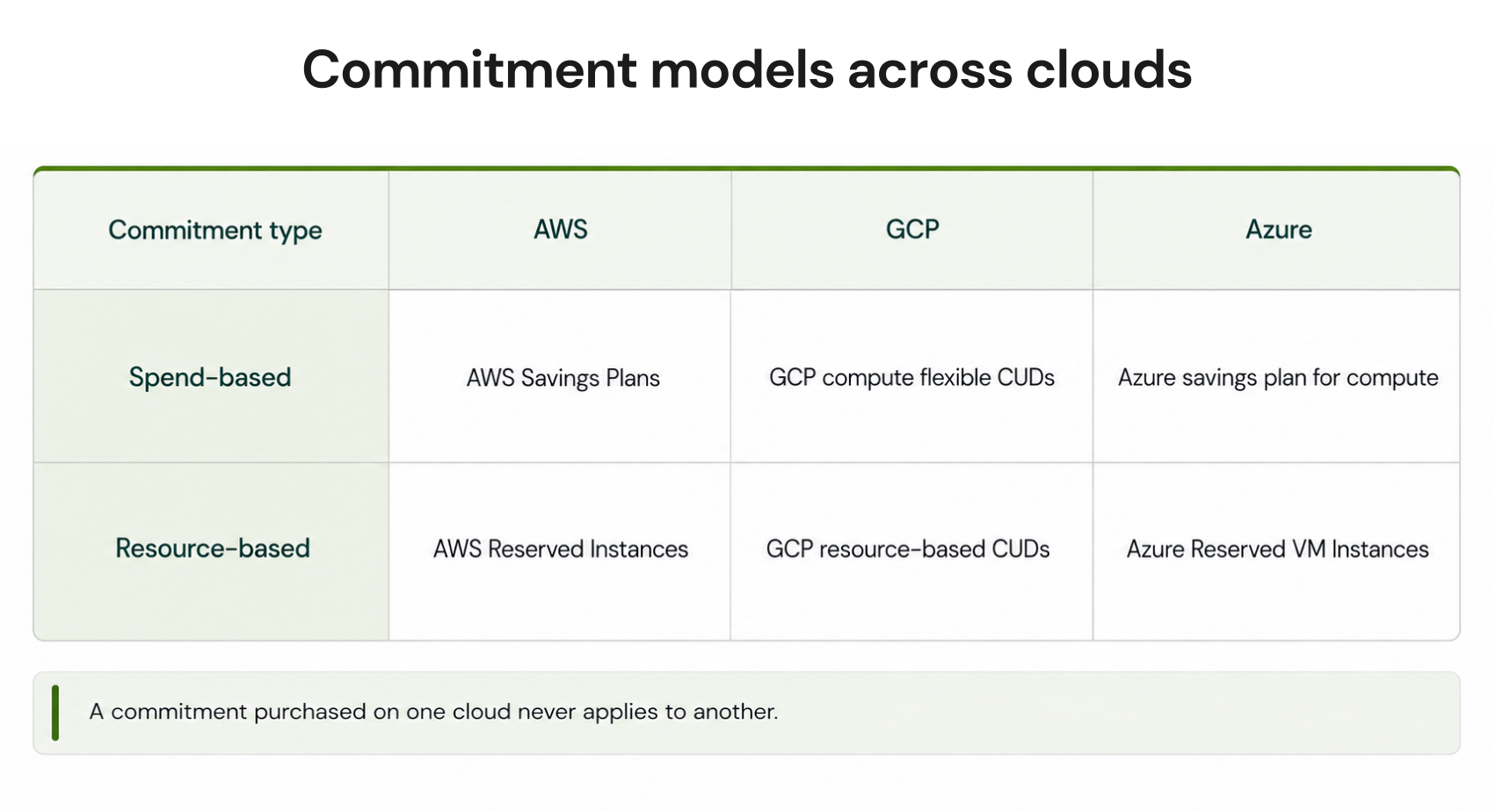
| AWS | GCP | Azure | |
|---|---|---|---|
| Max discount | Up to 72% | Up to 70%* | Up to 72% |
| Term options | 1 or 3 years | 1 or 3 years; eligible resource-based (hardware) CUDs can extend to custom terms† | 1 or 3 years |
| Payment options | All, partial, or no upfront | Monthly only | All upfront or monthly |
| Resale or transfer | RI Marketplace (Standard RIs only) | None | Exchange or refund, within limits |
Term extensions apply only to eligible Compute Engine hardware (resource-based) commitments, not to compute flexible commitments.
A 1-year commitment can extend to a custom term longer than 1 year and shorter than 3; a 3-year commitment to a custom term longer than 3 years and shorter than 6. See Google Cloud’s guidance on extending commitment terms.
Maximum discounts vary by eligible service, machine family, region, term, payment option, operating system, and utilization. Check the current provider pricing page before purchase.
AWS: Savings Plans and Reserved Instances
AWS offers four Savings Plans types: Compute Savings Plans (up to 66% across EC2, Fargate, and Lambda), EC2 Instance Savings Plans (up to 72%, locked to one instance family in one Region), Database Savings Plans (up to 35% across RDS, Aurora, and other database services), and SageMaker AI Savings Plans.Reserved Instances run alongside them: Standard RIs reach up to 72%, Convertible RIs up to 66% with the flexibility to exchange attributes mid-term. Full breakdowns in our guides to AWS Savings Plans and AWS Reserved Instances.
GCP: Committed Use Discounts
GCP structures both models as Committed Use Discounts: resource-based CUDs commit to vCPU and memory in a region (up to 55%, or up to 70% for memory-optimized series), while compute flexible CUDs commit to hourly spend across Compute Engine, GKE, and Cloud Run (28% and 46% for most general-purpose series).GCP is also the only provider with an automatic no-commitment tier, sustained use discounts compared in our SUD vs CUD guide. Full rates and sizing in our GCP CUD guide.
Azure: Reservations and Savings Plans
Azure Reserved VM Instances commit to a VM family and region for up to 72%, while Azure savings plan for compute commits to hourly spend across VM families and regions for up to 65%.When both apply to the same VM, Azure applies the reservation first. Full breakdowns in our guides to Azure reservations and Azure savings plans, and our side-by-side comparison.
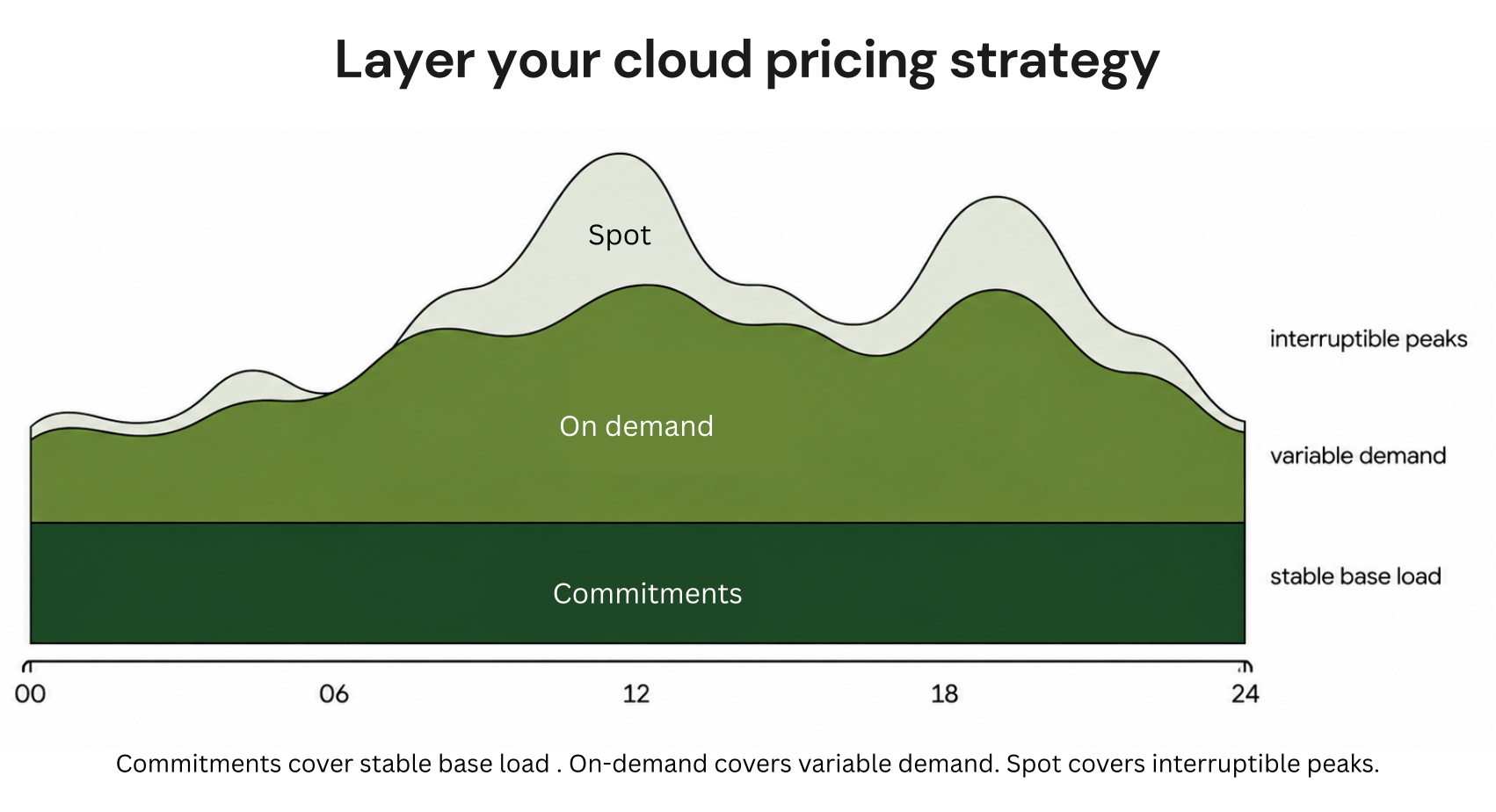
Commitment vs On-Demand vs Spot
- On-demand. Full price, full flexibility. Best for unpredictable, short-lived, or new workloads.
- Commitments. Discounted rates for the stable base load you can forecast across the term.
- Spot. Up to 90% off for interruptible capacity. Best for fault-tolerant batch and CI workloads spot usage is already discounted and sits outside commitment coverage.
Benefits of Commitment-Based Discounts
- Lower unit costs. Matching workloads run at provider-discounted rates, but realized savings depend on the product, term, payment option, configuration, and commitment utilization.
- Budget predictability. Committed spend is fixed for the term, giving finance teams a firmer baseline across planning cycles.
- No engineering effort. The discount is a billing construct with nothing about the infrastructure changes.
Risks FinOps Teams Must Manage
- Underutilization. An unused commitment bills at the committed rate whether or not matching workloads run. A commitment purchased on last year’s usage patterns can become a stranded cost when architectures change mid-term.
- Lock-in. Most commitments cannot be cancelled once purchased, so every purchase is a forecast. Over-commit and you pay for capacity you don’t use; under-commit and you leave savings on the table.
- Multi-cloud complexity. Each provider defines coverage and utilization differently, runs its own renewal calendar, and offers different exit routes and no commitment ports across clouds. Managing three portfolios is three times the tracking, not one consolidated view.
Commitment Management Maturity
Commitment capability typically matures through three stages:- Ad hoc. Individual purchases made from provider console recommendations, reviewed rarely if at all.
- Systematic. Baseline analysis on the providers’ recommendation look-back windows (7–60 days), workloads segmented by stability before purchase, and a fixed review cadence.
- Continuous. Automated monitoring of coverage and utilization, incremental purchases as usage grows, and renewals re-sized against current usage rather than repeated.
How Usage.ai Fits
The last of those stages, continuous automated optimization, is where we work. We analyse billing and usage data across AWS, Azure, and GCP and generate updated commitment recommendations every 24 hours, so coverage decisions track how workloads behave now rather than how they behaved last quarter.With Flex Insured Commitments, teams can get the 30–50% savings of a 1- or 3-year commitment with none of the commitment risk. That applies across covered workloads on AWS, Azure, and GCP, and after a customer approves a recommendation, we purchase and manage the commitment on their behalf.
If a commitment ever costs more than the equivalent on-demand usage would have, we calculate that loss at the end of the month and provide cashback protection for it. We charge a percentage of realized savings, so the fee only exists when the savings do.
Conclusion
Commitment-based discounts are the largest pricing lever available on AWS, GCP, and Azure and the only one that carries term risk. Size against the base load you can forecast, and treat every renewal as a fresh decision rather than a repeat purchase.Review base load, uncovered spend, and commitment risk across clouds.
Frequently asked questions
How do commitment-based discounts compare to on-demand pricing?
On-demand is the list price with no obligation. For the compute-focused commitment products covered here, commitments trade a one- or three-year term for rates up to 72% below it on AWS and Azure and up to 70% on GCP. Realized savings depend on the product, term, payment option, configuration, and commitment utilization, and the commitment bills whether you use it or not.
Are commitment-based discounts worth it for smaller teams?
Yes, once there is a stable usage baseline to commit against. Start with a small commitment covering the portion of spend that has held steady, and keep genuinely variable workloads on on-demand until a pattern emerges.
What happens if we over-commit or need to exit?
- AWS: Standard RIs can be resold on the Amazon EC2 Reserved Instance Marketplace; Savings Plans cannot be sold or cancelled.
- Azure: Reservations can be exchanged subject to product and value rules, or refunded within a $50,000 rolling 12-month cancellation cap. From February 1, 2027, reservations purchased on or after that date cannot be exchanged when the corresponding service is supported by savings plans; reservations purchased before that date retain one final exchange after that date.
- GCP: CUDs cannot be cancelled, exchanged, or resold once purchased.
Can commitment discounts stack?
Within one provider, yes, they apply in a fixed order rather than doubling up. AWS applies Reserved Instances before Savings Plans, Azure applies reservations before savings plans, and GCP applies resource-based CUDs before flexible CUDs.
https://learn.microsoft.com/en-us/azure/cost-management-billing/reservations/reservation-exchange-policy-changes