
 AWS
 Microsoft Azure
 Google Cloud


BigQuery costs mainly come from two components:
- Compute: The cost of processing queries, based on the amount of data processed or computing capacity allocated.
- Storage: The cost of keeping data in BigQuery tables, based on the amount stored and the storage billing method.
BigQuery pricing at a glance
| Pricing component | Price | What you pay for |
|---|---|---|
| On-demand queries | $6.25/TiB | Data processed |
| Standard edition | $0.04/slot-hour | Allocated computing capacity |
| Enterprise edition | $0.06/slot-hour | Allocated computing capacity |
| Enterprise Plus | $0.10/slot-hour | Allocated computing capacity |
| Active logical storage | ~$0.023/GiB-month | Uncompressed stored data |
| Long-term logical storage | ~$0.016/GiB-month | Eligible unchanged data |
| Active physical storage | ~$0.040/GiB-month | Compressed physical storage |
| Long-term physical storage | ~$0.020/GiB-month | Eligible long-term physical storage |
BigQuery also includes 1 TiB of eligible on-demand query processing and 10 GiB of storage free each month, subject to Google’s billing terms.
One TiB (tebibyte) equals 1,024 GiB (gibibytes).
Read Also – Google Cloud BigQuery pricing.
How does BigQuery pricing work?
Imagine an online store that uses BigQuery to analyze customer orders, product sales, and revenue.The company pays for storing its data and for processing queries under its selected compute billing model.
Google offers two compute pricing approaches: on-demand pricing and capacity pricing.
On-demand pricing: Pay for data processed
Under on-demand pricing, BigQuery charges according to how much data queries process, rather than their execution time or the number of rows returned.For example, assume your queries process 5 TiB in one month.
The first 1 TiB is free, leaving 4 TiB billable.
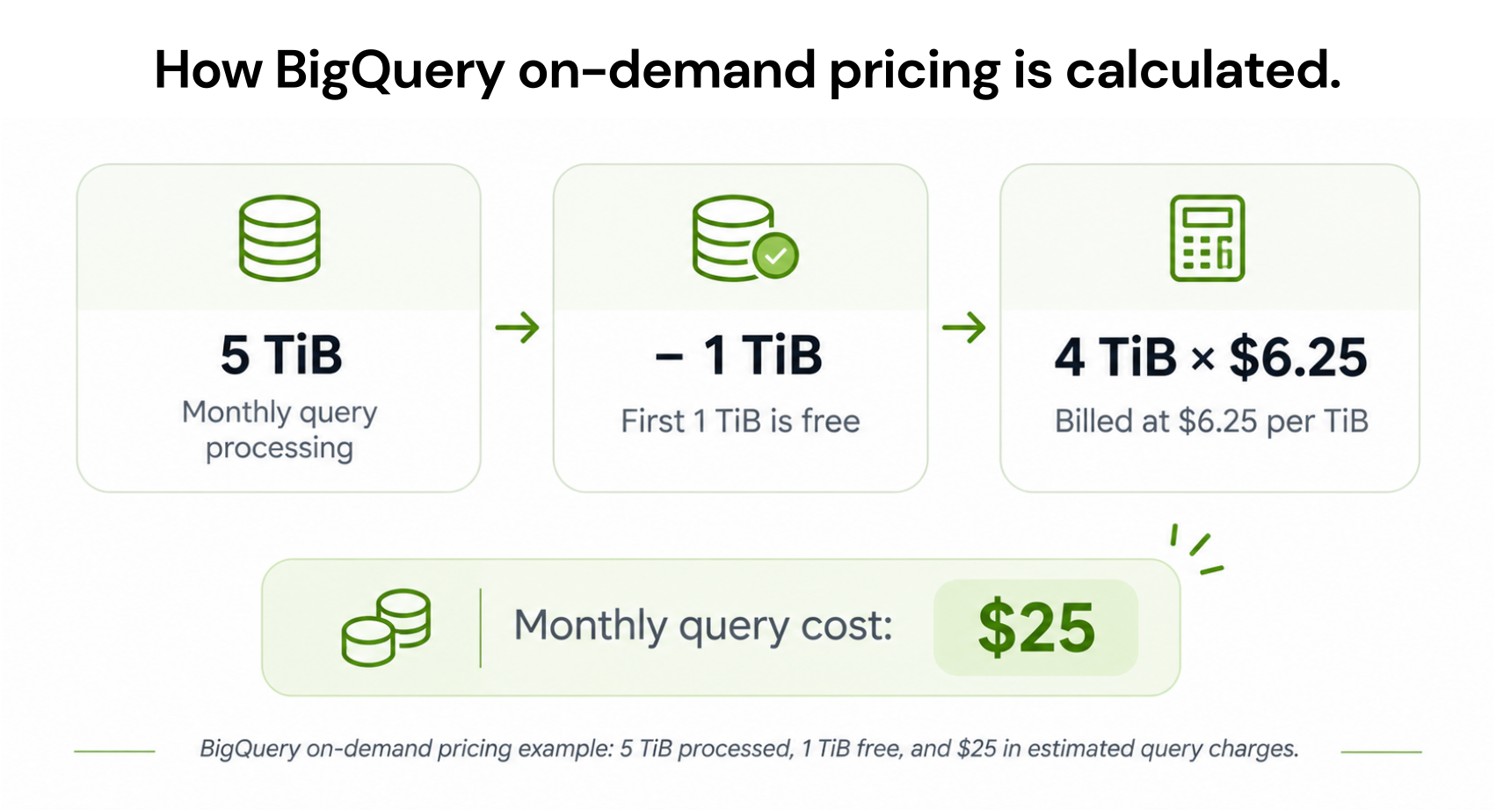
Because BigQuery uses columnar storage, selecting only necessary columns can reduce the data processed. Partitioning and clustering can also help queries scan less data.
Adding LIMIT 10 alone generally does not reduce billable bytes for a non-clustered table.
Cached query results are generally free. Other billable queries have processed bytes rounded up to the next MB, subject to a 10 MB minimum per referenced table and per query.
How can you avoid unexpected query charges?
Google provides several built-in cost controls:- Maximum bytes billed: Set a limit for an individual query. BigQuery rejects the query without charging when its estimated billed bytes exceed that limit.
- Custom query quotas: Limit daily on-demand query processing per user or project.
- Partitioning and clustering: Organize table data to reduce unnecessary scanning.
- Dry runs: Estimate query processing before executing SQL.
For more ways to reduce query processing costs, explore our BigQuery cost optimization guide.
See Google’s BigQuery cost estimation and control guide.
Capacity pricing: Pay for processing slots
Capacity pricing works differently.Instead of paying per TiB processed, you pay for computing resources called slots.
A slot is a unit of BigQuery compute capacity used to execute queries.
One slot allocated for one hour represents one slot-hour.
For example, suppose a workload uses 100 Standard edition slots for 10 billed hours.
A reservation is a pool of processing slots assigned to workloads. Reservations can include:
- Baseline slots: Continuously allocated capacity.
- Autoscaling slots: Additional capacity allocated when demand increases.
- Idle slots: Unused capacity that eligible reservations can share.
Autoscaling normally has a one-minute minimum billing duration, followed by per-second billing. Eligible reservations using BigQuery fluid scaling can avoid that minimum.
Actual autoscaling depends on workload demand and available capacity.
Simple takeaway: On-demand pricing charges for processed data, while capacity pricing charges for allocated computing power.
On-demand vs. capacity pricing
| Feature | On-demand | Capacity |
|---|---|---|
| Billing unit | TiB processed | Slot-hours |
| Main cost driver | Query processing volume | Allocated capacity |
| Reservation required | No | Yes |
| Monthly query free allowance | Available | Not applicable |
| Long-term commitment | Not required | Optional for eligible editions |
| Common use case | Occasional or variable queries | Recurring workloads with measured capacity needs |
The actual difference depends on query volume, concurrency, performance requirements, and measured slot demand.
Organizations can also combine on-demand and capacity-based billing across different projects or workloads.
Which BigQuery pricing model should you choose?
The appropriate model depends on how frequently queries run and what processing capacity they require.| Workload situation | Model to evaluate |
|---|---|
| Occasional reports or unpredictable query volume | On-demand |
| Regular queries with measurable computing demand | Capacity PAYG with reservations |
| High concurrency or specific workload performance requirements | Capacity with reservations |
| Different workloads with different usage patterns | Mixed on-demand and capacity models |
- Historical slot usage: How much computing capacity past workloads consumed.
- Peak query concurrency: How many queries need processing simultaneously.
- Baseline slots: The capacity that remains allocated.
- Autoscaling duration: How much additional capacity is allocated and for how long.
These estimates support planning but do not guarantee future performance or pricing.
How much does BigQuery cost per month? Three examples
These examples use Iowa list prices, active logical storage, and eligible free allowances.They are illustrative estimates, not customer invoices. Slot configurations are independent assumptions because data processed does not directly determine required computing capacity.
Example 1: A startup running weekly reports
A small company uses BigQuery to analyze customer orders and weekly sales.Assume:
- 5 TiB of monthly on-demand queries
- 100 GiB of active logical storage
| Monthly charge | Calculation | Cost |
|---|---|---|
| Queries | (5 − 1) × $6.25 | $25.00 |
| Storage | (100 − 10) × $0.023 | $2.07 |
| Estimated total | $27.07 |
Most of its bill comes from processing queries rather than storing data.
Example 2: A growing business running daily analytics
An online retailer uses BigQuery for sales dashboards, inventory reports, and customer analysis.Assume:
- 40 TiB of monthly on-demand processing
- 500 GiB of active logical storage
| Monthly charge | Calculation | Cost |
|---|---|---|
| Queries | (40 − 1) × $6.25 | $243.75 |
| Storage | (500 − 10) × $0.023 | $11.27 |
| Estimated total | $255.02 |
This shows why stored data volume and repeatedly processed data are separate cost drivers.
Example 3: An enterprise using capacity pricing
A larger organization runs analytics throughout the day.Assume it uses an Enterprise edition reservation.
For a 30-day month, suppose:
- 100 baseline slots are allocated for 720 hours.
- 200 additional autoscaling slots are assumed to be billed for two hours daily.
- 2 TiB (2,048 GiB) of active logical storage is retained.
| Monthly charge | Calculation | Cost |
|---|---|---|
| Baseline slots | 100 × 720 × $0.06 | $4,320.00 |
| Autoscaling slots | 200 × 2 × 30 × $0.06 | $720.00 |
| Storage | (2,048 − 10) × $0.023 | $46.87 |
| Estimated total | $5,086.87 |
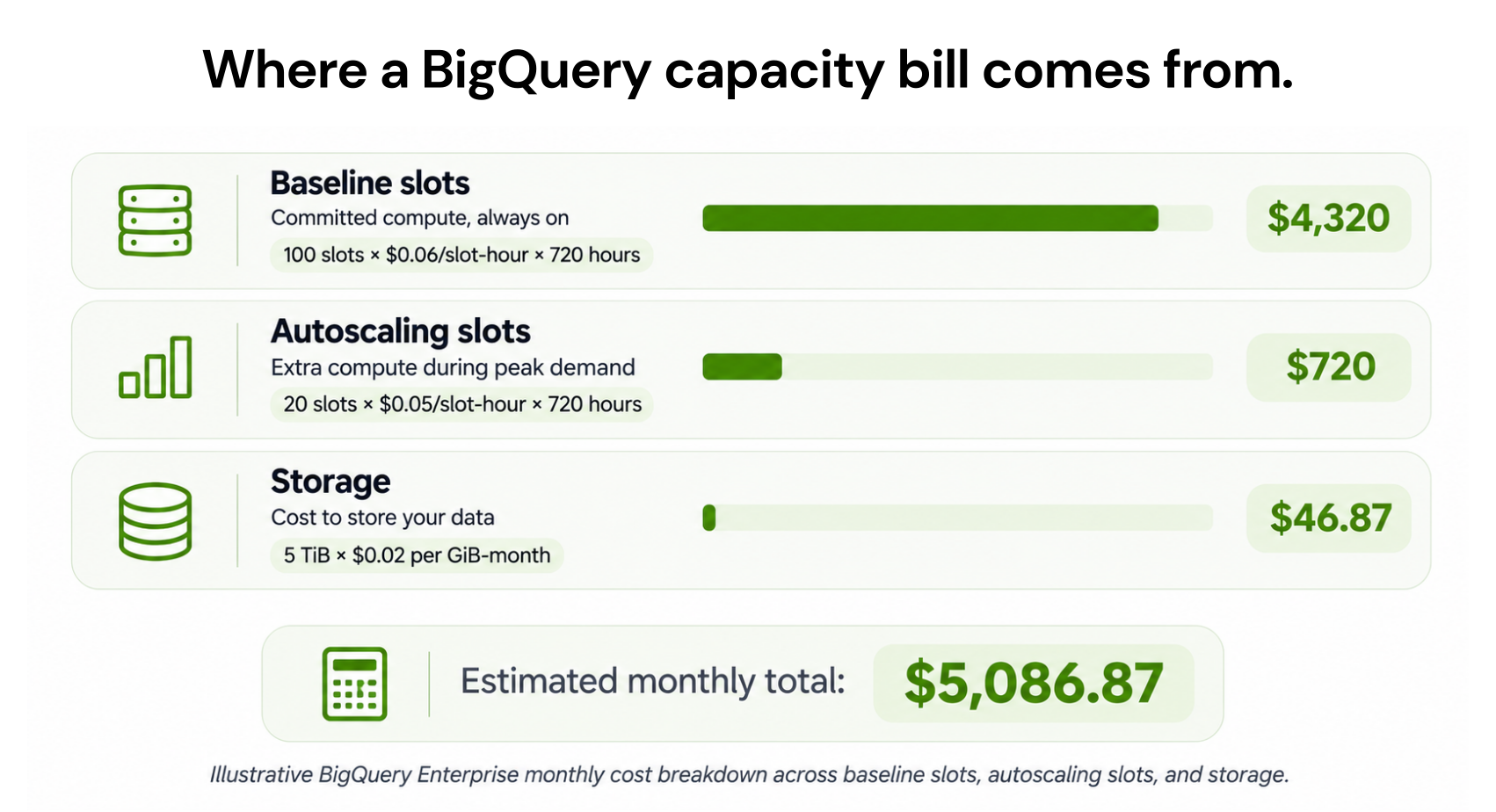
Actual autoscaling charges depend on the allocated slot count and billing duration, including the default one-minute minimum unless fluid scaling is enabled.
Unlike the first two examples, this calculation uses allocated processing capacity rather than TiB processed.
It does not prove that capacity would be cheaper than on-demand for the same enterprise. A fair comparison requires actual workload and performance data.
These examples exclude optional services, transfers, taxes, and negotiated pricing adjustments. Storage calculations use approximate monthly rates.
What other charges appear on a BigQuery bill?
Compute and storage are the main costs, but additional services can create charges.BigQuery storage pricing
BigQuery offers logical and physical storage billing.Logical storage measures uncompressed stored data.
Physical storage measures compressed data. Retained time-travel and fail-safe bytes can also generate charges at active physical storage rates.
Both approaches include active and long-term storage categories.
Data or partitions unchanged for 90 consecutive days can qualify for reduced long-term storage rates.
Simply querying data does not reset the storage age. Modifying the stored data can reset it.
For example, storing 1 TiB of active logical data for a full month costs approximately $23.55 before the storage free allowance in Iowa.
Physical storage is not automatically cheaper because compression and retained data affect total charges.
Data ingestion and additional services
| Service | Pricing consideration |
|---|---|
| Batch loading | Generally free through the shared slot pool |
| Streaming inserts (REST) | $0.01 per 200 MiB |
| Storage Write API (gRPC) | $0.025/GiB after 2 TiB of eligible monthly free usage |
| Storage Read API | $1.10/TiB beyond 300 TiB of eligible monthly reads |
| Data Transfer Service | Connector, orchestration, processing, or transfer charges may apply |
| BigQuery ML, BI Engine, and Omni | Additional usage-dependent charges |
Not every BigQuery user pays these additional charges. The final bill depends on which operations and services are used.
BigQuery committed use discounts: How much can you save?
Google Cloud offers Committed Use Discounts (CUDs) to help businesses reduce BigQuery costs when they have predictable computing needs.Instead of paying regular rates, businesses can receive discounted prices by committing to eligible spending or processing capacity for one or three years.
BigQuery offers two commitment options:
| Commitment type | 1-year discount | 3-year discount |
|---|---|---|
| Spend-based CUDs | 10% | 20% |
| Slot capacity commitments | 20% | 40% |
Slot commitments: You commit to a fixed number of processing slots in eligible Enterprise or Enterprise Plus editions.
For example, an Enterprise slot-hour priced at $0.06 in Iowa costs $0.048 at the qualifying three-year spend-based CUD rate, a 20% discount.
What should you consider?
CUDs work best when your BigQuery compute needs remain relatively consistent. If usage decreases, you still have to pay for your commitment during the agreed term.
These discounts do not apply to ordinary on-demand per-TiB query processing or BigQuery storage, and the two discount percentages cannot simply be combined.
For a deeper comparison of commitment options, read our BigQuery CUDs vs. slot commitments guide.
For eligibility and commitment terms, see Google’s BigQuery CUD documentation.
How to estimate BigQuery pricing before running a query
BigQuery provides tools for estimating costs before processing data.Check the query estimate
When you enter valid SQL in the BigQuery editor, Google can display an estimate of the data the query will process.For example, if a query is estimated to process 100 GiB, the approximate on-demand cost in Iowa is:
Use a dry run
A dry run checks a query and estimates processed bytes without executing it.Dry runs do not consume query slots or create normal query-processing charges.
Estimates can differ from actual billed processing, particularly for some query and table configurations.
Use the Google Cloud pricing calculator
The Google Cloud pricing calculator lets users estimate cloud service costs based on expected usage and location.For a basic BigQuery estimate:
- Estimate monthly query processing.
- Calculate expected storage usage.
- Include applicable ingestion and transfer charges.
- Apply the correct regional prices and free allowances.
The result is a planning estimate, not a guaranteed invoice.
For more ways to control spending across Google Cloud services, see our Google Cloud cost optimization best practices.
How we help optimize BigQuery commitments
Once businesses identify and reduce unnecessary BigQuery spending, our read-only Savings Test analyzes historical usage and existing commitments to uncover potential savings opportunities.Through our GCP commitment optimization, we manage eligible BigQuery commitments without modifying SQL queries or changing workloads.
With our Flex Insured Commitments teams can access a 20% discount on covered eligible BigQuery pay-as-you-go (PAYG) capacity through a three-year BigQuery spend-based Committed Use Discount (CUD), with none of the commitment risk.
If a commitment ever costs more than the equivalent On-Demand usage, our Cashback Protection covers the difference, helping organizations maximize savings while retaining the flexibility to adapt as infrastructure changes.
We charge an agreed percentage of realized savings, so the fee applies when verified savings are generated.
Before choosing a BigQuery commitment, review your historical usage and expected spending to understand whether a spend-based CUD could deliver consistent savings.
Unlock eligible BigQuery savings with automated commitments and qualifying cashback protection.
Frequently asked questions
Is BigQuery free?
BigQuery offers 1 TiB of eligible on-demand query processing and 10 GiB of storage free monthly, subject to Google's terms. A sandbox is also available for limited experimentation without a billing account.
How much does one BigQuery query cost?
In Iowa, processing 100 GiB costs approximately $0.61 under on-demand pricing before any remaining free allowance. Actual charges depend on billable processed bytes and regional rates.
How much does it cost to store 1 TiB in BigQuery?
One TiB of active logical storage costs approximately $23.55 for a full month in Iowa before the storage free allowance. Physical storage and long-term storage have different billing rates.
Is BigQuery charged per query or per hour?
BigQuery supports both models. On-demand charges for data processed by queries, while capacity pricing charges for allocated processing slots over time.
How can I cap BigQuery query costs?
For on-demand queries, you can set maximum bytes billed for individual queries and configure custom daily query quotas at the user or project level. These controls can prevent queries from exceeding configured processing limits.