
 AWS
 Microsoft Azure
 Google Cloud


A spend-based BigQuery CUD discounts eligible pay-as-you-go compute in exchange for an hourly spending commitment. A slot commitment purchases a fixed number of slots for a specified term. Both can reduce costs, but the savings depend on how closely the commitment matches your needs.
This guide explains how the two options work, where each fits, and what to check before purchasing. We’ve also included a 30-day workload example to show how the costs compare and what happens to your savings if demand drops.
What Are BigQuery Committed Use Discounts (CUDs)?
A BigQuery CUD lets you pay less for eligible compute usage by agreeing to spend a minimum amount each hour for one or three years. In return, Google gives you 10% off for a one-year commitment or 20% off for three years, compared with PAYG rates.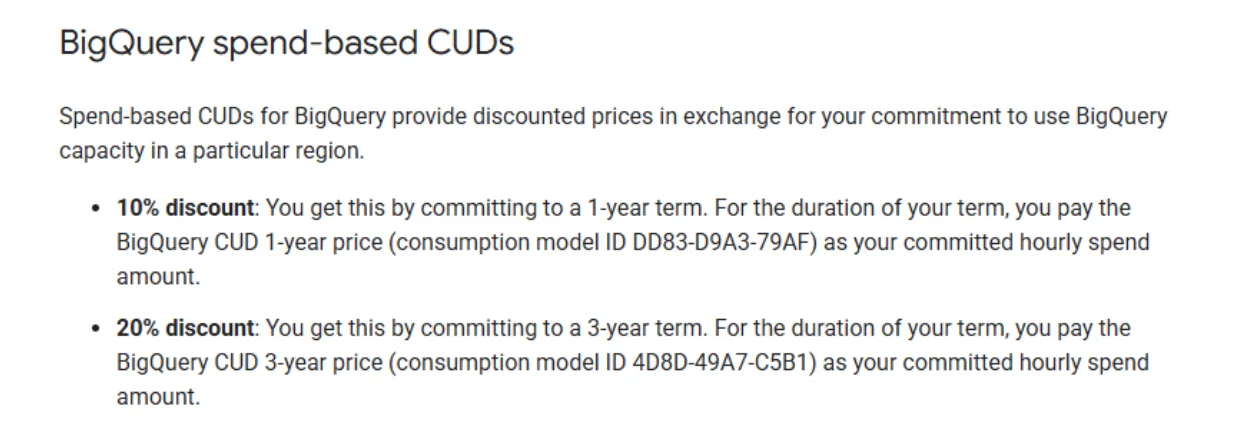
How BigQuery Spend-Based CUDs Work
When you purchase a BigQuery CUD, you choose a region, a one- or three-year term, and an hourly spending commitment. That hourly amount is measured at discounted CUD rates. Google bills the commitment fee monthly, whether or not you use it fully.Let’s say you choose a three-year commitment with a 20% discount and agree to pay $80 per hour. That covers eligible usage that would otherwise cost $100 per hour at PAYG rates:
| Eligible usage at regular PAYG prices | What you pay that hour | Your result |
|---|---|---|
| $100 | $80 commitment | You save $20 |
| $120 | $80 commitment + $20 uncovered usage | You save $20 |
| $50 | $80 commitment | You pay $30 more than PAYG |
The discount applies automatically to eligible usage across projects paid for by the same billing account, within the selected region. Usage beyond what your commitment covers is charged at regular PAYG rates. See Google’s BigQuery CUD documentation.
Your CUD can cover eligible PAYG charges from both baseline and autoscaling slots across BigQuery editions. It doesn’t cover storage or on-demand queries billed by data processed.
Check Google’s eligible SKU list before sizing your commitment, and remember that once purchased, you can’t cancel it during the term.
Note: The important question is how much eligible spending you can maintain each hour. A busy afternoon won’t make up for an unused commitment overnight, so check the hourly pattern rather than sizing your purchase from a monthly average.
How BigQuery Slot Commitments Work
With a slot commitment, you purchase a fixed number of slots for one or three years at a lower rate than PAYG. Instead of choosing an hourly spending amount, you choose how much computing capacity to buy.For example, you might commit to 100 slots to support work that runs regularly throughout the day. Those committed slots cover your reservation’s baseline capacity. If BigQuery adds autoscaling slots during busy periods, your slot commitment doesn’t cover those extra slots.
Before purchasing, there are a few boundaries to understand:
| What to check | How it works |
|---|---|
| Edition | Slot commitments are available for Enterprise and Enterprise Plus. A commitment for one edition cannot cover reservations using another edition. |
| Location | The commitment must match the reservation’s region or multi-region. A commitment in US, for example, cannot cover a reservation in us-central1. |
| Administration project | The commitment belongs to the project where you purchase it and cannot be moved to another administration project. |
| Purchase size | You buy slots in increments of 50, starting with 50 slots. |
| Capacity availability | Your purchase is subject to available capacity. Once it succeeds, the capacity remains available until the commitment expires. |
| Payment and renewal | You’re billed monthly but remain committed for the full term. Check the renewal setting before purchase and again before expiry. |
If you later need fewer slots, you still owe the commitment payments.
Unused capacity can serve other eligible reservations in the same administration project, location, and edition, subject to your sharing configuration. That can help you put spare capacity to work, but it doesn’t reduce the commitment fee.
Note: Size your purchase around the capacity you expect to keep using, including during quieter periods.
Do You Need a Commitment to Use BigQuery Reservations?
No. You can create a BigQuery reservation and pay for its capacity at PAYG rates without purchasing a long-term commitment. Reservations manage capacity; commitments change how eligible usage is priced.Here’s how the pieces fit together:
| Component | What it does |
|---|---|
| Reservation | Organizes a pool of slots, with baseline and autoscaling settings for your workloads. |
| Assignment | Directs work from a project, folder, or organization to a reservation for specified job types. |
| Commitment | Establishes a long-term purchase of slots or an hourly spending amount in exchange for discounted pricing. |
A spend-based BigQuery CUD doesn’t replace this setup either. It discounts eligible spending, while reservations and assignments continue to control how your workloads use capacity.
Understanding that separation lets you evaluate the discount purchase alongside the capacity configuration your team needs.
BigQuery Spend-Based CUDs vs Slot Commitments
Both options can lower compute costs, but they suit different kinds of predictability. With a spend-based BigQuery CUD, you need consistent eligible hourly spending. With a slot commitment, you need enough ongoing demand to make use of the baseline capacity you purchase.| What you’re comparing | Spend-based CUD | Slot commitment |
|---|---|---|
| Your commitment | A discounted spending amount per hour | A fixed number of slots |
| Term | One or three years | One or three years |
| Compute coverage | Eligible BigQuery PAYG SKUs, including baseline and autoscaling slots | Baseline slots; excludes autoscaling slots |
| Edition flexibility | Can cover eligible PAYG usage across editions | Must match the reservation’s edition; available for Enterprise and Enterprise Plus |
| Location | Applies within the selected region or multi-region | Must match the reservation’s region or multi-region |
| Purchase scope | Cloud Billing account; covers eligible usage across its projects | Administration project; capacity serves eligible assigned workloads |
| Capacity availability | The discount itself does not reserve capacity | Purchased capacity remains available through the term once the purchase succeeds |
| When usage falls | You still owe the hourly commitment fee | You still owe payments for the committed slots |
To evaluate a spend-based CUD, look at eligible spending hour by hour.
To evaluate a slot commitment, also examine when capacity is needed within those hours.
We’ll use the same workload in the next section to show how those differences affect the cost of each option.
Worked Example: What Would Each BigQuery Option Cost?
Let’s compare PAYG capacity, a spend-based BigQuery CUD, and a slot commitment using the same 30-day workload. We’ll calculate compute costs first, then add excluded charges and management fees.This is a synthetic example, not a customer result. We’re using Enterprise edition in us-central1, with one-year terms for both commitments.
Start With the Same Workload
Imagine your reporting workloads need 100 slots throughout the day. For eight hours each day, additional work increases that requirement to 200 slots.| Assumption | Value |
|---|---|
| Location and edition | us-central1, Enterprise |
| Comparison period | 30 days, or 720 hours |
| Reservation baseline | 100 slots, available all day |
| Additional autoscaling capacity | 100 slots for eight hours daily |
| Existing commitments | None |
We haven’t modeled borrowed idle slots, scaling delays, taxes, or negotiated discounts.
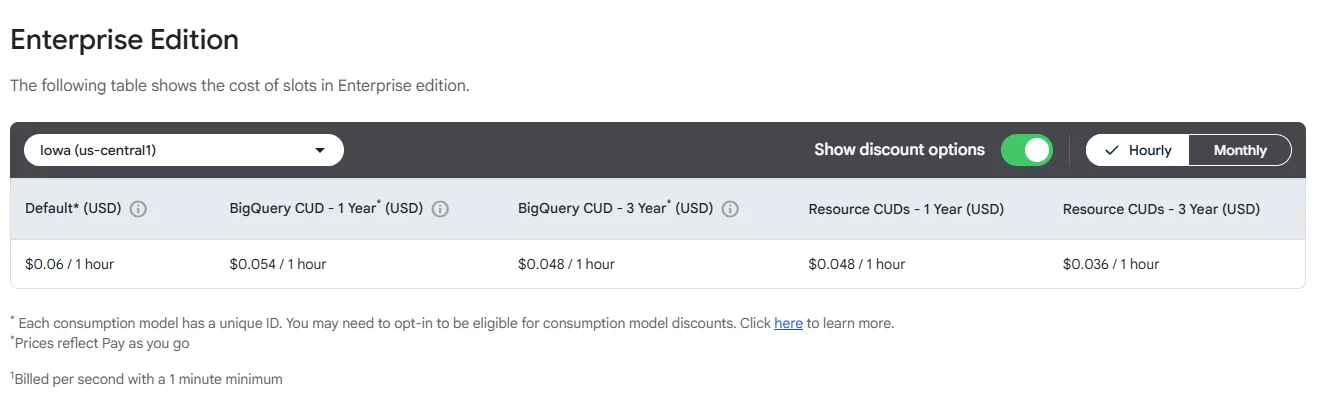
Google’s published rates for Enterprise edition in this location are:
$0.060 per slot-hour for PAYG,
$0.054 for usage covered by a one-year spend-based CUD, and
$0.048 for a one-year slot commitment.
Option 1: Pay for Capacity Without a Commitment
At PAYG rates, the regular 100 slots cost:Option 2: Purchase a Spend-Based BigQuery CUD
To cover the regular 100 slots at the one-year CUD rate, you commit to:In our example, it covers the regular eligible usage each hour. The extra autoscaling usage exceeds that commitment and costs $1,440 at PAYG rates.
Your total compute cost is $5,328, saving $432 compared with PAYG.
Option 3: Purchase a Slot Commitment
Here, you purchase 100 slots to cover the reservation’s baseline capacity:Your total compute cost is $4,896, saving $864 compared with PAYG.
Add the Charges These Commitments Don’t Cover
Our example also includes a separate project with 20 billable TiB of on-demand queries after the free allowance. At $6.25 per TiB, that costs $125. We also assume $300 in storage charges.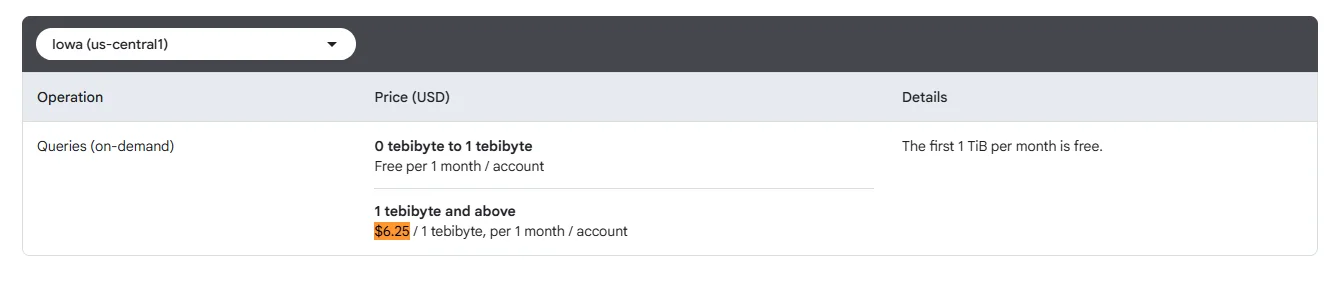
| Cost over 30 days | PAYG | Spend-based CUD | Slot commitment |
|---|---|---|---|
| Commitment fees | $0 | $3,888 | $3,456 |
| PAYG capacity charges | $5,760 | $1,440 | $1,440 |
| Excluded query and storage charges | $425 | $425 | $425 |
| Total before management fees | $6,185 | $5,753 | $5,321 |
| Gross savings versus PAYG | — | $432 | $864 |
Calculate What You Keep After Fees
If you use a management provider, include its fees before deciding what you’ll save.For this example, assume a flat $100 management fee per 30-day period for either managed commitment option. The fee remains payable even if savings disappear.
This is an illustrative fee, not Usage.ai pricing. The PAYG reference is unmanaged.
| Result after management fees | Spend-based CUD | Slot commitment |
|---|---|---|
| Gross savings | $432 | $864 |
| Illustrative management fee | $100 | $100 |
| Savings you retain | $332 | $764 |
Remember that the purchase lasts longer than this comparison. Over a 365-day year, the native commitment obligation is $47,304 for the spend-based CUD or $42,048 for the slot commitment, before overage, excluded charges, and management fees.
The next question is whether those savings survive a drop in demand. We’ll test that using the same purchases, while explaining how any change to the reservation baseline affects the bill.
What Happens to Your Savings When Demand Drops?
The first comparison assumed you needed all 100 baseline slots throughout the day. Now let’s reduce capacity demand by 50% and replay the same 30-day period:| Capacity needed | Original workload | After the drop |
|---|---|---|
| For 16 hours each day | 100 slots | 50 slots |
| For eight hours each day | 200 slots | 100 slots |
| Total consumption | 96,000 slot-hours | 48,000 slot-hours |
What Can You Change When You Need Fewer Slots?
To match the lower demand, we reduce the reservation baseline to 50 slots and use another 50 autoscaling slots for eight hours daily in the PAYG and spend-based CUD scenarios.Remember, baseline slots remain billable even when queries don’t use them. Lower demand alone does not reduce a configured baseline charge. See Manage workload commitments.
For the slot-commitment scenario, we retain the 100-slot baseline because all 100 purchased slots remain payable. The workload uses 50 during quiet hours and all 100 during busy hours. We assume no other workloads use the spare capacity.
Recalculate Each Option
PAYG without a commitmentYou pay for the adjusted baseline and extra autoscaling capacity:
Your eligible usage is now worth either $2.70 or $5.40 per hour at CUD rates, depending on the hour. Neither exceeds the purchased $5.40/hour commitment, so there is no overage.
You still pay:
You still owe payment for 100 committed slots, even though you no longer keep them fully occupied:
Compare the Results After the Drop
| Cost over 30 days | PAYG | Spend-based CUD | Slot commitment |
|---|---|---|---|
| Commitment fees | $0 | $3,888 | $3,456 |
| PAYG capacity charges | $2,880 | $0 | $0 |
| Excluded query and storage charges | $425 | $425 | $425 |
| Total before management fees | $3,305 | $4,313 | $3,881 |
| Gross savings versus PAYG | — | −$1,008 | −$576 |
| Illustrative management fee | $0 | $100 | $100 |
| Savings after management fees | — | −$1,108 | −$676 |
Negative savings mean you spend more than you would under PAYG for the reduced workload.
Why the Discount No Longer Produces Savings
The spend-based commitment is now approximately 66.7% utilized. The committed slots are also approximately 66.7% occupied on average. These percentages describe different things: use of a spending commitment versus use of purchased capacity.In this simplified model, before management fees:
The 10% spend-based discount needs 90% commitment utilization to break even.
The 20% slot discount needs 80% slot utilization to break even.
Both options fall below their break-even points after the demand drop. That’s why evaluating a BigQuery CUD means looking beyond the advertised discount to the spending you expect to sustain throughout its term.
What Should You Check Before Buying a BigQuery Commitment?
Before making another purchase, check what you already own and how much eligible usage remains uncovered. A recommendation based on your total bill can overstate the opportunity if existing commitments already cover part of that usage.Use this checklist to establish your starting point:
Review existing spend-based CUDs. Check hourly commitment amounts, billing account, location, remaining term, and utilization.
Review existing slot commitments. Confirm slot counts, edition, location, administration project, remaining term, and renewal settings.
Check reservations and assignments. Review baseline slots, autoscaling settings, and the workloads assigned to each reservation.
Identify uncovered eligible usage. Account for existing commitments before sizing another purchase. Exclude storage and on-demand query charges.
Factor in planned changes. Consider migrations, query optimization, workload retirement, and changes to edition or location.
Calculate the full payment obligation. Include the entire commitment term, expected overage, and any management fees.
Check expiry behavior. A slot commitment ending doesn’t remove configured baseline slots; those can continue generating PAYG charges.
Confirm purchasing responsibility. Establish who approves and executes purchases so internal teams and providers don’t buy against the same usage.
Check What Happens at Expiry
A slot commitment ending does not remove its reservation or baseline capacity. If you leave 100 baseline slots configured after the commitment expires, those slots continue generating charges at PAYG rates unless another applicable commitment covers them.Review the renewal setting and reservation baseline together.
For a spend-based CUD, remember that the agreed payments continue throughout its term even if you stop running the workloads that originally justified it. Size any new purchase against your expected future minimum eligible spending, alongside historical usage.
Once you’ve accounted for these obligations, you can compare the options against the usage that genuinely remains available for a new commitment.
Which BigQuery Commitment Should You Choose?
The right choice depends on what you can confidently sustain throughout the commitment term.Consider a spend-based BigQuery CUD if your eligible hourly spending is consistent.
Your workloads can change or use different eligible editions within the selected location, provided enough eligible spending remains to use the commitment. Look at each hour rather than relying on a monthly average.
Consider a slot commitment if you consistently need baseline capacity in the same edition and location.
Check how demand behaves within each hour, too. Brief spikes can leave committed capacity idle between jobs, while additional autoscaling slots still generate PAYG charges.
Stay on PAYG if the savings don’t hold up under realistic changes.
If you expect migrations, workload retirement, or significant reductions in usage, keeping spending flexible may cost less than paying for unused commitments.
Before buying, factor in any planned BigQuery cost optimization. Then compare costs under normal demand and a plausible decline, including management fees.
Make Your BigQuery Commitment Decision With Usage.ai
A lower rate is useful only if it leaves you with a lower bill. Before buying a BigQuery CUD, you need to understand what’s already covered, how much eligible spending will remain, and what happens if demand changes.That’s where we start. We analyze your connected Google Cloud billing data and existing commitments to identify additional eligible savings opportunities.
You can begin with a read-only Savings Test, so you can evaluate the opportunity before granting purchasing authority.
From there, we work with you to establish the supported commitment scope, purchasing controls, and management workflow for your setup.
For commitments confirmed as eligible under our Flex Insured Commitment Program, Cashback covers the calculated loss when commitment costs exceed the equivalent PAYG cost for the same usage. Google’s underlying commitment remains payable.
Our approach to GCP commitment management focuses on the usage you expect to keep, alongside the obligations you already have.
Want to see how this applies to your workloads? Book a demo, and we’ll walk through the next steps for assessing the stable, eligible portion of your BigQuery compute spend.
BigQuery spend-based CUDs commit you to an hourly spending amount. Our Google Cloud CUD guide explains the broader commitment options.
Explore how we help you assess eligible usage, manage Google Cloud commitments, and track savings as your needs change.
Frequently asked questions
Why is BigQuery so expensive?
Your BigQuery bill depends on how much data you process, the capacity you allocate, storage, and any additional services you use. Repeated large scans or baseline slots that sit unused can increase costs.
A BigQuery CUD lowers eligible compute rates, but it doesn’t remove unnecessary work or discount every charge. Start with BigQuery cost optimization before deciding how much to commit.
What are committed use discounts in Google Cloud?
Committed use discounts let you access lower prices by committing to eligible spending or resources for a specified term. The coverage, discount, and purchasing rules depend on the service.
BigQuery spend-based CUDs commit you to an hourly spending amount. Our Google Cloud CUD guide explains the broader commitment options.
How much discount does a BigQuery CUD offer?
BigQuery spend-based CUDs offer 10% off eligible PAYG compute for one year or 20% for three years. Those percentages apply to covered usage, not your entire BigQuery bill.
Your actual savings depend on how fully you use the commitment and any management fees.
How is a BigQuery CUD commitment amount calculated?
Start with the eligible hourly usage you expect to maintain, then value it at the applicable discounted rates. For example, covering usage that consistently costs $100/hour at PAYG rates would require an $80/hour commitment with a 20% discount.
Check each hour and account for existing commitments before purchasing; a monthly average can hide periods of low usage.
Which BigQuery editions support slot commitments?
Slot commitments are available for Enterprise and Enterprise Plus, not Standard. Your commitment must also match the reservation’s edition and location. Spend-based CUDs are a separate option that can discount eligible PAYG compute across editions.