 AWS
 Microsoft Azure
 Google Cloud


How to identify GCP CUD optimization opportunities
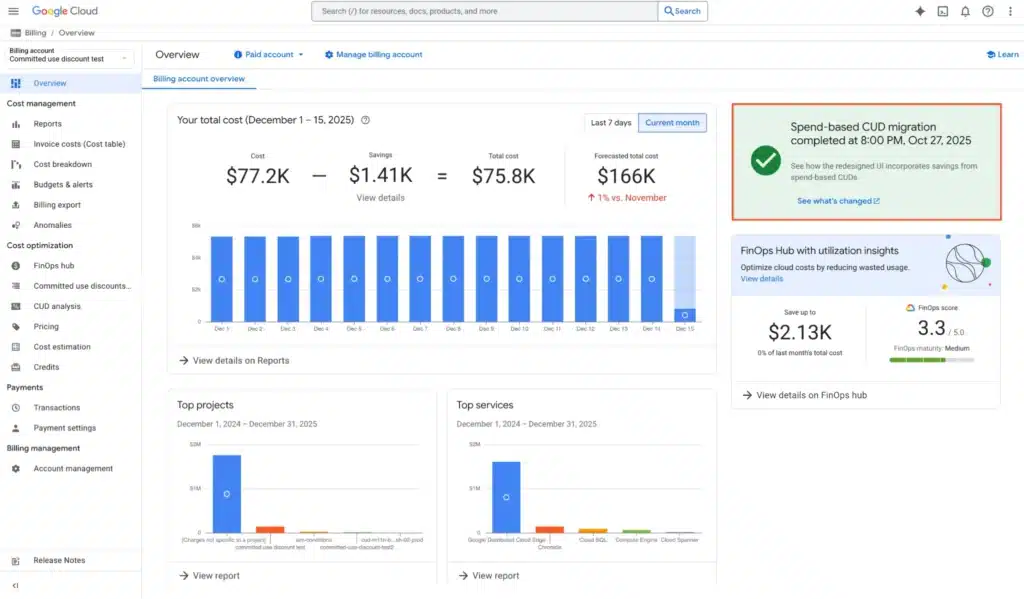
Start in Google Cloud Console > Billing > Committed use discounts (CUDs). You need Billing Account Viewer or Billing Account Administrator access for the relevant Cloud Billing account.Open CUD Analysis to review coverage, utilization, and savings.
Three signals deserve attention:
- High utilization and recurring uncovered eligible usage: An additional purchase might help.
- Low utilization: Unused commitments may reduce your net savings or increase costs.
- Upcoming expirations or changing workloads: Your next purchase may need to be smaller or differently scoped.
How to optimize GCP CUDs in 7 steps
1. Audit existing commitments
Use Google’s commitment inventory to record each purchase’s product, scope, amount, term, expiration date, and owner. Check whether existing coverage is underutilized before purchasing more.For resource-based commitments, check auto-renewal settings. Export the inventory if multiple teams own commitments, and flag those expiring within the next 90 days.
2. Review eligible hourly usage and planned changes
Monthly averages can hide quiet hours. A development environment that shuts down each evening should not be treated like a continuously running production workload.Inspect at least 30 days of hourly usage. Use Cloud Billing export to BigQuery to study longer periods, especially for seasonal workloads. Account for usage already covered by commitments.
Ask engineering teams about scheduled migrations, rightsizing, regional moves, and shutdowns. Include future growth only when it is sufficiently certain.
3. Choose a commitment that fits the workload
Ask three questions:- Will the workload remain stable?
- Does the discount need to match specific resources and a region?
- Could spending move among resources supported by a flexible commitment?
Spend-based CUDs: Best for predictable eligible spending. Commitments are purchased at the Cloud Billing account level, with hourly or monthly purchase units depending on the product. Discounts apply to supported usage across eligible projects, subject to service and regional restrictions.
What to consider: Resource-based CUDs require matching resource usage, while spend-based CUDs depend on eligible spending. Both can create unnecessary costs if usage falls.
Check Google Cloud’s CUD documentation for eligibility and purchase rules. For a detailed comparison, see our resource-based vs. Flex CUD guide.
4. Calculate a conservative commitment size
Base the amount on stable demand, not peak usage or your average monthly bill.For new-model spend-based CUDs, enter the equivalent discounted commitment amount in the unit required by the product, which can be hourly or monthly.
For an hourly commitment covering a single SKU with one discount rate:
Use Google’s commitment-sizing guidance to verify the correct calculation.
5. Test savings and a usage drop
Model three situations: expected demand, a realistic decline, and a severe decline.For each scenario, compare the on-demand cost with the total CUD cost, including any uncovered on-demand usage.
Unused commitment costs are already part of the purchased commitment charge. Do not count them twice.
Calculate the point where the commitment stops producing net savings, as shown in the example below.
6. Validate recommendations before approving
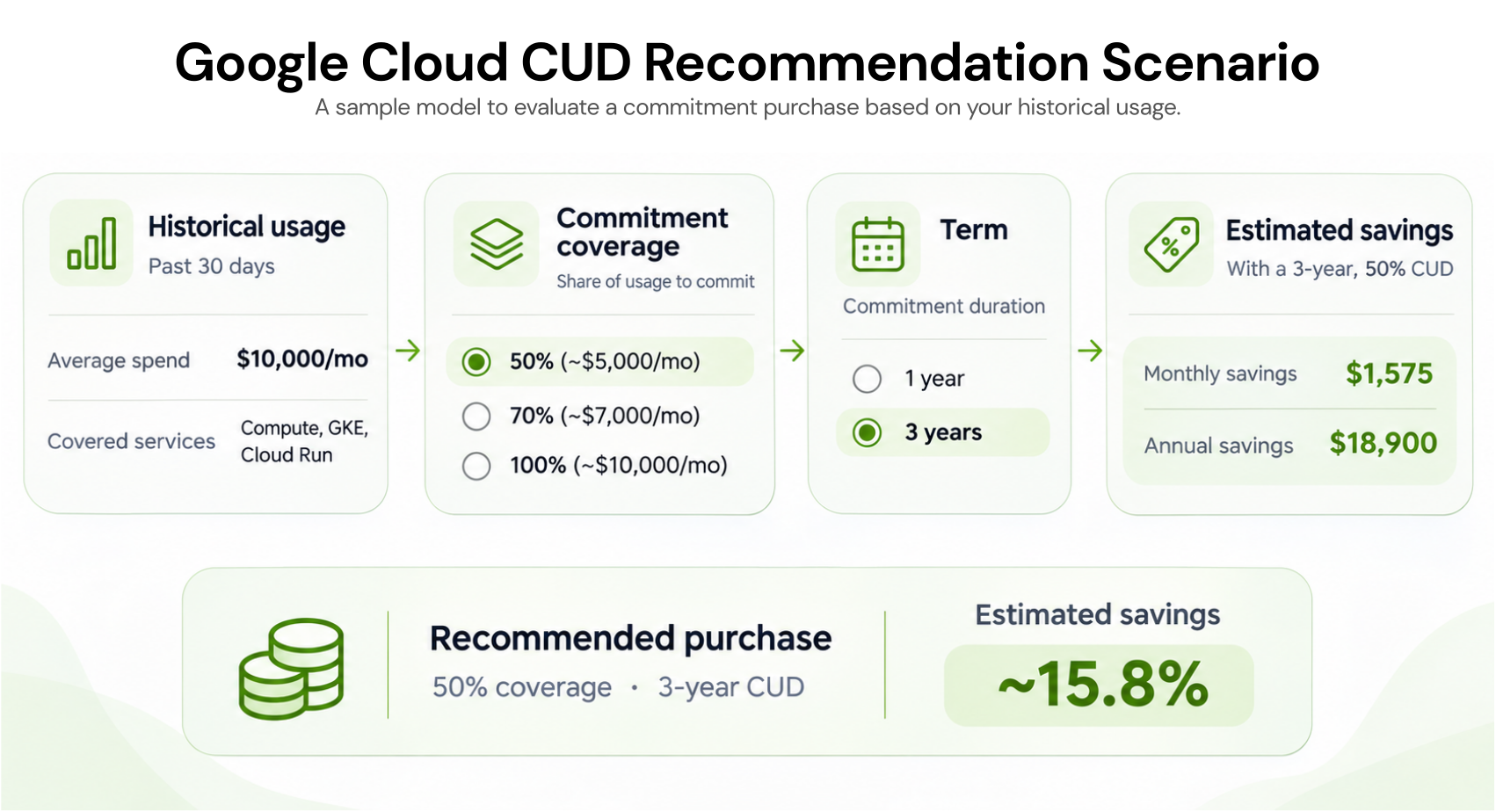
Google Cloud’s CUD recommendations use the previous 30 days of usage by default.The stable-usage model focuses on continuously active demand. The optimal-savings model can also include intermittent usage when it meets a financial break-even threshold.
In FinOps Hub or Recommendations, use scenario modeling where available to adjust historical usage, coverage, and commitment terms.
Check that each recommendation reflects planned engineering changes and existing commitments. Purchase approvals and permissions should remain with authorized owners.
7. Review performance and expiration dates
After purchasing, use CUD Analysis to examine actual utilization, uncovered eligible spending, and net savings.Investigate sudden drops before buying more. Check expiration dates and auto-renewal settings, then decide whether future commitments should change.
Purchased spend-based CUDs cannot be canceled, and Google Cloud does not let you lower the commitment amount or change its region or term after purchase. See Google Cloud’s spend-based CUD documentation.
Which GCP CUD optimization approach fits your team?
- Self-managed purchasing: Best for teams with clear billing ownership, stable workloads, and time for monthly reviews.
- Recommendation-led purchasing: Best for teams using Google Cloud’s recommendations while retaining internal approval and purchasing responsibility.
- Managed commitment optimization: Best for teams needing ongoing analysis and purchasing controls. Evaluate eligibility, fees, commitment ownership, and protection terms before selecting a provider.
GCP CUD optimization example: When usage drops
Consider a hypothetical new-model, hourly spend-based CUD, not a published Google Cloud rate.Assume one eligible SKU group, a 30% discount, constant hourly usage, and a 720-hour month. Exclude taxes and other discounts.
When usage stays stable
- On-demand usage: $10/hour × 720 = $7,200/month.
- Discounted commitment: $7/hour × 720 = $5,040/month.
- Expected savings: $2,160/month.
When usage falls by 40%
Suppose eligible usage drops from $10/hour to $6/hour.- On-demand alternative: $6 × 720 = $4,320/month.
- Fixed CUD commitment cost: $7 × 720 = $5,040/month.
- Net loss: $5,040 − $4,320 = $720/month.
Break-even point: At $7/hour of eligible on-demand-equivalent usage, the commitment and on-demand costs are equal. Below this level, the commitment becomes more expensive.
Key takeaway: A CUD can provide savings when usage is stable, but reduced demand can make the fixed commitment cost higher than the on-demand alternative.
Common GCP CUD optimization mistakes and fixes
| Mistake | Practical fix |
|---|---|
| Buying against average or peak demand | Use a stable, uncovered hourly baseline and test lower-demand scenarios. |
| Ignoring workload migrations | Confirm rightsizing, shutdown, and regional plans with engineering. |
| Assuming all spending is eligible | Verify supported SKUs, product scope, and purchase units. |
| Missing expirations | Review renewal settings and assign an owner before the term ends. |
How to monitor and improve CUD savings
Use CUD Analysis to compare coverage, utilization, and net savings.Use FinOps Hub to review additional opportunities, then validate recommendations against planned demand.
Monthly GCP CUD optimization checklist
Check unused commitment costs and recurring uncovered eligible usage.
Compare actual net savings with the approved forecast.
Review planned workload changes and commitments expiring within 90 days.
Reconcile costs after billing data settles. The most recent day may be incomplete, and commitment charges or credits can be delayed by up to 36 hours.
How Usage.ai helps optimize GCP commitments
Once you identify stable Google Cloud usage, the next step is deciding how much to commit without increasing unnecessary costs. At Usage.ai, we help teams optimize GCP commitments through ongoing usage analysis, improved commitment coverage, and automated purchasing decisions as workloads change.Our read-only Savings Test reviews billing data and existing commitments without purchasing access during the evaluation.
Before enabling purchasing, review the actual role created through our GCP integration process and separately confirm how your agreed purchasing scope and financial limits will be enforced.
With our Flex Insured Commitments, teams can access 46% discount on qualifying usage through a three-year Google Compute flexible CUD with none of the Commitment risk. If an eligible Flex Commitment costs more than equivalent pay-as-you-go usage, we provide cashback for the qualifying difference under our program terms. Our protection does not cancel the underlying commitment, and we do not automatically protect existing customer-owned commitments as Flex Commitments.
Final verdict
Effective GCP CUD optimization means purchasing commitments against dependable demand, evaluating potential losses, and reviewing actual savings after purchase.Start with regular internal reviews. If ongoing analysis and approvals consume too much time, assess whether managed commitment optimization offers additional value beyond Google’s native discounts.
Optimize GCP commitments as workloads change, with reduced underutilization risk and eligible cashback protection, subject to terms.
Frequently asked questions
Why can a recommendation exceed my lowest hourly usage?
Google's optimal-savings model considers intermittent usage when it is financially worthwhile. Review the break-even assumptions and future demand before purchasing the recommended amount.
Why might CUD savings differ from my monthly invoice?
CUD Analysis groups costs by usage date, while invoices follow billing periods. Late-reported usage, fees, and credits can affect the comparison. Reconcile after billing data settles.
What should I do when CUD utilization suddenly falls?
Check for workload shutdowns, SKU or region changes, and lost eligibility. Use matching eligible demand where possible, and plan smaller future purchases if the decline is expected to continue.
Is a 1-year or 3-year GCP CUD better for cost optimization?
A 1-year GCP CUD offers more flexibility for workloads that may change, while a 3-year commitment may provide higher discounts for stable, long-term usage. Compare the applicable discount rates, expected usage, and underutilization risks before choosing a term.
Can GCP CUDs be shared across multiple projects?
Yes. Resource-based CUDs can cover eligible usage across projects linked to the same Cloud Billing account when CUD sharing is enabled. Spend-based CUDs generally apply to eligible usage across projects paid for by the purchasing billing account, subject to product and regional restrictions. Check your billing account's CUD scope before purchasing.