AWS
AWS Microsoft Azure
 Google Cloud

Short answer
Google Compute Engine charges vCPUs, GPUs, and memory with a one-minute minimum, then per-second increments. Your rate is set by four things: the machine family you pick, the region you run in, the operating system, and which discount model covers the workload.On-demand is the default and the most expensive way to run steady infrastructure. Sustained use discounts apply automatically up to about 30% for eligible older families. Committed use discounts go deeper, up to 55% for most machine series and up to 70% for memory-optimized, in exchange for a one or three year commitment. Spot VMs cut up to 91% but can be reclaimed at any time.
How Compute Engine pricing works
You pay for provisioned capacity, not utilization. A VM pinned at 5% CPU costs exactly the same as one at 95%, which is why rightsizing is the first lever to pull before any discount enters the picture. Five variables drive the bill.vCPU and memory are priced separately per machine family. Custom machine types let you tune the ratio but carry a 5% premium over commitment prices when covered by a resource-based CUD, per Google’s VM instance pricing documentation.
Region matters. us-central1 (Iowa) is consistently among the cheapest, while europe-west4 and asia-northeast1 run higher. The gap compounds at fleet scale.
OS licensing is free on Linux. Windows Server, RHEL, and SUSE add per-vCPU premiums that can exceed the compute cost on small instances, so always price the OS in before comparing machine types.
Attached resources like persistent disks, Hyperdisks, GPUs, and Local SSDs bill separately. For VM-to-VM traffic, data transfer between zones in the same Google Cloud region costs $0.01/GiB within the same VPC network.
Traffic between VMs in the same zone is free when it uses internal IPv4 addresses or IPv6 addresses within the same VPC network. While, inter-region VM-to-VM traffic uses separate region-pair data transfer rates.
What the machine families cost
E2 is the cost-optimized general-purpose family, best for web, application, and dev/test workloads. N2 steps up for higher sustained compute throughput. The current generation adds N4 (Intel Emerald Rapids) as the all-round pick, C4 (Intel Granite Rapids) for compute-dense apps, N4A (Google Axion, Arm) for containerized and GKE workloads, and N4D (AMD EPYC Turin) for high density.Memory-optimized M-series machines target SAP HANA and large in-memory databases, and 3-year resource commitments on that family reach the deepest discounts on the platform.
Every figure in the table below is reproducible from Google’s own pricing pages for us-central1, Linux, and was checked on September 3, 2026 against Google’s general-purpose pricing and accelerator-optimized pricing pages. Confirm current numbers there before you buy, since rates change.
| Instance | vCPU / RAM | On-demand/hr | 1-yr resource CUD/hr | 3-yr resource CUD/hr |
|---|---|---|---|---|
| e2-standard-4 | 4 / 16 GiB | $0.1340 | $0.0844 (37%) | $0.0603 (55%) |
| n2-standard-4 | 4 / 16 GiB | $0.1942 | $0.1224 (37%) | $0.0874 (55%) |
| g2-standard-4 (L4 GPU) | 4 / 16 GiB | $0.7068 | $0.4453 (37%) | $0.3181 (55%) |
That pattern does not hold across all accelerator-optimized machines: A2, A3, and A4 also qualify for resource-based CUDs, but at series-specific rates (A2 standard, for example, runs deeper than 55% on a 3-year term), and some multi-GPU configurations show no published resource-CUD rate at all.
Flexible CUDs are narrower still: only the G2 and G4 series are eligible, at rates below the general 28%/46% (closer to 21% and 43% on G2), while A2, A3, and A4 are resource-CUD only. The GPU lever that still matters most is utilization, because hardware cost dominates the bill and a GPU idling between training runs wastes more than any commitment structure saves.
On-demand, SUD, CUD, and Spot compared
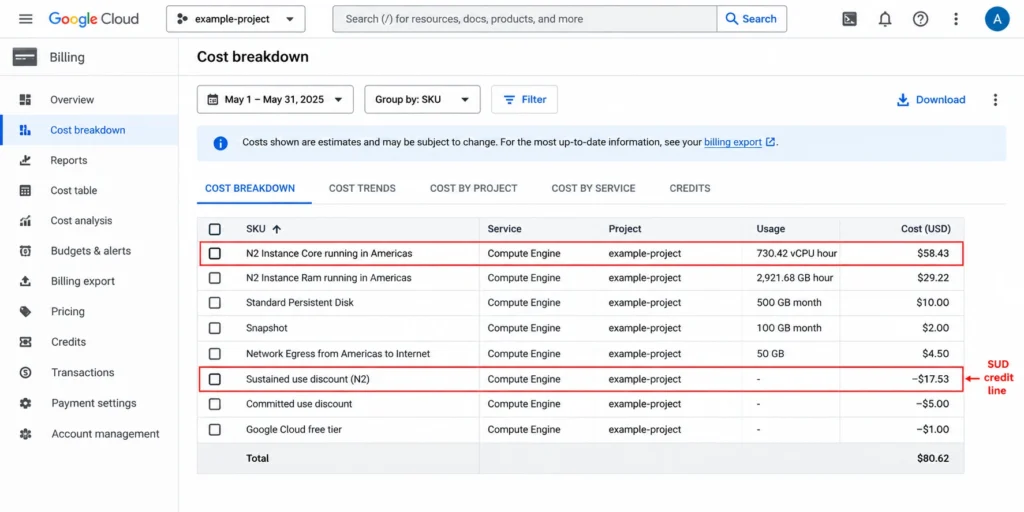
Sustained use discounts are automatic and require no purchase. They start once a resource runs more than 25% of a billing month and increase in tiers, but the ceiling is not uniform. Among standard VM machine series, N1 and memory-optimized M1 and M2 reach the 30% maximum, while N2, N2D, and C2 cap at 20%. E2, C3, C4, and N4 earn no SUD at all. SUDs also cannot stack with a CUD on the same usage, and commitments take precedence.Committed use discounts are the highest-leverage option for predictable baselines. Resource-based committed use discounts, documented in Google’s committed use discount overview, lock you to a machine series and region for the term and deliver roughly 37% at one year and 55% at three for general-purpose families, up to 70% for memory-optimized.
Flexible, spend-based CUDs cover eligible Compute Engine, GKE, and Cloud Run usage, but the discount is not one flat number. Most general-purpose and compute-optimized families land around 28% for one year and 46% for three. H3 and H4D run lower, at 17% and 38%.
C4N runs higher, at 28% and 54%. Memory-optimized M1 through M4 get no discount on a 1-year term and 63% on a 3-year term only. Cloud Run’s request-based billing and Cloud Run functions sit flat at 17% on either term.
Check Google’s flexible CUD rate table for your specific services before sizing a commitment, and see our breakdown of resource-based versus flexible CUDs or our SUD versus CUD break-even analysis for how the two commitment types trade off.
| Model | Max discount | Interruptible | Best for |
|---|---|---|---|
| On-demand | 0% | No | Variable or new workloads |
| SUD | ~20-30% (N1/M-series) | No | Eligible always-on families |
| 1-yr resource CUD | ~37% | No | Stable baseline production |
| 3-yr resource CUD | up to 55-70% | No | Long-lived predictable fleets |
| Flexible CUD | up to 63%, by SKU | No | Mixed Compute Engine, GKE, Cloud Run |
| Spot VM | up to 91% | Yes | Fault-tolerant batch jobs |
One 2026 change is worth flagging: CUD sharing is enabled by default for Cloud Billing accounts created on or after June 16, 2026, so eligible resource-based CUDs can apply across projects in the same billing account.
Google separately notifies customers when eligible spend-based CUDs migrate to its discount-based consumption model. Our June 2026 GCP FinOps update covers the specifics and the exceptions.
What egress and add-ons cost
Instance pricing is only part of the bill. Persistent disk and Hyperdisk storage bill per GB per month, and a 100 GB boot disk on every VM in a large fleet adds up quickly.Network data transfer is one of the most commonly overlooked line items. Internet data transfer out uses separate tiered rates.
VM-to-VM traffic between zones in the same Google Cloud region costs $0.01/GiB within the same VPC network, while inter-region VM traffic is priced by the source and destination regions.
However, same-zone VM-to-VM traffic using internal IPv4 addresses or IPv6 addresses within the same VPC network is free.
Windows licensing and GPUs, as noted above, can each exceed base compute on the wrong instance. Model these separately before finalizing any estimate, because they rarely show up in a quick calculator pass.
How to size CUDs without waste
Because commitments are non-cancellable, sizing is the whole game. Your target is a conservative floor, not your average or your peak.Export 90 days of billing data to BigQuery for per-SKU, per-region, per-hour usage.
Use that historical hourly eligible usage to set a conservative commitment baseline, then validate coverage and utilization against Google Cloud's CUD analysis report before you buy more.
Choose resource-based CUDs for a stable single-series fleet in one region, or flexible CUDs for a mixed Compute Engine and GKE estate.
Purchase your validated baseline in the console, then monitor utilization monthly.
Re-run the baseline before every renewal, especially if you are rightsizing or migrating machine series.
Common mistake to avoid
Committing to your median instead of a conservative floor is the classic trap. A widely used approach is to size commitments to a low percentile of hourly usage, such as P10, rather than the average, then validate whatever baseline you choose against Google Cloud’s CUD analysis report before buying.Google does not designate any single percentile as universally safe, so treat P10 as a starting point rather than a guarantee. When usage dips below the committed level, you pay the full commitment anyway, with no refund, credit, or cashback from Google.
The three failure modes are over-commitment, wrong-region commitment, and wrong-machine-series commitment, and all three leave you paying for capacity that no longer maps to live usage. If a migration is on the roadmap, verify it will not strand an active commitment before you buy.
Pre-purchase commitment checklist
90 days of billing data exported and reviewed per region and machine series
Baseline sized to a conservative percentile of hourly usage and validated against Google's CUD analysis report, not median or peak
Region confirmed stable for the full term
Machine series confirmed, with no migration planned that would strand it
Resource-based versus flexible CUD chosen deliberately
Memory-optimized usage placed on a 3-year flexible term if using flexible CUDs, since a 1-year flexible commitment gives no discount there
Utilization review scheduled monthly
Renewal baseline re-validation set as a recurring task
How Usage.ai helps with GCP commitments
The manual version of everything above is never finished. Baselines drift, workloads migrate between machine series, and a commitment that fits in January can be stranded by June, with no refund from Google.That is the gap we work in. We help teams identify and manage eligible GCP commitment opportunities based on actual usage across Compute Engine, GKE, and Cloud Run, so coverage tracks real usage instead of a one-time snapshot.
With Flex Insured Commitments, teams can get the 30–50% savings of a commitment with none of the commitment risk. Our Flex Commitments use the same conservative-baseline logic described above and are designed to reduce covered cloud spend by 30–50%, while qualifying commitments can include cashback protection for eligible underutilization. Our fee is a share of realized savings.
Validate your commitment baseline before you buy
Before purchasing additional CUD coverage, compare your proposed commitment against actual hourly usage, existing commitments, and any planned workload changes.The goal is not to maximize coverage. It is to find the portion of Compute Engine usage that is stable enough to commit without creating avoidable underutilization.
A Savings Test can provide that validation before you make the purchase decision.
Identify safer GCP commitment opportunities from actual usage, with cashback protection available for eligible Flex Commitments.
Frequently asked questions
How much does a Compute Engine instance cost per hour?
It depends on machine type, region, and OS. In us-central1 on Linux, an e2-standard-4 was about $0.134/hr on-demand as of September 2026, dropping to roughly $0.084 on a 1-year CUD and $0.060 on a 3-year CUD. Verify current rates at Google's all-pricing page, since they change.
Is Compute Engine free?
Not in general. The Always Free tier includes one non-preemptible e2-micro VM per month in us-west1, us-central1, or us-east1, plus small storage and egress allowances. New accounts also get $300 in credit for 90 days. Anything beyond those limits bills at standard rates.
What is the difference between a CUD and a SUD?
A SUD is automatic and needs no purchase, but caps at 20% to 30% and only on eligible families. A CUD requires a 1 or 3 year commitment and delivers deeper savings, up to 55% or 70%. They cannot combine, and the CUD takes precedence.
Do GPU instances get the same CUD discount as CPU instances?
Not uniformly. On resource-based commitments, g2-standard-4 lands near the general tier (about 37% at 1 year, 55% at 3 years), but other accelerator-optimized series (A2, A3, A4) run at series-specific rates. Only G2 and G4 qualify for flexible CUDs, at rates below the general 28%/46%.
What happens if I over-commit?
You pay for the full commitment regardless of usage. Google does not refund unused directly purchased CUDs, which is why sizing to a conservative baseline and reviewing utilization monthly matters more than chasing the deepest headline rate.