
 AWS
 Microsoft Azure
 Google Cloud


What Is Cloud Spend Optimization?
Cloud spend optimization is the process of improving how an organization uses and pays for cloud resources. It covers infrastructure utilization, architecture, pricing models, and financial accountability.For example, a company spending $100,000 monthly might reduce costs by removing unused resources, downsizing oversized instances, or applying discounts to stable compute usage.
These actions solve different problems:
| Approach | What it changes | Example |
|---|---|---|
| Waste elimination | Unnecessary resources | Delete an unused VM |
| Usage optimization | Resources consumed | Right-size an oversized database |
| Rate optimization | Price paid per unit | Apply an eligible Savings Plan |
| Architecture optimization | How work is delivered | Reduce cross-region transfers |
| Financial optimization | Spending decisions | Prioritize projects by net savings |
This distinction is consistent with the FinOps Foundation’s usage optimization framework, which emphasizes efficient resource selection and utilization while meeting operational requirements.
Where Cloud Spending Goes
Before optimizing, understand what drives your bill. Most cloud environments contain several spending categories with different cost controls.| Cost category | Common spending drivers | Optimization opportunity |
|---|---|---|
| Compute | VMs, containers, serverless | Rightsizing, scheduling, discounts |
| Databases | Provisioned capacity, storage, I/O | Capacity tuning, eligible commitments |
| Storage | Capacity, requests, retrieval | Lifecycle policies, cleanup |
| Networking | Internet egress, NAT, cross-region traffic | Traffic routing, caching |
| Observability | Logs, metrics, tracing | Retention, sampling, ingestion controls |
| AI workloads | GPUs, inference, training | Batching, model selection, utilization |
For instance, a production database consuming $20,000 monthly may already be efficiently sized. Meanwhile, a $5,000 development environment running continuously could offer more immediate savings.
The first question should be: Which costs can we safely change?
For more examples of unnecessary spending, see our cloud waste guide.
Find Your Savings Opportunities
A useful cloud spend analysis should produce a prioritized list of actions, not just another dashboard.Step 1: Establish a Baseline
Collect at least 30 days of billing data, preferably 60–90 days for workloads with changing demand. Longer histories may be needed for seasonal applications.Break down spending by cloud provider, service, account, project, application, and environment.
Record:
- Current monthly spend and recent trends
- Resource utilization and peak demand
- Existing commitment coverage and utilization
- Forecasted workload changes
- Known reliability and performance requirements
For teams that need more structure, our cloud budgeting guide explains how to connect actual costs with forecasts and ownership.
Step 2: Separate Cost Types
Divide spending into three categories.Avoidable costs: Resources that no longer serve a purpose, such as abandoned test instances or unnecessary storage.
Adjustable costs: Resources that are needed but may be oversized, poorly scheduled, or inefficiently configured.
Discountable costs: Necessary, predictable usage that may qualify for a lower pricing rate.
This classification prevents teams from treating every recommendation as equivalent.
A database that can be safely downsized should be evaluated differently from an already optimized instance that could benefit from a reservation.
Step 3: Rank by Net Savings
Prioritize recommendations using financial impact, implementation effort, and operational risk.A simple decision table helps:
| Opportunity | Monthly savings | Effort | Risk | Priority |
|---|---|---|---|---|
| Delete unused test resources | $1,200 | Low | Low | High |
| Schedule development VMs | $2,000 | Low | Low | High |
| Right-size production database | $3,000 | Medium | Medium | Review |
| Redesign network architecture | $4,000 | High | High | Validate |
| Discount stable compute | $5,000 | Medium | Commitment risk | Model |
The largest projected saving should not automatically be implemented first. A smaller, low-risk change may produce more dependable results.
Cloud Spend Optimization Example
Consider a company with a monthly cloud bill of $100,000 across AWS, Azure, and Google Cloud.Its spending is divided as follows:
| Category | Current monthly spend |
|---|---|
| Compute | $55,000 |
| Databases | $20,000 |
| Storage | $10,000 |
| Networking | $8,000 |
| Monitoring and other services | $7,000 |
| Total | $100,000 |
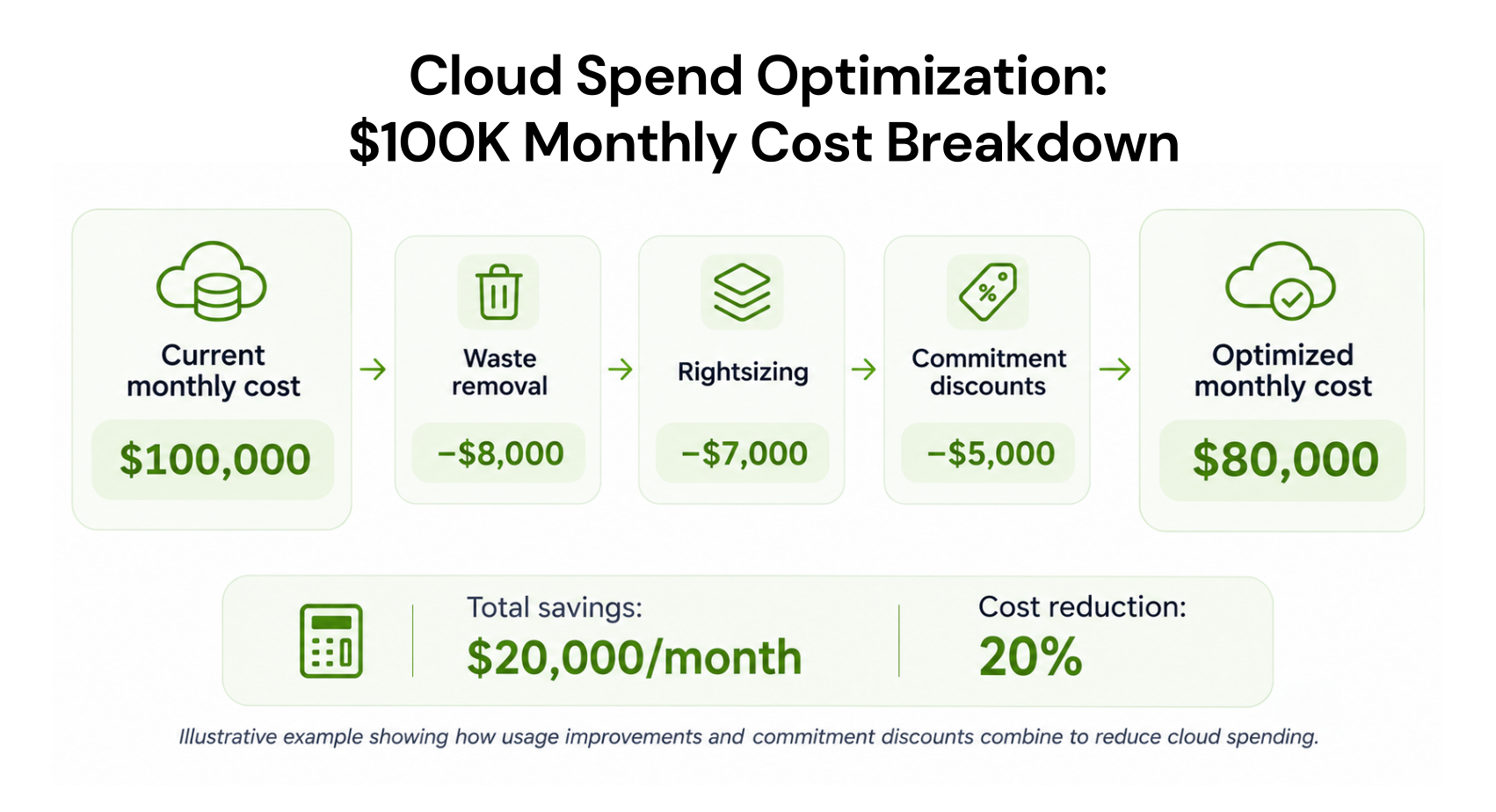
Phase 1: Remove Waste
Unused development resources and unnecessary storage cost $4,000/month.After confirming dependencies and retention requirements, the team removes them.
New monthly baseline: $96,000.
Phase 2: Improve Utilization
Rightsizing and scheduling reduce another $6,000/month without affecting production performance.New monthly baseline: $90,000.
Phase 3: Reduce Rates
After usage optimization, the team identifies $40,000/month of remaining eligible On-Demand compute spending.Suppose an appropriately sized commitment strategy delivers an effective 25% reduction on that eligible spending.
Phase 4: Calculate Net Savings
The organization now spends $20,000 less each month, before implementation and management costs.| Metric | Amount |
|---|---|
| Original monthly spend | $100,000 |
| Waste eliminated | $4,000 |
| Usage savings | $6,000 |
| Rate savings | $10,000 |
| Gross monthly savings | $20,000 |
| Ongoing optimization costs | $2,000 |
| Net monthly savings | $18,000 |
| Net reduction | 18% |
That sequencing matters. Applying a commitment discount to the original compute bill and then subtracting the same rightsizing savings could overstate the benefit.
Avoid Double-Counting Savings
Double-counting occurs when multiple optimization activities claim savings against the same original spending.For example, consider a VM costing $1,000/month at On-Demand rates.
Rightsizing reduces its equivalent On-Demand cost to $700. An eligible commitment then reduces the remaining $700 by 30%.
The correct calculation is:
| Stage | Monthly cost |
|---|---|
| Original On-Demand VM | $1,000 |
| After rightsizing | $700 |
| After 30% discount | $490 |
| Total savings | $510 |
They are not $300 plus $300, because the commitment discount applies to the reduced eligible usage.
Actual commitment billing can be more complicated when existing commitments remain payable after usage falls. Always evaluate incremental savings against the current contracted baseline, not only public On-Demand prices.
Optimize Without Performance Loss
Reducing infrastructure capacity can lower spending, but aggressive changes can also introduce outages, latency, or operational problems.Use these controls before implementing major changes.
Right-Size with Evidence
Review CPU, memory, disk, network, and application latency together. A VM with low average CPU utilization may still need its existing size for memory or peak traffic.Test proposed changes against real workload patterns and maintain a rollback plan.
Schedule Non-Production Resources
Development and testing environments often do not need to operate continuously.For example, reducing eligible compute runtime from 168 hours per week to 40 hours cuts runtime by approximately 76%.
The actual bill reduction depends on which components stop billing, shared infrastructure, and existing commitments.
Review Storage Lifecycles
Identify unused volumes, obsolete snapshots, and data stored in expensive tiers without a business requirement.Before moving data to colder storage, account for retrieval fees, minimum storage durations, and recovery-time requirements.
Reduce Network Waste
Investigate high-volume cross-region transfers, unnecessary NAT processing, and repeated data movement.A network redesign should compare the complete before-and-after cost, including any new endpoints or infrastructure.
Protect Critical Workloads
Use performance thresholds, staged rollouts, and clear approval requirements for production changes.Cost savings should not come from removing capacity needed for failover, recovery, or predictable demand spikes.
Optimize Cloud Pricing
Once unnecessary usage is removed, the remaining baseline may qualify for discounted pricing.The available mechanisms differ by provider.
| Provider | Common discount options |
|---|---|
| AWS | Savings Plans, Reserved Instances, Spot Instances |
| Azure | Savings Plans, Reservations, Spot VMs |
| Google Cloud | Committed Use Discounts, Spot VMs |
The FinOps Foundation identifies rate optimization as a separate capability involving commitments, negotiated pricing, and other discount mechanisms.
Source: FinOps Rate Optimization.
For AWS workloads, our AWS Savings Plans guide explains commitment options, eligibility, and potential savings.
Avoid Overcommitting
Do not purchase commitments solely because last month’s bill was high.Examine hourly usage, upcoming migrations, planned rightsizing, seasonal demand, and existing discounts.
For example, a workload averaging $20,000/month might have a stable baseline equivalent to only $13,000/month. Committing against the full average could create unused capacity exposure.
The right commitment amount depends on eligible usage, flexibility, discount structure, and business plans.
Measure Real Cloud Efficiency
A lower bill does not always mean a more efficient application.Imagine a company whose monthly cloud spending grows from $50,000 to $60,000 while completed transactions double from one million to two million.
| Metric | Before | After |
|---|---|---|
| Monthly cloud spend | $50,000 | $60,000 |
| Transactions | 1 million | 2 million |
| Cost per transaction | $0.050 | $0.030 |
This can represent healthy business growth rather than poor cost control, provided service quality and business value are maintained.
Google Cloud’s Well-Architected cost optimization guidance similarly recommends connecting cloud spending to business outcomes and unit economics.
Metrics Worth Tracking
| Metric | What it tells you |
|---|---|
| Total cloud spend | Overall spending trend |
| Cost per transaction | Efficiency of delivered work |
| Unallocated spend | Costs without clear ownership |
| Commitment coverage | Eligible usage receiving discounts |
| Commitment utilization | Purchased commitments being used |
| Net realized savings | Financial benefit after relevant costs |
| Forecast variance | Difference between expected and actual spend |
Build a 30-Day Plan
Cloud spend optimization works best as an ongoing operating process. A focused first month can establish the foundation.| Timeline | Main action | Deliverable |
|---|---|---|
| Days 1–5 | Analyze billing and ownership | Spending baseline |
| Days 6–10 | Identify avoidable and adjustable costs | Ranked opportunity list |
| Days 11–20 | Implement low-risk changes | Verified usage reductions |
| Days 21–25 | Evaluate eligible commitments | Discount coverage plan |
| Days 26–30 | Measure results and assign owners | Savings report and next actions |
A good optimization report should show the original baseline, completed actions, verified savings, remaining opportunities, and the person responsible for each next step.
For additional techniques to apply during the first month, explore our guide to reducing AWS costs.
Where Usage.ai Fits
Cloud spend optimization requires both engineering changes and financial decisions. Rightsizing, storage cleanup, and traffic optimization reduce unnecessary consumption. Commitment management helps lower the rates paid for eligible usage that remains.At Usage.ai, we help organizations optimize eligible commitments across AWS, Azure, and Google Cloud. We analyze usage, identify savings opportunities, and manage supported commitments without changing production infrastructure.
Explore potential savings on eligible cloud commitments without changing your infrastructure.
Final Thoughts
Cloud spend optimization is not about cutting every expensive resource. It is about finding controllable costs, implementing safe improvements, and paying efficient rates for necessary workloads.Start with verified opportunities, measure net financial results, and track cost per business outcome. That creates a repeatable optimization process instead of a one-time cost-cutting exercise.
Frequently asked questions
What is cloud spend optimization?
Cloud spend optimization is the process of reducing unnecessary cloud expenses and improving the efficiency of required workloads. It includes waste elimination, rightsizing, architecture improvements, and eligible pricing discounts.
How can companies optimize cloud spending?
Start by reviewing billing data, identifying unused resources, analyzing utilization, and ranking opportunities by net savings and risk. After reducing waste, evaluate eligible commitments for predictable workloads.
What is the difference between cloud spend management and optimization?
Cloud spend management includes budgeting, monitoring, allocation, forecasting, and governance. Optimization focuses on changing resource usage, architecture, or pricing to improve cost efficiency.
How much can cloud spend optimization save?
There is no universal savings percentage. Results depend on existing waste, resource utilization, discount coverage, workload mix, and implementation costs. Calculate realized savings against a consistent baseline rather than relying on generic benchmarks.
Can cloud spending increase while efficiency improves?
Yes. If transaction volume or customer demand grows faster than infrastructure spending, cost per business outcome can decline even while the total bill increases.