
 AWS
AWS Microsoft Azure
 Google Cloud
Industry research consistently estimates that 27-32% of cloud spend is wasted — resources delivering no business value. For a team spending $1M/year on AWS, that is $270,000-320,000 leaving the organization annually without return. None of it requires a billing dispute or an architecture overhaul to recover. It requires configuration changes and the right purchasing decisions applied in the right order.
The 10 strategies below are ranked by the typical percentage of annual spend they recover. Start at the top and work down. The first three strategies alone often recover more than strategies 4-10 combined, because they address the largest line items on most AWS bills: compute purchasing model and right-sizing.
See exactly what you’re overpaying in under 60 seconds. Try the Calculator for free →
The 10 Strategies at a Glance
Apply in order. Each row shows the typical savings range and primary AWS service affected.
| # | Strategy | Typical Savings | Primary Service |
| 1 | Buy Savings Plans or Reserved Instances | 30-72% on covered spend | EC2, RDS, ElastiCache, Fargate, Lambda |
| 2 | Right-size instances before committing | 15-30% on affected instances | EC2, RDS, ElastiCache |
| 3 | Migrate to AWS Graviton | 10-20% at list price + compounding | EC2, RDS, ElastiCache |
| 4 | Reserve database instances separately | 33-69% on database compute | RDS, ElastiCache, OpenSearch, Redshift |
| 5 | Use Spot Instances for fault-tolerant workloads | Up to 90% vs on-demand | EC2 Spot, ECS/EKS Spot nodes |
| 6 | Eliminate idle and orphaned resources | 5-15% of total bill | EC2, EBS, Elastic IPs, RDS, snapshots |
| 7 | Apply S3 lifecycle policies and Intelligent-Tiering | 40-70% on cold storage spend | S3 |
| 8 | Reduce data transfer and NAT Gateway costs | Varies — often $10K-$100K+/yr at scale | VPC, NAT Gateway, CloudFront |
| 9 | Schedule non-production environments to shut down | 65-70% of non-prod off-hours compute | EC2, RDS dev/staging instances |
| 10 | Upgrade away from Extended Support | Applicable Extended Support surcharge eliminated | RDS MySQL 5.7, PostgreSQL 11, DocumentDB 3.6 |
Strategy 1: Buy Savings Plans or Reserved Instances on Stable Workloads
Expected savings: 30-72% on covered compute and database spend. This single action is almost always the highest-leverage move on any AWS bill.
Savings Plans and Reserved Instances are billing commitments — nothing about your infrastructure changes. You commit to a minimum hourly spend level, AWS reduces your per-unit rate in return. The Compute Savings Plan is the most flexible: a single commitment covers EC2, Fargate, and Lambda simultaneously, across any instance family, region, operating system, and tenancy. Source: AWS official Savings Plans documentation.
Illustrative model: $500,000 in annual eligible On-Demand EC2 spend, with 80% coverage at an assumed 31% discount and full commitment utilization, saves $500,000 × 80% × 31% = $124,000/year. The 31% discount is an assumption, not a universal one-year No Upfront Compute Savings Plan rate. Price the actual workload before purchasing.
The correct sequence: (1) identify workloads running at predictable utilization for at least 30 days, (2) calculate the stable baseline hourly spend, (3) commit at 70-80% of that baseline with a 1-year No Upfront plan, (4) expand to Partial or All Upfront after 12 months if utilization confirms stability.
AWS Savings Plans: Complete Guide to Types, Pricing, and Buying Strategy
Strategy 2: Right-Size Every Instance Before Committing to a Discount
Expected savings: 15-30% on affected instances. Buying a reservation on an oversized instance locks in the waste for 1-3 years at a locked-in rate.
The four CloudWatch metrics that identify over-provisioned EC2 and RDS instances: CPUUtilization (P90 below 40% signals over-provisioned compute), FreeableMemory (consistently above 25% of total RAM signals over-provisioned memory for RDS), DatabaseConnections (confirm the smaller instance supports the connection ceiling), and NetworkIn/NetworkOut (confirm the smaller instance’s bandwidth covers peak).
A verified price example (US East/N. Virginia, RDS MySQL Single-AZ, October 15, 2026): db.r8g.2xlarge costs $0.956/hr, or $697.88 per 730-hour month. A db.r8g.xlarge costs $0.478/hr, or $348.94/month. After validating that the smaller instance can meet peak CPU, memory and I/O demand, the compute saving is $348.94/month. A one-year No Upfront RI for the xlarge is $0.320/hr ($233.60/month), a 33.1% reduction from its On-Demand rate and a combined $464.28/month saving versus the original 2xlarge. Storage, backup, transfer, support and tax are separate. A workload using 60% of the larger instance’s memory would exceed the smaller instance’s RAM if memory demand remained unchanged; average CPU alone does not justify this resize. Source: AWS RDS MySQL pricing and the current AWS public price list.
Rule of thumb: right-size first, then reserve. Spending 2-4 hours on CloudWatch analysis before purchasing RIs typically reduces the required RI count by 20-30% and generates savings that compound for the full term.
Also read: RDS Reserved Instances: complete guide for database right-sizing and reservation
Strategy 3: Migrate to AWS Graviton
Expected savings: 10-20% at list price versus equivalent x86 instances, compounding with Savings Plans or RI discounts applied on top.
Graviton3 (c7g, m7g, r7g) and Graviton4 (c8g, m8g, r8g) instances are 10-20% cheaper than equivalent Intel or AMD instances at on-demand rates. They also typically deliver better performance per dollar on ARM-compatible workloads. The discount compounds: a Savings Plan or RI discount applies on top of the already-cheaper Graviton base rate, producing a materially lower effective cost than discounting an x86 instance.
Graviton4 (r8g) RDS instances carry deeper RI discounts than Graviton3 (r7g) at identical on-demand rates in some configurations. Migrate to the current Graviton generation before purchasing RIs to maximize the combined base-rate and RI discount.
Most containerized workloads, web applications, and managed runtimes (Java, Python, Node.js, Go) run without modification on Graviton. Native compiled code and workloads with x86-specific dependencies require validation. Start with a dev environment migration and run a 7-day performance comparison before migrating production. Source: AWS Graviton documentation.
Also read: RDS PostgreSQL Graviton: benchmarks and cost savings guide
Strategy 4: Reserve Your Database Instances Separately
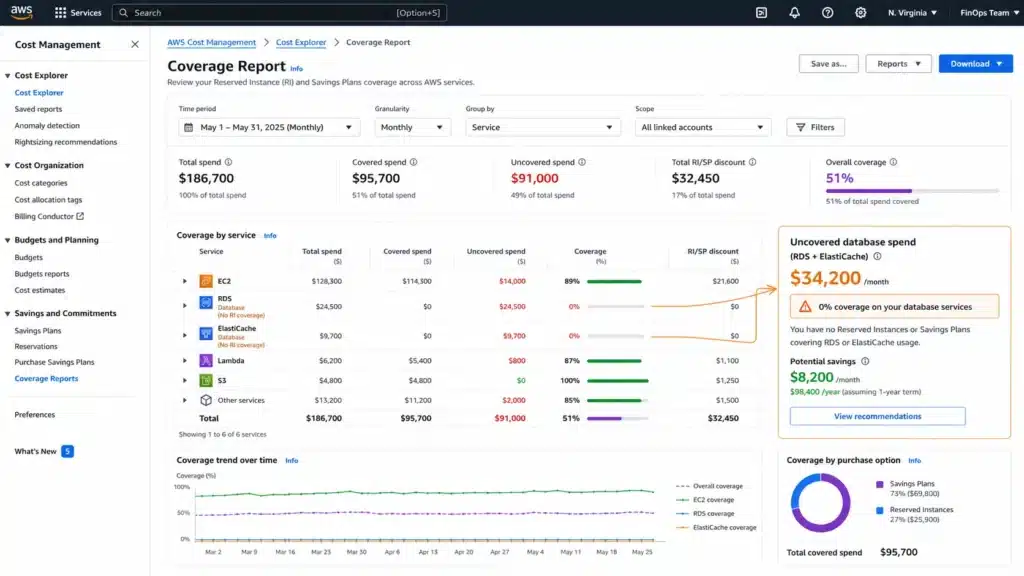
Expected savings: 33-69% on database compute. Compute Savings Plans do not cover RDS, ElastiCache, OpenSearch, Redshift, or DynamoDB.
This is the most common commitment gap on AWS bills. Teams that buy a Compute Savings Plan expecting it to cover the database tier leave up to 69% of database compute savings uncaptured. Databases require their own reservation products: RDS Reserved Instances, ElastiCache Reserved Nodes, OpenSearch Reserved Instances, Redshift Reserved Nodes, and Database Savings Plans.
RDS Reserved Instances save 33-69% depending on engine, term, and payment option. Source: AWS official RDS pricing. Database Savings Plans cover a broader set of database services (including Neptune, DocumentDB, Keyspaces, ElastiCache Valkey) with up to 35% savings on a 1-year No Upfront commitment.
For RDS specifically: buy Single-AZ RIs at the smallest size in the target instance family. AWS’s normalization unit system allows a single small-size RI to flex across multiple sizes within the family. This is more deployment-flexible than buying a large-size RI that only covers one instance.
Before reserving any database instance: check Extended Support status (see Strategy 10). MySQL 5.7 and PostgreSQL 11 are in Year 3 Extended Support carrying $0.200/vCPU-hr surcharges. An RI does not discount the surcharge, but upgrading to a version in standard support stops Extended Support charges; the RI does not lock in those surcharges.
Also read: ElastiCache Reserved Nodes: complete pricing guide for node-based clusters (live)
Strategy 5: Use Spot Instances for Fault-Tolerant Workloads
Expected savings: up to 90% off on-demand pricing for eligible workloads. Source: AWS official Spot pricing.
Spot Instances use spare EC2 capacity at a steep discount. They can be interrupted with a 2-minute warning when AWS needs the capacity back. Workloads that handle interruption gracefully — batch processing, CI/CD pipelines, big data analytics, ML training jobs, video transcoding, and dev/test environments — are candidates for Spot pricing.
The correct Spot strategy: (1) use Spot for batch and dev workloads, on-demand or Reserved for production services requiring high availability; (2) diversify across multiple instance families and availability zones to reduce interruption probability; (3) use EC2 Auto Scaling Spot capacity rebalancing or AWS Fault Injection Simulator to test interruption handling before relying on Spot in critical pipelines.
For EKS and ECS: Karpenter enables automatic Spot instance provisioning and fallback to on-demand when Spot capacity is unavailable. A properly configured Karpenter node pool mixing Spot and on-demand nodes captures 60-80% of the savings while maintaining availability guarantees. Source: AWS Karpenter documentation.
Spot savings vary by instance family, region, and time of day. Real-time Spot pricing is available in the AWS EC2 console under Spot Requests. The historical Spot price for common families like c7g, m7g, and r7g has been 60-80% below on-demand for extended periods in us-east-1 and us-west-2. Verify current spot prices at aws.amazon.com/ec2/spot/pricing/ before planning workload migration. Source: AWS official Spot pricing page.
Strategy 6: Eliminate Idle and Orphaned Resources
Expected savings: 5-15% of total AWS bill. Pure waste — resources billing without delivering any business value.
The most common idle resource categories: (1) EC2 instances stopped but with attached EBS volumes still billing (EBS bills regardless of instance state); (2) unattached EBS volumes — snapshots from terminated instances that continue incurring storage costs; (3) unused Elastic IPs — AWS charges $0.005/hr (approximately $3.65/month) per unattached Elastic IP; (4) RDS instances in stopped state past 7 days (AWS automatically restarts stopped RDS instances after 7 days, returning them to billing); (5) unused load balancers with no registered targets; (6) old CloudWatch Logs log groups with multi-year retention policies accumulating data nobody reads.
The AWS tool for finding idle resources: AWS Cost Explorer’s ‘Idle and Underutilized Resources’ view under Cost Optimization Hub. Also: AWS Compute Optimizer flags idle EC2 instances with <10% CPU utilization for the past 14 days. For EBS specifically: the AWS console filter for ‘Available’ (unattached) volumes gives you the exact dollar amount billing for no reason.
Elastic IP cost detail: at $0.005/hr, 100 unattached Elastic IPs cost $365/month or $4,380/year. Many teams accumulate these during infrastructure iterations and never audit them. A 15-minute console audit of unattached EIPs and available EBS volumes is one of the fastest AWS bill reductions available. Source: AWS EC2 pricing page.
Strategy 7: Apply S3 Lifecycle Policies and Intelligent-Tiering
Expected savings: 40-70% on cold data stored in S3 Standard. Compare total storage, transition, retrieval and minimum-duration charges; lower archive storage rates alone do not determine savings.
S3 storage class pricing (US East (N. Virginia), checked October 15, 2026, verify at aws.amazon.com/s3/pricing/): S3 Standard $0.023/GB-month. S3 Standard-IA $0.0125/GB-month. S3 Glacier Instant Retrieval $0.004/GB-month. S3 Glacier Flexible Retrieval $0.0036/GB-month. S3 Glacier Deep Archive $0.00099/GB-month. Source: AWS official S3 pricing page.
Most organizations accumulate S3 data in Standard storage by default and never implement lifecycle policies. A lifecycle policy that moves objects to Standard-IA after 30 days and Glacier Instant Retrieval after 90 days cuts storage costs by 80%+ on objects that follow that age pattern. For log data that is only accessed within the first 7 days: S3 Standard for 7 days, then Glacier Deep Archive — a 95.7% reduction in the ongoing per-GB storage rate after transition. This excludes the initial Standard storage period, transition/retrieval fees, metadata overhead and Deep Archive’s 180-day minimum storage duration.
S3 Intelligent-Tiering is the correct choice for datasets with unknown or variable access patterns. It automatically moves objects between Standard, Standard-IA, and Archive tiers based on access frequency, with a small monthly monitoring charge ($0.0025 per 1,000 objects). For buckets with mixed access patterns where lifecycle policy rules are hard to define, Intelligent-Tiering captures most of the savings without manual tier management. Source: AWS official S3 pricing page.
Strategy 8: Reduce Data Transfer and NAT Gateway Costs
Expected savings: often $10,000-$100,000+/year at scale. Data transfer is the most invisible large cost category on AWS bills.
Data transfer costs are per-GB charges that accumulate invisibly. The most common categories: (1) EC2 outbound to the internet — $0.09/GB in US East for the first 10 TB/month; (2) NAT Gateway data processing — $0.045/GB processed through the NAT Gateway; (3) cross-AZ data transfer — $0.01/GB each direction for traffic between AZs in the same region.
NAT Gateway is the most underestimated cost category for containerized applications. Every container-to-internet request routes through the NAT Gateway and incurs the $0.045/GB processing fee on top of the $0.045/hr NAT Gateway hourly charge. For high-traffic applications with containers making frequent external API calls, NAT Gateway data processing can exceed the EC2 or ECS compute cost.
Three actions that reduce data transfer costs: (1) Use free gateway VPC endpoints for S3 and DynamoDB — eligible traffic routed through those gateway endpoints does not traverse the NAT Gateway and incurs $0 data processing fees. (2) Use CloudFront for outbound internet content — Compare CloudFront’s regional pricing, request charges and available pricing plans with your origin’s egress cost. Cache hits reduce repeated origin fetches; there is no universal 20–60% saving. (3) Co-locate services in the same AZ for high-traffic inter-service communication — the $0.01/GB cross-AZ fee compounds at scale for microservices that make thousands of inter-service calls per second.
Check your AWS Cost Explorer for ‘Data Transfer’ line items filtered to the past 60 days. If NAT Gateway data processing appears as a top-10 line item, VPC endpoints for S3 and DynamoDB are almost certainly the correct immediate action. Source: AWS VPC pricing and data transfer pricing pages.
Strategy 9: Schedule Non-Production Environments to Shut Down
Expected savings: 65-70% of non-production compute cost by eliminating overnight and weekend billing. Non-production environments typically run 8-10 hours per day on weekdays — but bill 24/7 by default.
Non-production EC2 and RDS instances — development, staging, QA, load testing environments — are typically active only during business hours when engineers are working against them. A standard 8-hour workday, 5 days per week represents 40 hours out of 168 hours in a week — 24% of the total. The remaining 76% (128 hours/week) is idle billing.
Schedule using AWS Instance Scheduler or Lambda functions triggered by EventBridge rules: for an eight-hour day, start at 8am and stop at 4pm on weekdays. A month with 22 weekdays has 176 active hours; compared with a 730-hour reference month, that is a 75.9% reduction in On-Demand compute hours. Actual savings depend on the calendar, shutdown eligibility and existing commitments. Storage and other retained resources continue billing, and stopping instances does not cancel RI or Savings Plans obligations.
Verified compute rates as of October 15, 2026, US East (N. Virginia): ten Linux shared-tenancy m7g.xlarge EC2 instances at $0.1632/hr and three RDS MySQL Single-AZ db.r8g.large instances at $0.239/hr have a combined rate of $2.349/hr. Assume all compute is On-Demand and retained storage costs $50/month in both cases. Before scheduling: $2.349 × 730 + $50 = $1,764.77/month. After scheduling: $2.349 × 176 + $50 = $463.42/month. The saving is $1,301.35/month, or $15,616.15 over twelve identical modeled months, calculated before rounding. Actual annual savings vary with weekday counts and other charges. Sources: AWS EC2 pricing and RDS MySQL pricing.
Implementation note: use a tagging strategy to identify schedulable instances. Apply an ‘Environment: dev’ or ‘Environment: staging’ tag at instance creation. AWS Instance Scheduler uses these tags to apply the correct schedule. Environments that need to run overnight (scheduled jobs, batch processes, integration tests) can be exempted per tag. Source: AWS Instance Scheduler documentation.
See exactly what you’re overpaying in under 60 seconds. Try the Calculator for free →
Strategy 10: Upgrade Away From Extended Support
Expected impact: eliminates applicable Extended Support surcharges; the percentage depends on engine, instance, region and support year. Extended Support surcharges are the fastest-growing invisible cost driver for teams running older RDS and DocumentDB engine versions.
AWS Extended Support applies when you continue running a database engine version past its AWS standard-support end date. The surcharge is calculated per vCPU-hour and stacks on top of your standard instance rate. For RDS:
MySQL 5.7: RDS standard support ended February 29, 2024. In US East (N. Virginia), Year 3 pricing applies from March 1, 2026 at $0.200/vCPU-hour. For a supported db.r6g.xlarge (4 vCPUs), the $0.430/hr Single-AZ compute rate plus $0.800/hr Extended Support totals $1.230/hr before other charges. The surcharge is 186.0% of the base compute rate, or $584 per 730-hour month. Source: AWS RDS MySQL pricing.
PostgreSQL 11 also requires an engine-, region- and date-specific Extended Support calculation. Use the RDS support calendar and current rate for the version actually running; do not apply a MySQL instance example to PostgreSQL without checking its base rate.
DocumentDB 3.6: Extended Support billing starts July 1, 2026. Year 1-2: $0.111/vCPU-hr. For a db.r5.large (2 vCPUs) at $0.277/hr: surcharge = $0.222/hr — an 80% increase. Source: AWS official DocumentDB pricing page.
The action: audit your RDS and DocumentDB clusters for engine versions, identify which are in Extended Support, and plan upgrades immediately. An in-place major version upgrade for MySQL 5.7 to 8.0 or PostgreSQL 11 to 16 is a supported, automated process in RDS that can be scheduled for a maintenance window with minimal downtime. Upgrading to a version currently in standard support removes the surcharge while that version remains supported. Every month of delay adds the applicable support charge. Source: AWS official RDS engine upgrade documentation.
DocumentDB Pricing Breakdown: Extended Support billing starting July 1, 2026 explained
| MySQL 5.7 db.r6g.xlarge, US East (N. Virginia) | 730-hour monthly cost |
|---|---|
| Single-AZ On-Demand compute: $0.430/hr | $313.90 |
| Year 3 Extended Support: 4 × $0.200/vCPU-hour | $584.00 |
| Combined compute and Extended Support | $897.90 |
The Correct Order: Why Sequence Matters
These 10 strategies are not independent — they interact, and the sequence matters. Applying them in the wrong order leaves money on the table.
Right-size before committing (Strategy 2 before Strategy 1): a Savings Plan purchased on an oversized instance discounts the oversized rate. Right-size first, then commit at the correct size. The combined saving is larger than either action alone.
Eliminate Extended Support before reserving (Strategy 10 before Strategies 1 and 4): an RI does not cover Extended Support charges, and an eligible engine upgrade can stop the surcharge during the RI term. Upgrade first, confirm the new version is stable, then purchase the RI.
Eliminate idle resources before right-sizing (Strategy 6 before Strategy 2): removing idle instances reduces the total footprint before you right-size the remaining instances. This gives CloudWatch utilization metrics a cleaner signal — averaged across fewer but more relevant instances.
Apply Graviton before reserving (Strategy 3 before Strategies 1 and 4): migrating to Graviton and confirming stable performance before purchasing RIs or Savings Plans ensures the commitment covers the correct, lower Graviton base rate.
Recommended 90-day sequence: (Days 1-14) Audit and eliminate idle resources. Upgrade Extended Support instances. Check for non-production scheduling opportunities. (Days 15-45) Right-size using CloudWatch P90 metrics. Migrate to Graviton where validated. (Days 46-90) Purchase Savings Plans and Reserved Instances on the confirmed, right-sized, Graviton infrastructure. Review S3 lifecycle policies and data transfer costs. Implement Spot for batch workloads. This sequence produces the maximum combined saving.
How Usage.ai Automates These 10 Strategies
Usage.ai automates the three strategies that deliver the most dollar impact and require the most ongoing maintenance: commitment purchasing (Strategies 1 and 4), recommendation freshness (the 72-hour lag in AWS Cost Explorer versus Usage.ai’s 24-hour refresh), and underutilization protection.
For Savings Plans and Reserved Instances: Usage.ai purchases Insured Flex Commitments on your behalf — Savings Plans and RIs with a buyback guarantee on every commitment purchased through the platform. If a commitment becomes underutilized — because you right-sized, migrated to Fargate, or decommissioned a workload — Usage.ai buys back the underutilized commitment and returns the value as cashback in real money. Not credits. The 24-hour recommendation refresh means commitment opportunities surface before the 72-hour AWS Cost Explorer cycle catches up.
For right-sizing: Usage.ai’s recommendation engine analyzes CloudWatch P90 CPU, memory, and network utilization per instance and surfaces specific downsizing recommendations ranked by annual dollar saving. For database instances, the analysis includes connection counts, storage I/O, and read replica traffic to confirm the target instance can handle production load before the recommendation is surfaced.
For Extended Support: Usage.ai flags any RDS or DocumentDB cluster in Extended Support with the exact monthly surcharge calculation and the estimated saving from upgrading. The 24-hour refresh catches new clusters created on affected engine versions immediately.
For S3 and data transfer: Usage.ai surfaces S3 buckets where the access pattern justifies tier migration and NAT Gateway spend where VPC endpoints would eliminate the data processing charges.
Usage.ai’s fee model: percentage of realized savings only. $0 if Usage.ai saves nothing. 30-minute setup, billing-layer access only — no infrastructure changes required.
$91M+ in savings delivered to 300+ enterprise customers. Named customers include Motive, EVGo (NASDAQ: EVGO), Blank Street Coffee, and Secureframe.
See how Usage.ai automates all 10 strategies across your AWS account

Frequently Asked Questions
1. How much can you save by optimizing AWS costs?
Industry research estimates 27-32% of cloud spend is wasted on average. For a team spending $1M/year on AWS, implementing all 10 strategies in the correct order typically recovers $250,000-400,000 annually. The exact amount depends on the starting commitment coverage, instance right-sizing opportunity, and how much non-production compute is running 24/7. The three highest-impact strategies — Savings Plans/RIs, right-sizing, and database reservations — typically account for 60-70% of the total recoverable savings. Source: Gartner cloud waste estimates and AWS official savings documentation.
2. What is the fastest way to reduce an AWS bill?
Three actions that typically produce results within 24-48 hours: (1) audit and terminate idle resources (unattached EBS volumes, unused Elastic IPs, stopped instances with attached storage) — pure waste elimination with immediate billing impact; (2) purchase a 1-year No Upfront Compute Savings Plan at 70% of your current stable EC2/Fargate/Lambda baseline — activates within the billing hour; (3) check for Extended Support surcharges on RDS instances and initiate upgrades. These three combined typically recover 15-25% of total AWS spend within the first month.
3. Do Compute Savings Plans cover RDS and ElastiCache?
No. Compute Savings Plans cover EC2 instance compute, AWS Fargate, and AWS Lambda only. RDS, ElastiCache, OpenSearch, Redshift, and DynamoDB require separate commitment products: RDS Reserved Instances, ElastiCache Reserved Nodes, OpenSearch Reserved Instances, Redshift Reserved Nodes, or Database Savings Plans. This is one of the most common commitment gaps on AWS bills — teams buy a Compute Savings Plan expecting database coverage and leave 33-69% of database compute savings uncaptured. Source: AWS official Savings Plans documentation.
4. How do you find idle AWS resources?
Three AWS-native tools: (1) AWS Cost Optimization Hub in the Billing and Cost Management console — surfaces idle and underutilized resources across EC2, RDS, EBS, Elastic IPs, and load balancers in a single view; (2) AWS Compute Optimizer — flags EC2 instances with P90 CPU utilization below 10% for the past 14 days as idle; (3) AWS Console filters — filter EC2 for ‘stopped’ state with attached EBS, filter Elastic IPs for ‘unassociated’ status, filter EBS for ‘available’ (unattached). A 30-minute console audit typically surfaces $500-5,000/month in pure waste on accounts that have never been audited. Source: AWS Cost Optimization Hub documentation.
5. What is AWS Extended Support and how much does it cost?
RDS Extended Support applies after AWS standard support ends for an eligible engine version. Charges depend on region, vCPU count, engine and support year, and are separate from RI discounts. In the verified MySQL 5.7 example above, four vCPUs at $0.200/vCPU-hour add $0.800/hr ($584 per 730-hour month). Compared with a db.r6g.xlarge base rate of $0.430/hr, that is a 186.0% surcharge. Upgrading to a version in standard support stops that surcharge. See AWS Extended Support documentation.




