
.png)
Amazon EC2 (Elastic Compute Cloud) pricing refers to how you are charged for running virtual machines in the cloud through Amazon Web Services.
EC2 allows you to rent computing capacity on demand instead of owning physical servers. You choose the type of machine you need, how long it runs, and where it’s located, and you’re billed accordingly.
Think of it this way. Amazon EC2 is like renting a fleet of computers in remote data centers. You pay for each computer based on how powerful it is and how long you use it.
Amazon EC2 pricing is primarily usage-based, but there are several variables too that determine the final cost:
While Amazon EC2 pricing is often thought of as “compute pricing,” the total cost of running workloads includes multiple components:
This is why EC2 pricing can feel more complex than expected. You're not just paying for a machine, but for the entire infrastructure around it.
Also read: AWS Savings Plan: A Complete Guide to Maximizing Savings
When people think about Amazon EC2 pricing, they usually focus on the cost of running virtual machines. But in reality, your EC2 bill is made up of multiple components. Many of which are easy to overlook.
This is the base cost of running Amazon EC2 instances. You’re charged based on:
You pay for provisioned capacity, not actual utilization. For example, an instance running at 20% CPU still incurs 100% of its cost.
Most Amazon EC2 workloads rely on Elastic Block Store (EBS) for persistent storage. You are billed for:
Storage costs continue even if the instance is stopped. This makes EBS one of the most common sources of silent, persistent spend.
Data transfer costs are frequently underestimated and can scale quickly.
In high-traffic systems, data transfer can become one of the top cost drivers, sometimes rivaling compute.
Beyond raw data transfer, EC2 relies on several networking services that add to total cost:
These costs are often overlooked because they are distributed across services, not tied to a single instance.
A significant portion of cloud waste comes from resources that are no longer actively used. Some common examples are detached EBS volumes, unused Elastic IPs, old snapshots and underutilized or forgotten instances.
These costs accumulate gradually and are rarely caught without active monitoring.
Also read: Introduction to Cloud Unit Economics: A Comprehensive Guide for DevOps and FinOps Teams
Even when pricing models are understood, total costs can still exceed expectations due to structural inefficiencies:

Amazon EC2 pricing models are often explained as four simple options. But in practice, they behave more like layers in a system. Each model exists to solve a different problem, and the way they interact determines your actual cost.
On-Demand is the simplest model, where you launch instances, pay for what you use, and you can stop at any time. It’s designed for flexibility, and every AWS account starts here.
But in real environments, On-Demand quickly turns into the default layer that absorbs everything you didn’t plan for, like traffic spikes, new services, misconfigured workloads, and any usage not covered by commitments.
This is why many teams end up with a large portion of their infrastructure unintentionally running on On-Demand. And that’s where the cost problem begins.
Savings Plans were introduced to reduce this inefficiency without forcing teams into rigid infrastructure decisions. Instead of committing to specific machines, you commit to a baseline level of spend.
In theory, this solves flexibility, but in practice, it introduces a challenge to accuracy. If your committed usage closely matches your actual usage, Savings Plans work extremely well. But if your infrastructure shifts, whether due to scaling, architectural changes, or seasonality, you start paying for capacity you no longer use.
So while Savings Plans reduce cost, they also introduce a dependency on your ability to predict future usage.
Reserved Instances take this one step further. Instead of committing to spend, you commit to specific infrastructure.
This works well in environments where very little changes. Long-running workloads, stable systems, and predictable demand can benefit from the precision of Reserved Instances.
But modern cloud environments rarely stay static. Teams upgrade instance types, migrate workloads, or shift regions. When that happens, Reserved Instances can become misaligned with actual usage. At that point, the discount still exists, but the efficiency doesn’t.
Also read: AWS Savings Plans vs Reserved Instances: A Practical Guide to Buying Commitments
Spot Instances operate on a completely different principle. Instead of committing to future usage, you take advantage of unused capacity in the present.
This can dramatically reduce costs, but it shifts responsibility to your system design. Your applications need to tolerate interruptions, recover quickly, and distribute workloads intelligently.
For the right workloads, this works extremely well. For the wrong ones, it introduces instability.
In production environments, these pricing models are rarely used independently. They are stacked upon each other.
A typical system looks something like this:
The cost of your infrastructure is then determined by how much of your usage falls into each layer.
Where Most Teams Go Wrong
The common assumption is that choosing the “cheapest” pricing model leads to lower costs. But in practice, costs are driven by alignment, not selection.
What matters is how closely your pricing strategy matches your workload behavior over time, and not which model you choose.
To understand how Amazon EC2 pricing behaves in practice, let’s look at a realistic scenario. The goal here is to build intuition for how pricing models impact total spend.
Scenario: A fairly typical baseline for a small-to-mid scale production system
Let’s assume a common setup:
At first glance, this shows how different pricing models lead to different savings levels. But these savings only apply to the portion of your usage that is actually covered by each model.
The Role of Coverage in This Example
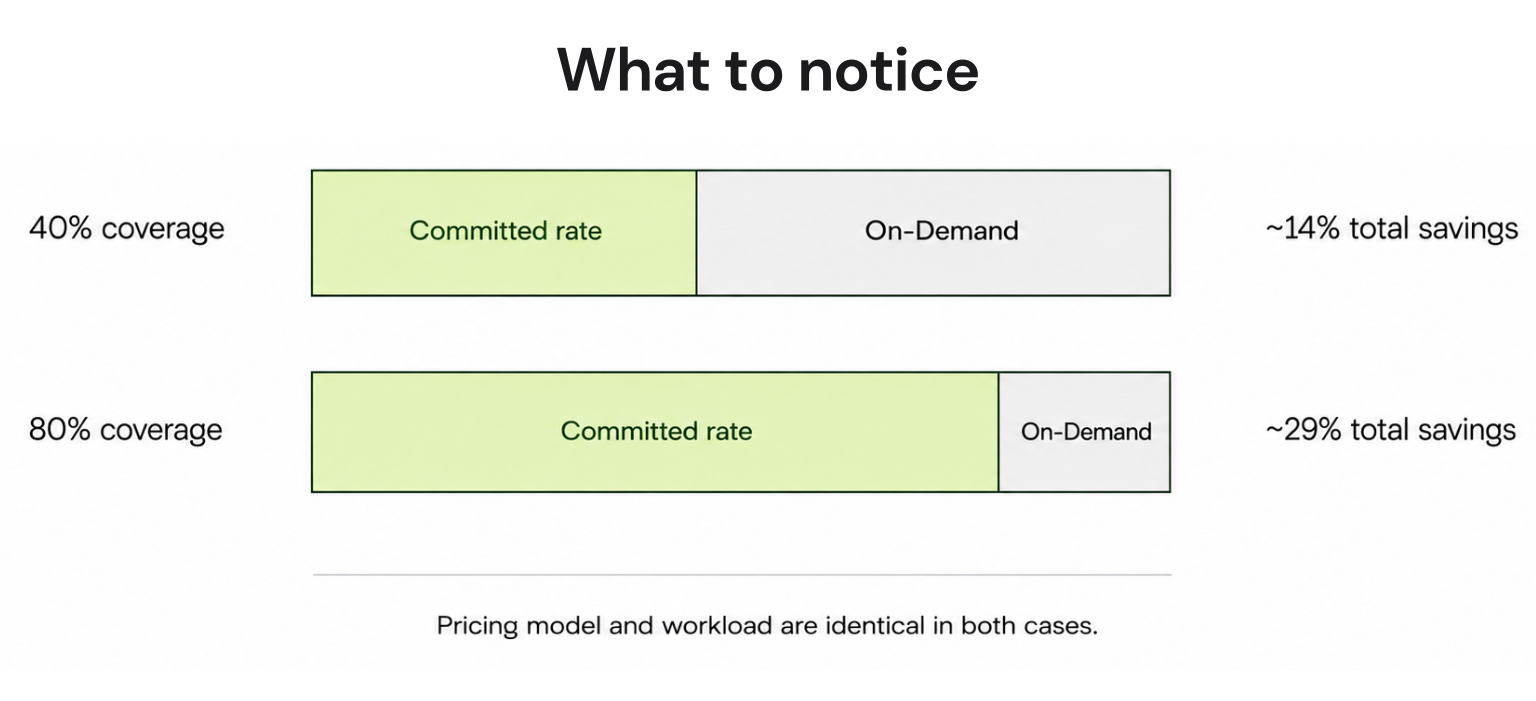
Let’s take the same workload and change only one variable. Let’s say coverage.
Case 1: Low Coverage (40%)
Even with commitments in place, a large portion of usage is still billed at full price. Total savings are limited.
Case 2: High Coverage (80%)
Now most of the workload benefits from lower rates, and total cost drops significantly.
Why This is More Important Than Pricing Model Choice
Most discussions around Amazon EC2 pricing focus on which model is cheapest. But in practice:
Now consider what happens if this workload changes. For example, traffic drops, instances are scaled down and architecture is modified.
If you’ve committed to a fixed level of usage, your actual usage decreases but your committed spend remains the same. This is where savings can turn into waste.
The example above shows that:
Also read: How to Identify Idle & Underutilized AWS Resources
Amazon EC2 costs are not just determined by what you run, but by how your infrastructure behaves over time.
Even when teams understand Amazon EC2 pricing models, costs often behave in ways that feel unpredictable. Two environments using the same instance types and pricing strategies can end up with very different bills.
One of the most common sources of waste comes from how instances are sized. In practice, teams tend to overprovision. They choose larger instances “just to be safe” leaving headroom for peak traffic that rarely occurs.
But EC2 pricing doesn’t adjust based on utilization. If an instance is running at 20–30% capacity, you’re still paying for 100% of it. Over time, this gap between provisioned capacity and actual usage becomes a persistent cost inefficiency.
EC2 pricing varies across regions, sometimes significantly. While this is well known, what’s often overlooked is how architectural decisions lock you into a region. That includes data residency requirements, latency constraints and service dependencies.
Once workloads are deployed, moving regions is rarely trivial. As a result, teams often continue operating in suboptimal pricing environments simply because migration is too complex.
In most real-world systems, traffic fluctuates due to time of day, seasonality, product growth and unexpected spikes. This variability creates a constant mismatch between what you provision and what you actually use. And more importantly:
This is one of the main reasons cost optimization is difficult because usage itself is not stable.
Overprovisioning is often intentional. Teams design systems to handle peak load, which means infrastructure is sized for worst-case scenarios and most of the time, it runs below capacity.
This tradeoff makes sense from a reliability perspective, but it introduces structural inefficiency in cost. You’re effectively paying for performance you only occasionally need.
Commitment-based pricing models (Savings Plans and Reserved Instances) are designed to reduce costs, but only when they are fully utilized. In practice, underutilization happens when:
When this happens, the discount still exists, but it applies to usage that no longer exists. This is one of the least visible forms of waste, because it doesn’t show up as an obvious unused resource, but as missed value.
The Compounding Effect
What makes EC2 costs difficult to manage is not any single factor. It’s how these factors combine. A typical environment might simultaneously have:
Individually, each issue seems small. Together, they create a compounding effect that drives costs higher over time.
Most explanations of EC2 pricing focus on choosing between On-Demand, Savings Plans, and Reserved Instances. But, those choices only define how discounts are applied. They don’t determine how much you actually save. That depends on coverage.
Amazon EC2 coverage is the percentage of your total compute usage that is billed under discounted pricing (Savings Plans or Reserved Instances) rather than On-Demand rates.
It is typically measured as:
Coverage (%) = (Usage billed under commitments ÷ Total compute usage)
For example, if 70% of your compute usage is covered by Savings Plans or RIs, the remaining 30% is billed at On-Demand rates.
AWS does not apply commitments to specific instances by default (especially with Savings Plans). Instead, discounts are applied dynamically to eligible usage up to your committed level.
This means:
So at any given time, your infrastructure is effectively split into two layers:
Pricing models define how much you could save. Coverage determines how much you actually save.
Two teams can both use Savings Plans, but:
Even with the same pricing model, their total costs will differ significantly.
Coverage is not something you set once. It fluctuates as your infrastructure changes. It shifts when traffic increases or decreases, instances are added, removed, or resized, new workloads are deployed and services move across regions or architectures.
Because commitments are fixed (e.g., $/hour), but usage is variable, the relationship between the two is constantly changing.
Also read: 7 AWS Savings Plan KPIs Every FinOps Team Should Track for Better Cost Efficiency
Understanding coverage also means understanding how it fails.
When coverage is low, a large portion of usage runs on On-Demand and potential savings are not captured. This is the most visible inefficiency which is high bills despite using “discounted” pricing models.
When commitments exceed actual usage, discounts are applied to all available usage. The remaining committed capacity goes unused.
This unused portion still represents spend, meaning you’ve effectively prepaid for usage that didn’t occur.
Why Coverage Is Difficult to Optimize
Optimizing coverage requires aligning two things that behave very differently:
Even small shifts in usage can create:
This makes coverage a moving target rather than a fixed optimization problem. A useful way to think about EC2 pricing is:
Savings Plans and Reserved Instances underperform when committed usage and actual usage drift apart over time.
Savings Plans and Reserved Instances are designed to reduce EC2 costs by offering discounted pricing in exchange for commitment. On the surface, you commit to a certain level of usage, receive lower rates, and reduce overall spend.
But in real-world environments, the outcome is rarely that clean.
The effectiveness of these models depends on a single assumption, that future usage will closely match what was committed. This assumption holds in theory, but begins to break down as soon as infrastructure starts to evolve.
In most production systems traffic changes, services are added or removed, workloads are re-architected, and scaling patterns shift over time. As these changes accumulate, the relationship between committed usage and actual consumption begins to drift.
When usage falls below the committed level, the discounts continue to apply, but only to the usage that still exists. The remaining portion of the commitment has nothing to attach to. From a billing perspective, that unused portion simply stops generating value. You are still paying for the commitment, but no longer benefiting from it fully.
The opposite scenario creates a different kind of inefficiency. When usage grows beyond the committed level, the discounted pricing is applied only up to the commitment threshold. Everything beyond that point is billed at On-Demand rates. The result is a split system, where part of the infrastructure is optimized and the rest remains exposed to full pricing.
What makes this more complex is the mismatch in time horizons. Commitments are fixed over one- or three-year periods, while infrastructure decisions are made continuously. Even small changes, like resizing instances or shifting workloads can gradually misalign commitments from actual usage. This drift is rarely sudden, which makes it harder to detect, but over time it has a meaningful impact on cost efficiency.
There is also a difference in how various workloads behave. Compute workloads tend to be relatively stable, which makes them more suitable for longer commitments. In contrast, databases and other specialized services evolve more quickly, making long-term commitments harder to align with actual usage over time .
Also read: AWS Database Savings Plans Explained for DB Teams
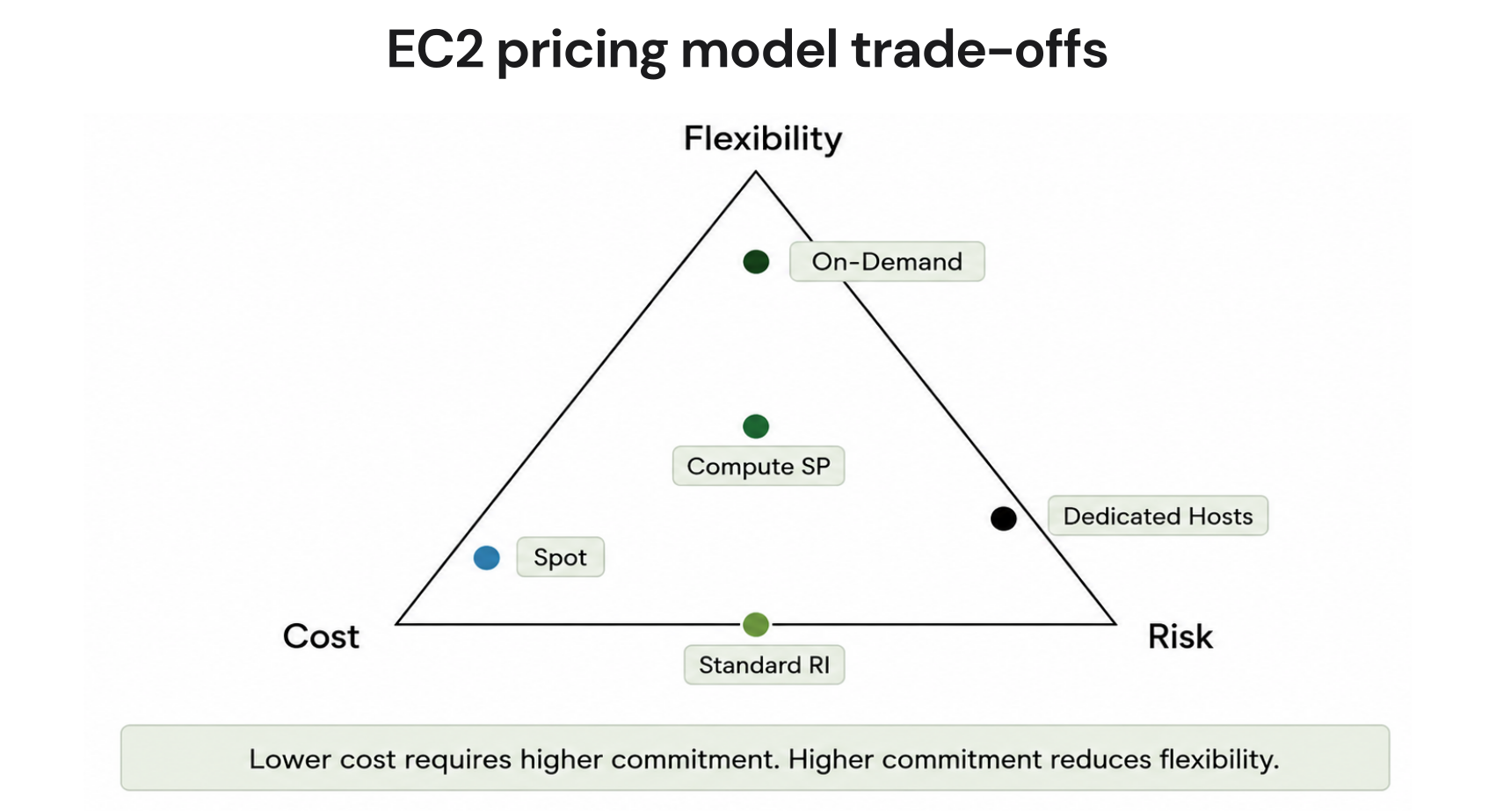
Amazon EC2 pricing models look like a menu of options. But in practice, every decision around pricing is a tradeoff between cost, flexibility, and risk. You can optimize for one or even two of these, but not all three at the same time.
The lowest EC2 prices are always tied to commitment. Savings Plans and Reserved Instances offer significant discounts because they require you to commit to future usage. The more predictable your usage, the more aggressively you can commit, and the lower your effective cost becomes.
But that lower cost is exchanged for reduced flexibility and increased exposure to misalignment.
On-Demand pricing sits at the opposite end of the spectrum. It allows you to scale up or down at any time, change instance types freely, and adapt your infrastructure without constraints.
This flexibility is valuable, especially in fast-changing environments. But it comes at a consistently higher cost, because you are not making any long-term commitments.
In practice, flexibility acts as a buffer against uncertainty, but you pay for that buffer on every unit of usage.
Risk enters the system when commitments and actual usage diverge. If you commit too little, you leave a large portion of your infrastructure exposed to On-Demand pricing. This results in higher costs, but the inefficiency is visible and relatively easy to understand.
If you commit too much, the problem becomes less obvious. You are still paying for the commitment, but not all of it is being utilized. The unused portion appears as savings that were expected but never realized.
This is a different kind of risk of not overspending directly, but failing to convert commitments into actual savings.
Why You Can’t Maximize All Three
The relationship between cost, flexibility, and risk forms a natural constraint. Reducing cost requires increasing commitment. Increasing commitment reduces flexibility. Reduced flexibility increases the likelihood that usage and commitments will drift apart, which introduces risk.
Trying to eliminate risk entirely pushes you back toward On-Demand usage, which increases cost. Trying to minimize cost aggressively pushes you toward higher commitments, which increases risk. There is no configuration where all three are optimized simultaneously.
Also read: How to Choose Between 1-Year and 3-Year AWS Commitments

Once teams understand EC2 pricing models, coverage, and the tradeoff between cost, flexibility, and risk, the challenge shifts from choosing the right option to maintaining alignment over time.
In most AWS environments, inefficiency comes from small gaps between usage and pricing that compound over time, especially when coverage and utilization drift out of sync.
Most teams begin optimization by rightsizing instances or shutting down unused resources. While useful, this usually delivers incremental savings. The larger opportunity comes from improving coverage.
In many environments, even after adopting Savings Plans, 30–50% of EC2 usage still runs on On-Demand pricing. Since On-Demand can be 30–60% more expensive, this uncovered portion becomes a major cost driver.
Increasing coverage from 50% to 75–80% often reduces total compute cost more than aggressive rightsizing, simply because more of the existing workload benefits from discounted pricing.
Coverage alone does not guarantee savings. What matters is whether committed spend is actually used.
For example:
This is why FinOps teams track both:
In well-optimized environments, these typically fall in the range of Coverage between ~70–85% and utilization between ~85–95%.
Not all workloads behave the same way, and treating them uniformly leads to misalignment. Stable workloads, such as long-running compute services can support higher commitment levels with lower risk. In contrast, workloads that scale frequently or evolve quickly introduce more uncertainty.
For example:
This is why compute workloads often support longer commitments, while more dynamic services require flexibility .
Mature environments do not rely on a single pricing model. Instead, they distribute usage across multiple layers.
A typical structure looks like:
This portfolio approach allows teams to capture baseline savings while maintaining enough flexibility to absorb changes without overcommitting.
One of the biggest gaps between theory and practice is how often optimization happens. Infrastructure changes daily, but optimization is often done monthly or quarterly. During that time, coverage and utilization drift.
Native recommendation systems can lag by several days , while usage can shift by 10–30% in short periods. Even a 5–10% misalignment between committed and actual usage can lead to meaningful inefficiency at scale.
The goal is to maintain alignment between Usage, Commitments and Pricing models
When alignment is strong:
When alignment breaks:
Most EC2 cost inefficiencies come from small decisions that seem reasonable in isolation but compound over time.
Many teams start with On-Demand pricing for flexibility, which makes sense early on.
The problem is that it often remains the default even after workloads stabilize. Over time, large portions of infrastructure that could be covered by discounted pricing continue running at full rates.
In mature environments, it’s not uncommon to see 30–50% of usage still on On-Demand, even when baseline workloads are predictable. This creates a persistent cost premium that often goes unnoticed.
On the opposite end, some teams aggressively adopt Savings Plans or Reserved Instances to maximize discounts. This works only if usage remains stable.
When infrastructure changes, which it almost always does, commitments can exceed actual usage. The unused portion doesn’t show up as idle infrastructure, but as commitments that are no longer fully utilized. This is one of the hardest inefficiencies to detect because it looks like optimization on paper.
Many teams track total cost, but not how that cost is distributed across pricing models.
Without visibility into coverage:
As a result, teams may believe they are optimized simply because they use Savings Plans, without realizing that a significant portion of usage is still uncovered.
Discount percentages are often the most visible part of EC2 pricing. But high discounts don’t guarantee savings.
A commitment offering 50–60% discount only delivers value if it is fully utilized. If utilization drops to 70–75%, a portion of that discount is effectively lost.
This is why focusing only on discount rates can be misleading. What matters is how much of that discounted capacity is actually used.
Cost optimization is often handled during monthly reviews or quarterly audits. By the time these reviews happen, infrastructure has already changed:
This delay allows misalignment between usage and commitments to accumulate over time.
Native tools and basic dashboards provide useful guidance, but they are often based on historical snapshots. In fast-moving environments, recommendations can lag behind actual usage by several days.
During that time, decisions based on outdated data can reinforce inefficiencies instead of correcting them.
Also read: Cloud Waste in AWS: Causes, Examples & How to Eliminate It
The AWS Pricing Calculator is a web-based tool provided by Amazon Web Services to estimate the cost of running cloud infrastructure, including Amazon EC2.
It allows you to model a specific setup and calculate what that configuration would cost based on AWS pricing. You define:
Based on these inputs, the calculator generates an estimated monthly or annual cost.
How It is Typically Used
The Amazon EC2 Pricing Calculator is most useful during planning and decision-making stages. Teams commonly use it for:
For example, you might model:
And get a rough monthly estimate to guide decisions.
What It Represents (and What It Doesn’t)
The key thing to understand is that the calculator represents a static configuration, not a live system.
It assumes the infrastructure stays the same, usage is consistent and the selected pricing model applies exactly as defined. This makes it accurate for estimating a known setup, but limited when applied to real-world environments where usage changes over time.
The calculator itself is not misleading, but it is often misinterpreted. Teams sometimes treat its output as a guaranteed monthly cost or a fully optimized pricing scenario. In reality, it is neither.
It does not account for:
So while the numbers are correct for the inputs given, they do not reflect how costs behave once infrastructure is running and evolving.
As EC2 environments grow in scale and complexity, manual optimization becomes increasingly difficult to maintain. This has led to the emergence of tools and platforms designed to manage cloud costs more systematically.
These platforms don’t replace AWS pricing models, they operate on top of them. Their role is to continuously align usage, commitments, and pricing decisions in environments where conditions change frequently.
Modern cloud cost optimization platforms focus on three core functions:
Instead of relying on periodic reviews, these systems continuously analyze usage patterns across accounts, services, and regions.
They track instance-level usage, historical trends and variability in demand. This allows them to identify how stable or volatile different parts of the infrastructure are.
Rather than treating Savings Plans or Reserved Instances as one-time decisions, these platforms model them as adjustable strategies.
They evaluate how much usage should be committed, which type of commitment fits best and how changes in usage affect existing commitments. The goal is to keep coverage and utilization aligned over time, rather than optimizing once and revisiting later.
One of the main differences from native tooling is frequency. Instead of working on delayed or static recommendations, these systems operate with shorter feedback cycles, allowing decisions to reflect more recent usage patterns.
This helps reduce the gap between what the system is doing and what the pricing strategy assumes.
Traditional optimization approaches are typically manual, periodic (monthly or quarterly) and based on historical snapshots. Modern platforms shift this toward continuous cost analysis, and automated or assisted decision-making.
Traditional EC2 pricing models are built on a simple tradeoff: the more you commit, the more you save. But as infrastructure becomes more dynamic, maintaining alignment between committed usage and actual usage becomes increasingly difficult.
This has led to the emergence of flexible or assured commitment approaches, which aim to preserve discounted pricing while reducing the downside of misalignment. Instead of assuming perfect usage, these models are designed to handle variability more effectively over time.
In traditional setups, unused commitments result in lost value, and excess usage falls back to On-Demand pricing. Flexible approaches attempt to reduce this gap, either by adapting how commitments are applied or by offsetting underutilization in some form. Usage.ai implements this through mechanisms such as automated commitment optimization and cashback-backed models, where a portion of unused commitments can be returned as real value rather than fully lost.
As cloud environments continue to evolve, this reflects a broader shift from optimizing for static usage assumptions to building pricing strategies that remain effective even as usage changes.
1. What is Amazon EC2 pricing per hour?
Amazon EC2 pricing per hour varies based on instance type, region, and operating system. For example, a general-purpose instance like m5.large may cost around $0.08–$0.10 per hour on On-Demand pricing in common regions, while discounted pricing models can reduce this significantly.
2. What affects EC2 pricing the most?
The main factors affecting EC2 pricing are instance type, region, operating system, and pricing model. However, in practice, the biggest cost drivers are coverage and utilization, which determine how much of your usage is billed at discounted rates versus On-Demand pricing.
3. What is the cheapest EC2 pricing model?
Spot Instances are typically the cheapest EC2 pricing model, offering discounts of up to 90% compared to On-Demand rates. However, they can be interrupted at any time, making them suitable only for fault-tolerant or non-critical workloads.
4. Are Savings Plans worth it?
Savings Plans are worth it when your usage is stable and predictable. They can reduce compute costs by up to ~66%, but their effectiveness depends on how well your committed usage matches actual usage over time. Misalignment can reduce realized savings.
5. What is EC2 coverage?
EC2 coverage is the percentage of your total compute usage that is billed under discounted pricing models like Savings Plans or Reserved Instances. Higher coverage generally leads to lower costs, as more of your usage avoids On-Demand pricing.
6. Why is my EC2 bill so high?
EC2 bills are often high due to a combination of factors such as low coverage, overprovisioned instances, data transfer costs, and underutilized commitments. Even when using discounted pricing, a large portion of usage may still be billed at On-Demand rates.
7. Can Reserved Instances be canceled?
Reserved Instances generally cannot be canceled once purchased. However, some types can be modified or sold on the AWS Reserved Instance Marketplace, depending on the configuration and region.
8. What happens if I don’t use my commitment?
If you don’t fully use your Savings Plan or Reserved Instance commitment, the unused portion does not carry over—it simply results in lost value. You still pay for the commitment, but only the utilized portion generates savings.
9. Is EC2 cheaper than on-premise infrastructure?
EC2 can be cheaper than on-premise infrastructure when usage is optimized and scaled efficiently. However, costs can exceed on-premise setups if resources are overprovisioned, poorly utilized, or heavily reliant on On-Demand pricing.
10. How can I reduce EC2 costs?
You can reduce EC2 costs by increasing coverage with Savings Plans or Reserved Instances, improving utilization of committed resources, rightsizing instances, and using Spot Instances where appropriate. Continuous monitoring and adjustment are key to maintaining efficiency.
Share this post