.png)



AWS Savings Plans let you reduce cloud compute costs by up to 66% by committing to a fixed hourly spend over 1–3 years. However, if your usage drops, you still pay for unused capacity, making overcommitment the biggest risk. Modern FinOps teams use automation and assured commitments to maximize savings without taking on that risk.
AWS Savings Plans are one of the most effective ways to reduce cloud compute costs, offering discounts of up to 66% compared to on-demand pricing. For teams running workloads on AWS, they are often positioned as the default path to cost optimization. But while the concept is simple, the reality is far more complex.
An AWS Savings Plan is a pricing model where you commit to a specific hourly spend over a one- or three-year term. In return, AWS applies discounted rates across eligible compute services like EC2, Lambda, and Fargate. The more accurately your commitment matches your actual usage, the more you save. However, if your usage drops or shifts, you are still obligated to pay for that committed spend, regardless of whether you use it.
As a result, many FinOps and DevOps teams find themselves underutilizing Savings Plans due to fear of overcommitment, or overcommitting and absorbing unnecessary costs when usage patterns change. The challenge is not understanding what Savings Plans are, but knowing how to use them effectively in a dynamic cloud environment.
This guide goes beyond the basics to explain how AWS Savings Plans actually work in practice, how to determine the right level of commitment, and how to maximize savings without taking on unnecessary risk. It also introduces a new approach to commitment management, one that combines automation, real-time recommendations, and cashback-backed protection to eliminate the downside of unused commitments.
What is an AWS Savings Plan?
An AWS Savings Plan is a pricing model that lets you save up to 66% on compute costs by committing to a fixed amount of hourly cloud spend for a 1- or 3-year term.
Instead of paying on-demand rates for services like Amazon EC2, AWS Lambda, or AWS Fargate, you agree to spend a consistent amount per hour (for example, $10/hour), and AWS automatically applies discounted pricing to your usage that falls within that commitment. Any usage beyond your committed amount is billed at standard on-demand rates.
AWS Savings Plans are designed to simplify cost optimization compared to Reserved Instances by applying discounts more flexibly across services, instance families, and regions depending on the plan type. This means you don’t need to lock into specific machines, but you are still committing financially to a predictable level of usage over time.
The key concept behind Savings Plans is committed spend. AWS measures your usage in dollars per hour rather than specific infrastructure configurations. As long as your workloads consume compute resources equal to or greater than your committed rate, you receive the discounted pricing. If your usage falls below that level, the unused portion of your commitment is effectively wasted spend.
This is what makes AWS Savings Plans powerful but also inherently risky. They reward consistent, predictable workloads, but they penalize variability. For organizations with stable infrastructure, they can significantly reduce cloud costs. For teams with changing workloads, evolving architectures, or uncertain growth, they require careful planning and ongoing optimization to avoid overcommitting.
In practice, AWS Savings Plans sit between on-demand pricing and long-term Reserved Instances. They offer more flexibility than Reserved Instances, but they still require a forward-looking commitment that must be actively managed to deliver maximum savings.
AWS Savings Plans Payment Options
AWS offers three payment options for Savings Plans, which determine how you pay and the level of discount you receive:
- All Upfront – Pay the full amount at the start of the term to receive the highest discount.
- Partial Upfront – Pay a portion upfront and the rest monthly, offering a balance between savings and cash flow.
- No Upfront – Pay entirely in monthly installments with maximum flexibility but the lowest discount.
All options require the same commitment, only the payment structure and effective pricing differ.
How AWS Savings Plans Work

The system is simple, where you commit, AWS tracks your usage, and discounts are applied automatically. But to fully understand how Savings Plans work in practice, it’s important to break down the mechanics step by step.
Step 1: You Commit to an Hourly Spend
When you purchase an AWS Savings Plan, you choose a commitment level expressed in dollars per hour, such as $5/hour or $100/hour, along with a term length of either one year or three years.
This commitment represents the amount of compute usage AWS expects you to consistently consume every hour. Unlike Reserved Instances, this commitment is not tied to a specific machine or configuration.
For example, if you commit to $10/hour, AWS expects that your workloads will continuously generate at least $10/hour in eligible compute usage over the duration of the plan.
Step 2: AWS Applies Discounts Automatically
Once your Savings Plan is active, AWS continuously evaluates your usage and applies discounted rates to any eligible compute services, including EC2, Lambda, and Fargate.
The discount is applied automatically and in real time, without requiring manual intervention. AWS prioritizes applying the Savings Plan benefit to maximize your savings based on your usage patterns.
If your hourly usage meets or exceeds your commitment, your entire committed spend receives the discounted rate. If your usage exceeds the commitment, the excess portion is billed at standard on-demand pricing.
Step 3: Usage Is Matched Against Your Commitment
AWS measures your usage in terms of cost per hour. Every hour, your actual compute usage is compared to your committed spend.
If your usage equals or exceeds your commitment, your Savings Plan is fully utilized for that hour, and you achieve maximum savings.
If your usage falls below your commitment, the unused portion is not carried forward or refunded. You still pay for the full committed amount, even if you didn’t consume enough resources to use it.
Step 4: You Continue Paying for the Full Term
Once purchased, a Savings Plan cannot be canceled or reduced. You are committed to paying the agreed hourly amount for the entire duration of the contract, whether your usage increases, decreases, or changes.
This is where Savings Plans behave like a financial contract rather than a purely technical optimization tool. The discount is guaranteed, but so is the obligation.
Here’s a real-world example. Imagine you commit to a Savings Plan of $10/hour for one year. If your infrastructure consistently uses $12/hour in compute resources, AWS applies discounted pricing to $10/hour, and the remaining $2/hour is billed at on-demand rates. In this scenario, your Savings Plan is fully utilized, and you are maximizing your savings.
However, if your usage drops to $6/hour, AWS will still charge you for the full $10/hour commitment. The unused $4/hour becomes wasted spend, with no refund or rollover.
Key Insight: Savings Plans Optimize for Consistency
AWS Savings Plans are designed to reward consistent, predictable usage. The closer your actual usage aligns with your committed spend, the more value you extract from the plan.
This is why Savings Plans are highly effective for stable workloads, but require careful management in environments where usage fluctuates due to scaling, deployments, or architectural changes.
Also read: Why Cloud Cost Management Keeps Failing (and What Teams Are Missing)
Types of AWS Savings Plans
AWS offers three types of Savings Plans: Compute Savings Plans, EC2 Instance Savings Plans, and SageMaker Savings Plans.
Each type provides discounted pricing in exchange for a commitment, but they differ in flexibility, use cases, and risk level. Choosing the right type is critical because it determines how easily your commitment adapts to changes in your infrastructure.
1. Compute Savings Plans – Flexible and Widely Used
Compute Savings Plans are the most flexible option, applying discounts across EC2, AWS Lambda, and AWS Fargate regardless of instance type, region, or operating system.
This flexibility allows teams to change instance families, migrate regions and shift workloads between services, all without losing their discount.
Because modern cloud environments are constantly evolving, Compute Savings Plans are the default choice for most organizations. They provide strong savings while minimizing the risk of locking into infrastructure decisions that may change.
2. EC2 Instance Savings Plans – Maximum Discount, Higher Risk
EC2 Instance Savings Plans offer deeper discounts but require you to commit to a specific instance family within a specific region.
For example, you might commit to the m5 family in us-east-1. While you can change instance sizes within that family, you cannot switch to a different family or region without losing the discount.
This makes EC2 Instance Savings Plans best suited for highly stable workloads and long-term, predictable infrastructure. However, the increased restriction also increases risk. If your architecture changes, your commitment may no longer align with your usage, leading to underutilization.
3. SageMaker Savings Plans – Specialized Use Cases
SageMaker Savings Plans apply specifically to AWS SageMaker usage and are designed for machine learning workloads.
They function similarly to Compute Savings Plans but are limited to SageMaker services. Because of their narrow scope, they are primarily used by organizations with significant, predictable ML workloads.
For most FinOps and DevOps teams, SageMaker Savings Plans are not a primary optimization lever unless machine learning infrastructure represents a large portion of spend.
Which AWS Savings Plan Should You Choose?
For most teams, Compute Savings Plans provide the best balance between savings and flexibility. They allow infrastructure to evolve without breaking your commitment model, which is critical in fast-moving environments.
EC2 Instance Savings Plans can deliver higher savings, but only when your workloads are highly predictable and unlikely to change. In practice, they are often layered on top of a flexible baseline to maximize total savings.
The key tradeoff is higher discounts come with higher constraints, and higher risk if your usage changes.
Also read: Cloud Pricing Comparison: AWS vs Azure vs GCP
On-Demand vs AWS Savings Plans
AWS offers multiple pricing models for compute, but the most fundamental decision is between On-Demand pricing and AWS Savings Plans.
This is essentially a tradeoff between flexibility and cost optimization. On-Demand gives you complete freedom with no commitment, while Savings Plans offer significant discounts in exchange for predictable usage.
AWS Savings Plans vs Reserved Instances (RIs)
Similarly, both AWS Savings Plans and Reserved Instances (RIs) reduce compute costs through commitment, but they differ in how rigid that commitment is and how it applies to your infrastructure.
Savings Plans simplify cost optimization with flexible, spend-based commitments, while Reserved Instances require precise infrastructure alignment.
How to Buy AWS Savings Plans
You can purchase AWS Savings Plans directly from the AWS Billing & Cost Management Dashboard in just a few steps.
Step 1: Go to AWS Cost Management
Navigate to the Billing & Cost Management Dashboard, then open Savings Plans.
Step 2: Review Recommendations
AWS provides recommended commitment levels based on your historical usage. These serve as a starting point but should be validated against your actual baseline usage.
Step 3: Choose Plan Type
Select between Compute Savings Plan (flexible) or EC2 Instance Savings Plan (higher discount, less flexible).
Step 4: Set Commitment and Term
Define hourly commitment ($/hour), and term (1-year or 3-year).
Step 5: Select Payment Option
Choose among All Upfront, Partial Upfront and No Upfront.
Step 6: Review and Purchase
Confirm the details and complete the purchase. Once activated, discounts are automatically applied to eligible usage.
How Much Can You Save with an AWS Savings Plan?
AWS Savings Plans can reduce compute costs by up to 66%, but actual savings depend on commitment utilization, coverage ratio, workload variability, and how closely usage aligns with the committed hourly spend.
The savings generated from AWS Savings Plans are a function of rate differential and commitment utilization over time.
At a pricing level, AWS applies a discounted rate curve to eligible compute usage based on three variables:
- commitment size ($/hour),
- term length (1-year vs 3-year),
- payment option (no upfront, partial, or all upfront).
The effective savings rate is derived from the delta between on-demand pricing and the Savings Plan rate applied to covered usage.
However, for FinOps, the more accurate way to model savings is:
Realized Savings = (On-Demand Cost – Effective Blended Cost Under Commitment)
Where:
- On-Demand Cost = baseline cost without commitments
- Effective Blended Cost = (Committed Spend + On-Demand Spillover + Unused Commitment)
Also read: 7 AWS Savings Plan KPIs Every FinOps Team Should Track for Better Cost Efficiency
Core Drivers of AWS Savings Plans
1. Commitment Utilization Rate
The most important variable is utilization, defined as:
Utilization (%) = Consumed Commitment ($/hr) ÷ Purchased Commitment ($/hr)
A Savings Plan operating at 100% utilization fully converts commitment into discounted usage. Any drop below this threshold introduces inefficiency, as unused commitment is still billed but produces no compute value.
Even small deviations in utilization can materially impact effective savings, especially at higher commitment levels.
2. Coverage Ratio
Savings Plans only apply to the portion of your workload that is covered by the commitment.
Coverage (%) = Committed Spend ÷ Total Eligible Compute Spend
If coverage is too low, a large portion of usage remains billed at on-demand rates. If coverage is too high, utilization risk increases.
Optimizing savings requires balancing coverage and utilization simultaneously, which is a non-trivial optimization problem in dynamic environments.
3. Rate Differential Across Services
Different services and instance configurations have varying discount curves under Savings Plans. For example, EC2 compute often yields higher relative savings compared to more variable or specialized workloads.
This creates a weighted savings profile where your service mix directly impacts effective savings, even at identical commitment levels.
4. Temporal Variability in Workloads
Savings Plans operate on an hourly commitment model, which means intra-day and intra-week usage variability directly affects utilization.
Workloads with bursty traffic patterns, aggressive autoscaling and batch processing cycles can experience significant hourly underutilization, even if daily averages appear stable.
This makes hourly granularity the correct unit of analysis for commitment sizing.
Why “Up to 66%” Is Misleading in Practice
The commonly cited “up to 66% savings” assumes:
- near-perfect utilization
- stable workloads
- optimal plan selection
- no structural changes over the commitment period
In reality, most environments experience variability that reduces effective savings through:
- partial utilization of commitments
- overcommitment relative to baseline usage
- mismatch between plan flexibility and workload evolution
As a result, realized savings are best understood as a distribution, influenced by how well commitments track actual usage over time.
Savings Efficiency Model (What Advanced Teams Track)
Mature FinOps teams evaluate Savings Plans using an efficiency lens:
Savings Efficiency = Realized Savings ÷ Maximum Possible Savings
This metric captures how effectively a team converts theoretical discounts into actual financial outcomes.
A high-efficiency system requires accurate baseline modeling, continuous adjustment of commitments and a tight alignment between infrastructure changes and financial commitments.
Also read: 10 Best Cloud Cost Management Tools in 2026 (Ranked by Real Savings Impact)
The Hidden Risk of AWS Savings Plans (What Most Teams Miss)
The biggest risk of AWS Savings Plans is underutilization caused by inaccurate forecasting and changing workloads, leading to paying for unused committed spend with no refund.
AWS Savings Plans are often presented as a deterministic cost optimization tool, but in practice they introduce non-trivial financial risk driven by uncertainty in future workload behavior.
At the core of this risk is a structural mismatch. Savings Plans require fixed forward commitments, while cloud workloads are inherently variable.
This mismatch creates exposure that compounds over time, especially in environments where infrastructure, traffic patterns, or architectural decisions evolve faster than the commitment horizon.
1. Risk Is Not Binary. It is Continuous Exposure
Most teams think of Savings Plans risk as a one-time decision: either you overcommit or you don’t. In reality, risk is continuously realized at the hourly level, driven by fluctuations in utilization relative to your committed spend.
Even if your average usage appears stable, variance within shorter time windows (hourly granularity) can create persistent underutilization. Because AWS does not allow unused commitment to roll forward, these inefficiencies accumulate into measurable financial leakage.
2. Forecasting Error Is the Root Cause
All Savings Plan strategies depend on the assumption that future usage can be predicted with reasonable accuracy.
In practice, this assumption breaks down due to:
- Autoscaling behavior that introduces non-linear usage patterns
- Deployment cycles that temporarily reduce or spike compute demand
- Architectural changes such as containerization, serverless migration, or instance right-sizing
- Business volatility, including traffic growth, seasonality, or contraction
Each of these factors introduces forecasting error, and even small percentage deviations can materially impact commitment utilization over a 1–3 year term.
3. Commitment Rigidity vs Infrastructure Evolution
Savings Plans are financially rigid by design. Once purchased, the commitment level cannot be reduced or canceled. Infrastructure, however, is not static. Over a multi-year period, most organizations will:
- Change instance families
- Adopt new services
- Optimize workloads
- Reduce inefficiencies
Ironically, successful engineering optimization can reduce usage, which directly increases the risk of underutilizing existing commitments. This creates a paradox where improving infrastructure efficiency can degrade financial efficiency under fixed commitments.
4. Asymmetric Risk Profile
The risk model of Savings Plans is inherently asymmetric. Upside is capped at the discount rate and the downside is unbounded relative to unused commitment
If usage exceeds commitment, the only penalty is paying on-demand rates for the excess. But if usage falls below commitment, the unused portion becomes pure cost with no recovery mechanism.
This asymmetry means that overcommitment errors are more expensive than undercommitment inefficiencies, yet many teams optimize aggressively for higher coverage without accounting for downside risk.
5. Compounding Effect Over Time
Because commitments are long-term, small inefficiencies compound. A consistent 10–15% underutilization rate may seem minor in isolation, but over a multi-year contract, it can translate into significant absolute cost leakage.
This is especially critical for high-spend environments where commitments scale into tens or hundreds of thousands of dollars per month.
Why AWS Native Recommendations Fall Short for Cloud Cost Optimization
AWS provides built-in Savings Plan recommendations through Cost Explorer, but these recommendations are not designed to solve cloud cost optimization in a dynamic environment.
At a fundamental level, cloud cost optimization is a continuous system where infrastructure usage, pricing exposure, and financial commitments must remain tightly aligned over time. AWS recommendations, however, are generated from historical usage patterns and delivered as periodic snapshots. This creates a structural mismatch between how optimization should work and how it is actually implemented.
Savings Plan decisions are inherently forward-looking. When a team commits to a one- or three-year plan, they are making a financial bet on future usage. Yet AWS generates recommendations based on past consumption, often with delays in data freshness. In a system where workloads are constantly evolving due to autoscaling behavior, deployment cycles, and architectural changes, this reliance on historical averages introduces systemic inefficiency. Teams are effectively optimizing future commitments using outdated signals in a non-stationary environment.
The problem is compounded by the lack of an execution layer. AWS provides recommendations, but it does not automate the decision-making or purchasing process. Teams are left to interpret recommendations, decide on commitment levels, execute purchases manually, and monitor outcomes over time. This introduces latency, operational overhead, and human bias into a system that requires speed and precision. In practice, this leads to conservative decision-making, delayed execution, and missed optimization opportunities.
Even when compared to third-party platforms, the limitation persists. These tools improve visibility and cost allocation, but they largely operate within the same paradigm of retrospective analysis. They enhance understanding of cloud spend, but they do not fundamentally solve the problem of continuous, risk-aware commitment optimization. Insight alone does not translate into optimized outcomes without execution and adaptation.
Also read: Cloud Cost Analysis: How to Measure, Reduce, and Optimize Spend
How to Automate AWS Savings Plans Optimization
Automating AWS Savings Plans optimization means replacing static, one-time commitment decisions with a system that continuously aligns financial commitments with real-time infrastructure usage. This system is built on four core capabilities.
1. Continuous Data Ingestion and Real-Time Visibility
Automation begins with high-frequency access to billing and usage data. Because Savings Plans operate on an hourly commitment model, optimization requires visibility at the same level of granularity.
A continuously updating system ensures that changes in workload behavior, whether driven by scaling events, deployments, or traffic shifts are reflected immediately in the optimization model. This eliminates the lag associated with delayed recommendation cycles and allows decisions to be based on current conditions rather than historical snapshots.
2. Dynamic Recommendation Engine
With fresh data as input, the system continuously recalculates the optimal commitment level. Instead of generating periodic suggestions, it evaluates commitment sizing as an ongoing process.
This includes determining whether additional commitments should be purchased, whether existing coverage is sufficient, and how changes in usage affect optimal positioning. By operating continuously, the system avoids the drift that occurs when recommendations are generated infrequently in a rapidly changing environment.
3. Risk-Aware Commitment Strategy
A critical component of automation is incorporating variability into decision-making. Rather than optimizing purely for maximum discount, the system evaluates how stable and predictable the underlying usage is.
This enables a shift from maximizing theoretical savings to maximizing risk-adjusted savings, where commitment levels are aligned with high-confidence baseline usage. By accounting for uncertainty, the system reduces exposure to underutilization while still capturing meaningful discounts.
4. Automated Execution and Continuous Adjustment
Insight alone does not produce optimization. The final layer is execution, i.e., automating the process of acting on recommendations and maintaining alignment over time.
This includes purchasing commitments, monitoring utilization, and incrementally adjusting strategy as usage evolves. By removing manual intervention, the system reduces latency and ensures that optimization decisions are implemented consistently and at the right time.
Extending Automation with Financial Protection
Even with continuous optimization, uncertainty cannot be fully eliminated. This is where modern platforms like Usage.ai extend the model further by introducing assured commitments.
By providing real cashbacks when commitments are underutilized, this approach adds a financial protection layer on top of automated optimization. The result is a system where teams can increase commitment coverage to unlock higher savings, while mitigating the downside traditionally associated with long-term commitments.
How Usage.ai Maximizes AWS Savings Plans Without Risk
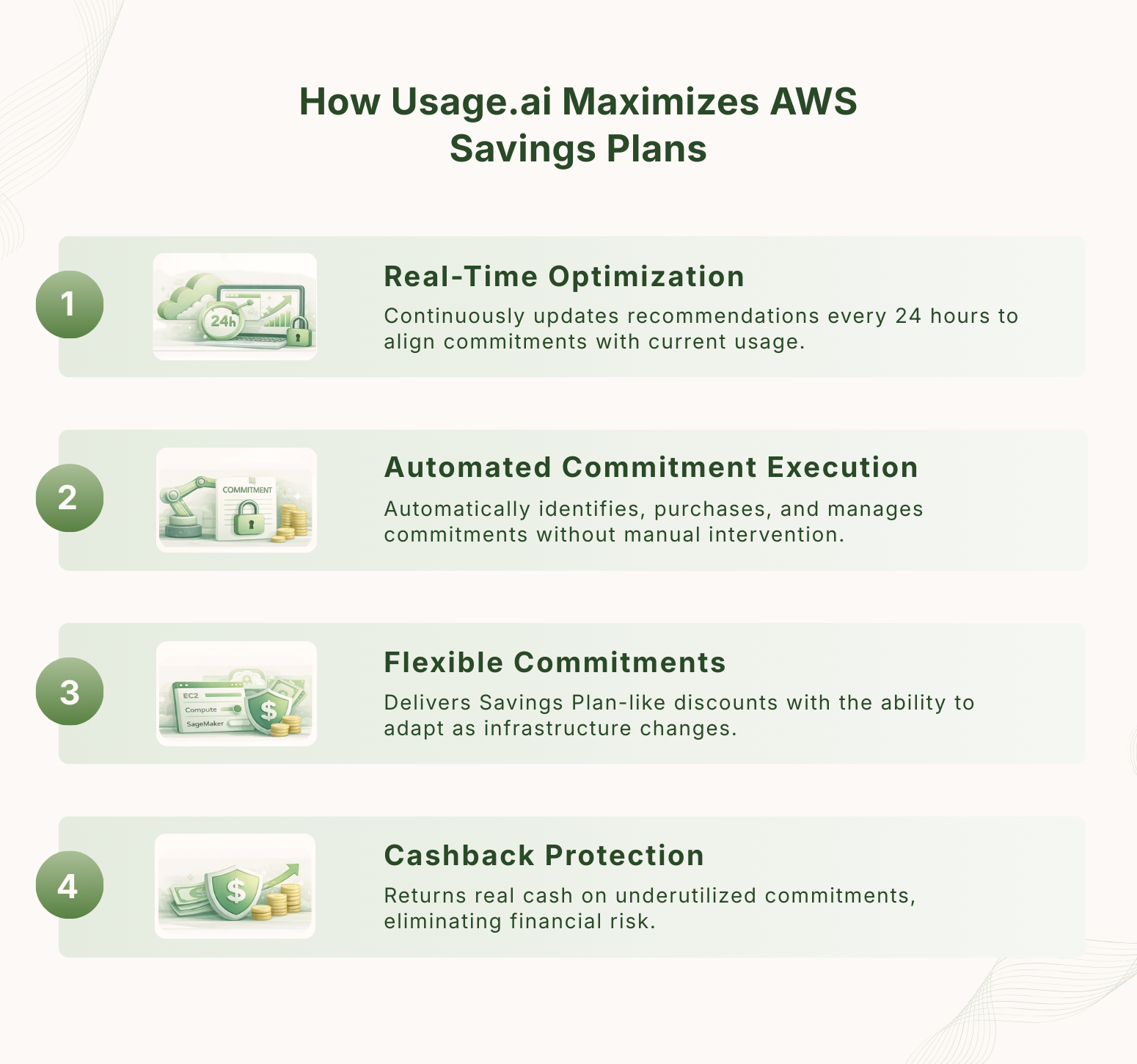
Traditional AWS Savings Plans force teams into a tradeoff between maximizing discounts and minimizing risk. Usage.ai removes this tradeoff by transforming Savings Plans from a static financial commitment into a continuously optimized, risk-managed system.
This is achieved through four core capabilities.
1. 24-Hour Recommendation Refresh for Real-Time Optimization
Unlike AWS-native tools that rely on delayed historical snapshots, Usage.ai continuously updates its recommendations with a 24-hour refresh cycle.
This higher-frequency data model allows the platform to detect shifts in usage patterns earlier and adjust commitment strategies accordingly. In environments where infrastructure changes frequently, this reduces the lag between signal and decision, improving both timing and accuracy.
2. Automated Commitment Discovery and Execution
Usage.ai eliminates the manual workflow required to manage Savings Plans. So, instead of requiring teams to analyze data, interpret recommendations, and manually purchase commitments, the platform automates the full lifecycle, from identifying opportunities to executing purchases.
This ensures that optimization decisions are timely, consistent and free from human bias or delay.
3. Flex Commitments or Savings Without Rigid Lock-In
Usage.ai introduces Flex Commitments, a model that delivers Savings Plan-like discounts without the rigidity of traditional long-term contracts.
This allows teams to:
- increase commitment coverage
- adapt to changing infrastructure
- avoid overexposure to fixed decisions
Flex Commitments function as a more adaptive layer on top of traditional pricing models, aligning better with the dynamic nature of cloud environments.
4. Cashback Protection on Underutilized Commitments
The most significant innovation is cashback-backed protection. If committed capacity is underutilized, Usage.ai returns real cash (not credits) based on predefined terms. This directly addresses the biggest limitation of Savings Plans, the inability to recover value from unused commitments.
This changes the optimization model fundamentally. Instead of optimizing under uncertainty, teams can operate with higher confidence, higher coverage and reduced downside exposure.
By combining continuous optimization with financial protection, Usage.ai enables teams to safely increase their level of commitment.
Best Practices for Maximizing AWS Savings Plans Efficiency
Maximizing AWS Savings Plans efficiency comes down to one objective, i.e., ensuring that committed spend closely matches actual usage over time. Here’s how to do it right.
1. Start with Baseline, Not Total Usage
Commitments should be based on steady-state (baseline) compute usage, not total or peak usage. Most environments include a mix of always-on workloads and variable or bursty workloads.
Only the predictable, continuously running portion should be covered by Savings Plans. Using total usage as the reference point leads to overcommitment and low utilization.
2. Prioritize High Utilization Before Increasing Coverage
The primary driver of realized savings is utilization, not just discount percentage.
Before increasing commitment levels, teams should ensure that existing Savings Plans are consistently well-utilized. Low utilization indicates that commitments are too high relative to actual usage, which reduces effective savings.
3. Increase Coverage Incrementally
Instead of making large upfront commitments, teams should increase coverage in small, controlled increments.
This approach allows:
- validation of usage patterns over time
- adjustment based on new data
- reduced exposure to forecasting errors
Incremental commitment is especially important in environments where usage is still evolving.
4. Choose the Right Plan Type Based on Workload Stability
Different workloads require different levels of flexibility.
- Stable workloads can support more restrictive plans (higher savings)
- Changing workloads require flexible plans (lower risk)
Matching plan type to workload stability improves both utilization and long-term efficiency.
5. Monitor at the Same Granularity as Billing
AWS Savings Plans are applied on an hourly basis, so performance should be evaluated at the same level.
Looking only at daily or monthly averages can hide underutilization caused by short-term drops in usage. Monitoring at hourly granularity provides a more accurate view of how effectively commitments are being used.
Also read: 18 Proven Ways to Cut 30–50% of Your Cloud Bill in 2026
6. Regularly Review Coverage and Utilization
Cloud environments change continuously, so commitment strategies must be reviewed regularly.
Teams should track how much of their usage is covered and how efficiently commitments are being used. Without ongoing review, even well-sized commitments become misaligned as infrastructure evolves.
7. Avoid Overcommitting to Maximize Discount Rates
Higher discounts often require more restrictive or longer-term commitments, but this also increases risk.
A slightly lower discount with consistent utilization will typically deliver better overall savings than a higher discount with unused commitment.
8. Reduce Time Between Insight and Action
Delays in acting on optimization opportunities reduce savings. In many teams, there is a lag between identifying an opportunity, approving a decision and executing a purchase.
Reducing this delay improves alignment between usage and commitments, which directly improves efficiency.
The bottomline: AWS Savings Plans efficiency is driven by how well you maintain alignment between what you commit to and what you actually use, not by how aggressively you commit.
Book a demo with Usage.ai to see how you can increase Savings Plans coverage while eliminating commitment risk.
Frequently Asked Questions
1. What is an AWS Savings Plan?
An AWS Savings Plan is a pricing model where you commit to a fixed hourly spend for 1 or 3 years in exchange for discounted compute rates across services like EC2, Lambda, and Fargate.
2. How do AWS Savings Plans work?
AWS applies discounted pricing to your eligible compute usage up to your committed hourly spend. Any usage above the commitment is billed at on-demand rates, while unused commitment is not carried forward.
3. How much can you save with AWS Savings Plans?
AWS Savings Plans can reduce compute costs by up to 66%, but actual savings depend on utilization, coverage, and how closely your usage matches your committed spend.
4. What happens if you don’t use your Savings Plan?
You still pay for the full committed amount. Any unused portion of your hourly commitment becomes wasted spend, as AWS does not provide refunds or rollover.
5. Can you cancel or modify a Savings Plan?
No, AWS Savings Plans cannot be canceled, reduced, or modified once purchased. You are committed for the full term.
6. Are Savings Plans better than Reserved Instances?
Savings Plans are generally more flexible than Reserved Instances because they apply across services and instance types, but both require long-term commitments and careful management.
7. How do you choose the right Savings Plan?
The right Savings Plan depends on your workload stability, required flexibility, and ability to maintain high utilization. Most teams start with Compute Savings Plans for flexibility and add more restrictive plans for stable workloads.
8. What is Savings Plan coverage?
Coverage refers to the percentage of your eligible compute usage that is covered by Savings Plans. Higher coverage increases potential savings but also increases risk if utilization drops.
9. What is Savings Plan utilization?
Utilization measures how much of your committed spend is actually used. High utilization is critical for maximizing realized savings and avoiding wasted commitment.
10. How often should you adjust your Savings Plans strategy?
Savings Plans should be reviewed continuously as usage changes. Static strategies lead to misalignment over time, reducing efficiency and increasing risk.