

New See exactly what you're overpaying AWS in under 60 seconds. Try the Calculator for free →

AWS Compute and Container Updates: What They Mean for Cost Control

Explore the latest AWS compute and container updates and what they mean for cloud costs, efficiency, and commitment strategies.
Updated August 17, 2026
16 min read
AWS Compute and Container Updates: What They Mean for Cost Control
In this article
Key takeaways
1
New EC2 families set fresh price-performance benchmarks. AWS reports up to 30% higher performance for M8a over M7a and up to 20% higher performance for C8i over C7i. These are AWS "up to" figures, not guarantees.
2
Newer generations can make RIs and SPs tied to older instance types less efficient, so continuous commitment analysis matters.
3
ECS Managed Instances removes infrastructure overhead, but the underlying EC2 capacity still runs on your account and stays eligible for Savings Plans and Reserved Instances.
4
AI and agent services raise consumption. Funding them well depends on tighter cost discipline on baseline compute.
5
Right-size first, then re-cover. Buying a commitment before validating the new family locks in the wrong shape.
New AWS compute (EC2 M8a, C8i/C8i-flex, ECS Managed Instances, Bedrock) improves price-performance, but only if you re-check your Reserved Instances and Savings Plans. Here is what changed and what to do.

The short answer

Treat every new instance family as a trigger to review your commitment portfolio, not just an upgrade. The financial win from M8a or C8i is real only if migrated workloads remain covered at a good rate and stranded commitments are avoided.

Convertible RIs and Compute Savings Plans give you the flexibility to shift across instance families. Standard RIs and EC2 Instance Savings Plans are narrower, so a migration can leave them underused. Model the move before you make it.

New EC2 price-performance standards

Every new generation resets the total cost of ownership (TCO) math for compute. Two families are most relevant to general and compute-optimized fleets.

General purpose: EC2 M8a

Amazon EC2 M8a instances are generally available and run on 5th Generation AMD EPYC processors (formerly code named Turin) at up to 4.5 GHz. AWS reports up to 30% higher performance and up to 19% better price-performance compared with M7a, plus 45% more memory bandwidth. M8a offers 12 sizes including two bare metal sizes and is SAP certified.

Compute optimized: EC2 C8i and C8i-flex
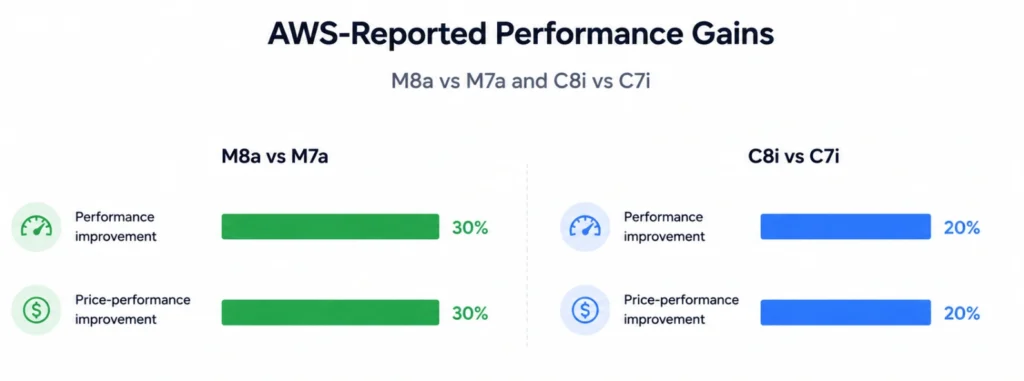
Amazon EC2 C8i and C8i-flex instances are generally available and run on custom Intel Xeon 6 processors available only on AWS. AWS reports up to 15% better price-performance and 2.5x more memory bandwidth versus the previous Intel generation, and up to 20% higher performance than C7i and C7i-flex. C8i-flex is the lower-cost variant for workloads that do not fully use every vCPU.
Chart showing AWS-reported performance and price-performance improvements for EC2 M8a over M7a and C8i over C7i
Family Processor AWS-reported gain vs prior gen Good fit for
M8a 5th Gen AMD EPYC (Turin) Up to 30% performance, 19% price-performance Web and app hosting, microservices, databases
C8i Custom Intel Xeon 6 Up to 20% performance, 15% price-performance Sustained high-CPU, large compute fleets
C8i-flex Custom Intel Xeon 6 Up to 20% performance, 15% price-performance Steady compute that does not peak all vCPUs
The commitment implication is direct. A commitment bought for M7a or C7i does not automatically follow you to M8a or C8i. Review your Reserved Instances and Savings Plans coverage before migrating, and see the EC2 pricing and cost optimization guide for how instance choice flows through to the bill.

Managed containers move the work to the commitment layer

Amazon ECS Managed Instances is a fully managed compute option for Amazon ECS. It provisions and operates EC2 instances in your account, selects cost-optimized instance types by default, consolidates tasks onto fewer instances, and patches on a regular cycle. It reduces operational overhead while keeping access to EC2 capabilities such as GPU acceleration and specific instance types.

For FinOps, the important detail is that the compute still runs as EC2 in your account, so it remains eligible for EC2 pricing options including Savings Plans and Reserved Instances. Managed services abstract the servers, not the commitment decision. If you are weighing container compute models, the EC2 vs Fargate cost comparison is a useful companion.

Security and AI updates worth noting

AWS IAM Identity Center added support for customer-managed KMS keys for encryption at rest, giving regulated teams more control over encryption and compliance.

On the AI side, Amazon Bedrock added agent infrastructure, including Model Context Protocol (MCP) support through Bedrock AgentCore, and Anthropic’s Claude models became available for coding and agent workflows in Bedrock. These services are consumption-based, so their cost scales with usage. The Bedrock vs Vertex AI vs Azure OpenAI cost breakdown explains why AI bills move quickly. Disciplined savings on baseline compute is often what funds this experimentation.

How to re-evaluate commitments when a new family launches

Use this five-step process each time AWS ships a family relevant to your fleet. It maps cleanly to HowTo schema.
  1. Inventory coverage. List active RIs and SPs, their instrument type, term, and current utilization and coverage.
  2. Benchmark for your workload. AWS “up to” figures are a starting point. Test the new family on a representative workload to find your real price-performance ratio.
  3. Model the migration. Check whether existing commitments follow the move. Compute Savings Plans and convertible RIs are flexible across families. EC2 Instance Savings Plans and standard RIs are not.
  4. Right-size, then re-cover. Resize to the new family first, then buy or convert commitments to match the new shape. Buying before validating locks in the wrong footprint.
  5. Review quarterly. New families ship often. Set a recurring check so coverage does not drift.
For the instrument choice in step 3, compare Compute vs EC2 Instance Savings Plans.

Formulas that keep the decision honest

Cost per unit of work
=
Instance hourly rate Relative performance score
Commitment coverage
=
Covered eligible compute hours Total eligible compute hours
A cheaper hourly rate is not a saving if performance drops proportionally, and a high discount rate is wasted if coverage falls after a migration. Track both.
The practical test:
Pick one representative workload. Run it on your current family and the new family for 24 to 48 hours under similar load. Compare cost per transaction or cost per unit of work, not headline hourly price. Decide on the commitment only after the new family proves out on your data.

Commitment re-evaluation checklist

Current RIs and SPs inventoried with utilization and coverage recorded
New family benchmarked on a representative workload, not just vendor figures
Migration impact modeled against existing commitments and their flexibility
Workloads right-sized to the new family before any purchase
Convertible or Compute-level instruments chosen where migration is likely
Stranded or underused commitments identified and addressed
Quarterly review scheduled for future instance-family launches
Disclosure: Instance specifications and performance figures are based on AWS documentation and represent AWS “up to” claims, not guaranteed results. Actual performance and cost depend on the workload, Region, pricing, and configuration.
Evaluate with your own data
See how new EC2 families affect commitment coverage.

Review your Reserved Instances, Savings Plans, coverage, and likely savings before you migrate to M8a or C8i.

Frequently asked questions

What did AWS announce in its late-2025 compute updates?

The main compute releases included the general-purpose EC2 M8a on 5th Gen AMD EPYC, the compute-optimized C8i and C8i-flex on custom Intel Xeon 6, Amazon ECS Managed Instances for containers, IAM Identity Center support for customer-managed KMS keys, and new Amazon Bedrock agent capabilities.

How much better are M8a and C8i instances?

AWS reports up to 30% higher performance and up to 19% better price-performance for M8a over M7a, and up to 20% higher performance with up to 15% better price-performance for C8i over C7i. These are "up to" figures. Benchmark against your own workload before committing.

Do new EC2 instances affect my Reserved Instances and Savings Plans?

Yes. Commitments tied to older families can become less efficient when you migrate. Convertible RIs and Compute Savings Plans move across families more easily than standard RIs and EC2 Instance Savings Plans.

Does ECS Managed Instances change how I buy commitments?

It removes infrastructure management, but the underlying EC2 capacity still runs in your account and remains eligible for Savings Plans and Reserved Instances, so the commitment decision still applies.

Should I move to a new instance family immediately?

Not automatically. Right-size and benchmark first, model the effect on existing commitments, then migrate and re-cover. This avoids stranded commitments and locking in the wrong footprint.

Share
Facebook
X
LinkedIn
Reddit
Cut cloud cost with automation
Latest from our blogs