.png)


Every RDS PostgreSQL read replica is a running database instance. It consumes compute, memory, and storage. It bills at the on-demand rate by default. A fleet of three db.r8g.xlarge read replicas in us-east-1 running at full on-demand costs approximately 3 x $0.478/hr x 730 = $1,047/month in compute alone — before storage, I/O, or backup charges. A 1-year No Upfront Reserved Instance on each of those instances reduces the effective rate by approximately 33%. Three 1-year No Upfront Single-AZ RIs in the same region: approximately $700/month. The difference — $347/month — is $4,164/year recovered by a billing configuration change with zero infrastructure impact. Source: db.r8g.xlarge on-demand rate from AWS official RDS PostgreSQL pricing — verify at aws.amazon.com/rds/postgresql/pricing/ — rates change.
The four-attribute match rule is simple to state and easy to misapply. This guide covers the rule precisely, the PostgreSQL-specific operational considerations that determine whether a replica is a good RI candidate before you buy, the normalization unit strategy for replica fleets, and the cross-region and Multi-AZ DB Cluster cases where most teams leave coverage gaps.
See exactly what you’re overpaying in under 60 seconds. Try the Calculator for free →
The Four-Attribute RI Match Rule for Read Replicas
An RDS Reserved Instance covers a read replica automatically — with no manual configuration — when the following four attributes match exactly between the RI and the running replica instance. Source: AWS official RDS Reserved Instances documentation.
| Attribute | Required Value for Replica Coverage | Common Mistake |
| Database Engine | PostgreSQL — must match exactly | Buying a MySQL RI for a PostgreSQL replica. Engines must match. |
| Instance Family | Same family (e.g., db.r8g, db.r7g). Size can differ with normalization units. | Buying an RI in a different generation (db.r7g vs db.r8g). Generations do not flex across each other. |
| AWS Region | Same region as the replica instance (e.g., us-east-1). | Buying an RI in us-east-1 expecting it to cover a cross-region replica in eu-west-1. Regions are independent. |
| Deployment Type | Single-AZ ONLY. Read replicas are always Single-AZ. | Buying a Multi-AZ RI for a read replica. Multi-AZ RIs never cover read replicas because replicas are always Single-AZ. |
Source: AWS official RDS Reserved Instances documentation (aws.amazon.com/rds/reserved-instances). All four attributes must match for automatic discount application.
The most expensive RI mistake for PostgreSQL replica fleets: buying Multi-AZ RIs expecting to cover read replicas. A Multi-AZ RI covers a Multi-AZ primary instance. Read replicas are always Single-AZ regardless of the primary deployment type. If the primary is Multi-AZ and you create read replicas from it, the replicas are Single-AZ and require Single-AZ RIs — not Multi-AZ RIs.
Also read: RDS Multi-AZ vs Single-AZ: RI coverage mechanics for each deployment type
How PostgreSQL Read Replication Works: The Mechanics That Affect RI Strategy
Unlike MySQL (which uses binlog-based logical replication), RDS PostgreSQL uses PostgreSQL’s native physical streaming replication to maintain read replicas. Understanding the mechanics is necessary for making correct RI decisions — particularly for cross-region replicas and lag management.
WAL Streaming and Physical Replication Slots
RDS PostgreSQL uses Write Ahead Log (WAL) streaming to replicate changes from the primary to each replica. The primary maintains a replication slot for each replica. This slot tracks where each replica is in the WAL stream and retains WAL segments that the replica has not yet consumed. Source: AWS official PostgreSQL read replica configuration documentation (docs.aws.amazon.com/AmazonRDS/latest/UserGuide/USER_PostgreSQL.Replication.ReadReplicas.html).
For same-region replicas, WAL is transferred directly over a secure streaming connection. For cross-region replicas, RDS uses a physical replication slot on the source instance — the slot retains WAL until the cross-region replica has consumed it. If the cross-region replica falls significantly behind, the slot accumulates WAL on the source instance’s storage, increasing Transaction Logs Disk Usage. A severely lagging cross-region replica can cause the source instance’s storage to fill up.
This PostgreSQL-specific risk has a direct bearing on RI purchasing: a cross-region replica with chronic high ReplicaLag is not a good RI candidate until the lag is resolved. Committing to a 1-3 year RI on a replica with an unresolved replication architecture problem locks in cost on an instance that may need to be replaced or resized.
PostgreSQL Read Replica Sizing: Do Not Size Replicas Smaller Than the Primary
AWS re:Post explicitly states: ‘It is a best practice to set your read replicas to match or exceed the primary instance’s specifications. A smaller instance class or different storage type can cause lag.’
The reason: a read replica must process the primary’s entire write workload (replaying WAL records) in addition to serving its own read queries. If the replica is sized smaller than the primary, it has less CPU and memory to process WAL replay under write pressure, causing lag to accumulate. Under high write load on the primary, an undersized replica falls progressively further behind.
The RI implication: teams that size replicas smaller to reduce cost should resolve the sizing first and confirm the correct instance class before purchasing an RI. An RI on an undersized replica locks in the wrong size for 1-3 years. The correct sequence: right-size the replica to match or exceed the primary’s specifications, confirm stable ReplicaLag under load, then purchase the RI on the correctly-sized instance.
CloudWatch Metrics to Monitor Before Reserving PostgreSQL Replicas
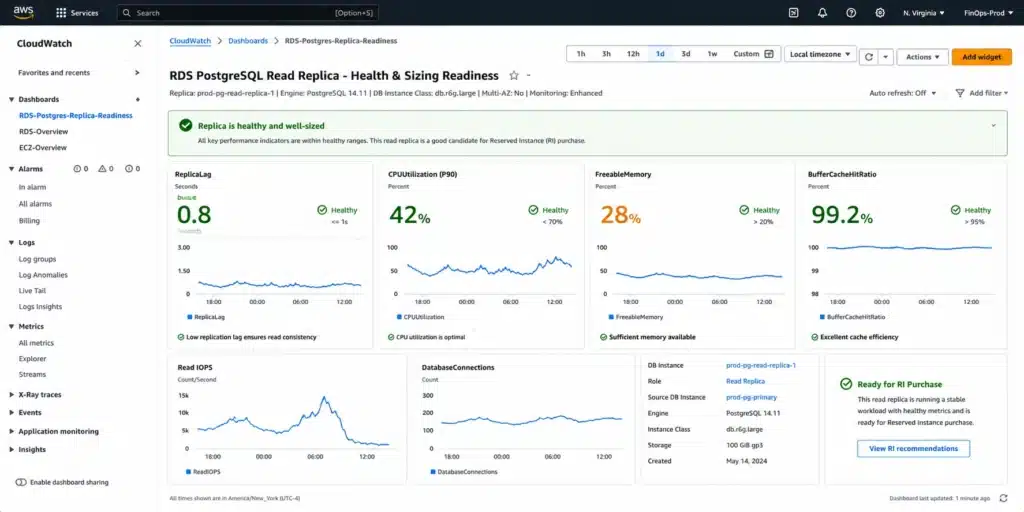
Pull 30 days of the following CloudWatch metrics per read replica before purchasing an RI:
ReplicaLag: measures the lag in seconds between the primary and replica, calculated as SELECT extract(epoch from now() – pg_last_xact_replay_timestamp()) AS reader_lag. Source: AWS official monitoring documentation. A consistently high lag (above 30 seconds for OLTP workloads) signals the replica is undersized or the replication connection is degraded. Do not reserve a lagging replica before addressing the underlying cause.
Oldest Replication Slot Lag: applicable for cross-region replicas using physical replication slots. Shows how far behind the most-lagging replica is in terms of WAL received. A high value means WAL is accumulating on the source.
Transaction Logs Disk Usage: shows how much storage is being used for WAL data retained for cross-region replicas. A steadily increasing value signals a lagging cross-region replica. Source: AWS official.
CPUUtilization (P90): a replica consistently above 80% P90 CPU is over-provisioned for its read query load and may need a larger instance before you lock in an RI at the current size.
FreeableMemory: consistently below 15% of total instance memory signals the replica’s working set is not fitting in the buffer pool — sizing up before reserving is warranted.
BufferCacheHitRatio: below 95% means the replica is reading a significant portion of query data from storage rather than memory. A cache hit ratio this low on a replica usually indicates the instance needs more memory (a larger instance class) or the read queries need index optimization.
Size Flexibility and Normalization Units for PostgreSQL Read Replica Fleets
RDS PostgreSQL supports size flexibility for Reserved Instances, the same as MySQL, MariaDB, and Aurora. Size flexibility means one RI at a specific size within an instance family can partially or fully cover instances at different sizes within the same family, based on normalization units. Source: AWS official RDS Reserved Instances documentation.
Normalization units by size within a family (applies to PostgreSQL, MySQL, MariaDB, Aurora, and Oracle BYOL):
| Instance Size | Normalization Units | Coverage Example (db.r8g family) |
| micro | 0.5 | 2x micro instances covered per 1x small RI |
| small | 1 | Baseline unit |
| medium | 2 | 1x medium covered by 2x small RIs |
| large | 4 | 1x large covered by 4x small RIs or 2x medium RIs |
| xlarge | 8 | 1x xlarge covered by 2x large RIs or 8x small RIs |
| 2xlarge | 16 | 1x 2xlarge covered by 2x xlarge RIs or 4x large RIs |
| 4xlarge | 32 | 1x 4xlarge covered by 2x 2xlarge RIs or 4x xlarge RIs |
Source: AWS official RDS Reserved Instances size flexibility documentation. Normalization units apply within the same instance family only — they do not cross families (db.r8g units cannot apply to db.m8g) or generations (db.r8g units cannot apply to db.r7g).
The Optimal RI Purchasing Strategy for PostgreSQL Replica Fleets
For size-flexible engines including PostgreSQL, the AWS-recommended strategy is to purchase RIs at the smallest size in the target instance family. This gives maximum deployment flexibility because a small-size RI can partially cover any larger instance in the same family, and multiple small RIs can combine to cover one larger instance.
Example: a fleet of 3 db.r8g.xlarge read replicas. Option A: buy 3 db.r8g.xlarge Single-AZ RIs. Each RI exactly covers one replica (8 normalization units each). Total: 24 normalization units, exactly covering 3 xlarge instances. Option B: buy 6 db.r8g.large Single-AZ RIs (4 normalization units each). Total: 24 normalization units, same coverage. If one xlarge replica is later right-sized to a large, the 6 large RIs still cover the new configuration: 2 large replicas + 2 spare large RIs that can cover other instances in the same family.
The practical benefit: buying at large size instead of xlarge gives you a fleet-level coverage buffer. When one replica is resized within the family, the RI pool self-adjusts via normalization units without orphaning a committed reservation. Source: consistent with AWS official size flexibility documentation and Usage.ai live RDS RI guide.
Generation constraint — this breaks size flexibility: normalization units apply within the same instance family and generation only. A db.r8g (Graviton4) RI does NOT cover a db.r7g (Graviton3) instance and vice versa. Mixing generations in your replica fleet requires separate RIs for each generation. Before purchasing RIs for a mixed-generation replica fleet, consolidate to a single generation.
Cross-Region Read Replicas: The RI Coverage Gap
An RI in us-east-1 does not cover a read replica in eu-west-1. Reserved Instances are regional billing instruments. Each region requires its own RI purchase. Source: AWS official RDS Reserved Instances documentation.
Teams with cross-region PostgreSQL read replicas frequently create RIs in the primary region and then discover their cross-region replicas are still billing at on-demand rates. The cross-region replica is visible in the RDS console but the RI attribute match fails on Region — the only qualifying RI is in the wrong region.
Scenario: primary db.r8g.xlarge PostgreSQL in us-east-1 (covered by a 1-year Single-AZ RI). One same-region replica in us-east-1 (covered by a second 1-year Single-AZ RI). One cross-region replica in eu-west-1 (running at on-demand $0.478/hr = $348.94/month). The cross-region replica requires a separate Single-AZ 1-year RI purchased in eu-west-1 — this cannot be done from the us-east-1 RI purchase page. In the RDS console: navigate to Reserved Instances, ensure the Region selector (top right) is set to eu-west-1 before purchasing.
Dollar impact: a single uncovered db.r8g.xlarge cross-region replica at on-demand $0.478/hr = $4,187/year. A 1-year No Upfront Single-AZ RI for db.r8g.xlarge PostgreSQL in eu-west-1 (verify current rate at aws.amazon.com/rds/postgresql/pricing/) saves approximately 33% = approximately $1,382/year. Verify current RI rates at eu-west-1 pricing before purchasing — prices vary by region.
Also read: RDS Reserved Instances: Complete Guide
Multi-AZ DB Cluster vs Standard Multi-AZ: Different RI Requirements
RDS PostgreSQL offers two Multi-AZ deployment options, and they have very different RI requirements. Confusing them is a common — and expensive — RI purchasing error.
Standard Multi-AZ (Single-Standby): 1 Multi-AZ RI
Standard Multi-AZ deploys one writer and one non-readable standby instance in a second Availability Zone. The standby is a passive failover target — it does not serve any read queries. No read replicas are included. To get read scaling, you add explicit read replica instances on top.
RI requirement: one Multi-AZ RI covers the entire standard Multi-AZ deployment (writer + passive standby as a single Multi-AZ billing unit). The passive standby is not a separate billable instance — the Multi-AZ RI is priced at 2x Single-AZ because of the two-instance deployment, but it is one RI purchase. If you add read replicas to a standard Multi-AZ primary, each read replica is a separate Single-AZ instance requiring its own Single-AZ RI. Source: AWS official and Usage.ai live Multi-AZ vs Single-AZ RI guide.
Multi-AZ DB Cluster (Two Readable Standbys): 3 Single-AZ RIs
Multi-AZ DB Cluster is the newer PostgreSQL-specific deployment option (PostgreSQL 13.4+). It deploys one writer and two readable standby instances across three Availability Zones. Unlike the standard Multi-AZ standby, the two readable standbys in a DB Cluster actively serve read queries and appear as separate instances in the RDS console.
RI requirement: a Multi-AZ DB Cluster consists of three separate instances (1 writer + 2 readers). Each is a separate Single-AZ instance from a billing perspective. Covering a full Multi-AZ DB Cluster with RIs requires three Single-AZ RIs for the same engine, instance family, and region. You cannot buy a single ‘DB Cluster RI’ — it does not exist as a product. Source: Usage.ai live RDS RI guide: ‘Requires 3 separate Single-AZ RI purchases to cover all three nodes. MySQL 8.0.28+ and PostgreSQL 13.4+ only.’
You can also create up to 15 additional asynchronous read replicas from a Multi-AZ DB Cluster (since May 2023 announcement). These additional replicas are separate Single-AZ instances requiring their own Single-AZ RIs in the replica region.
| Deployment | Instances | RI Purchases Needed | Reader Traffic |
| Standard Multi-AZ | 1 writer + 1 passive standby | 1 Multi-AZ RI | None from standby — primary only |
| Standard Multi-AZ + 3 same-region replicas | 1 Multi-AZ primary + 3 Single-AZ replicas | 1 Multi-AZ RI + 3 Single-AZ RIs | 3 replicas serve reads |
| Multi-AZ DB Cluster (no extra replicas) | 1 writer + 2 readable standbys (3 total) | 3 Single-AZ RIs | 2 readable standbys serve reads |
| Multi-AZ DB Cluster + 3 extra read replicas | 1 writer + 2 standbys + 3 replicas (6 total) | 6 Single-AZ RIs | 2 standbys + 3 replicas serve reads |
Source: AWS official Multi-AZ deployment documentation, AWS announcement May 2023 (15 read replicas from Multi-AZ DB Cluster), Usage.ai live RDS RI guide. Verify RI purchase requirements at aws.amazon.com/rds/reserved-instances before purchasing.
Also read: RDS Multi-AZ vs Single-AZ: RI Coverage Implications for each Deployment Type
PostgreSQL 11 Extended Support: Upgrade Before Reserving Any Replica
PostgreSQL 11 entered Year 3 Extended Support in March 2026. The Year 3 Extended Support surcharge is $0.200/vCPU-hr. This charge applies on top of the standard instance rate and is NOT reduced by the Reserved Instance discount. Source: Usage.ai live RDS RI complete guide and AWS official RDS pricing page.
The combined cost impact for a PostgreSQL 11 read replica under Extended Support: db.r8g.xlarge (4 vCPUs) standard on-demand $0.478/hr. Year 3 Extended Support surcharge: 4 x $0.200 = $0.800/hr. Combined effective rate: $1.278/hr. Monthly: $932.94. With a 1-year No Upfront RI (approximately 33% off the base rate only, not the surcharge): effective ~$0.320/hr base + $0.800/hr surcharge = $1.120/hr = $817.60/month. The RI discount on the base rate saves $116/month — but the Extended Support surcharge adds $584/month versus a current PostgreSQL version. The surcharge dwarfs the RI savings.
The correct action for any PostgreSQL 11 read replica: upgrade the engine before purchasing an RI. A 3-year RI on a PostgreSQL 11 replica locks in the RI commitment for the full term AND requires paying the Extended Support surcharge for however long the upgrade is delayed. PostgreSQL 11 to PostgreSQL 16 is a supported in-place major version upgrade in RDS. Use Blue/Green Deployments for a production upgrade with minimal downtime.
Also read: RDS MySQL Read Replicas: How They Affect Your RI Strategy
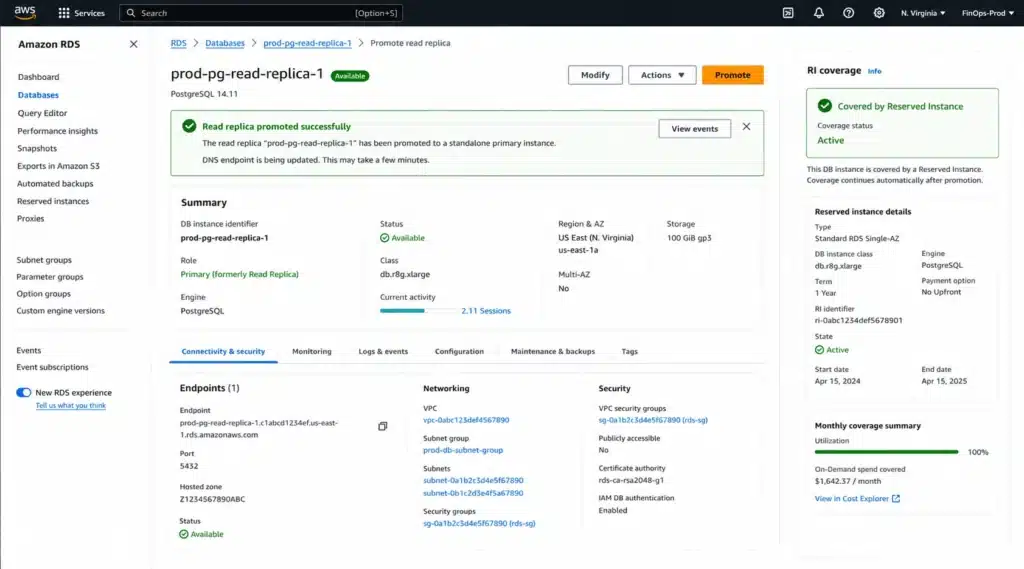
Read Replica Promotion: What Happens to the RI
A PostgreSQL read replica can be promoted to become a standalone primary database instance. After promotion, it is no longer a replica — it becomes an independent single-AZ instance that can accept writes. Source: AWS official PostgreSQL read replica documentation.
The RI coverage after promotion: the promoted instance is still a Single-AZ PostgreSQL instance in the same region with the same instance family. The RI continues to cover it if all four attributes still match. Promotion does not change the instance’s billing attributes from the RI’s perspective. The RI coverage is maintained.
What does change: the promoted instance is now a standalone instance, not a replica. If you had purchased a second RI to cover both the original primary and this replica simultaneously, promoting the replica creates a second standalone instance that both RIs can potentially cover. The RI that was covering the replica now covers the promoted standalone instance.
Edge case: if you promote a read replica and intend to create a new replica to replace it, the new replica requires a new RI (or the existing RI must match the new replica’s attributes). If the new replica is in a different instance family or size than the promoted one, the RI previously covering the promoted replica may not match the new one.
The Complete RI Purchase Checklist for PostgreSQL Read Replica Fleets
Follow this sequence for every PostgreSQL read replica fleet before purchasing Reserved Instances:
Step 1: Audit All Replicas with the AWS CLI
Run the following command to list all RDS instances, including whether they are read replicas:
aws rds describe-db-instances –query ‘DBInstances[*].[DBInstanceIdentifier,DBInstanceClass,MultiAZ,ReadReplicaSourceDBInstanceIdentifier,AvailabilityZone,DBInstanceStatus,EngineVersion]’ –output table
Look for instances with a non-null ReadReplicaSourceDBInstanceIdentifier — these are read replicas. Record the DBInstanceClass, Region (from the console), and EngineVersion for each.
Step 2: Check Engine Version for Extended Support
Any replica running PostgreSQL 11 should be upgraded before purchasing an RI. PostgreSQL 11 is in Year 3 Extended Support at $0.200/vCPU-hr. Upgrade to PostgreSQL 16 (current LTS) using Blue/Green Deployments before committing to a term.
Step 3: Validate Replica Health Before Committing
Pull 30 days of ReplicaLag, CPUUtilization (P90), FreeableMemory, and BufferCacheHitRatio for each replica from CloudWatch. ReplicaLag consistently above 30 seconds: investigate before reserving. CPUUtilization P90 above 80%: consider sizing up before reserving. FreeableMemory below 15% of total: consider sizing up before reserving. BufferCacheHitRatio below 95%: investigate buffer pool sizing before reserving.
Step 4: Identify Cross-Region Replicas and Their Regions
Cross-region replicas require separate RIs in each replica region. A replica in eu-west-1 requires a Single-AZ RI purchased with the Region selector set to eu-west-1. Verify which regions contain replicas and ensure you purchase RIs in each replica region separately.
Step 5: Determine Multi-AZ DB Cluster vs Standard Multi-AZ
Multi-AZ DB Cluster instances (PostgreSQL 13.4+): two readable standbys that each require a Single-AZ RI (3 RIs total for the full cluster). Standard Multi-AZ: one Multi-AZ RI for the primary. Read replicas added on top: one Single-AZ RI each.
Step 6: Choose Instance Size and RI Type
For replicas: purchase Single-AZ RIs only (read replicas are always Single-AZ). For size flexibility: purchase at the smallest size in the target family that does not cause coverage fragmentation. For a fleet of same-size replicas: purchase at the exact replica size for simplicity. For a mixed-size fleet: consider purchasing at large (4 normalization units) to cover both large and xlarge replicas with different counts of the same RI type.
Step 7: Purchase in the Correct Region
In the RDS console, ensure the Region selector (top right corner) matches the region of the replicas you are covering before clicking Purchase Reserved DB Instances. Selecting the wrong region results in an RI that covers nothing in the target region.
Pricing Comparison: On-Demand vs Reserved for PostgreSQL Read Replicas
All rates: US East (N. Virginia), PostgreSQL, Single-AZ, db.r8g family, June 2026. Verify current rates at aws.amazon.com/rds/postgresql/pricing/ — rates change.
| Configuration | On-Demand/hr | 1-yr No Upfront RI/hr | Monthly (730 hrs) | Annual Saving vs On-Demand |
| db.r8g.large (Single-AZ) | ~$0.239 | ~$0.160 | On-dem: $174 | RI: $117 | ~$684/yr per instance |
| db.r8g.xlarge (Single-AZ) | ~$0.478 | ~$0.320 | On-dem: $349 | RI: $234 | ~$1,380/yr per instance |
| db.r8g.2xlarge (Single-AZ) | ~$0.956 | ~$0.640 | On-dem: $698 | RI: $467 | ~$2,772/yr per instance |
| 3x db.r8g.xlarge replicas | ~$1.434 combined | ~$0.960 combined | On-dem: $1,047 | RI: $701 | ~$4,152/yr for 3-replica fleet |
Rates approximate. Source: Usage.ai live RDS RI guide citing verified AWS official rates. 1-year No Upfront RI discount approximately 33% for PostgreSQL db.r8g Single-AZ. Verify exact current rates at aws.amazon.com/rds/postgresql/pricing/ before purchasing — rates change.
How Usage.ai Handles PostgreSQL Read Replica RI Coverage
Usage.ai analyzes the full RDS PostgreSQL instance fleet — primaries and read replicas identified separately — with the same 24-hour utilization refresh cycle. The platform identifies read replica instances by examining the ReadReplicaSourceDBInstanceIdentifier attribute from the AWS API, classifies them as Single-AZ, and includes them in the RI recommendation and purchase workflow.
For cross-region replicas, Usage.ai identifies the replica region from the AWS API and generates separate RI recommendations for each region. If a replica in eu-west-1 is running at on-demand rates while an RI purchased in us-east-1 was intended to cover it, the region mismatch is flagged explicitly with the exact monthly cost of the gap. The 24-hour refresh cycle means this flag surfaces quickly rather than sitting undetected through multiple monthly billing cycles.
For PostgreSQL 11 replicas: Usage.ai surfaces the Extended Support surcharge calculation and flags them as requiring engine upgrade before RI purchase. A replica running PostgreSQL 11 is excluded from RI recommendations until the engine version is confirmed upgraded.
For Multi-AZ DB Cluster configurations: Usage.ai identifies the three-node structure and generates three Single-AZ RI recommendations (one per node) rather than a single Multi-AZ RI recommendation. Teams that manually review the RDS console often see ‘Multi-AZ’ in the deployment type and incorrectly purchase one Multi-AZ RI — Usage.ai’s per-instance classification prevents this error.
Usage.ai Insured Flex Reserved Instances carry a buyback guarantee: if a read replica is decommissioned, promoted to standalone, or the fleet is restructured before the RI term expires, the underutilized commitment is bought back and the value returned as cashback in real money. Fee: percentage of realized savings only.
See how Usage.ai identifies PostgreSQL read replica RI coverage gaps across your full RDS fleet.
Start your free PostgreSQL RI coverage analysis with Usage.ai
Frequently Asked Questions
1. Can Reserved Instances be applied to RDS PostgreSQL read replicas?
Yes. An RDS Reserved Instance covers a PostgreSQL read replica automatically when four attributes match: database engine (PostgreSQL), instance family (same family and generation), AWS Region (same region as the replica), and deployment type (Single-AZ — read replicas are always Single-AZ). No manual configuration is needed. The AWS billing system detects the attribute match and applies the discounted rate. Source: AWS official RDS Reserved Instances documentation.
2. Do I need a Multi-AZ RI for read replicas?
No. Read replicas are always Single-AZ regardless of whether the primary instance is Multi-AZ. A Multi-AZ RI will not cover a read replica because the deployment type (Multi-AZ) does not match the replica’s deployment type (Single-AZ). Always purchase Single-AZ RIs for read replicas. Source: AWS official RDS Reserved Instances documentation.
3. Does an RI in us-east-1 cover a cross-region read replica in eu-west-1?
No. Reserved Instances are regional billing instruments. An RI in us-east-1 only covers instances in us-east-1. A cross-region read replica in eu-west-1 requires a separate Single-AZ RI purchased in eu-west-1. In the RDS console, set the Region selector to eu-west-1 before purchasing the RI for the cross-region replica. Source: AWS official RDS Reserved Instances documentation and Usage.ai live RDS RI guide.
4. How many RIs do I need for a Multi-AZ DB Cluster?
A Multi-AZ DB Cluster (PostgreSQL 13.4+) has three instances: one writer and two readable standbys. Each is a separate Single-AZ instance requiring its own Single-AZ RI. To cover a full Multi-AZ DB Cluster, purchase three Single-AZ RIs with matching attributes. This differs from standard Multi-AZ (one writer + one passive standby), which requires one Multi-AZ RI for the entire deployment. Source: Usage.ai live RDS RI guide and AWS official Multi-AZ DB Cluster documentation.
5. Should I size read replicas the same as the primary before reserving?
Yes. AWS re:Post explicitly recommends that read replicas match or exceed the primary instance’s specifications. Undersized replicas accumulate ReplicaLag under write pressure because they must replay the primary’s entire WAL while also serving read queries. Right-size replicas to at least match the primary’s instance class, confirm stable ReplicaLag over 30 days, then purchase the RI on the correctly-sized instance. Reserving an undersized replica locks in the wrong size for 1-3 years. Source: AWS re:Post knowledge center, February 2026.
6. How does size flexibility apply to PostgreSQL read replica RIs?
RDS PostgreSQL supports size flexibility via normalization units. One RI at a smaller size covers a proportional fraction of a larger instance in the same family. A large-size RI (4 normalization units) can cover two medium-size replicas (2 units each) or half of one xlarge replica (8 units). For a mixed-size replica fleet, purchasing at the large size maximizes flexibility: when replicas are resized within the family, the RI pool adjusts automatically via normalization. Normalization does not cross instance families or generations.
7. Does PostgreSQL 11 Extended Support affect RI strategy?
Yes, significantly. PostgreSQL 11 is in Year 3 Extended Support since March 2026 at $0.200/vCPU-hr surcharge. This surcharge applies on top of the RI rate and is not reduced by the RI discount. Upgrade to a supported PostgreSQL version before purchasing any RI for PostgreSQL 11 replicas. Reserving a PostgreSQL 11 replica locks in the commitment for 1-3 years while continuing to pay $0.200/vCPU-hr on top of the RI rate.