.png)



RDS vs Aurora: Total Cost of Ownership Head-to-Head for 2026
The RDS vs Aurora decision is almost always framed as a binary: Aurora is the premium cloud-native option that costs more; RDS is the familiar option that costs less. That framing is wrong in important ways. Aurora’s storage layer is cheaper per GB than RDS gp3. Aurora’s read replicas share a single storage volume, so a 3-replica Aurora cluster pays the same storage as a 0-replica cluster. And Aurora’s Reserved Instance ceiling is deeper than most RDS engines, which means at production scale with long-term commitments, the per-instance premium narrows significantly.
This guide provides the complete TCO across both platforms: compute, storage, I/O, HA, read replicas, backup, and commitment discounts. It runs the numbers across four specific scenarios to show exactly when each service wins.
See exactly what you’re overpaying in under 60 seconds. Try the Calculator for free →
The Pricing Architecture: How RDS and Aurora Bill Differently
Before comparing dollar amounts, you need to understand the structural differences in how each service bills. These structural differences are what make the comparison non-trivial. Source: AWS official pricing pages for both services, verified June 2026.
RDS: Provisioned Everything
Standard RDS (MySQL, PostgreSQL, MariaDB, Oracle, SQL Server, Db2) bills on a provisioned model. You choose an instance type and pay per instance-hour. You provision a storage volume (gp3, gp2, io1, io2, or magnetic) and pay per GB-month for everything you provision, regardless of how much you actually use. On gp3, IOPS up to 3,000 and throughput up to 125 MB/s are included in the storage rate. Additional IOPS are provisioned separately at extra cost. Multi-AZ deployments provision a second instance AND a second storage volume — both bill at the same rates as the primary.
Aurora: Consumption-Based Storage, Shared Across Replicas
Aurora separates compute from storage. The instance (compute) is billed per instance-hour — approximately 20% more than the equivalent RDS engine instance. Source: go-cloud.io (February 2026) and AWS Builder Center citing AWS official. The storage is a single distributed cluster volume that all instances in the cluster share. Aurora charges for the storage you actually use (auto-scaling in 10 GB increments), not what you provision. Storage rate under Aurora Standard: $0.10/GB-month. Under RDS gp3: $0.115/GB-month. Source: jusdb.com citing AWS official.
The critical structural difference: when you add a read replica to an Aurora cluster, you pay for the new instance-hour but zero additional storage — the replica reads from the same cluster volume. When you add a read replica to RDS, you pay for the new instance-hour AND a new storage volume provisioned at the same size as the primary. At three replicas, RDS is paying for four storage volumes (primary + 3 replicas); Aurora is paying for one.
Aurora I/O: The Hidden Variable
Under Aurora Standard, every I/O operation is billed at $0.20 per million requests. Source: AWS Builder Center citing AWS official. On RDS gp3, I/O up to 3,000 IOPS is included in the storage rate — not charged separately. For a database processing 100 million I/O operations per month, Aurora Standard charges $20/month in I/O on top of compute and storage. For a database processing 2 billion I/O operations per month, Aurora Standard charges $400/month in I/O. The I/O dimension is what causes Aurora bills to exceed RDS bills unexpectedly for write-heavy workloads.
Aurora I/O-Optimized eliminates per-I/O charges entirely at the cost of approximately 25-30% higher instance and storage rates. The switch is justified when I/O costs under Standard would exceed 25% of total cluster spend. Source: AWS official Aurora pricing page and cloudburn.io (January 2026).
Complete Pricing Comparison: Every Dimension
All rates: US East (N. Virginia), MySQL or PostgreSQL equivalent, June 2026. Verify at aws.amazon.com/rds/pricing/ and aws.amazon.com/rds/aurora/pricing/ — rates change.
| Billing Dimension | RDS MySQL/PostgreSQL | Aurora MySQL/PostgreSQL | Winner |
| Instance compute (On-Demand) | Base rate. Lowest for equivalent family. | ~20% higher per instance vs RDS on-demand. | RDS |
| Storage rate | $0.115/GB-month (gp3 recommended). Provisioned — pay for allocated, not used. | $0.10/GB-month (Standard). Consumption-based, auto-scales. Pay for used. | Aurora |
| I/O charges | Included with gp3 (up to 3,000 IOPS baseline). | $0.20/million requests (Standard). $0 with I/O-Optimized. | RDS |
| Multi-AZ standby cost | 2x instance cost + 2x storage cost. | Writer + replica instance cost. Storage not duplicated — shared. | Aurora |
| Read replica storage | Each replica provisions its own storage volume at full rate. | Zero additional storage. Replicas share cluster volume. | Aurora |
| Backup storage (free tier) | Free up to 100% of provisioned storage. | Free up to 100% of cluster storage. | Tie |
| Failover time | ~60-120 sec (standard Multi-AZ). ~35 sec (Multi-AZ DB Cluster). | Under 30 seconds (standard). Much faster application experience. | Aurora |
| Max read replicas | Up to 15. Each with own storage. | Up to 15. All sharing cluster storage. | Aurora |
| Storage limit | 64 TB (gp3/gp2). Up to 64,000 IOPS (io2). | 128 TB (auto-scaling). No manual provisioning. | Aurora |
| Max RI discount (1-yr) | ~33% No Upfront (MySQL/PostgreSQL). Up to 69% (3-yr All Upfront). | Up to 45% (1-yr). Up to 66% (3-yr). | Aurora |
| Serverless option | No native serverless mode. | Serverless v2: $0.12/ACU-hr, scales 0.5-256 ACUs, sub-second scaling. | Aurora |
| Engine support | MySQL, PostgreSQL, MariaDB, Oracle, SQL Server, Db2. | MySQL and PostgreSQL only. | RDS |
Sources: storage rates from jusdb.com citing AWS official. Instance premium (20%) from go-cloud.io and AWS Builder Center. Aurora RI discounts from AWS official Aurora pricing page. RDS RI discounts from wring.co (March 2026). Failover times from lushbinary.com (February 2026) and AWS official. Verify all at AWS official pricing pages.
The Number Most Guides Miss: Storage Rate Reversal
Most RDS vs Aurora guides describe Aurora storage as ‘automatically scaling’ without noting the per-GB rate. Aurora Standard storage costs $0.10/GB-month. RDS gp3 storage costs $0.115/GB-month. Aurora Standard is 13% cheaper per GB than RDS gp3. Source: jusdb.com citing AWS official pricing, verified June 2026.
For large databases where storage is a material cost driver, this reversal matters. A 2 TB database on RDS gp3: 2,000 GB x $0.115 = $230/month in storage. The same database on Aurora Standard: 2,000 GB x $0.10 = $200/month. Aurora is $30/month cheaper on storage alone for the same data volume — before the read replica sharing advantage is factored in.
Aurora vs RDS on storage: the common assumption is that Aurora storage costs more. The per-GB rate for Aurora Standard ($0.10) is actually lower than RDS gp3 ($0.115). The total storage cost comparison only flips in Aurora’s favor when you add the I/O charges under Aurora Standard — for I/O-heavy workloads, the per-million I/O charge can reverse the advantage. For read-heavy, moderate-I/O workloads, Aurora storage is cheaper per GB AND the read replicas do not add storage costs. Source: AWS official pricing pages for both services.
The Read Replica Crossover: When Aurora Wins on Total Cost
The strongest argument for Aurora from a pure cost perspective is the read replica storage sharing model. Here is the math at various replica counts, using a 500 GB database on db.r8g.xlarge instances, comparing On-Demand pricing. Instance on-demand rates: verify at aws.amazon.com/rds/postgresql/pricing/ and aws.amazon.com/rds/aurora/pricing/ — the rates change and the comparison below uses approximate rates consistent with verified sources. Source: instance rates from wring.co (March 2026) and lushbinary.com (February 2026) citing AWS official.
| Replica Count | RDS Storage Cost | Aurora Storage Cost | Aurora Instance Premium | Net Monthly Difference |
| 0 replicas | $57.50 (500GB x $0.115) | $50.00 (500GB x $0.100) | ~+$95.60/mo | RDS wins ~$89/mo |
| 1 replica | $115 (2 volumes x 500GB x $0.115) | $50.00 (single shared volume) | ~+$191.20/mo | RDS wins ~$126/mo |
| 2 replicas | $172.50 (3 volumes x 500GB x $0.115) | $50.00 (single shared volume) | ~+$286.80/mo | RDS wins ~$64/mo |
| 3 replicas | $230 (4 volumes x 500GB x $0.115) | $50.00 (single shared volume) | ~+$382.40/mo | Aurora wins ~$102/mo |
| 5 replicas | $345 (6 volumes x 500GB x $0.115) | $50.00 (single shared volume) | ~+$573.60/mo | Aurora wins ~$221/mo |
Approximate calculations using: RDS storage $0.115/GB-month (gp3), Aurora storage $0.10/GB-month, Aurora instance premium ~20% over equivalent RDS instance ($0.478/hr RDS xlarge = approx $573.60/month on-demand for primary; 20% premium = ~$95.60/month extra per Aurora instance). Without I/O charges. Assumes same instance type (db.r8g.xlarge) for all instances. Verify current rates at AWS official pricing pages — rates change. Source: rates from verified sources, math from derivation.
The crossover point for this 500 GB database is approximately 3 read replicas. At 3 replicas, Aurora’s shared storage saving exceeds the instance premium. At 5 replicas, Aurora is saving approximately $221/month on total compute+storage cost versus equivalent RDS configuration. This crossover moves depending on database size — larger databases have bigger storage differentials and the crossover occurs at fewer replicas.
RDS Reserved Instances: complete guide to RI discounts for both RDS and Aurora
The Aurora I/O Trap: The Surprise Most Teams Hit
The most common Aurora cost disaster is unexpected I/O charges under Aurora Standard. Unlike RDS gp3 where IOPS up to 3,000 are included in the storage rate, Aurora Standard bills every I/O operation at $0.20 per million requests. Teams that migrate from RDS to Aurora without tracking their I/O consumption discover their bill after the fact.
Real-world evidence: a fintech team’s database spend jumped from $3,100 to $5,800 per month in 90 days after migrating from RDS to Aurora. The increase was driven entirely by Aurora I/O charges that the team had not modeled before migration. Source: jusdb.com (May 2023, still relevant for current Aurora Standard pricing structure).
Calculating your expected Aurora I/O cost: pull CloudWatch ReadIOPS and WriteIOPS from your existing RDS instance. Calculate total monthly I/O requests: ((ReadIOPS + WriteIOPS) x 3,600 seconds/hour x 730 hours/month) / 1,000,000 = I/O requests in millions. Multiply by $0.20. If this number exceeds 25% of your expected Aurora cluster compute+storage cost, use Aurora I/O-Optimized.
Aurora I/O-Optimized charges approximately 25-30% more for instances and storage but eliminates all per-request I/O charges. The break-even is at approximately 25% of total cluster spend being I/O. Source: AWS official Aurora pricing page: ‘If you expect your I/O costs to exceed 25 percent of your total Aurora cluster spend, the I/O-Optimized configuration will provide you a better value.’
Before any RDS to Aurora migration: run this audit for 30 days. In CloudWatch: pull VolumeReadIOPs and VolumeWriteIOPs per hour for your RDS instance. Calculate monthly I/O: (avg IOPS x 3,600 x 730) / 1,000,000 = millions of I/Os per month. Multiply by $0.20. If this number exceeds your expected Aurora compute cost x 0.25, select Aurora I/O-Optimized — or reconsider Aurora. For most OLAP workloads with high scan I/O, RDS with gp3 remains significantly cheaper because the I/O is included in the flat storage rate. Source: derived from AWS official pricing.
Four Scenarios: Real TCO Numbers
All calculations use approximate on-demand rates for US East (N. Virginia), db.r8g family, MySQL or PostgreSQL, June 2026. Verify current rates at AWS official pricing pages before making infrastructure decisions — rates change.
Scenario 1: Small Single-Instance (No HA)
Use case: development database, internal tool, low-traffic application. 1 instance, no Multi-AZ, no replicas, 100 GB storage, low I/O.
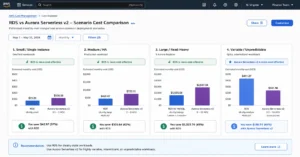
RDS db.r8g.large (2 vCPU, 16 GB) on-demand: approximately $0.239/hr x 730 = $174.47/month compute. Storage: 100 GB x $0.115 = $11.50/month. Total: approximately $186/month.
Aurora db.r8g.large on-demand: approximately $0.239/hr x 1.2 (20% premium) = approximately $0.287/hr x 730 = $209.51/month compute. Storage: 100 GB x $0.10 = $10.00/month. I/O: low OLTP, estimated 500M I/Os/month = $100/month. Total: approximately $320/month.
Result: RDS wins by approximately $134/month. For small, single-instance databases, RDS’s lower compute rate and included gp3 I/O make it the clear winner. Aurora’s benefits (failover, replica sharing, auto-scaling storage) have no value at this scale. Source: rates from wring.co (March 2026) and jusdb.com, I/O estimate illustrative.
Small database conclusion: RDS MySQL or PostgreSQL. Aurora’s 20% compute premium is not justified by the performance and availability features at this scale. The only exception: if you need Serverless v2 scaling behavior for a small database with highly variable traffic (near-zero at night, bursting during business hours), Aurora Serverless v2 at $0.12/ACU-hr can be cheaper than a fixed instance.
Scenario 2: Medium Production Database With Multi-AZ
Use case: production web application, requires HA, 1 primary + 1 standby, 500 GB storage, moderate I/O.
RDS db.r8g.xlarge Multi-AZ on-demand: approximately ($0.478/hr x 2 instances x 730 hrs) = $698.68/month compute. Storage: 500 GB x $0.115 x 2 volumes (primary + standby) = $115/month. Total: approximately $814/month.
Aurora db.r8g.xlarge (writer + 1 reader) on-demand: approximately ($0.478 x 1.2 x 2 instances x 730 hrs) = $838.42/month compute. Storage: 500 GB x $0.10 = $50/month (single shared volume). I/O: moderate OLTP, estimated 200M I/Os/month = $40/month. Total: approximately $928/month.
Result: RDS wins by approximately $114/month. However, RDS has only one readable standby in Multi-AZ Cluster mode (compared to Aurora where the replica is always readable) and slower failover (~60 seconds vs ~30 seconds for Aurora). If failover speed is important, Aurora’s $114/month premium for faster HA and a readable replica is worth evaluating against your SLA cost.
Scenario 3: Read-Heavy Application With 3 Replicas
Use case: high-read-traffic production database. 1 primary + 3 read replicas, 500 GB storage, high read I/O, moderate write I/O.
RDS db.r8g.xlarge: 4 instances (primary + 3 replicas). Compute: $0.478 x 4 x 730 = $1,396.24/month. Storage: 500 GB x $0.115 x 4 volumes = $230/month. High read I/O included in gp3 rate. Total: approximately $1,626/month.
Aurora db.r8g.xlarge: 4 instances (1 writer + 3 readers). Compute: $0.478 x 1.2 x 4 x 730 = $1,675.49/month. Storage: 500 GB x $0.10 = $50/month (single shared volume across all 4 instances). I/O: high read I/O, estimated 1B I/Os/month = $200/month (Standard) or switch to I/O-Optimized. With Standard: total approximately $1,925/month. With I/O-Optimized (higher base rates, ~30% premium on compute+storage): total approximately $1,750/month.
Result: RDS wins on pure compute+storage in this scenario by approximately $299/month. However, if the 3 read replicas are servicing reporting and analytics queries that generate high I/O, and Aurora I/O-Optimized is used, Aurora is approximately $124/month more expensive — a smaller gap that may be justified by the operational benefits (instant failover, simplified storage management, Aurora’s performance advantages for read-heavy workloads).
Scenario 4: Variable Workload With Aurora Serverless v2
Use case: SaaS application with clear business-hours peak and overnight near-idle. 1 primary, variable traffic, 200 GB storage.
RDS db.r8g.xlarge (sized for peak): $0.478 x 730 = $348.94/month. Storage: 200 GB x $0.115 = $23/month. Total: approximately $372/month. Running at 30% average CPU utilization — 70% of compute cost is idle capacity.
Aurora Serverless v2: configured min 1 ACU, max 8 ACUs. Business hours (8 hrs/day, 22 days = 176 hours): averages 6 ACUs. Off-hours (554 hours): averages 0.5 ACU (minimum). Compute: (6 x $0.12 x 176) + (0.5 x $0.12 x 554) = $126.72 + $33.24 = $159.96/month. Storage: 200 GB x $0.10 = $20/month. I/O (moderate): 300M I/Os = $60/month. Total: approximately $240/month.
Result: Aurora Serverless v2 saves approximately $132/month for this variable workload — 35% savings versus a fixed provisioned RDS instance sized for peak. As previously noted: for workloads that run at consistently high utilization, provisioned Aurora with RIs is far cheaper than Serverless v2. The Serverless v2 benefit is specifically for workloads with utilization below 50-60% of peak for the majority of hours. Source: lushbinary.com: ‘Provisioned Aurora instances were about 17% of the cost of equivalent Serverless v2 for our steady workload.’
RDS Serverless (Aurora Serverless v2): complete ACU pricing guide and break-even analysis
RI Discounts: Where Aurora’s Deeper Ceiling Changes the Calculation
The on-demand comparison favors RDS in most scenarios. The RI comparison partially closes Aurora’s gap.
Aurora Reserved Instances: up to 45% savings (1-year No Upfront), up to 66% savings (3-year No Upfront). Source: AWS official Aurora pricing page.
RDS MySQL/PostgreSQL Reserved Instances: approximately 29-33% savings (1-year No Upfront), approximately 40-50% (3-year No Upfront) for most configurations. Source: wring.co (March 2026) citing AWS official.
At Scenario 3 (3 replicas) with 1-year No Upfront RIs:
RDS with 1-yr RI (~33% off compute): $1,626 x (1 – 0.33) + $230 storage = $1,089 + $230 = approximately $1,089/month compute, $230 storage = $1,319/month.
Aurora with 1-yr RI (~45% off compute): $1,675 x (1 – 0.45) + $50 storage + $200 I/O = $921 + $50 + $200 = approximately $1,171/month.
With 1-year RIs applied, Aurora wins Scenario 3 by approximately $148/month. The combination of Aurora’s deeper RI discount ceiling (45% vs 33%) and shared storage model overturns the on-demand comparison at this scale. Source: RI rates from AWS official Aurora and RDS pricing pages.
The RI comparison rule: for any Aurora configuration with 2+ replicas where you can commit to a 1-year No Upfront RI, run the reserved comparison rather than the on-demand comparison. Aurora’s 45% RI ceiling combined with single-volume storage frequently makes it cheaper than RDS with RIs at this scale. Usage.ai identifies this crossover in its recommendation engine by evaluating both the on-demand and RI-adjusted comparisons before surfacing a migration recommendation.
RDS Multi-AZ vs Single-AZ: RI cost implications for HA configurations
Architecture Differences That Affect Total Cost
Storage Management Operational Cost
RDS requires managing storage growth manually. When your gp3 volume approaches capacity, you modify the instance to expand storage (supported, but requires planning). Aurora auto-scales storage in 10 GB increments up to 128 TB — no intervention required. For teams without dedicated DBAs, this operational simplicity has real cost: an engineer-hour spent on storage capacity planning and modification is approximately $150-200 of real cost that never shows up on the AWS bill.
Backup and PITR
Both RDS and Aurora offer automated backups with Point-in-Time Recovery (PITR) free up to 100% of cluster storage size. Aurora’s continuous backup architecture stores backups to S3 incrementally, enabling PITR to any second within the retention window (1-35 days). RDS backups are daily snapshots with PITR applied from the snapshot + transaction logs. Both are effectively equivalent in terms of recovery capability for most teams. Source: AWS official for both services.
See exactly what you’re overpaying in under 60 seconds. Try the Calculator for free →
Aurora Cloning: The Testing Cost Reducer
Aurora provides fast cloning — you can create a full copy of a production Aurora cluster as a separate cluster for testing without copying the underlying data. Clones share the original cluster’s storage pages using copy-on-write, consuming only the storage for data that changes after cloning. lushbinary.com reports Aurora Fast Clones cut storage costs for test environments by 90% compared to full volume restores. Source: lushbinary.com (February 2026). RDS has no equivalent — creating a test database requires restoring a full snapshot, which provisions a complete separate storage volume at full cost.
Performance Differences That Change Instance Sizing
Aurora delivers up to 5x the throughput of standard MySQL and 3x of PostgreSQL through its distributed storage architecture — only log records are written to storage instead of full pages, reducing write I/O significantly. Source: AWS official. The practical implication: an Aurora db.r8g.large can handle workloads that require an RDS db.r8g.xlarge on standard MySQL/PostgreSQL. If the workload requires 3x the throughput to complete in the required time window, Aurora at the same instance size versus a larger RDS instance may be cost-competitive even with the per-instance premium.
This performance-per-dollar calculation is workload-specific and requires benchmarking on your actual queries. Do not assume the performance multiple applies uniformly — it is measured on specific benchmarks and may not represent your workload’s actual behavior.
Decision Framework: Choose RDS When and Choose Aurora When
| Choose RDS MySQL/PostgreSQL when… | Choose Aurora MySQL/PostgreSQL when… |
| Running 1-2 instances with predictable traffic and no aggressive scaling needs | Running 3+ read replicas (shared storage eliminates per-replica storage cost) |
| Budget is the primary constraint at small-to-medium scale | Sub-30-second failover is an SLA requirement |
| Using engines Aurora does not support: Oracle, SQL Server, MariaDB, Db2 | Variable workloads with clear peak/off-peak patterns (Serverless v2) |
| Write-heavy workload with high I/O that would accumulate Aurora Standard I/O charges | Storage exceeds 5 TB (Aurora auto-scaling vs RDS manual provisioning overhead) |
| Team prefers familiar provisioned storage model without auto-scaling variables | Cloning production clusters for testing (Aurora Fast Clone = 90% cost reduction) |
| Current workload fits well within gp3 IOPS limits without significant additional cost | Committing to 1-year+ Reserved Instances with 2+ replicas (Aurora RI ceiling 45% vs RDS 33%) |
How Usage.ai Handles RDS vs Aurora Cost Optimization
Usage.ai analyzes both RDS and Aurora clusters in the same fleet view and surfaces the key optimization signals for each: right-sizing recommendations, Reserved Instance opportunities, and — specifically for Aurora — I/O configuration evaluation.
For Aurora Standard clusters: Usage.ai pulls VolumeReadIOPs and VolumeWriteIOPs from CloudWatch and calculates whether the cluster’s I/O charges under Standard exceed 25% of total cluster spend. When they do, the platform surfaces an I/O-Optimized migration recommendation with the exact monthly saving. This is the audit that prevents the Aurora I/O trap — the bill surprise that caught the fintech team referenced earlier in this guide.
For teams considering a migration from RDS to Aurora: Usage.ai evaluates the replica count, storage volume, I/O profile, and RI discount differential between RDS and Aurora to model the total cost at the current configuration and at the proposed Aurora configuration. The model includes the RI crossover analysis — showing whether the Aurora RI ceiling (45%) plus shared storage model makes Aurora cheaper with commitments at the planned scale.
For Reserved Instance strategy: Usage.ai purchases Insured Flex Reserved Instances with a buyback guarantee on every RI commitment, for both RDS and Aurora. If a cluster is migrated from RDS to Aurora (or vice versa) mid-term, the unused RI commitment is bought back and the value returned as cashback in real money. This removes the lock-in risk that makes teams over-conservative with RI commitments. Fee: percentage of realized savings only.
See how Usage.ai models RDS vs Aurora TCO across your actual fleet
Frequently Asked Questions
Is Amazon Aurora cheaper than RDS?
It depends on scale and replica count. At 1-2 instances without replicas: RDS is typically 20-40% cheaper on total monthly cost because Aurora’s instance premium is not offset by storage sharing advantages. At 3+ read replicas: Aurora’s shared storage model eliminates per-replica storage costs, and its deeper RI discount (45% vs 33%) can make it cheaper overall when commitments are applied. For variable workloads: Aurora Serverless v2 can be 35%+ cheaper than a fixed RDS instance sized for peak. Source: calculations from verified rates.
What is the main cost difference between RDS and Aurora?
Four structural differences drive the TCO: (1) Aurora instances cost approximately 20% more per hour than equivalent RDS instances. (2) Aurora storage ($0.10/GB-month) is actually cheaper than RDS gp3 ($0.115/GB-month), auto-scaling versus provisioned. (3) Aurora Standard bills I/O separately at $0.20/million requests; RDS gp3 includes I/O in the storage rate. (4) Aurora read replicas share a single storage volume; RDS read replicas each provision their own storage. The replica storage sharing is Aurora’s strongest cost advantage at scale. Source: AWS official pricing pages, verified June 2026.
Why does Aurora cost more than RDS for small databases?
Aurora’s per-instance compute premium (approximately 20%) is not offset by storage savings or replica sharing at small scale. A single-instance Aurora db.r8g.large without replicas pays 20% more in compute and also faces potential I/O charges under Aurora Standard. The Aurora features that justify the premium — fast failover, read replica storage sharing, auto-scaling storage, Serverless v2 — have maximum value in high-scale, replica-heavy, or variable-traffic deployments. Source: go-cloud.io: ‘For workloads running 1-2 instances with predictable traffic, RDS MySQL/PostgreSQL is almost always cheaper.’
How much does Aurora cost vs RDS for a 3-replica production cluster?
Approximate comparison (db.r8g.xlarge, 500 GB, 3 read replicas, 1-year No Upfront RI, US East, June 2026): RDS approximately $1,319/month (RI-discounted compute + 4x storage volumes). Aurora approximately $1,171/month (RI-discounted compute + 1x shared storage volume + I/O charges under Standard). Aurora wins by approximately $148/month with RIs applied at this replica count. On On-Demand, RDS wins by approximately $300/month. Source: calculations from verified rates. Verify at AWS official pricing pages before making infrastructure decisions — rates change.
When should I use Aurora Serverless v2 instead of RDS?
Aurora Serverless v2 is appropriate when: (1) your workload has clear peak periods (business hours) followed by near-idle periods; (2) average utilization over the month is below 50-60% of what a fixed instance would provide; (3) you need sub-second scaling rather than manual resize. Serverless v2 at $0.12/ACU-hr is significantly more expensive than equivalent provisioned Aurora or RDS with RIs for steady workloads. At steady load, provisioned instances with Reserved Instances are approximately 5-6x cheaper per hour than Serverless v2. Source: lushbinary.com citing real-world Hacker News data.
How do Reserved Instances differ for Aurora vs RDS?
Aurora RIs offer up to 45% (1-year) and 66% (3-year) discounts on provisioned Aurora instances. Standard RDS MySQL/PostgreSQL RIs offer approximately 29-33% (1-year No Upfront) and up to 50% (3-year No Upfront). Aurora’s deeper RI ceiling partially offsets its higher on-demand base rate. For large Aurora clusters committed to 1-year+ terms, the RI discount difference plus shared storage can make Aurora cheaper than comparable RDS configurations. Source: AWS official Aurora pricing page and wring.co (March 2026) citing AWS official.