.png)



GPU compute is now the single largest uncontrolled line item on cloud bills for any team running AI or ML workloads. A p4d.24xlarge on AWS (8x A100) costs approximately $32.77 per hour on-demand — $23,925 per month if left running continuously. An H100 instance on AWS runs approximately $98.32 per hour. Most teams are paying these rates for workloads that run at 20-40% GPU utilization on average, on instances sized for peak experiments rather than real workload floors.
The commitment optimization playbook is not complicated, but it has five distinct layers and most guides cover only two or three of them. The layer with the highest sustained dollar impact (commitment purchasing) is almost entirely absent from every competing resource on this topic, because it involves lock-in risk that teams historically could not manage. That has changed.
This guide covers all five layers with real pricing data across AWS, GCP, and Azure, a direct cross-cloud cost comparison, and a framework for capturing commitment-level discounts without accepting multi-year lock-in on hardware that may be obsolete before the term expires.
What is GPU Cost Optimization?
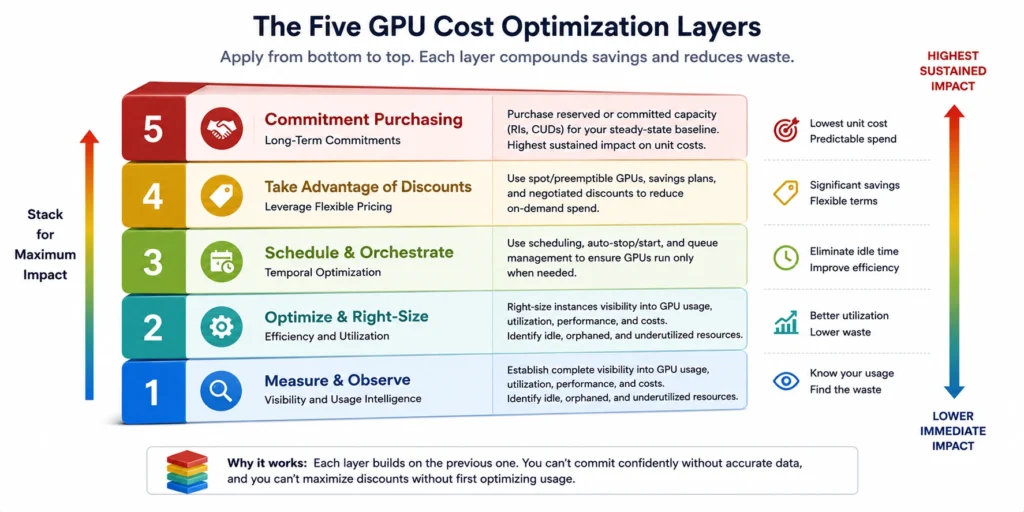
GPU cost optimization is the practice of reducing the per-unit cost of GPU compute for AI and ML workloads without sacrificing throughput, latency, or model quality. It operates across five distinct layers, and most teams only work one or two of them.
The five layers, in order of implementation complexity:
- Right-sizing — matching instance type and GPU count to actual workload requirements
- Spot/preemptible instances — using discounted interruptible capacity for fault-tolerant jobs
- Model optimization — reducing GPU memory and compute requirements through quantization, pruning, and batching
- GPU sharing — dividing a single physical GPU across multiple workloads using time-slicing or MIG
- Commitment purchasing — locking in discounts via Savings Plans (AWS), Committed Use Discounts (GCP), or Reserved Instances (Azure) for predictable, sustained workloads
Most articles stop at layers one through four. Layer five is where the largest sustained savings live for any team running GPU workloads at scale, and it is the layer most FinOps teams skip because it traditionally required accepting multi-year lock-in on hardware that could be obsolete in 18 months.
Why GPU Bills Are So Hard to Control
Before getting into tactics, it helps to understand why GPU costs compound so aggressively.
GPU instances are the most expensive EC2/GCE/Azure VM types by a significant margin. A single p5.48xlarge on AWS (8x H100) runs approximately $98.32 per hour on-demand (verify at aws.amazon.com/ec2/pricing — rates change). A p4d.24xlarge (8x A100) runs approximately $32.77 per hour. Left running for a month, a single idle p4d.24xlarge costs approximately $23,925.
Three structural problems drive GPU waste:
Idle time is invisible and expensive. A GPU running at 5% utilization costs exactly the same as one running at 95%. Development workflows are particularly prone to this — a developer spins up an H100 instance for a 20-minute experiment, gets pulled into a meeting, and the instance runs untouched for six hours. At $98 per hour, that meeting costs $588 in wasted GPU time.
Instance sizing is a guess. Most teams spin up the largest GPU instance they think they might need. A 7-billion-parameter model fine-tuning job does not need 8x A100s — a single g5.xlarge (1x A10G) at approximately $1.00 per hour on AWS often handles it. Running a 7B fine-tune on a p4d.24xlarge wastes more than 87% of available GPU capacity.
Commitment risk discourages discounts. AWS 3-year Reserved Instances on P4d/P5 instances save up to 62% (verify at aws.amazon). GCP 3-year CUDs on A2 instances save up to 65% (verify at cloud.google). Most teams never capture these savings because the lock-in risk on GPU hardware, which evolves rapidly feels too high. The result is sustained on-demand pricing for predictable baseline workloads.
| Spending more than $10K/month on GPU instances?
Usage.ai shows you exactly where that spend is uncovered, idle, or overcommitted in 30 minutes, with read-only billing access. |
Layer 1: Right-Sizing GPU Instance Selection
The fastest path to GPU cost reduction is not running fewer workloads — it is running workloads on the right instance for the job.
AWS GPU Instance Families
AWS offers several GPU instance families for AI/ML (all prices approximate for us-east-1 Linux, on-demand; verify at aws.amazon, rates change):
| Instance | GPU | vCPUs | GPU RAM | On-Demand (approx) | Best For |
| g5.xlarge | 1x A10G | 4 | 24 GB | ~$1.006/hr | Single-GPU inference, small fine-tuning |
| g5.12xlarge | 4x A10G | 48 | 96 GB | ~$5.672/hr | Mid-scale inference, 13B model fine-tuning |
| p4d.24xlarge | 8x A100 40GB | 96 | 320 GB | ~$32.77/hr | Large-model training, distributed fine-tuning |
| p5.48xlarge | 8x H100 80GB | 192 | 640 GB | ~$98.32/hr | Foundation model training, 70B+ models |
| Trn1.32xlarge | 16x Trainium | 128 | 512 GB | ~$21.50/hr | Cost-efficient training (Neuron SDK required) |
| Inf2.xlarge | 1x Inferentia2 | 4 | 32 GB | ~$0.758/hr | Inference on supported models (Llama, BERT) |
The practical rule: match GPU count to model memory requirements, not to ambition. A 7B parameter model in FP16 requires approximately 14 GB of GPU memory. A single g5.xlarge (24 GB VRAM) handles it. Running the same job on a p4d.24xlarge wastes over $30 per hour.
GCP GPU Instance Families
GCP structures GPU compute through accelerator-optimized machine families (all prices approximate for us-central1, Linux, on-demand; verify at cloud.google, rates change):
| Instance | GPU | On-Demand (approx) | 1-Year CUD (approx) | 3-Year CUD (approx) |
| a2-highgpu-1g | 1x A100 40GB | ~$3.67/hr (~$2,682/mo) | ~$2.31/hr (save 37%) | ~$1.29/hr (save 65%) |
| a2-highgpu-8g | 8x A100 40GB | ~$26.27/hr | ~$16.55/hr (save 37%) | ~$9.20/hr (save 65%) |
| a3-highgpu-8g | 8x H100 80GB | ~$35.00/hr (approx) | Available via CUD | Available via CUD |
| g2-standard-4 | 1x L4 | ~$0.90/hr | ~$0.83/hr (save 8%) | ~$0.80/hr (save 11%) |
Note: GCP’s CUD discount structure differs sharply between GPU families. A2 instances receive up to 65% on a 3-year CUD. G2 instances (L4 GPU) receive only 8-11%, a consequence of GPU hardware cost dominance in G2 pricing. GPU instances on GCP are not eligible for spend-based (flexible) CUDs; only resource-based CUDs apply (verify at cloud.google, rates change).
Also read: 10 Best GCP Cost Optimization Tools in 2026
Azure GPU Instance Families
Azure’s GPU instances fall into ND-series (training focus) and NC-series (inference/general ML). Prices are approximate for East US, Linux, on-demand (verify at azure.microsoft, rates change):
| Instance | GPU | On-Demand (approx) | 1-Year Reserved (approx) | Best For |
| NC6s v3 | 1x V100 16GB | ~$3.06/hr | Available | Legacy inference, budget fine-tuning |
| NC24ads A100 v4 | 1x A100 80GB | ~$3.67/hr | Available | Single-GPU A100 inference |
| ND96isr H100 v5 | 8x H100 SXM5 | ~$98.32/hr | ~$18.17/hr (spot) | Large-scale distributed training |
| NV36ads A10 v5 | 1x A10 | ~$2.22/hr | Available | Inference, visualization |
Azure ND H100 v5 reserved pricing delivers meaningful savings over on-demand for teams with predictable sustained training workloads. Spot pricing on ND H100 v5 instances drops to approximately $18.17/hr — an 82% reduction — but spot availability is inconsistent across regions (verify at azure.microsoft, rates change).
Layer 2: Spot, Preemptible, and Low-Priority Instances
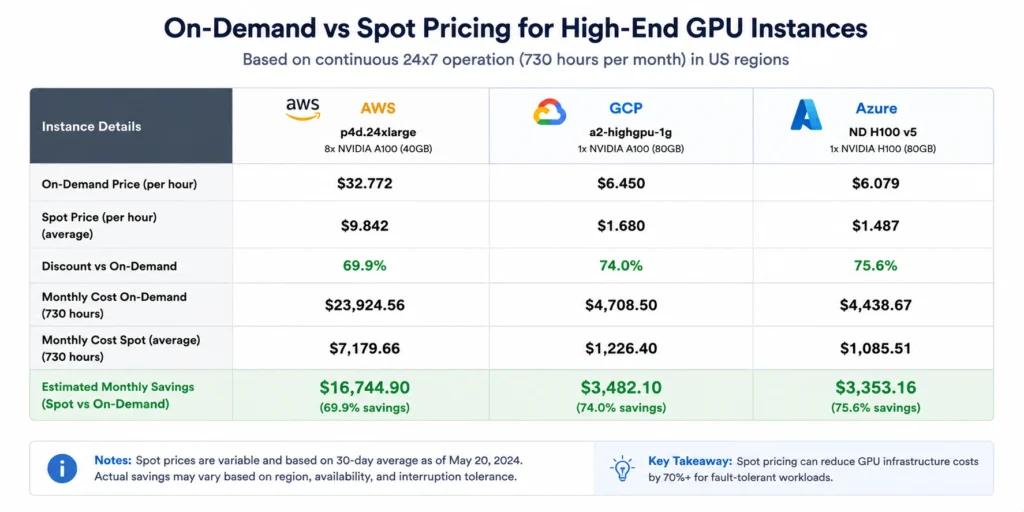
For interruptible workloads, batch inference, model training with checkpointing, data preprocessing, spot instances deliver the largest per-hour cost reduction available without any architectural commitment.
AWS Spot savings on GPU instances:
- G5 family: 60-70% discount from on-demand
- P4d/P5 family: 50-70% discount from on-demand
- P5 spot price in us-east-1 is volatile due to sustained AI/ML training demand in 2026
GCP Preemptible/Spot savings on GPU instances:
- A2 instances: approximately 51% off on-demand (a2-highgpu-1g spot approximately $1.80/hr vs $3.67/hr on-demand)
- A3 instances: spot pricing available, varies by region
- Spot VMs can change price up to once per day and can be reclaimed with a 30-second notice
Azure Spot/Low-Priority savings on GPU instances:
- ND H100 v5: approximately $18.17/hr spot vs $98.32/hr on-demand (82% reduction)
- Low-priority availability on ND-series is inconsistent, East US and South Central US have reasonable availability; UK South and Southeast Asia frequently show zero capacity
The requirement for all three clouds: implement checkpointing every 15-30 minutes so training can resume after interruption without losing progress. AWS SageMaker Managed Spot Training handles checkpointing automatically. For self-managed training, libraries like PyTorch Lightning include built-in checkpoint resume.
The checkpoint math for training workloads:
A p4d.24xlarge training job running for 7 days on-demand costs approximately $5,769. The same job on spot (assuming 65% discount) costs approximately $2,019. The risk: one interruption without checkpointing restarts from zero. With checkpoints every 20 minutes, a worst-case interruption costs 20 minutes of recompute, approximately $11 of wasted compute. The spot discount pays for itself after any interruption within the first 8 hours of training.
Layer 3: Model-Level Optimization
Model optimization reduces GPU memory and compute requirements before instances are even selected, directly enabling smaller (cheaper) instance choices.
Quantization
Quantization converts model weights from higher-precision formats (FP32, FP16) to lower-precision formats (INT8, INT4, FP8). A model in FP32 using 40 GB of GPU memory uses approximately 10 GB in INT4, a 4x reduction that moves the workload from a p4d.24xlarge to a single g5.xlarge.
Modern quantization frameworks (GPTQ, AWQ, bitsandbytes) support quantizing most Llama, Mistral, and Falcon model variants with less than 2% accuracy degradation on standard benchmarks. Quantization is most effective for inference; training typically requires FP16 or BF16 for gradient stability.
Inference Batching
Batching groups multiple inference requests to process simultaneously, maximizing GPU core utilization. A GPU processing requests individually at 10% utilization costs the same as one processing batched requests at 90% utilization. The throughput difference is roughly 9x — meaning the batched setup needs approximately 9x fewer GPU-hours for the same inference volume.
Production inference services (TensorRT-LLM, vLLM, TGI) implement continuous batching automatically. Teams running naive single-request inference in production are leaving the majority of GPU capacity idle while paying full price.
CPU Offloading
Data preprocessing, tokenization, and postprocessing do not require GPU compute. Offloading these operations to CPU instances, particularly ARM-based instances like AWS Graviton (m8g, c8g) at 20-30% lower cost than x86 equivalents prevents expensive GPU cycles from being consumed by work that costs a fraction of the price on CPU.
Layer 4: GPU Sharing Techniques
GPU sharing is relevant primarily for development environments and lightweight inference workloads where multiple jobs share a single physical GPU.
Time-Slicing
Time-slicing allows multiple workloads to share a single GPU by executing sequentially in time slices. It is analogous to CPU context switching. No memory isolation exists between workloads and one job’s memory footprint is visible to others making it unsuitable for production multi-tenant environments. For development environments where a team of eight developers shares one H100 instance, time-slicing eliminates the cost of running eight separate instances.
Multi-Instance GPU (MIG)
MIG partitions a single physical GPU (supported on H100, A100, and A30 models) into up to seven fully isolated “micro-GPU” instances, each with its own compute engines, L2 cache, and dedicated memory bandwidth. Unlike time-slicing, MIG instances run in parallel with full hardware isolation. A single A100 80GB can be partitioned into, for example, one 40GB MIG instance for a production serving workload and three 13GB instances for concurrent developer experiments.
The H100 supports seven 10GB MIG instances — meaning a single $98/hr H100 instance can run seven isolated workloads simultaneously, bringing the effective per-workload cost to approximately $14/hr.
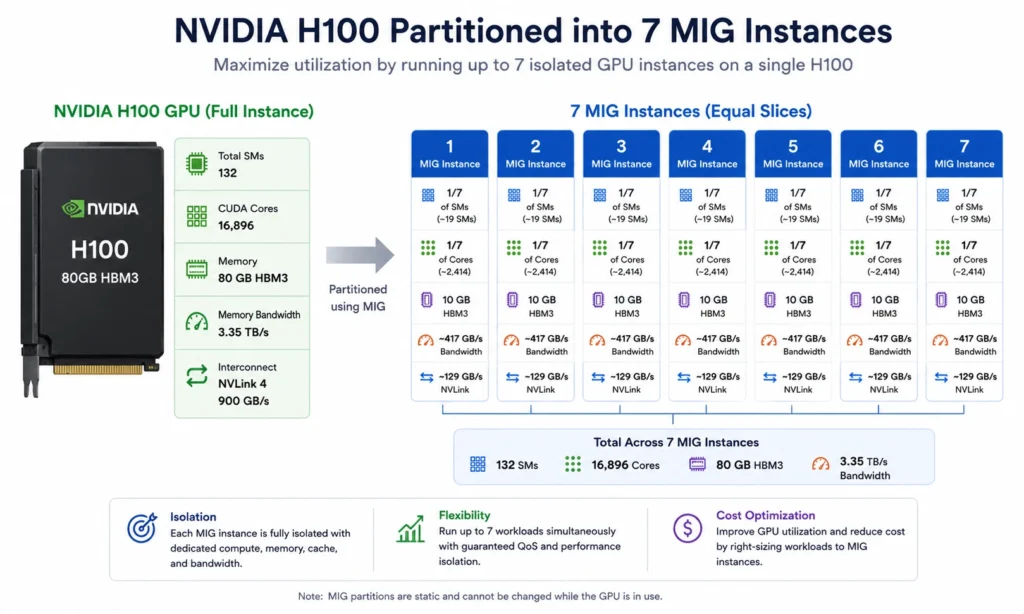
MIG is supported on GCP A2/A3 instances, AWS P4d/P5 instances, and Azure ND H100 v5. Configuration requires NVIDIA device plugin for Kubernetes and MIG manager for automated partitioning.
Layer 5: Commitment Purchasing – The Highest-Impact Lever
For AI teams running sustained, predictable GPU workloads, production inference endpoints, regular training pipelines, model serving, commitment purchasing delivers the largest sustained cost reduction of any layer. This is also the layer most teams skip.
The reason teams skip it: GPU hardware evolves fast. Committing to a P4d instance for three years when P5 and P6 exist felt financially reckless. That risk calculus is now changing, but the traditional form of commitment purchasing still requires accepting it.
Also read: Best AI Agents for FinOps: 7 Tools Platform Engineers Should Evaluate
AWS Savings Plans for GPU Instances
AWS Compute Savings Plans apply to EC2 instance usage including GPU families (p3, p4d, p5, g4dn, g5) without requiring commitment to a specific instance type. This is important: a Compute Savings Plan covering $10/hr of compute spend applies automatically whether that spend is on a p4d, p5, or g5 family.
Savings Plans discount rates for GPU-relevant families (approximate, 3-year, all upfront; verify at aws.amazon, rates change):
- Compute Savings Plans: up to 66% off on-demand across EC2, Fargate, Lambda
- EC2 Instance Savings Plans: up to 72% off for a committed instance family in a specific region
The catch: a 1-year or 3-year Savings Plan commitment is fixed. If your GPU workload scales down, the committed spend continues generating charges. If usage drops below commitment, you pay for compute you are not using. See: Amazon EC2 Pricing Explained: Models, Costs & How to Save.
GCP Committed Use Discounts for GPU Instances
GCP offers resource-based CUDs for accelerator-optimized machine types including A2 (A100), A3 (H100), and G2 (L4). Key facts (verify at cloud.google, rates change):
- A2 instances: 1-year CUD saves approximately 37%; 3-year CUD saves approximately 65%
- G2 instances: 1-year CUD saves approximately 8%; 3-year CUD saves approximately 11%
- GPU instances are NOT eligible for flexible (spend-based) CUDs — only resource-based CUDs apply
- Separate commitments are required for each GPU type (one commitment cannot cover both A100 and H100 usage)
- CUDs for A3 Mega, A3 High, A3 Edge, A2, G4, and G2 require attached reservations at purchase
The practical implication: a team running consistent A2 production inference can save approximately $1,365 per month per a2-highgpu-1g instance on a 3-year CUD versus on-demand (from approximately $2,682/mo to approximately $939/mo). The risk is the same as AWS — workload must stay predictably consistent for the commitment term. Also see: Google Cloud Compute Engine Pricing Guide.
Azure Reserved Instances for GPU VMs
Azure Reserved Instances for ND-series and NC-series VMs deliver savings on 1-year and 3-year terms. Azure offers two payment options: all upfront (lowest effective hourly rate) or monthly payments (5-7% higher effective cost over the term).
ND H100 v5: on-demand approximately $98.32/hr. Reserved pricing delivers meaningful discounts for teams with committed training schedules (verify at azure.microsoft, rates change).
The Lock-In Problem: Why Most Teams Never Capture These Discounts
The math on commitment purchasing is clear. The barrier is lock-in.
A team committing to 3-year GCP A2 CUDs in Q1 2026 must predict their GPU usage through Q1 2029. GPU hardware will have gone through at least two generations in that period. Model architectures, inference frameworks, and workload patterns will have shifted substantially. Teams that over-committed to P3 instances before P4d was released paid on-demand P4d prices on top of P3 RI charges.
The result: most teams pay on-demand rates for workloads that are actually consistent and predictable, leaving 37-65% of GPU compute spend on the table every month.
This is the problem Usage.ai’s Insured Flex Commitments solve.
| Comparing cloud cost tools for GPU spend?
Usage.ai helps FinOps teams find idle, underutilized, and uncovered GPU resources across AWS, Azure, and GCP, with prioritized recommendations your team can act on. |
How Insured Flex Commitments Work for GPU Workloads
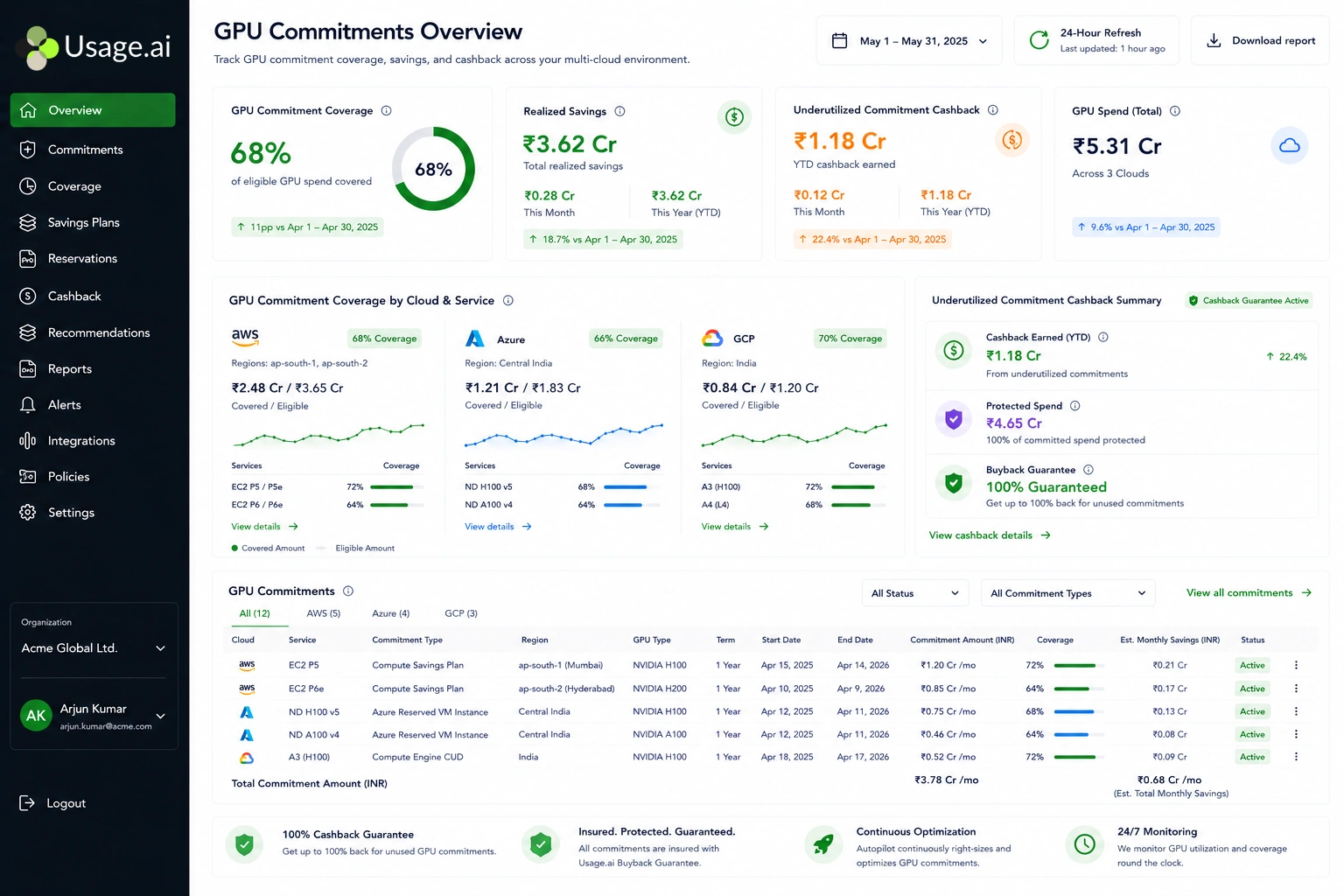
Usage.ai’s Insured Flex Commitments deliver Savings Plan and CUD-equivalent discounts of 30-60% on GPU instance families, without requiring multi-year lock-in or upfront payment.
The mechanism: Usage.ai holds the commitment on its own balance sheet and passes the discount through to the customer. The customer receives 3-year savings rates without owning a 3-year obligation.
| Insured Flex Commitment: an SP/RI-equivalent discount structure that delivers savings of 30-60% without requiring multi-year lock-in or upfront payment. Every commitment is fully insured — underutilized portions are returned as cashback (real money), not credits. Commitments adjust quarterly. Scale down? No penalty. Underutilized GPU capacity? Cashback paid in real money, not credits. |
For GPU workloads specifically, this addresses the core risk that keeps teams on on-demand pricing:
- If a training workload scales down or migrates to a newer GPU family, Usage.ai adjusts the commitment quarterly with no penalty
- If a production inference endpoint goes underutilized, Usage.ai pays cashback on the underutilized portion — in real money, not credits that lock you into a single vendor
- Setup takes 30 minutes with billing-layer access only; no infrastructure changes, no code changes
Comparison: commitment options for GPU workloads
| Dimension | AWS Native (Savings Plans) | GCP Native (CUDs) | Azure Native (Reserved Instances) | Usage.ai Insured Flex |
| Term | 1-3 years | 1-3 years | 1-3 years | Quarterly adjustments |
| Upfront cost | Upfront or monthly | Full upfront or monthly | Full upfront or monthly | $0 upfront |
| Underutilization protection | None — full charge applies | None — full charge applies | None — full charge applies | Cashback in real money |
| Cancel anytime | No | No | No | Yes, buyback guarantee |
| Recommendation refresh | 72+ hours (Cost Explorer) | Manual | Manual | 24-hour refresh |
| Multi-cloud coverage | AWS only | GCP only | Azure only | AWS + GCP + Azure |
| Fee model | Baked into discount | Baked into discount | Baked into discount | % of realized savings only |
The 24-hour recommendation refresh is a concrete operational difference. AWS Cost Explorer refreshes SP/RI recommendations every 72+ hours. Usage.ai refreshes every 24 hours. At $6-12K per day in uncovered GPU spend, a 3-day lag in recommendations compounds to $18K+ per refresh cycle in missed savings.
Cross-Cloud GPU Cost Comparison: What Your Workload Actually Costs
The decision of which cloud to run GPU workloads on has significant cost implications independent of optimization tactics.
| Workload | AWS Cost (on-demand) | GCP Cost (on-demand) | Azure Cost (on-demand) | Notes |
| Small fine-tune (7B model, 1 A10G/A100, 6 hrs) | ~$6 (g5.xlarge) | ~$22 (a2-highgpu-1g) | ~$22 (NC A100 v4) | AWS wins on small single-GPU workloads |
| Large training (70B model, 8x H100, 72 hrs) | ~$50,883 (p5.48xlarge) | ~$75,600 (a3-highgpu, approx) | ~$50,825 (ND H100 v5) | AWS and Azure roughly equivalent; GCP higher |
| Sustained inference (1x A100, 30 days) | ~$26,500 (p4d, partial) | ~$2,682 (a2-highgpu-1g) | ~$2,682 (NC A100 v4) | GCP and Azure win on single A100 — AWS only offers 8-GPU A100 configuration |
| Inference with 3-yr commitment (1x A100, monthly) | N/A (no single A100) | ~$939/mo (3-yr CUD) | Check azure.microsoft.com/pricing | GCP’s single A100 + 3-yr CUD delivers strong inference economics |
Note: AWS only offers A100 GPUs in an 8-GPU configuration (p4d.24xlarge). Teams running single-GPU inference or small fine-tuning jobs cannot access A100-class compute on AWS without paying for all eight GPUs. GCP and Azure both offer single-GPU A100 instances, making them significantly more cost-effective for sub-8-GPU workloads.
All prices approximate. Verify at aws.amazon, cloud.google as rates change.
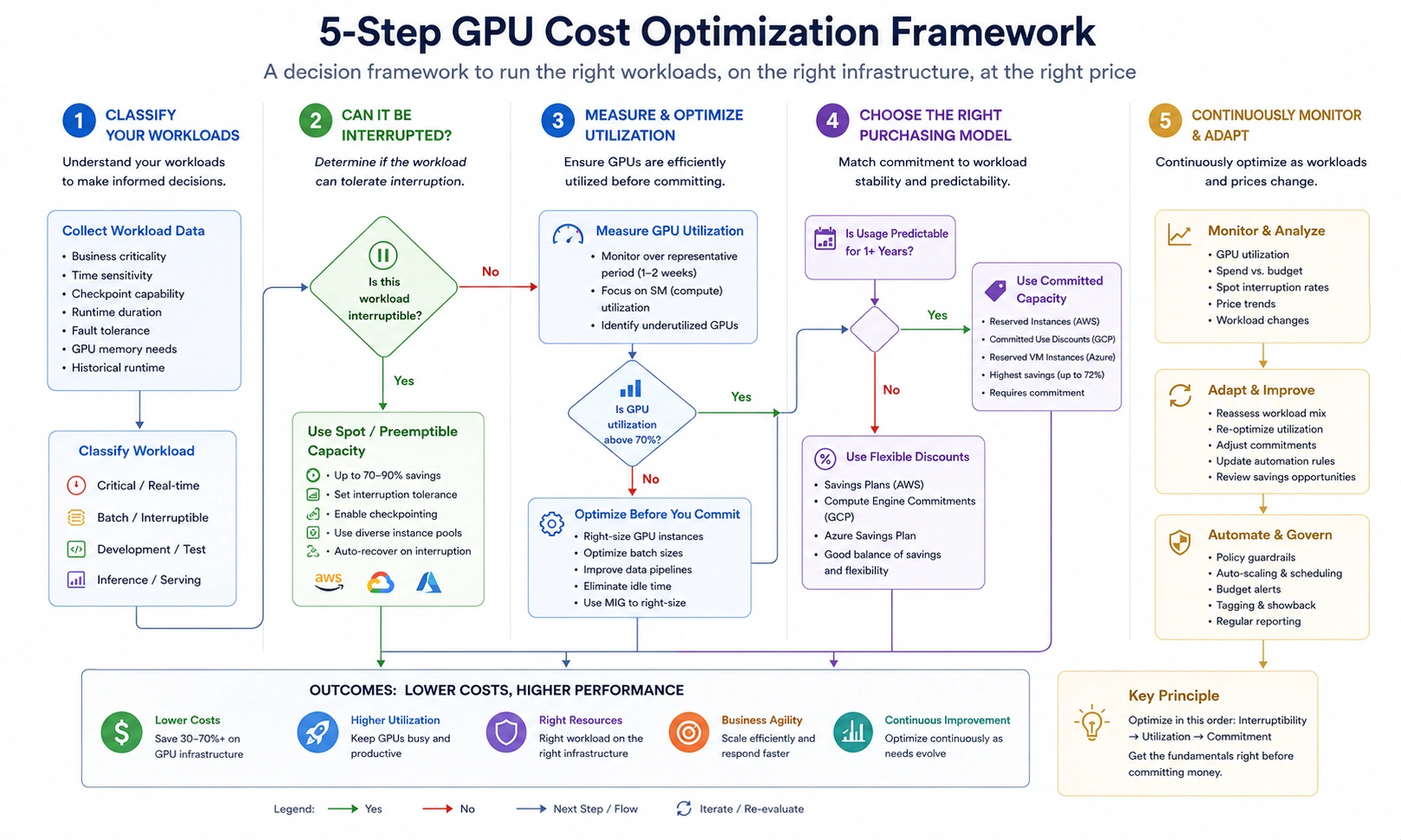
How to Build a GPU Cost Optimization Plan: A 5-Step Framework
Step 1: Audit current GPU utilization
Pull GPU utilization metrics from CloudWatch (AWS), Cloud Monitoring (GCP), or Azure Monitor. Target: any GPU instance averaging below 60% utilization over a 7-day rolling window is a right-sizing or idle-termination candidate. A p4d.24xlarge at 20% average GPU utilization is costing approximately $19,000/month for the work that a single g5.12xlarge could handle at $4,141/month.
Also read: What is Cloud Cost Visibility? Tools, Tips and Best Practices for AWS, Azure, and GCP
Step 2: Classify workloads by interruptibility
Training jobs with checkpointing: move to spot immediately. Development environments: implement auto-stop on idle (30-minute idle threshold is standard). Production inference endpoints: on-demand or committed, never spot.
Step 3: Implement model optimizations for inference
Enable quantization (INT8 minimum) for all production inference endpoints. Implement continuous batching via vLLM or TensorRT-LLM. Target: GPU utilization above 70% during active serving windows. Measure cost per 1,000 inference requests, not cost per GPU-hour.
Step 4: Apply GPU sharing for development
Configure MIG partitioning on H100/A100 development instances. Assign developers to MIG slices rather than dedicated instances. A single a3-highgpu-8g (8x H100) with 7-way MIG partitioning supports 56 concurrent developer workloads. Also learn about the FinOps for AI: The Practitioner’s KPI Playbook.
Step 5: Purchase commitments for steady-state baseline
Identify the floor of your GPU usage, the minimum GPU capacity running 24/7 regardless of project cycles. This floor is the commitment target. Over-committing to your average or peak results in paying for unused capacity during downturns. For teams unwilling to accept traditional lock-in risk, Usage.ai’s Insured Flex Commitments deliver commitment-level discounts with quarterly adjustments and buyback protection on underutilized capacity.
Frequently Asked Questions
1. What is GPU cost optimization?
GPU cost optimization is the practice of reducing the per-unit cost of GPU compute for AI and ML workloads across five layers: right-sizing instance selection, spot/preemptible instances for interruptible workloads, model-level optimizations (quantization and batching), GPU sharing techniques (MIG and time-slicing), and commitment purchasing (Savings Plans, CUDs, Reserved Instances) for predictable sustained workloads. The five layers interact — model quantization enables smaller instances, smaller instances make spot interruptions cheaper, and smaller committed baselines reduce lock-in risk.
2. How much can you save with AWS Savings Plans on GPU instances?
AWS Compute Savings Plans save up to 66% on GPU instance families including p3, p4d, p5, g4dn, and g5, compared to on-demand pricing. EC2 Instance Savings Plans save up to 72% for a committed instance family. The actual realized savings depend on how closely committed spend matches actual GPU usage over the 1-3 year term. Teams that over-commit pay for unused capacity; teams that under-commit leave on-demand pricing on the uncovered portion.
3. Does GCP offer committed use discounts on GPU instances?
Yes. GCP offers resource-based Committed Use Discounts on accelerator-optimized machine types including A2 (A100) and A3 (H100). A2 instances receive up to 37% off on a 1-year CUD and up to 65% off on a 3-year CUD. G2 instances (L4 GPU) receive only 8-11% CUD discounts due to GPU hardware cost dominance in their pricing. Critical: GPU instances on GCP are not eligible for spend-based (flexible) CUDs, only resource-based CUDs apply, and separate commitments are required for each GPU type.
4. What is Multi-Instance GPU (MIG) and how does it reduce costs?
Multi-Instance GPU (MIG) partitions a single physical GPU into up to seven isolated micro-GPU instances, each with dedicated compute engines, L2 cache, and memory bandwidth. Supported on NVIDIA H100 and A100 GPUs. A single H100 ($98/hr on AWS p5) partitioned into seven 10GB MIG instances brings the effective per-workload cost to approximately $14/hr — equivalent to a G5 instance at fraction of the H100’s raw throughput. MIG is most cost-effective for development environments, lightweight inference, and multi-tenant scenarios where full GPU throughput is not required per workload.
5. Which cloud is cheapest for GPU inference workloads? For single-GPU A100 inference, GCP and Azure offer single-instance configurations (a2-highgpu-1g at approximately $3.67/hr, Azure NC A100 at approximately $3.67/hr) while AWS only offers A100 in an 8-GPU p4d.24xlarge configuration. For teams running inference at sub-8-GPU scale, GCP and Azure are significantly cheaper. With a 3-year CUD, GCP’s a2-highgpu-1g drops to approximately $1.29/hr — delivering the strongest sustained inference economics among the three hyperscalers for single-A100 workloads.