
 AWS
 Microsoft Azure
 Google Cloud


This cloud cost optimization software implementation guide helps you work through those questions before onboarding begins. We’ll cover the preparation, responsibilities, and checks to agree on with your vendor, so you know what’s involved beyond connecting your first account.
What Does Cloud Cost Optimization Software Implementation Include?
Well, that depends on what you’re asking the software to do. For example, a platform that organizes spending reports needs a different setup from one that resizes workloads or purchases cloud commitments.You should always start with the features you plan to use. That tells you which data to connect, and what to check before putting those features into use. The following table can help:
| Software type | What your team needs to set up | What to check |
|---|---|---|
| Cost visibility and reporting | Billing connections, allocation rules, dashboards, and user access | Required accounts appear, costs reconcile, and spending reaches the correct teams. |
| Infrastructure optimization | Usage metrics, workload access, approval rules, and execution controls | Changes stay within approved limits, with performance checks and recovery procedures in place. |
| Commitment management | Existing commitments, eligible usage data, purchasing permissions, and approval settings | Recommendations reflect current coverage, purchases follow configured approvals or automation controls, and reporting captures savings and unused commitments |
For example, connecting billing data may let a commitment platform analyze your spending. But should it also be able to make purchases? Who approves them, and within what limits?
Reviewing the access requirements early helps your security team approve the permissions needed for each stage.
Define “Implementation Complete” Before Onboarding Begins
When the vendor says implementation is complete, what should your team be able to do? Settle that before onboarding starts, so you don’t reach the final call with Finance still questioning the numbers or Engineering waiting for an approval workflow.If you’re still comparing options, use the software evaluation scorecard to assess vendor capabilities. Once you’ve selected a platform, turn those requirements into practical checks for your first rollout:
- Can we trust the numbers? The agreed accounts should appear, and Finance should understand any differences between the dashboard and provider records.
- Can people use the approval process? Send a test request. Does it reach the correct person, and does rejecting it prevent the action?
- Can we follow what changed? Your team should be able to connect a completed action to its recommendation and approval.
- Who helps after setup? Name the people responsible for questions, failed integrations, and ongoing reviews.
A Phased Cloud Cost Optimization Software Implementation Plan
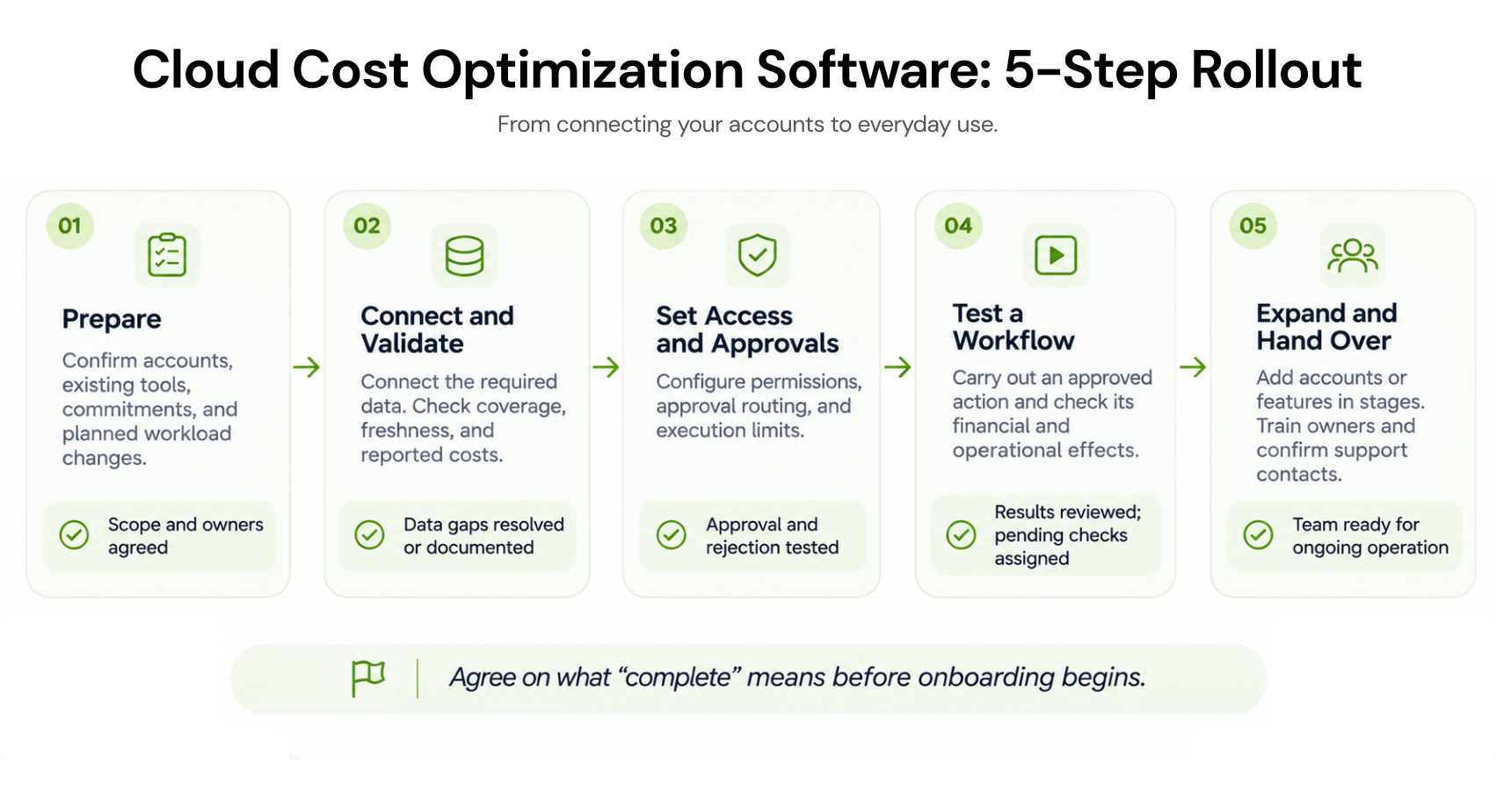
1. Prepare Your Data, Existing Tools, and Owners
Before the kickoff call, bring together the people who can approve access, connect accounts, explain the bill, and authorize actions. Ask the vendor what it needs from each person so they can prepare.You’ll also need a shared picture of what’s already running:
- Cloud accounts and billing sources: Which accounts, subscriptions, or projects are included? Who can connect them and provide the required billing data?
- Existing commitments: What Savings Plans, Reservations, RIs, or CUDs are already active, and who manages them?
- Other optimization tools: Are schedulers, autoscalers, or purchasing tools already acting on the same workloads?
- Upcoming changes: Is Engineering planning a migration, shutdown, or capacity reduction that could make historical usage misleading?
2. Connect and Validate the Required Data
Once the accounts are connected, check what has actually arrived. A dashboard can look complete while a subscription is missing, historical data is unavailable, or one service hasn’t started reporting.Ask the vendor to walk through the data with your FinOps or Finance team:
- Coverage: Can you see every account and service included in the first rollout?
- History: Is enough past usage available for the features you plan to enable? Ask which recommendations remain limited until more data arrives.
- Freshness: When was the data last updated, and how will your team know if a connection stops refreshing?
- Cost accuracy: Do the platform and provider records agree when you compare the same accounts, dates, currency, and cost basis?
Credits, refunds, and reporting delays can also affect the comparison. Have the vendor explain the difference before your team starts using those numbers to approve actions.
3. Configure Permissions and Decision Workflows
Now decide what the platform can do with that data. Will it only recommend changes, send them for approval, or carry them out automatically? Set this for each feature you’re enabling.Walk through a sample recommendation with the vendor:
- Who receives it? Route it to someone who understands the workload or purchasing decision.
- Who can approve it? Define the accounts, actions, and financial limits each approver controls.
- Who carries it out? Confirm whether execution belongs to the platform, your team, or another system.
- What happens if nobody responds? Agree on reminders and escalation. A pending request should follow the approval rules you configured.
- Where is the decision recorded? Your team should be able to find who approved the action, what was authorized, and what happened afterward.
4. Test One Complete Optimization Workflow
The approval process works. Now follow a real recommendation through to its result. Choose a limited scope with the vendor and workload owner, and agree on what you’ll measure before making the change.For example, if you’re testing a non-production shutdown schedule, check more than whether the instance stops. Does it restart when needed? Do dependent jobs still run? Does the billing data show the expected reduction in running hours?
For the first test, capture:
- The starting point: Current usage, costs, and relevant performance measures.
- The action: What will change, who approved it, and who will execute it.
- The outcome: What actually changed, including unexpected effects or costs that continued.
- The follow-up: Whether to keep, adjust, or reverse the change where possible.
When checking savings, account for other changes during the test too. A quieter week can lower costs even without optimization. Agree on a comparison that helps your team verify the savings claimed.
5. Approve Wider Rollout and Operational Handover
Once the first workflow passes its checks, decide where to expand next. Choose accounts or workloads with similar conditions, then review any differences in permissions, ownership, or business requirements before including them.A shutdown schedule that works for one development team, for example, may interrupt another team’s overnight testing. Use what you learned from the pilot, but confirm that it fits the next group.
Before expanding, settle three practical questions:
- Who handles exceptions? Name someone who can investigate failed actions, unexpected recommendations, or missing data.
- Who can change the settings? Make sure authorized users know how to adjust limits, pause future actions, and escalate problems.
- Who reviews results? Assign ongoing checks for financial outcomes and any relevant workload performance measures.
Make Your Cloud Cost Optimization Tools Work Together
Your new platform may be working alongside autoscalers, shutdown schedules, and other cloud cost optimization tools. Before enabling it, check whether another system already acts on the same workloads or makes purchasing decisions.Imagine Engineering is reducing a fleet’s capacity while a commitment manager is preparing purchases using historical usage. The purchase recommendation needs to reflect that planned reduction. Otherwise, you could commit to usage the team is about to remove.
Bring the vendor and existing tool owners together to agree on:
- Who controls each action: If two tools can change the same setting or purchase commitments, decide which one has authority.
- How planned changes are shared: Make sure migrations, shutdowns, and rightsizing plans reach whoever manages commitments.
- When recommendations need another review: Refresh the analysis when a change affects the usage assumptions behind a proposed action.
- How savings are counted: Check that separate tools aren’t taking credit for the same reduction.
How Long Does Cloud Cost Optimization Software Implementation Take?
Ask the vendor what its quoted timeline includes. Connecting an account, getting the platform ready for daily use, and confirming financial results are separate milestones.Your implementation plan should distinguish:
- Connection time: Creating the required identities, granting approved access, and connecting billing or usage data.
- Time until teams can use the platform: Checking data, configuring approvals, testing actions, and training the people taking over.
- Time to verified results: Allowing completed actions to appear in billing data and reviewing their financial and operational effects.
Before accepting a launch date, ask: what must our team provide, by when, and what happens if it’s delayed? Include that internal effort when assessing the total cost of the software.
Agree on dates for each milestone with the vendor. That gives your team a clearer plan than a single promise to be “live” by Friday.
Cloud Cost Optimization Software Implementation: Final Checks Before Sign-Off
At the handover call, ask your team to show how the platform works in practice. Use these questions to close out the rollout:- Is the agreed scope covered? Required accounts and features are working, with any exclusions clearly recorded.
- Have the workflows passed testing? Approvals, rejections, execution limits, and action records behave as expected.
- Are results checked or scheduled for review? Completed tests have been reviewed, and any pending financial checks have an owner and date.
- Can your team handle a problem? Authorized users know how to pause future actions, investigate failures, and contact support.
- Are continuing obligations understood? Your team knows which commitments or charges remain if automation is paused.
How We Approach Implementation at Usage.ai
Getting started with Usage.ai begins with choosing the cloud accounts you want us to evaluate and connecting the data needed for analysis. We then review your usage and existing commitments to identify where additional coverage could make sense.Our read-only Savings Test establishes that starting point. You can review the proposed commitments, savings estimates, and assumptions while purchasing authority stays with your team. If you’re planning a migration, rightsizing, or application shutdown, sharing that context helps us assess whether the recommendation fits your future usage.
If you move forward, we review the purchasing access and configuration needed for the agreed scope. You can use Copilot to review and approve recommendations or Autopilot to automate eligible purchases. From there, ongoing reporting helps your team track coverage, utilization, and realized savings.
Want to understand the work involved for your environment? We can help you assess the onboarding effort, identify who needs to participate, and clarify the access and preparation required.
Walk through your cloud setup with us to assess onboarding effort, access requirements, and who needs to be involved.
Frequently asked questions
What should a cloud cost optimization software implementation guide include?
A useful guide should explain what to prepare, who handles each task, how to connect and validate data, and what to test before expanding the rollout. Look for clear completion checks and a division of responsibilities between your team and the vendor.
How do we choose cloud FinOps tools that fit our implementation needs?
Start with the work you need help with: reporting, allocation, infrastructure optimization, or commitment management. Then ask shortlisted vendors to explain the data, permissions, integrations, and ongoing effort their features require. Use the same requirements to compare each proposal.
Who should be involved in implementation?
FinOps typically coordinates the work, cloud administrators connect the required accounts, Security reviews access, and Finance checks cost reporting. Engineering or workload owners should participate when recommendations affect infrastructure or future usage.
Confirm what the vendor handles before assigning the remaining tasks internally.
Does cloud cost optimization software need permission to change resources?
It depends on the features you enable. Reporting and assessment may use read-only access, while resource changes or commitment purchases require additional permissions.
Purchasing commitments and modifying infrastructure are separate capabilities, so ask the vendor to explain each requested permission and when it becomes necessary.