
 AWS
 Microsoft Azure
 Google Cloud


What is cost anomaly detection?
Cost anomaly detection identifies spending that differs from an expected pattern. That pattern, or baseline, is usually learned from historical activity. It is an expected range, not a minimum spend you must set.Normal spending can vary. A weekly reporting job may make Mondays expensive; a growing application may gradually need more capacity. Models can account for recurring patterns and growth rather than treating every increase as suspicious.
Anomalies can come from runaway requests, an unintended deployment or resources left running. They can also reflect a successful launch.
The distinction matters: an anomaly means “this looks different.” Whether it is waste, a mistake or justified growth requires context. Some detectors also identify unusual decreases, which may deserve investigation rather than celebration.
Why cost anomalies matter
Cloud resources can keep generating charges until someone changes their configuration or usage. Discovering an unintended workload during a month-end review leaves less opportunity to contain it.Automated detection helps teams notice changes earlier, focus investigation and connect spending with accountable owners. That reduces dependence on someone recognizing a problem in a dashboard.
Its value comes from the response. An alert without a human or automated response cannot limit further spending. Nor does detection refund charges already incurred.
A spike can also prompt a security investigation when unauthorized activity is suspected. Spending alone, however, does not establish that an account was compromised.
How cost anomaly detection works
Cost anomaly detection starts with data and scope. A tool receives billing or usage information and examines a defined group, such as a service, project, account or team. Existing native monitoring may already be enabled, but its coverage and recipients still need checking.Statistical methods and machine learning establish expected behavior. Rules can set conditions for raising an alert. These approaches vary; companies do not necessarily configure an algorithm or manually supply a baseline.
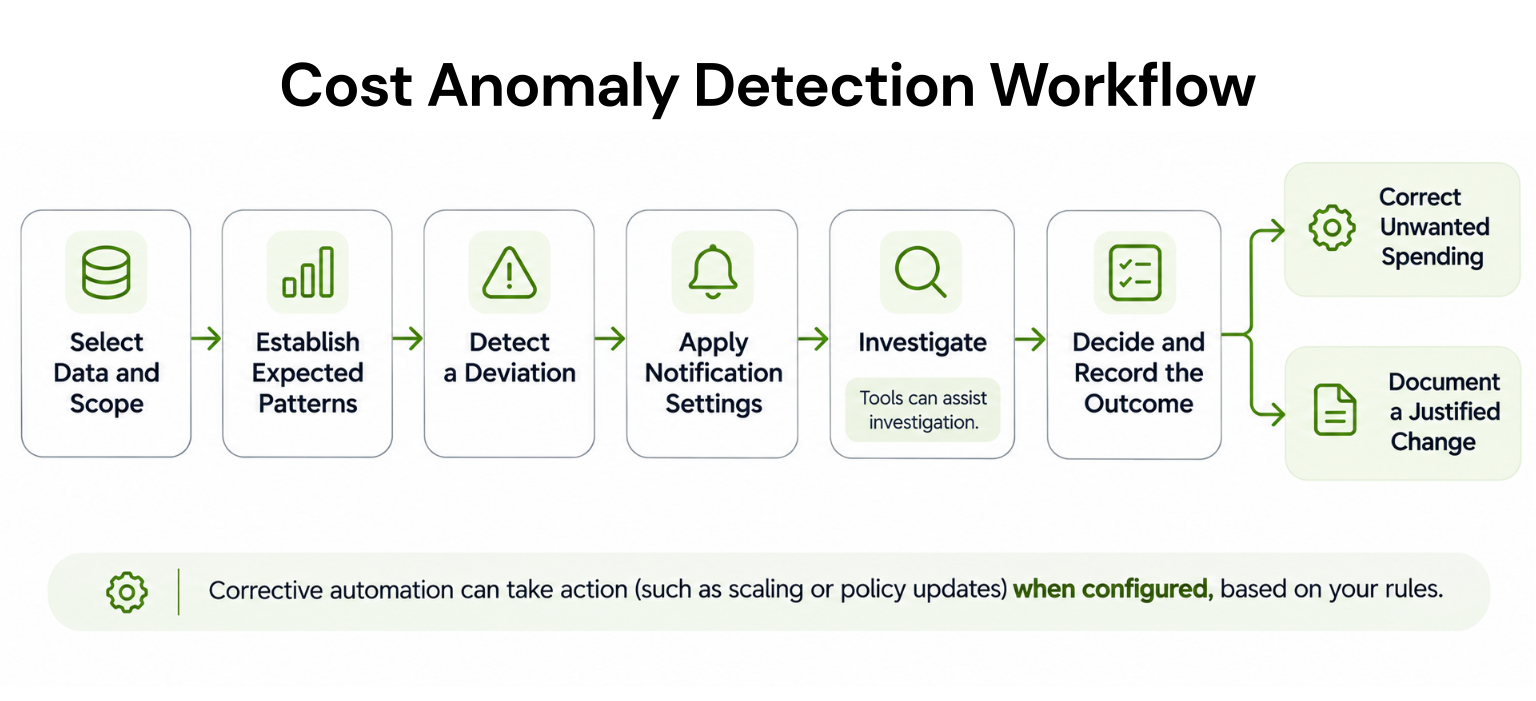
A useful notification identifies the affected period and scope, expected versus observed spending, financial impact, likely contributors and an investigation link. Cost impact describes the difference from expected spending on the same basis; it is not automatically waste or savings.
Notifications can reach a central cloud-cost team, individual workload owners or both. Channels depend on configuration. AWS uses its Amazon SNS messaging service to send alerts to Slack through Amazon Q Developer.
Investigation then asks what changed in usage, pricing or the workload. AWS provides AI-assisted investigation using cost data and available CloudTrail activity records, although access and logging affect how much it can explain.
Finally, someone decides whether to correct the change, investigate further or document it as expected. Supported automation can execute a configured response; detection alone does not authorize a shutdown. Recording the outcome helps subsequent reviews.
Anomalies versus other cost alerts
Cost anomaly detection and budget alerts answer different questions. A budget is a spending plan; an anomaly baseline describes expected behavior.| Control | Question it answers | What draws attention |
|---|---|---|
| Anomaly detection | Is this spending unusual? | A deviation from an expected pattern |
| Budget alert | Are we approaching or exceeding our plan? | Actual or forecast spending reaching a configured budget threshold |
| AWS CloudWatch estimated-charge alarm | Have estimated charges crossed this amount? | An estimated-charge threshold being exceeded |
Operational monitoring tracks performance and reliability, while routine cost reviews can identify steady waste. These controls complement one another; ordinary notifications do not impose a universal spending cap.
Also read our cloud budgeting guide for the distinction between budgets, forecasts and actual spending.
Native and third-party tools
Start by checking whether native cost anomaly detection covers the services, accounts and teams you need. Native tools already use learned models; advanced detection is not exclusive to paid platforms.Native cloud tools
The monitored measure matters as much as the feature name.| Native tool | Scope and monitored measure | Useful capability and important limit |
|---|---|---|
| AWS Cost Anomaly Detection | Services, linked accounts, cost allocation tags or cost categories; net unblended cost after applicable discounts | Contributor details and configurable notifications; billing-data delays affect detection |
| Microsoft Cost Management | Subscription-level normalized usage, rather than the final invoice total | Anomaly investigation and email alerts; delayed daily evaluation, with anomaly alerts unavailable in Azure Government |
| Google Cloud anomaly detection | Project-level usage costs, including applicable contracted rates and spend-based CUD discounts; excludes specified credits and savings. | Contributor breakdowns and configurable notifications; monitored costs can differ from the amount payable |
Google’s usage-cost definition excludes promotional credits and other specified savings, while including spend-based commitment discounts. Consequently, if usage and applicable pricing stay unchanged, promotional credits ending can increase the amount payable without increasing that monitored measure.
When another platform helps
Third-party cost anomaly detection is worth evaluating when you need a shared view of supported cloud sources grouped by business team or additional investigation workflows.Finout documents scoped monitoring for cost increases and decreases. CloudZero offers scoped monitors with investigation status and notification settings in public preview, enabled through Labs.
Choose based on the gap you need to fill. Native tooling may be sufficient when its coverage and routing meet your needs; there is no universal spending level that requires a replacement.
Where detection can fall short
Even a configured monitor can miss important changes or produce alerts that need little action. Understanding those limits helps a team interpret both a busy inbox and a quiet dashboard.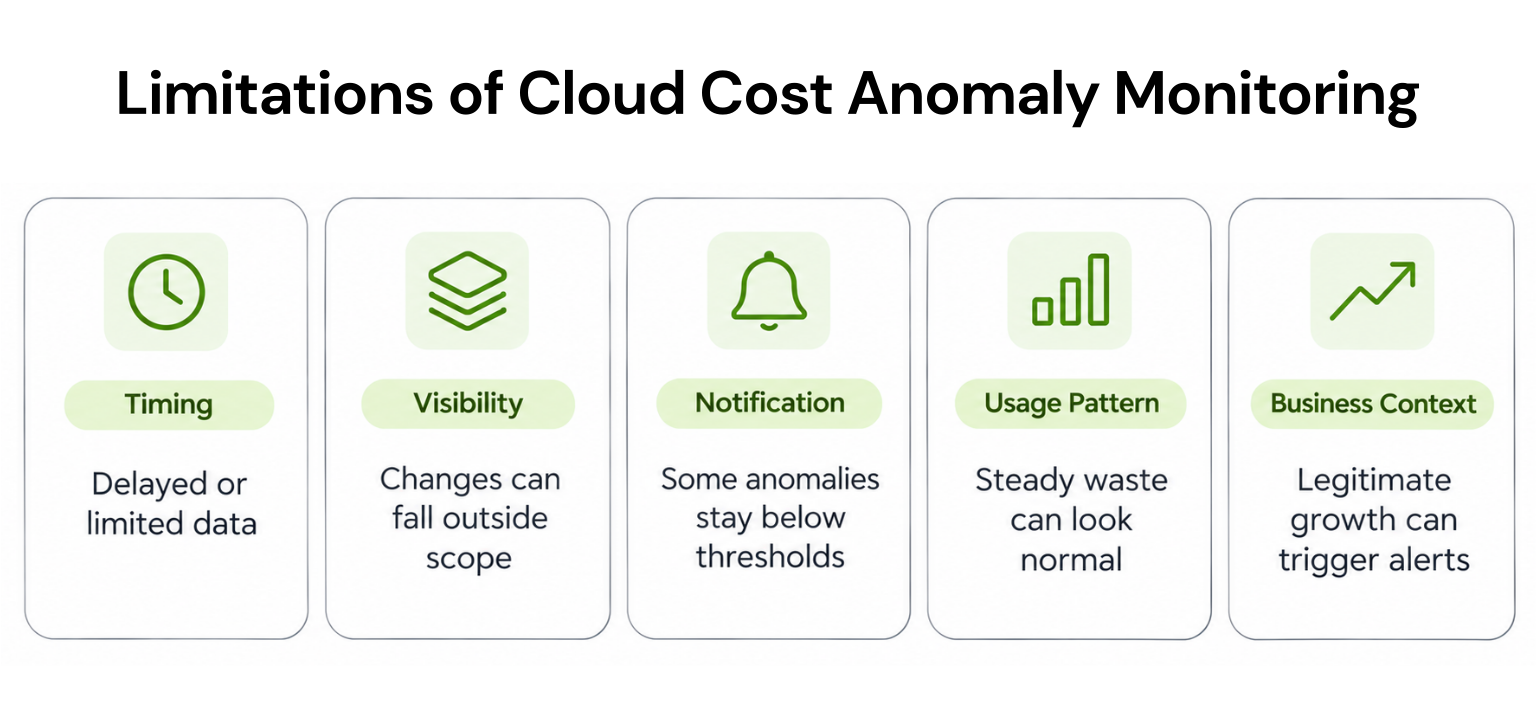
A combined total can also hide opposing changes: one service becomes more expensive while another falls by a similar amount. The account total barely moves. Narrower monitoring can reveal a change that a broad total conceals.
Stable waste poses another problem. An unnecessary resource running every day may look entirely normal to the model.
Models can also miss genuinely unusual changes or flag normal variation incorrectly. But a planned launch outside the learned range is not automatically a model mistake: it can be statistically unusual and commercially justified.
Best practices for useful alerts
A monitor becomes more useful when its scope, recipients and review process fit how your teams work.- Choose actionable scopes. Monitor groups whose owners can investigate them. Combine broad oversight with detail where material changes could disappear inside totals.
- Check data and history. Confirm which sources are connected, how fresh they are and whether a new workload has enough history.
- Set meaningful notification thresholds. Consider financial impact and business context. A large percentage increase from a tiny baseline may have little urgency.
- Name an owner and escalation route. Decide who reviews the alert and where it goes if ownership is unclear.
- Record planned changes and resolutions. Product launches and migrations provide context for deciding whether an alert needs action.
- Review usefulness. Examine missed issues, noisy alerts and response times rather than celebrating a rising alert count.
Connecting anomaly detection with FinOps
FinOps brings engineering, finance and business teams together around technology spending. The FinOps Framework places Anomaly Management within Understand Usage & Cost. In practice, the work connects with all three phases: Inform supplies visibility, Optimize evaluates improvements and Operate implements and maintains responses.Allocation and reporting supply trustworthy data and owners. Budgeting and forecasting put a change into financial context. Unit economics – cost per customer or transaction helps distinguish expensive inefficiency from increased business activity.
Optimization and governance help teams assign fixes and check they were completed. Commitments exchange an agreed usage or spending level for discounted rates over a term. An unexplained temporary spike is therefore a weak basis for a long-term purchase.
Our cloud cost management guide explains how these practices work together beyond individual alerts.
Where Usage.ai fits
Cost anomaly detection flags unusual spending; commitment decisions depend on whether that demand will continue. At Usage.ai, our Autopilot increases coverage when demand persists rather than following every temporary spike.Through our Flex Insured Commitment Program, we purchase and manage supported commitments across AWS, Azure and Google Cloud on your behalf.Evaluation starts with read-only billing and usage access; purchasing requires separate authorization. Our commitment automation cannot start, stop or resize workloads.
If your usage drops and an eligible Flex Insured Commitment costs more than the same covered usage, we pay back the qualifying difference. Protection does not cancel the underlying commitment or automatically cover existing customer-owned commitments.
We charge an agreed percentage of realized savings we generate, excluding savings from commitments you already had.
Make alerts lead to decisions
Cost anomaly detection earns its place when an unexpected change reaches someone who can explain it. Check what your monitors cover, which cost measure they use and who receives the notification. Then make sure the investigation ends with a recorded decision, whether that means correcting unwanted spending or confirming expected growth.For teams evaluating commitments against sustained usage, our read-only Savings Test can assess potential additional savings.
Connect read-only billing and usage data to review existing coverage and model potential savings before authorizing purchases.
Frequently asked questions
Is cost anomaly detection free?
AWS provides the native feature without an additional charge, and Azure includes anomaly features for supported subscriptions. Google's free anomaly detection can incur optional Pub/Sub charges. Third-party pricing varies; related messaging, queries or investigation services may add costs.
How do budget alerts differ?
Cost anomaly detection compares spending with an expected pattern. Budget alerts compare actual or forecast spending with a configured threshold against a budget. They complement each other because unusual spending can occur before that budget threshold is reached.
Can detection identify spending drops?
Some products detect unusual decreases as well as increases. Azure and Finout document this behavior. Check your specific detector rather than assuming all platforms work alike. A drop may reflect a planned change or a workload issue worth investigating.
Does detection work in real time?
Not always. AWS documents detection delays of up to 24 hours; Azure runs detection 36 hours after the UTC day ends. Data arrival, evaluation and notification timing all matter. Faster estimated-cost features have separate coverage and conditions.
Can detection automatically fix unusual spending?
Detection alone does not fix the cause. Configured workflows can take corrective action where supported; AWS EventBridge connects anomaly events with rule-based target actions. A valid response may instead be documenting expected growth.