
 AWS
 Microsoft Azure
 Google Cloud


What cloud spend management means
Cloud spend management connects cloud billing information with financial and engineering decisions. It includes spending visibility, cost allocation, budgeting, forecasting, governance, and ongoing financial reviews.Cloud cost management is often used interchangeably with cloud spend management. Cloud cost optimization focuses more specifically on improving resource efficiency and pricing, while FinOps provides a broader framework for financial accountability.
For a detailed comparison, read our cloud cost management guide.
Why cloud spending gets complicated
Cloud spending changes as applications scale, teams deploy services, and business requirements evolve.Common causes include:
- Unclear ownership: Teams cannot identify who is responsible for particular expenses.
- Unexpected demand: Traffic spikes, deployments, and scaling increase resource consumption.
- Resource waste: Idle instances, unused storage, and oversized infrastructure generate unnecessary charges.
- Forecasting gaps: Budgets fail to reflect planned launches or changing workloads.
- Commitment mismatches: Purchased commitments exceed eligible usage.
Effective cloud spend management separates necessary business investment from spending that requires correction.
From cloud bills to decisions
Cloud spending reports identify financial changes, but teams still need to understand what caused them and who should respond.A practical management process follows four stages:
| Stage | Key question | Expected outcome |
|---|---|---|
| Identify | Where did spending change? | Cost driver identified |
| Investigate | Is the change justified? | Cause explained |
| Decide | Who should respond? | Action and owner assigned |
| Verify | Did the action work? | Financial result measured |
Quick self-assessment: Can your team answer these?
- Do you know who owns your largest cloud expenses?
- Can you explain unexpected spending increases?
- Are important cost alerts assigned to responsible teams?
- Can you verify savings using actual billing data?
Seven strategies to control spending
Successful cloud spend management requires more than reviewing billing dashboards. Organizations need reliable spending data, accountable owners, and controls that identify unexpected changes early.The following seven strategies connect those activities into a repeatable process. Start with visibility, cost ownership, anomaly response, and verification; add more advanced optimization as those basics become reliable.
1. Know where cloud spending goes
Collect cost and usage information across accounts, subscriptions, projects, and services.The major cloud providers offer native reporting tools:
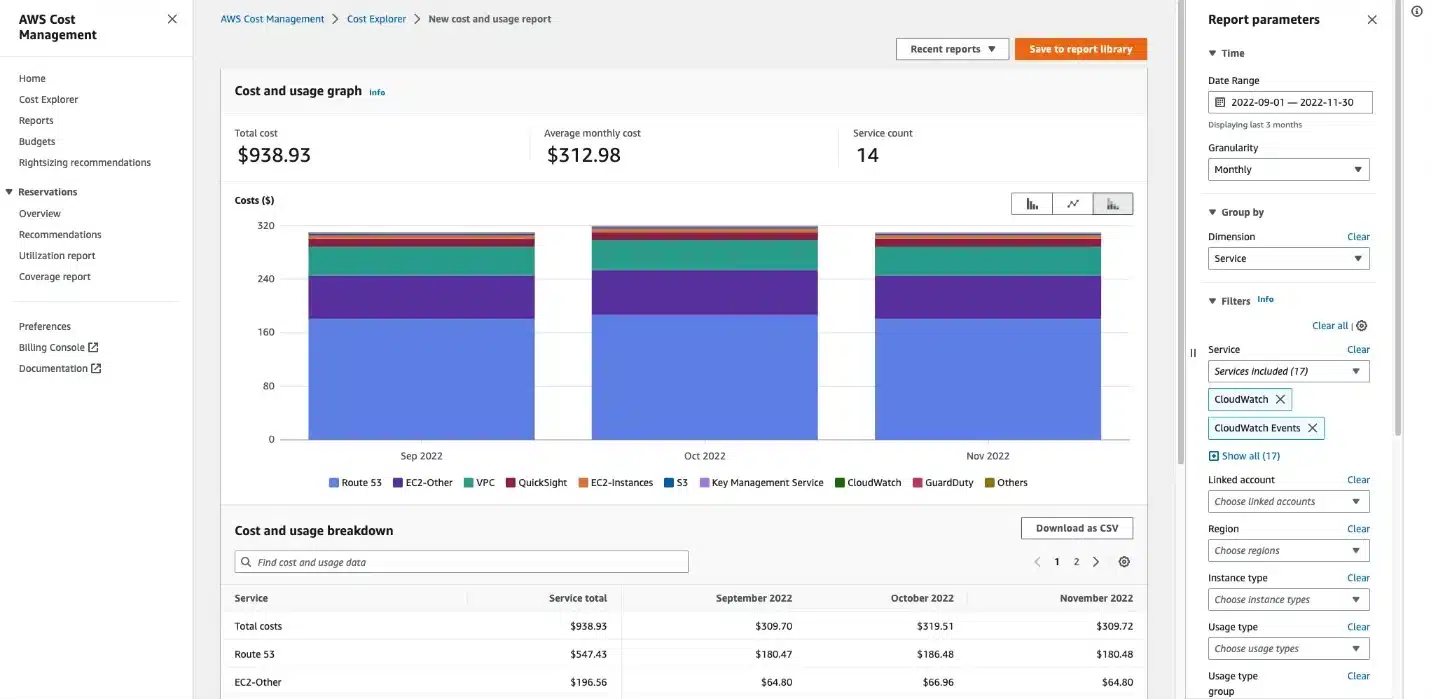
- AWS Cost Explorer tracks spending trends and forecasts.
- Microsoft Cost Management supports cost analysis, budgets, and alerts.
- Google Cloud Billing Reports provides project and service-level reporting.
Our cloud cost visibility guide explains reporting practices in greater detail.
2. Give each cost an owner
Every significant cloud expense should have a responsible team. In a smaller organization without a FinOps team, a designated finance or engineering lead can coordinate the review.Use tags, labels, cost centers, and allocation rules to connect spending with applications and business units. Track allocation coverage and document how shared or untaggable charges are distributed.
Two common approaches are:
- Showback: Reports spending to teams without transferring charges.
- Chargeback: Assigns spending directly to departmental or team budgets.
For complex environments, explore our comparison of cloud cost allocation tools.
3. Forecast what comes next
A budget defines planned spending, while a forecast estimates future costs based on current usage and expected changes.Compare both regularly. Treat forecasts as estimates, consider plausible ranges, and account for billing-data delays before interpreting projections as final charges.
For example, a product launch may justify higher compute costs, while an unexplained increase requires investigation.
Include workload growth, seasonal demand, deployment plans, and existing commitments in forecasting assumptions.
Our cloud budgeting guide explains more detailed planning methods.
4. Catch surprises before they grow
Cost alerts help identify unexpected changes before the monthly financial review.AWS provides Cost Anomaly Detection, while Azure Cost Management supports budget and anomaly alerts.
Standard budgets generally notify users rather than universally stopping spending. Some providers support configured actions, and Google Cloud offers spend-cap budgets for limited eligible services and scopes.
Every significant alert should have an investigation owner, a response deadline, and a documented outcome.
5. Make every spending alert actionable
An alert becomes valuable when someone identifies its cause and decides how to respond.| Spending problem | Responsible team | Recommended action |
|---|---|---|
| Unexpected compute growth | Engineering | Review scaling and deployments |
| Budget overrun | Finance and FinOps | Investigate variance |
| Unallocated expenses | FinOps | Correct allocation rules |
| Underused commitments | Commitment owner | Review utilization and demand |
For a broader approach, explore our cloud cost governance framework.
6. Remove waste before buying commitments
Once unnecessary spending is confirmed, investigate appropriate resource changes.Common opportunities include idle compute instances, oversized infrastructure, unattached storage, and development environments running outside required hours.
Validate dependencies and performance requirements before implementing changes. Remove confirmed waste and rightsize where appropriate; maintain governance controls to prevent recurrence before sizing new commitments against stable eligible usage.
Our cloud waste guide explains these categories in detail.
After removing unnecessary usage, evaluate eligible AWS Savings Plans, Azure Savings Plans, and Google Cloud CUDs.
Commitment coverage measures eligible usage receiving commitment discounts, while utilization measures how much purchased commitment is consumed.
Base new purchases on predictable eligible demand rather than peak spending.
7. Check whether savings were real
Estimated savings are not the same as realized savings.After implementing an action, compare costs for the same workload and allocation scope across comparable periods. Include amortized commitment charges and unused commitments, account separately for credits and discounts, and adjust for usage changes. Verify the results after billing data has settled.
Maintain a record of each action, its owner, expected financial benefit, and verified result.
Our cloud cost analysis guide explains how to investigate spending patterns and financial outcomes.
Four rules worth remembering
- Investigate, don’t assume: Not every increase in cloud spending represents waste.
- Assign ownership: Every important cost alert needs someone responsible for follow-up.
- Verify, don’t estimate: Report actual savings separately from projected savings.
- Commit carefully: Base cloud commitments on predictable demand, not temporary peaks.
KPIs that show what’s working
Tracking the right metrics helps organizations identify financial risks and measure progress.| KPI | What it measures | What to investigate |
|---|---|---|
| Budget variance | Actual or forecast costs versus budget | Unexplained overruns |
| Allocation coverage | Spending assigned to owners | Unallocated expenses |
| Forecast accuracy | Forecast versus actual spending | Repeated estimation errors |
| Unit cost | Cost per business output | Declining efficiency |
| Commitment utilization | Purchased commitment consumed | Underutilization |
Our cloud unit economics guide explains how to measure spending per customer, request, or transaction.
Tools that support spending decisions
The right cloud spend management software depends on the financial or operational problem being addressed.| Business requirement | What to evaluate |
|---|---|
| Single-cloud reporting | Native provider tools |
| Multi-cloud cost allocation | Unified reporting platforms |
| Unused or oversized resources | Infrastructure optimization tools |
| Stable eligible usage | Commitment management platforms |
| Spending approval controls | Governance and workflow tools |
Compare the available options in our cloud cost optimization tools guide.
Making cloud spending controls stick
Cloud spend management should be a continuous process rather than an occasional cost-cutting exercise.For the first 30 days, establish allocation coverage, assign budget and alert owners, investigate the biggest cost drivers, and document at least one verified outcome before expanding the program.
- Weekly: Investigate important anomalies and unresolved alerts.
- Monthly: Compare spending against budgets, review forecasts, and verify completed savings actions.
- After major changes: Reassess cost allocation, unit economics, and commitment requirements.
Where Usage.ai Fits In
Commitment management does not replace cost allocation, governance, rightsizing, or architecture optimization. Each plays an important role in controlling cloud spending.We built Usage.ai for teams with stable, eligible usage across AWS, Azure, and Google Cloud that want to optimize cloud commitments while reducing exposure to long-term commitment risk.
Our read-only Savings Test identifies potential savings without requiring purchasing permissions. With CoPilot and Autopilot, teams can approve recommendations or automate eligible commitment purchases.
With our Flex Insured Commitments teams can get the 30–50% savings of cloud commitments across AWS, Azure, and GCP with none of the commitment risk.
If an eligible Flex Commitment costs more than the equivalent on-demand usage, we calculate that loss at the end of the month and provide cashback protection for it, subject to program terms.
Our fee is a percentage of realized savings, billed monthly in arrears. If we do not generate verified savings, there is no savings-based fee.
Review eligible usage, existing commitments, and potential savings across AWS, Azure, and GCP.
Frequently asked questions
How do you identify unexpected cloud spending?
Compare current and historical costs in AWS Cost Explorer, Azure Cost Management, or Google Cloud Billing. Filter expenses by service, account, and workload, then investigate recent deployments, scaling activity, and usage changes to identify the cause.
Is tagging enough for cost allocation?
No. Tagging helps assign costs to teams and applications, but missing tags, shared infrastructure, and charges without resource-level attribution can leave expenses unallocated. Combine tagging with account structures, allocation rules, and regular reviews.
How can companies manage multi-cloud spending?
Companies can manage AWS, Azure, and Google Cloud spending through centralized reporting, standardized billing data, and consistent cost allocation rules. A unified view helps compare expenses, monitor budgets, identify unusual spending, and assign financial ownership.
Can cloud budgets prevent overspending?
Not universally. Standard cloud budgets usually provide alerts instead of automatically stopping charges. Some providers support configured actions or limited spending caps, but enforcement depends on the service, scope, settings, and billing limitations.
How can teams verify cloud savings?
Teams can verify cloud savings by comparing costs for the same workload and allocation scope across comparable periods, using a baseline that accounts for changes in usage and pricing. Include amortized commitment costs, unused commitments, credits, and discounts. Track estimated and realized savings separately, and confirm the results after billing data has settled.