.png)



FinOps automation refers to software that replaces manual cloud cost management with continuous, autonomous action on your cloud spend. The highest-impact area: commitment purchasing. Reserved Instances, Savings Plans, and Committed Use Discounts deliver 30-60% discounts versus on-demand pricing (verify at aws.amazon and cloud.google – rates change). Most teams do not capture these savings at full coverage because of a single problem: lock-in. A 3-year EC2 Reserved Instance binds you to a specific instance family, region, and size. If usage drops, you pay for compute you are not using. If architecture changes, the commitment no longer matches the workload.
This guide covers what FinOps automation actually does, why the lock-in problem stops most teams from committing aggressively, how leading platforms compare on the dimension that matters most, and how to evaluate automation for your organization’s specific risk profile.
Why FinOps Teams Still Manage Commitments Manually
Managing AWS Savings Plans or Reserved Instances manually requires continuous monitoring of utilization rates, expiration dates, instance family changes, and coverage gaps. At $1M+ per month in cloud spend, this is a full-time job for at least one engineer – and in most organizations, it becomes a quarterly fire drill rather than a continuous discipline.
The compounding problem: AWS Cost Explorer, the native tool most FinOps teams start with, refreshes recommendations every 72+ hours (verify at docs.aws.amazon – refresh cadence may be updated). At $6,000-$12,000 per day in uncovered compute spend, a 72-hour recommendation lag means each refresh cycle leaves $18,000-$36,000 of potential savings unacted on. This is not a niche edge case. It is a structural limitation of native tooling that compounds across every week your coverage gap remains open.
Manual FinOps management also breaks at organizational complexity. Multi-account AWS Organizations, multiple cloud providers, and teams with variable workloads (seasonal traffic, AI training runs, new product launches) make static commitment portfolios obsolete within months of purchase.
The alternative is FinOps automation. But most teams hit the same wall when they evaluate automation tools: the platforms still require them to own the commitment. The financial risk of underutilization moves from manual management to automated management, but the risk stays with the customer.
What Does FinOps Automation Actually Cover?
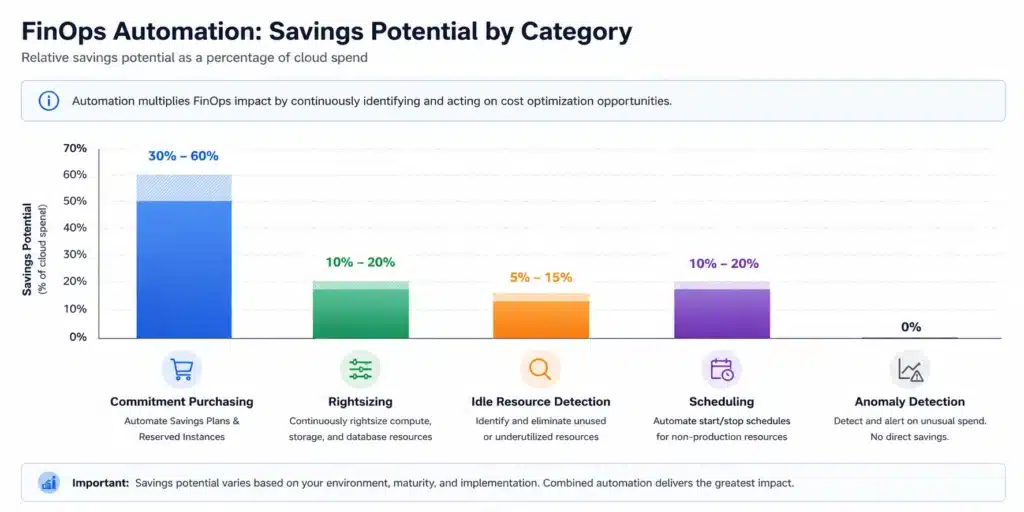
FinOps automation is not a single capability. The category covers five distinct problem types, and understanding which one drives the most value for your organization determines which platform makes sense.
- Commitment purchasing: Automatically buying Reserved Instances, Savings Plans (AWS), or Committed Use Discounts (GCP) based on detected baseline usage. This is where 70-80% of achievable cloud savings come from at scale. It is also where the lock-in risk lives. Automating this without underutilization protection shifts the risk from manual management to automated management – but does not eliminate it.
- Idle resource detection: Shutting down or rightsizing instances that are consistently underutilized. Tools in this category analyze CPU, memory, and network metrics and flag or terminate resources below a utilization threshold. This is valuable but typically delivers 5-15% savings compared to 30-60% from commitment automation.
- Tagging and cost allocation: Ensuring resources are labeled correctly so costs can be attributed to teams, products, or cost centers. This is a governance and visibility problem, not a direct savings mechanism. FinOps teams need this for chargeback and showback reporting, but it does not reduce spend by itself.
- Anomaly detection: Alerting when spend spikes unexpectedly relative to baseline. Most cloud providers offer native anomaly detection at no additional cost. Third-party platforms add cross-cloud visibility and more granular thresholds.
- Rightsizing and scheduling Matching instance types to workload requirements, or turning off non-production environments outside business hours. Useful for development and staging environments. Typically delivers 10-20% savings on non-production spend.
Most FinOps automation platforms cover all five areas. The decisive difference between them is how they handle commitment purchasing: specifically, who bears the financial risk if usage patterns shift after a commitment is in place.
The Lock-In Problem: Why FinOps Automation Stalls at Commitment Purchasing
Reserved Instances and Savings Plans deliver the largest discounts in cloud pricing – 30-60% versus on-demand (verify at aws.amazon – rates change). They also carry 1-3 year terms with no native exit option. AWS does not offer a buyback mechanism for underutilized commitments. GCP Committed Use Discounts operate on similar 1-3 year terms.
This creates a specific organizational problem for FinOps teams: the team responsible for cloud costs does not control the workloads generating the spend. Engineering ships a migration. Product reduces a service. A workload moves to a different instance family. A commitment accurate in Q1 becomes over-provisioned by Q3.
The rational response to this uncertainty is under-commitment. Most FinOps teams maintain 60-70% coverage of eligible spend because they are hedging against usage changes they cannot predict. The gap between their actual coverage rate and the 85-90% coverage that maximizes savings represents real, measurable money left on the table every month.
FinOps automation, by itself, does not fix this. An automated tool that purchases commitments on your behalf still exposes you to underutilization risk unless the tool also provides financial protection on those commitments. Automation changes who manages the commitment portfolio. It does not change who owns the financial risk of getting it wrong.
How FinOps Automation With a Buyback Guarantee Solves This
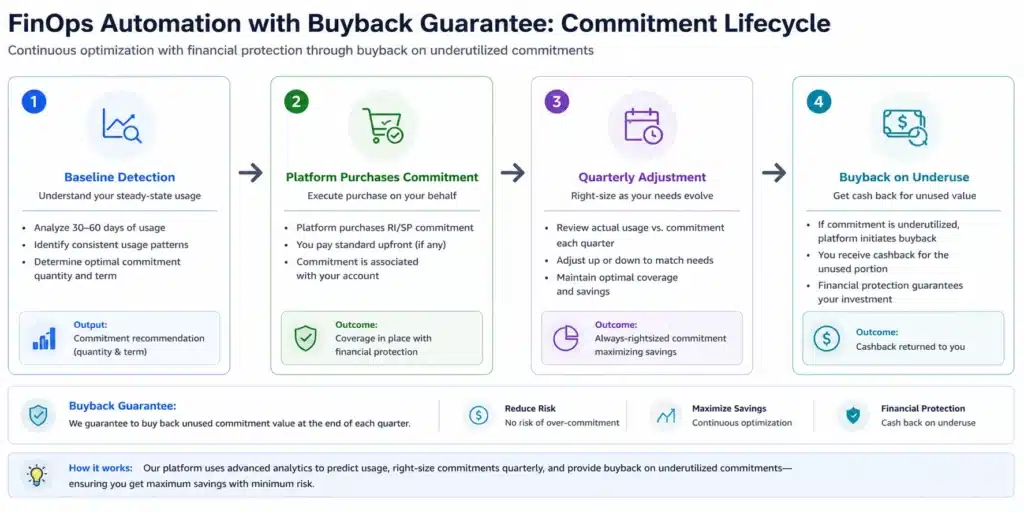
The structural fix is a platform that separates commitment purchasing from commitment ownership. Instead of your organization purchasing an AWS Reserved Instance and holding it for 3 years, the platform purchases the commitment using its own capacity and passes the discount to your account. If usage drops and you no longer need the commitment, the platform buys it back.
This model has three operational components:
- Baseline detection The platform analyzes historical usage across all services to identify the stable baseline – the compute capacity consumed reliably regardless of traffic spikes or application changes. Commitments are sized to the baseline, not to peak usage. Demand above the baseline continues on on-demand or spot pricing.
- Continuous adjustment As usage patterns shift due to migrations, new services, or team changes, the platform adjusts the commitment portfolio. A platform running continuous adjustment responds to a 20% infrastructure reduction within the next adjustment cycle, rather than leaving a mismatched commitment in place for the remainder of a 3-year term.
- Underutilization protection If a commitment goes underutilized despite continuous adjustment, the platform provides financial protection. The form this takes varies by vendor. Some return credits (locked to a single vendor or platform). Others return cashback (real money, spendable anywhere). The distinction matters: credits tied to a vendor have limited flexibility if you wind down a workload or migrate away. Cashback functions as actual recovered cost with no strings attached.
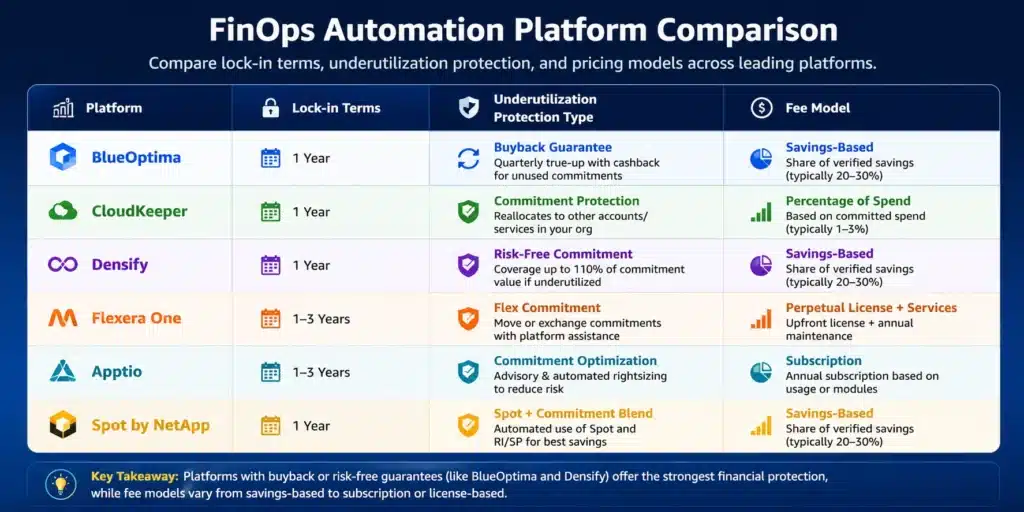
How Leading FinOps Automation Platforms Compare
The table below covers platforms most commonly evaluated for FinOps automation. Capabilities are drawn from publicly available documentation and product pages as of June 2026. Verify current capabilities directly with each vendor before making a purchasing decision.
| Platform | Clouds | Commitment Model | Lock-In Terms | Underutilization Protection | Recommendation Refresh | Fee Model |
| Usage.ai | AWS, GCP, Azure | Platform purchases; Insured Flex Commitment | Zero lock-in; cancel anytime; quarterly adjustment | Cashback (real money) + credits | 24 hours | % of realized savings; $0 if no savings |
| ProsperOps | AWS | Automated RI and SP purchasing | AWS standard terms apply | Credits | Not publicly stated | % of savings |
| Ternary | GCP, AWS | Recommendations + purchasing | Standard cloud terms | No buyback stated | Not publicly stated | Platform fee |
| CAST AI | AWS, GCP, Azure | Kubernetes-focused node rightsizing | Standard cloud terms | No buyback stated | Continuous (K8s only) | % of savings |
| Flexera | AWS, GCP, Azure | Recommendations; manual purchasing | Standard cloud terms | No buyback stated | Not publicly stated | Enterprise license |
| AWS Cost Explorer | AWS only | Recommendations only | 1-3 year AWS lock-in if you purchase | None | 72+ hours | Free |
Self-audit note: ProsperOps, Ternary, CAST AI, and Flexera capabilities are drawn from public-facing website content as of June 2026. Verify current product capabilities directly with each vendor before using this table in a purchasing decision.
Choose the Right FinOps Automation Approach for Your Team
Choose native cloud tools (AWS Cost Explorer, GCP FinOps Hub) when:
- Cloud spend is below $100K per month
- You have engineering bandwidth to review recommendations weekly and act on them
- Usage patterns are stable and predictable over 12-month windows
- Finance is comfortable with 1-3 year commitment terms on specific instance families
Choose a third-party FinOps automation platform when:
- Cloud spend exceeds $200K per month and manual management is consuming engineer time
- You run workloads across multiple AWS accounts, GCP projects, or cloud providers
- Usage patterns are variable due to seasonal traffic, AI/ML training, or rapid growth
- Finance wants cost predictability without betting on a specific infrastructure configuration 1-3 years out
Choose a platform with a buyback guarantee when:
- You want 85-90% commitment coverage but cannot accept the financial risk of over-commitment
- You are in a period of architectural change: migration, modernization, or scaling down
- You have experienced underutilized commitments in a previous commitment cycle
- Your organization’s risk tolerance does not permit multi-year financial obligations on specific infrastructure
What to Ask Every FinOps Automation Vendor Before Signing
1. Who owns the commitment risk?
This is the non-negotiable first question. If your organization purchases the commitment and the vendor helps manage it, underutilization risk is yours. If the vendor purchases the commitment and passes the discount to your account, ask specifically: what is the buyback mechanism? Is the protection cashback or credits? What triggers the buyback?
2. What is the recommendation refresh cadence?
A platform refreshing every 24 hours catches waste 3 days earlier than one refreshing every 72+ hours. At $6,000-$12,000 per day in uncovered spend, that 3-day gap compounds to $18,000-$36,000 per refresh cycle. Get a specific number from the vendor, not a general claim about real-time recommendations.
3. Multi-cloud or single-cloud coverage?
If you run workloads on more than one provider, a platform with native support across AWS, GCP, and Azure prevents fragmented reporting and multiple vendor relationships. Single-cloud tools are adequate for AWS-only or GCP-only environments.
4. What does setup require?
Platforms requiring agent installation, network changes, or IAM modifications across hundreds of accounts introduce deployment risk and delay time-to-savings. Billing-layer access only, requiring no infrastructure changes, is a meaningful operational advantage. Ask for the complete list of access requirements before agreeing to a trial.
5. How is the fee structured?
A platform charging a percentage of realized savings only has fee alignment with your outcome. You save more, they earn more. You save nothing, they earn nothing. A platform charging a flat enterprise license earns revenue regardless of savings delivered. Verify how “savings” is defined in the contract: some vendors measure against list on-demand pricing, which inflates the savings figure versus your actual blended rate.
6. What services does coverage include?
AWS Savings Plans cover EC2, Fargate, and Lambda. RDS, ElastiCache, Redshift, OpenSearch, and DynamoDB require Reserved Instances and are managed separately. A platform covering only compute Savings Plans leaves database commitment purchasing unautomated – which for RDS-heavy workloads can represent 20-35% of total eligible savings.
How Usage.ai’s Insured Flex Commitment Addresses the Lock-In Problem
Usage.ai Insured Flex Commitments are the specific product mechanism that addresses lock-in structurally rather than contractually.
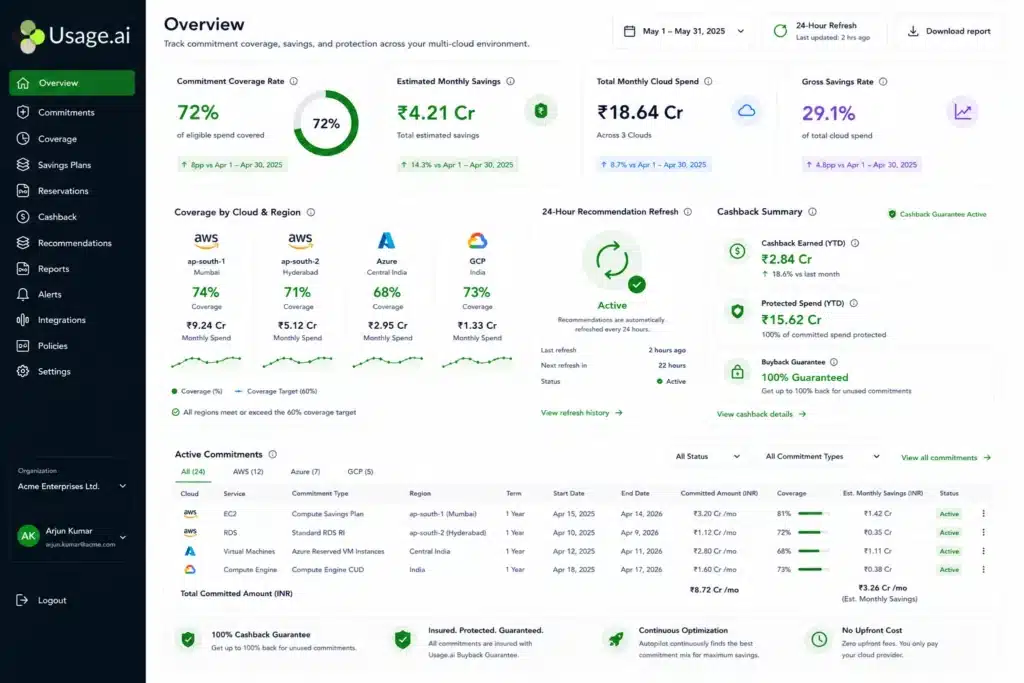
- Insured Flex Commitment: An SP/RI-equivalent discount structure delivering 30-60% savings without requiring multi-year lock-in or upfront payment. Usage.ai purchases the commitment using its own capacity and passes the discount to the customer’s AWS, GCP, or Azure account. Every commitment is fully insured: underutilized portions are returned as cashback (real money), not credits.
- Zero Lock-In Guarantee: Insured Flex Commitments carry no multi-year obligation. Commitments adjust quarterly. Scale down? No penalty. Underutilized? Cashback paid in real money, not credits.
- Buyback Guarantee: If a commitment purchased through Usage.ai goes underutilized, Usage.ai buys it back, returning the value as cashback, not credits.
Operationally, this means FinOps teams do not need to forecast usage 1-3 years ahead to capture maximum commitment discounts. The commitment adjusts as usage changes. The financial risk of over-commitment is absorbed by the platform, not the customer.
The AWS product suite covers:
- Usage Flex Savings Plan (EC2, Fargate, Lambda): saves 40-60% (verify at usage.ai – rates change)
- Usage Flex DB Savings Plan (RDS, ElastiCache, DocumentDB): saves 20-35%
- Usage Flex Reserved Instances (RDS, ElastiCache, OpenSearch, Redshift, DynamoDB): saves 30-40%
Setup uses billing-layer access only. No infrastructure changes, no code changes, no agent installation. Full commitment coverage in 60 days versus the 6-9 month industry standard for teams building coverage manually.
To run a no-cost savings assessment showing your current coverage gap and estimated savings, try our savings calculator.
A Real Scenario: What Happens When Usage Drops 30% After Automating
Consider a company running $800K per month in AWS EC2 and RDS spend. Their FinOps team automates commitment purchasing at 80% coverage of eligible compute spend – $640K per month – to capture a 40% average discount. Six months later, a product migration reduces their EC2 footprint by 30%.
Scenario A: Standard commitment automation (customer owns the commitment)
The $640K per month in commitments now covers $448K of actual usage. The remaining $192K per month is waste. AWS does not offer a native buyback. Over the remaining 18 months of a 3-year term, this underutilization costs $3.46M in payments for compute the team is no longer using. The savings on the utilized portion (approximately $256K per month at 40% discount) do not offset the waste on the over-committed portion.
Scenario B: FinOps automation with buyback guarantee
The platform detects the usage drop within the next adjustment cycle. It reduces the commitment portfolio to match the new baseline. The underutilized portion of any commitment in place during the transition is bought back, with the value returned as cashback. The team retains the discount on the utilized portion and absorbs no financial penalty on the reduced portion.
The numerical difference between Scenario A and Scenario B over 18 months is $3.46M in this example. Teams that have lived through Scenario A treat buyback guarantee as a non-negotiable evaluation criterion, not a nice-to-have feature.
FinOps Automation Across AWS, GCP, and Azure: What Differs by Cloud
AWS: Savings Plans and Reserved Instances
AWS offers two commitment mechanisms that must be managed separately. Savings Plans apply across EC2, Fargate, and Lambda based on a dollar-per-hour commitment regardless of instance type. Reserved Instances apply to specific instance families and require separate management by service (RDS, ElastiCache, OpenSearch, Redshift, DynamoDB). Automating both requires a platform with coverage across compute and database tiers. AWS native tools cover recommendations for both but with a 72+ hour refresh lag, no automated purchasing, and no underutilization protection.
GCP: Committed Use Discounts
GCP Committed Use Discounts apply to Compute Engine, GKE, Cloud SQL, and other services. CUDs are resource-based commitments for vCPU and memory on 1-year or 3-year terms. Flex CUDs offer more flexibility on some services but at lower discounts. Not all AWS-focused FinOps automation platforms support GCP CUDs natively. Verify GCP coverage explicitly when evaluating multi-cloud platforms. (Verify current Flex CUD availability at cloud.google.com/compute/docs/instances/signing-up-committed-use-discounts – availability may have changed.)
Azure: Reserved VM Instances and Savings Plans
Azure Reserved VM Instances follow a similar model to AWS RIs: instance type and region specific, on 1-3 year terms. Azure Savings Plans (launched 2022) provide more flexibility across VM families within a region. As with AWS, automating Azure commitment purchasing without underutilization protection leaves the financial risk of usage changes with the customer.
Across all three clouds, the FinOps automation evaluation framework is the same: who owns the commitment, what happens on underuse, and how frequently do recommendations refresh.
See a direct comparison of Usage.ai versus ProsperOps on AWS commitment automation.
How to Evaluate FinOps Automation for Your Organization: 5 Steps
Step 1: Quantify your current coverage gap
In AWS Cost Explorer or your cloud provider’s billing console, pull your current Savings Plan and Reserved Instance coverage rate. Anything below 80% on stable workloads represents uncaptured savings. Calculate the annual cost: (1 minus coverage rate) x eligible spend x average commitment discount rate. This is the number your FinOps automation evaluation should be measured against.
Step 2: Separate stable from variable workloads
Identify which workloads have consistent usage patterns over 6-12 months (always-on databases, steady-state services) versus which are variable (batch jobs, ML training runs, seasonal traffic). Commit the baseline. Leave variable workloads on on-demand or spot. The commitment portfolio should reflect the stable floor, not the peak.
Step 3: Assess your organization’s risk tolerance on commitments
Can finance accept a 3-year obligation on a specific EC2 instance family? If not, or if the answer depends on what happens to usage, a buyback-protected platform is the appropriate mechanism. This is not a product preference question. It is a risk management question with a financial answer.
Step 4: Run a savings assessment before signing with any platform
Most reputable FinOps automation platforms offer a no-cost assessment showing your current spend, coverage rate, and estimated savings before you commit to anything. The output should include: current blended rate, achievable discount rate by service, coverage gap by service tier, and time to full coverage. Use this to compare platforms on the same baseline numbers, not their own savings claims.
Step 5: Compare on lock-in terms, not just savings percentage
Two platforms claiming 40% savings are not equivalent if one exposes you to 3-year AWS lock-in and the other adjusts quarterly with a buyback guarantee. The savings percentage is one number. The downside risk of over-commitment is a separate number that most evaluation processes never calculate.
Book a savings assessment at usage.ai to see your specific coverage gap before starting vendor conversations.
Learn more about how Savings Plans automation works with variable workloads.
Frequently Asked Questions
1. What is FinOps automation?
FinOps automation is software that replaces manual cloud cost management with continuous, autonomous action on cloud spend. The main categories are commitment purchasing (Reserved Instances, Savings Plans, CUDs), idle resource detection, tagging and cost allocation, anomaly detection, and rightsizing. Commitment purchasing delivers the highest savings potential at 30-60% discounts on baseline workloads. The key evaluation criterion is whether the platform manages commitments you own, or purchases them on your behalf with underutilization protection.
2. What happens if I automate cloud commitments and my usage drops?
The answer depends on the platform model. With commitments your organization purchases directly, you continue paying for the committed capacity whether you use it or not – AWS and GCP do not offer native buyback mechanisms. With platforms that include a buyback guarantee, where the platform purchases the commitment rather than you, underutilized portions are bought back with value returned as cashback or credits. Cashback is real money spendable anywhere. Credits are vendor-locked to a specific platform.
3. How much can FinOps automation save on cloud spend?
Commitment automation typically delivers 30-60% discounts versus on-demand pricing depending on cloud provider, service type, and commitment term. AWS EC2 Instance Savings Plans deliver up to 72% for 3-year all-upfront on specific instance families (verify at aws.amazon.com/savingsplans/pricing – rates change). Realistic achievable savings for most organizations, accounting for variable workloads that cannot be committed, is 30-50% of total eligible spend. Platforms with buyback protection enable higher coverage rates because over-commitment risk is eliminated.
4. Do FinOps automation tools require multi-year lock-in?
It depends on the platform model. Platforms that automate the purchase of your AWS Reserved Instances or Savings Plans still expose you to standard 1-3 year AWS commitment terms – the automation changes who manages the commitment, not who owns the risk. Platforms that purchase commitments on your behalf with buyback guarantees and quarterly adjustment eliminate multi-year lock-in. You receive the discount without holding the commitment. The critical question to ask any vendor: who owns the commitment, and what happens if my usage drops?
5. What is the difference between cashback and credits in commitment protection?
Cashback returns real money when a commitment goes underutilized – deposited directly to your account or applied as a billing reduction, usable on any spend. Credits are locked to a specific vendor or platform and can only offset future spend on that platform. If you scale down a workload or shift providers, cashback retains its full value while credits may expire or be inapplicable. For FinOps teams evaluating underutilization protection, this distinction has a direct operational and financial impact.
6. How long does FinOps automation take to set up?
Setup time varies significantly by platform. Native cloud tools like AWS Cost Explorer require no setup but take no automated action – they produce recommendations that require manual execution. Third-party platforms requiring agent installation, IAM modifications across hundreds of accounts, or network configuration changes can take weeks to deploy and validate. Platforms using billing-layer access only operate without infrastructure changes and can be fully operational in 30 minutes. Time to full commitment coverage ranges from 60 days for platforms with automated purchasing to 6-9 months for teams building coverage manually.
7. What is an Insured Flex Commitment?
An Insured Flex Commitment is a commitment structure from Usage.ai that delivers SP/RI-equivalent savings of 30-60% without requiring multi-year lock-in or upfront payment. Usage.ai purchases the commitment using its own capacity and passes the discount to the customer’s AWS, GCP, or Azure account. If the commitment goes underutilized, Usage.ai buys it back and returns the value as cashback (real money), not credits. Commitments adjust quarterly as usage patterns change. No infrastructure modifications are required. This model is distinct from platforms that automate management of commitments the customer still holds.
8. What FinOps automation features matter most for multi-cloud teams?
For teams running workloads across AWS, GCP, and Azure, the highest-priority features are: unified cross-cloud commitment management from a single platform, coverage across compute and database services on each cloud, a consistent recommendation refresh cadence across providers, and consolidated reporting for chargeback and showback. Multi-cloud teams should verify that any platform evaluated has native coverage for GCP Committed Use Discounts and Azure Reserved VM Instances, not just AWS Savings Plans, before signing a contract.