
 AWS
 Microsoft Azure
 Google Cloud


What is cloud rightsizing?
Cloud rightsizing is the process of adjusting cloud resources to match actual workload requirements. It helps organizations avoid paying for more computing capacity than they need.For example, if an EC2 instance consistently uses only a small portion of its allocated CPU and memory, a company may move to a smaller instance that can handle the same workload.
Rightsizing can reduce infrastructure costs, but actual savings depend on existing discounts and commitments.
Why commitments go unused
Imagine reducing your cloud infrastructure by 40%, only to discover that your commitment payment has not changed.Your workloads are smaller, but you may still be paying for commitments purchased before the change.
This can happen because AWS Savings Plans, Reserved Instances, Azure Reservations, and Google Cloud Committed Use Discounts (CUDs) involve financial or resource commitments for a defined term.
When workloads shrink, they may consume fewer commitment benefits. However, the original obligation generally continues.
For example, an organization might purchase a Savings Plan based on its existing compute usage. Later, the engineering team reduces instance sizes to improve efficiency.
If no other eligible workloads can use the remaining benefits, commitment utilization decreases.
But unused commitments are not inevitable. Some commitments offer flexibility across instance sizes, services, or eligible workloads.
The financial outcome depends on commitment type, discount eligibility, sharing scope, and remaining demand.
Before and after costs
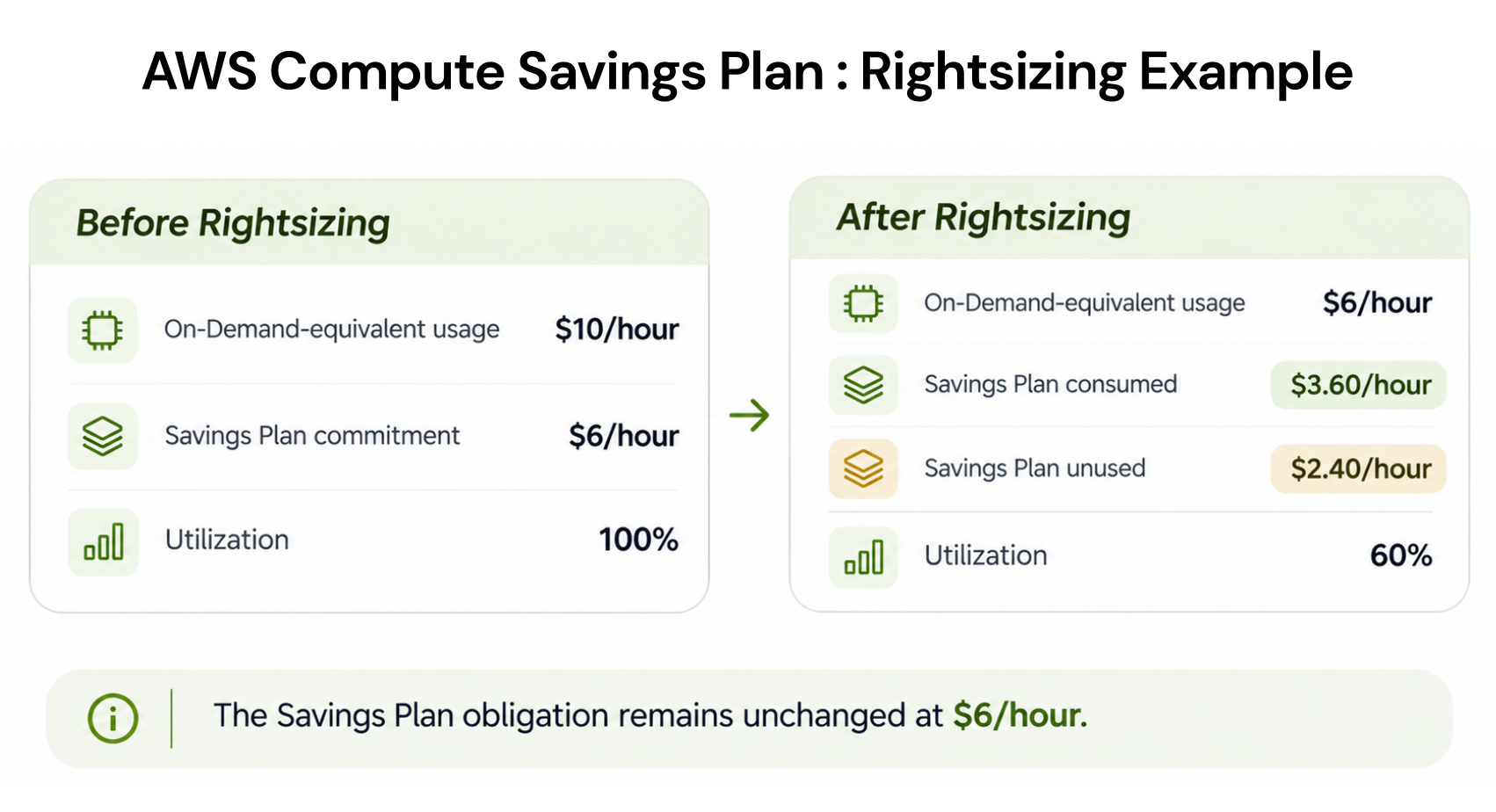
Consider a company running an AWS workload covered by an existing Compute Savings Plan.Engineering identifies an opportunity to reduce compute requirements, but the organization has already purchased a $6/hour Savings Plan.
The example assumes constant hourly usage, no other eligible consumption, and no additional variable infrastructure charges. All rates are illustrative rather than current AWS rate-card prices.
Before-and-after cost comparison
| Metric | Before rightsizing | After rightsizing |
|---|---|---|
| On-Demand-equivalent usage | $10.00/hour | $6.00/hour |
| Existing Savings Plan commitment | $6.00/hour | $6.00/hour |
| Commitment consumed | $6.00/hour | $3.60/hour |
| Unused commitment | $0.00/hour | $2.40/hour |
| Commitment utilization | 100% | 60% |
| Hourly commitment obligation | $6.00/hour | $6.00/hour |
| Immediate billed savings from rightsizing | $0.00/hour |
In this example, the resized workload remains fully covered, but commitment utilization falls from 100% to 60%.
What does this mean?
Rightsizing lowers the workload’s On-Demand-equivalent requirements by 40%, but it does not change the existing $6/hour Savings Plan commitment.Over an illustrative 720-hour month, the organization still has a $4,320 commitment obligation. Of that amount, $2,592 is consumed and $1,728 represents unused commitment value, not an additional charge. Immediate billed savings from the resize are $0 in this isolated example.
Before approving the financial outcome, check whether other eligible workloads can consume the remaining commitment. If not, evaluate permitted adjustment options and use expected post-rightsizing demand to guide future purchases.
Commitments across cloud providers
Cloud providers have different commitment models. The impact of rightsizing depends on the purchased product and whether the resized infrastructure remains eligible for its discount.| Cloud provider | Commitment type | What happens after rightsizing? | First check |
|---|---|---|---|
| AWS | Compute Savings Plans | Lower eligible spending may leave hourly commitment unused | Project eligible hourly spending |
| AWS | EC2 Instance Savings Plans | Benefits can continue within the purchased family and Region | Confirm family and Region |
| AWS | Reserved Instances | Discounts depend on matching requirements and size flexibility | Check RI scope and attributes |
| Azure | Savings Plans | Reduced eligible spending can lower utilization | Review hourly eligible usage |
| Azure | Reservations | Smaller compatible VMs may consume fewer reservation units | Check flexibility group and scope |
| GCP | Resource-based CUDs | Reduced resource consumption can leave committed quantities unused | Check resource matching and sharing |
| GCP | Spend-based CUDs | Lower eligible spending can leave commitment benefits unused | Check product eligibility and billing scope |
AWS: Savings Plans and Reserved Instances
AWS Compute Savings Plans offer flexibility across eligible EC2 instance families, sizes, Regions, and operating systems, along with supported Fargate and Lambda usage.Downsizing an EC2 instance does not automatically invalidate a Compute Savings Plan. However, lower eligible spending can create unused commitment.
For example, if one EC2 workload is downsized, remaining benefits may apply to eligible Fargate usage or EC2 workloads in another linked account when the applicable sharing conditions are met.
AWS explains the benefit application order in its Savings Plans documentation.
EC2 Instance Savings Plans are more restrictive because they apply to a particular instance family within a Region.
Reserved Instances have additional matching rules. Certain Regional RIs support instance-size flexibility, while zonal and other configurations can be more restrictive.
For a detailed comparison, see our AWS Savings Plans vs. Reserved Instances guide.
Azure: Reservations and Savings Plans
Azure Reservations can support instance-size flexibility within eligible VM groups.For example, if a company changes to a smaller compatible VM, the reservation benefit may continue applying. However, the smaller VM can consume fewer normalized reservation units.
Another compatible VM within the reservation’s benefit scope may consume the remaining units. A VM in an unrelated flexibility group would not qualify for the same size-flexibility benefit.
Microsoft explains the applicable groups and ratios in its instance-size flexibility documentation.
Azure Savings Plans provide broader flexibility across supported eligible services, but the hourly financial commitment continues.
Reservation exchanges, trade-ins, and cancellations are subject to specific rules. Microsoft has announced exchange-policy changes beginning February 1, 2027, including restrictions tied to purchase dates and savings-plan eligibility.
Read our Azure Reservations guide for more information about commitment scope and flexibility.
GCP: Committed Use Discounts
Google Cloud offers resource-based and spend-based CUDs.Resource-based CUDs commit to specified eligible resources, such as vCPUs or memory. Rightsizing can leave committed resource quantities unused when matching consumption decreases.
With resource-based CUD sharing enabled, eligible usage in another project linked to the same Cloud Billing account may consume the remaining benefit, subject to applicable resource and regional rules.
Google Cloud explains this in its resource-based CUD sharing documentation.
Spend-based CUDs commit to eligible spending. Standard spend-based CUDs use hourly entitlement periods, while certain Flexible Savings Plans use monthly entitlement windows.
Whether other workloads can consume remaining benefits depends on product eligibility, Region, billing account, and sharing rules.
For practical purchasing and monitoring guidance, explore our GCP CUD optimization guide.
Checklist before changing capacity
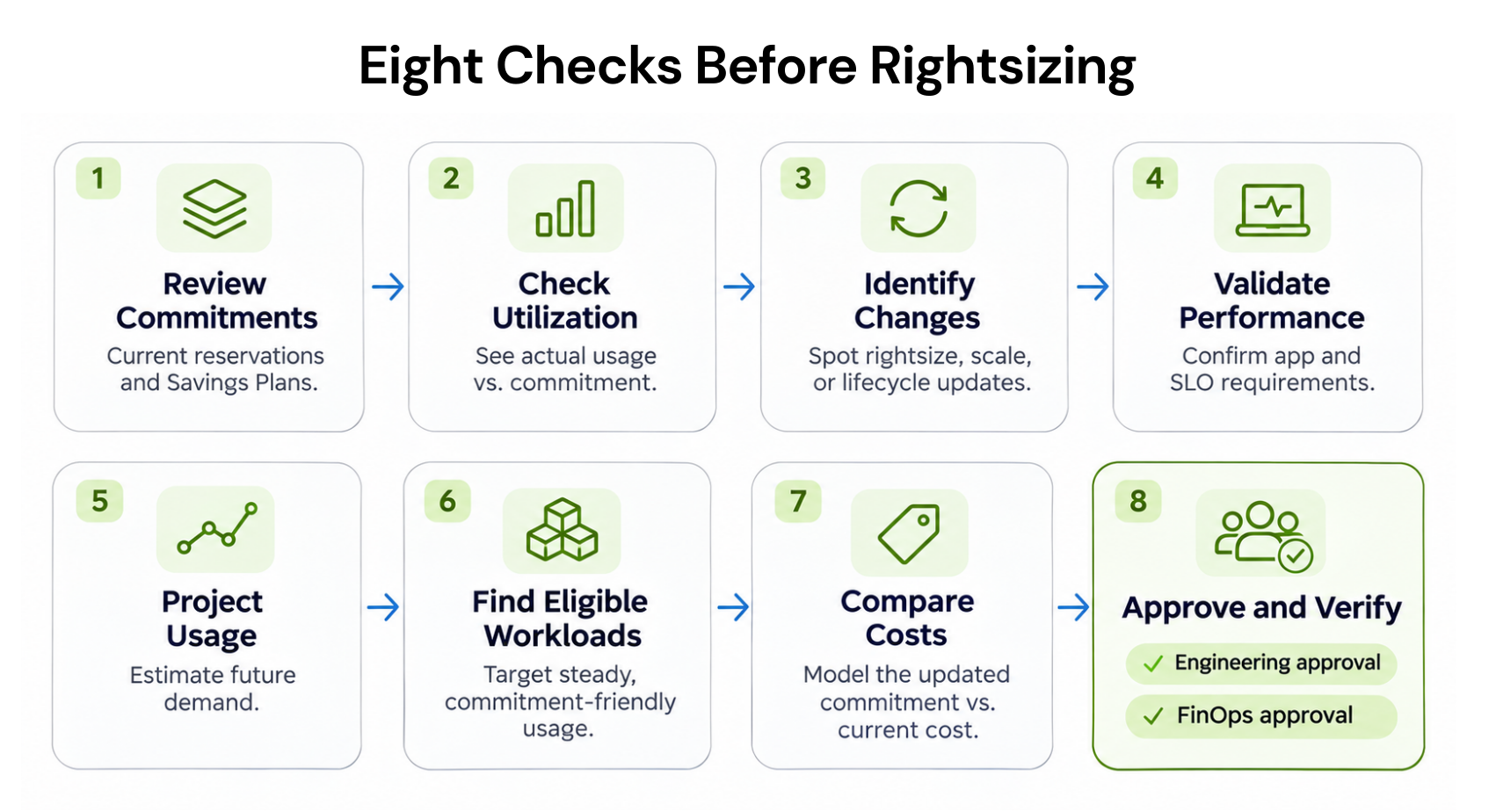
Before rightsizing workloads covered by existing cloud commitments, use this checklist to confirm both performance requirements and the actual financial impact.Pre-rightsizing checklist
- 1. Review existing commitments: Identify active Savings Plans, Reserved Instances, Azure Reservations, and GCP CUDs. Check purchase amounts, expiration dates, and eligible resources.
- 2. Check utilization and coverage: Review how much of each commitment is consumed and how much eligible usage receives discounts. See our Savings Plans coverage vs. utilization guide.
- 3. Identify capacity changes: Compare the current and proposed instance sizes, families, Regions, and other attributes that affect discount eligibility.
- 4. Validate workload performance: Check CPU, memory, storage, peak demand, and application performance requirements before reducing capacity.
- 5. Calculate projected utilization: Estimate how much of the existing commitment the rightsized workload will consume and identify any unused portion.
- 6. Find other eligible workloads: Check whether remaining commitment benefits can apply to other accounts, projects, or workloads under the provider’s sharing rules.
- 7. Compare actual costs: Calculate costs before and after rightsizing, including existing commitment obligations, unused value, and remaining On-Demand charges. Avoid double-counting savings.
- 8. Approve and verify results: Engineering should confirm performance, while FinOps validates the financial impact. After deployment, compare actual costs and utilization against the approved estimate.
When commitments stay unused
If rightsizing reduces commitment utilization, the next step is to determine whether the remaining benefits can be used or whether future purchasing decisions should change.Use other eligible workloads: Review matching consumption within the supported sharing scope. A commitment may continue providing value even when the original workload becomes smaller.
Check adjustment options: Some commitment products support modifications, exchanges, or trade-ins, but these options vary by provider:
- AWS: Eligible Reserved Instances may support modifications, and Convertible RIs have exchange options. Savings Plans generally cannot be canceled simply because usage falls.
- Azure: Eligible Reservations may support exchanges, cancellations, or trade-ins, subject to current rules. From February 1, 2027, additional exchange restrictions apply to certain newly purchased reservations for savings-plan-eligible services.
- GCP: Spend-based CUDs generally cannot be canceled after purchase. Resource-based CUDs have their own restrictions, while supported sharing configurations can help other eligible resources consume benefits.
Review upcoming expirations: Use renewal decisions to reconsider the amount and type of commitment needed.
Monitor realized savings: Compare actual effective costs with the approved baseline rather than relying on estimated resource savings.
The decision is straightforward: validate workload performance, estimate remaining commitment utilization, check other eligible demand, and review adjustment or renewal options before approving the financial outcome.
Keeping oversized infrastructure running solely to consume an existing commitment is not automatically the better decision.
If AWS consumption is declining, our guide on buying additional Savings Plans when usage falls explains how to evaluate future commitments against changing demand.
How Usage.ai assesses commitments
Rightsizing changes how much infrastructure you need. Your commitment strategy should reflect that change.Our read-only Savings Test helps you review recommendations without purchasing commitments or modifying workloads.At Usage.ai, we analyze your cloud usage and existing commitments, then help purchase and manage eligible Savings Plans, Reserved Instances, and CUDs across AWS, Azure, and Google Cloud.
With Flex Insured Commitments, teams can access 30–50% savings through eligible one- or three-year cloud commitments with none of the commitment risk.
If your usage drops and an eligible Flex Insured Commitment costs more than the same covered usage, we pay back the qualifying difference. Protection does not cancel the underlying commitment or automatically cover existing customer-owned commitments.
We charge an agreed percentage of realized savings we generate, excluding savings from commitments you already had.
Check commitments before resizing
Rightsizing can reduce infrastructure costs, but existing commitments may limit actual savings. Before changing capacity, review commitment utilization, eligible usage, and potential unused commitments to understand the financial impact.Review existing commitments, eligible usage, and potential additional savings before your next commitment decision.
Frequently asked questions
What happens to an AWS Savings Plan when an EC2 instance is downsized?
The Savings Plan remains active. If the smaller instance is eligible, the discount can continue applying. However, lower eligible spending may reduce utilization. Other eligible workloads can potentially consume the remaining commitment.
Does rightsizing automatically reduce Reserved Instance costs?
No. Rightsizing does not automatically change an existing RI obligation. A smaller instance may still receive the discount if matching conditions and instance-size flexibility rules allow it. Actual savings depend on remaining eligible usage and supported adjustments.
Can unused cloud commitments be used by other workloads?
Yes, when other workloads meet the commitment's eligibility requirements. Whether benefits can be reused depends on the product, billing scope, sharing configuration, and applicable provider rules. Not every purchased commitment can be transferred, exchanged, or canceled.
Should organizations rightsize before purchasing cloud commitments?
Generally, organizations should rightsize before purchasing additional commitments because it helps establish a more accurate usage baseline. However, teams with existing commitments must first evaluate how the proposed changes affect utilization and actual costs.
Can commitment utilization fall while coverage remains high?
Yes. A resized workload may have all its eligible usage covered while consuming only part of the existing financial commitment. In the earlier example, the workload remains fully covered, but commitment utilization decreases to 60%.