What Is Google Kubernetes Engine (GKE)?
Google Kubernetes Engine is a fully managed Kubernetes service on Google Cloud Platform. Google manages the Kubernetes control plane, the master nodes responsible for scheduling, API service, and cluster state management at no charge per cluster in the Standard tier (verify at cloud.google.com/kubernetes-engine/pricing, as- rates change). You are responsible for the worker nodes that run your workloads.
GKE sits on the same infrastructure Google uses to run Search, Gmail, and YouTube. That is not marketing copy, but it means the autoscaler, the networking stack, and the container runtime are battle-tested at a scale most organizations will never approach.
The two things GKE does that manual Kubernetes on Compute Engine VMs cannot: it auto-repairs failed nodes without human intervention, and it auto-upgrades cluster components on a schedule you control. For most engineering teams, this is the real value. Fewer 2am pages, not necessarily lower compute costs. See how compute savings plans work (step-by-step).

GKE Autopilot vs Standard: Which Mode Is Right for Your Workload?
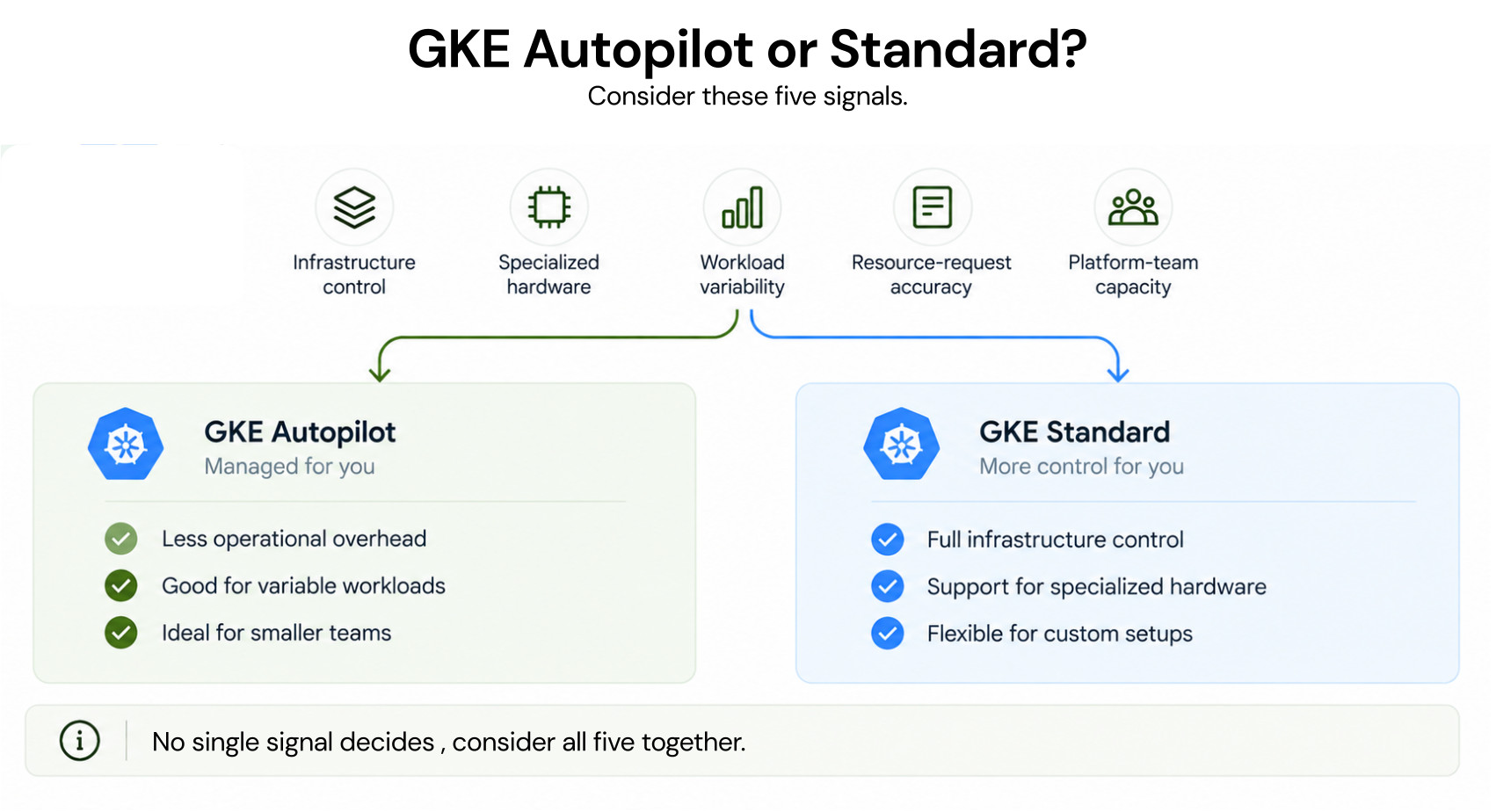
This is the first question every team faces when creating a GKE cluster. The answer depends on your workload characteristics and your team’s operational appetite.
How GKE Standard Pricing Works
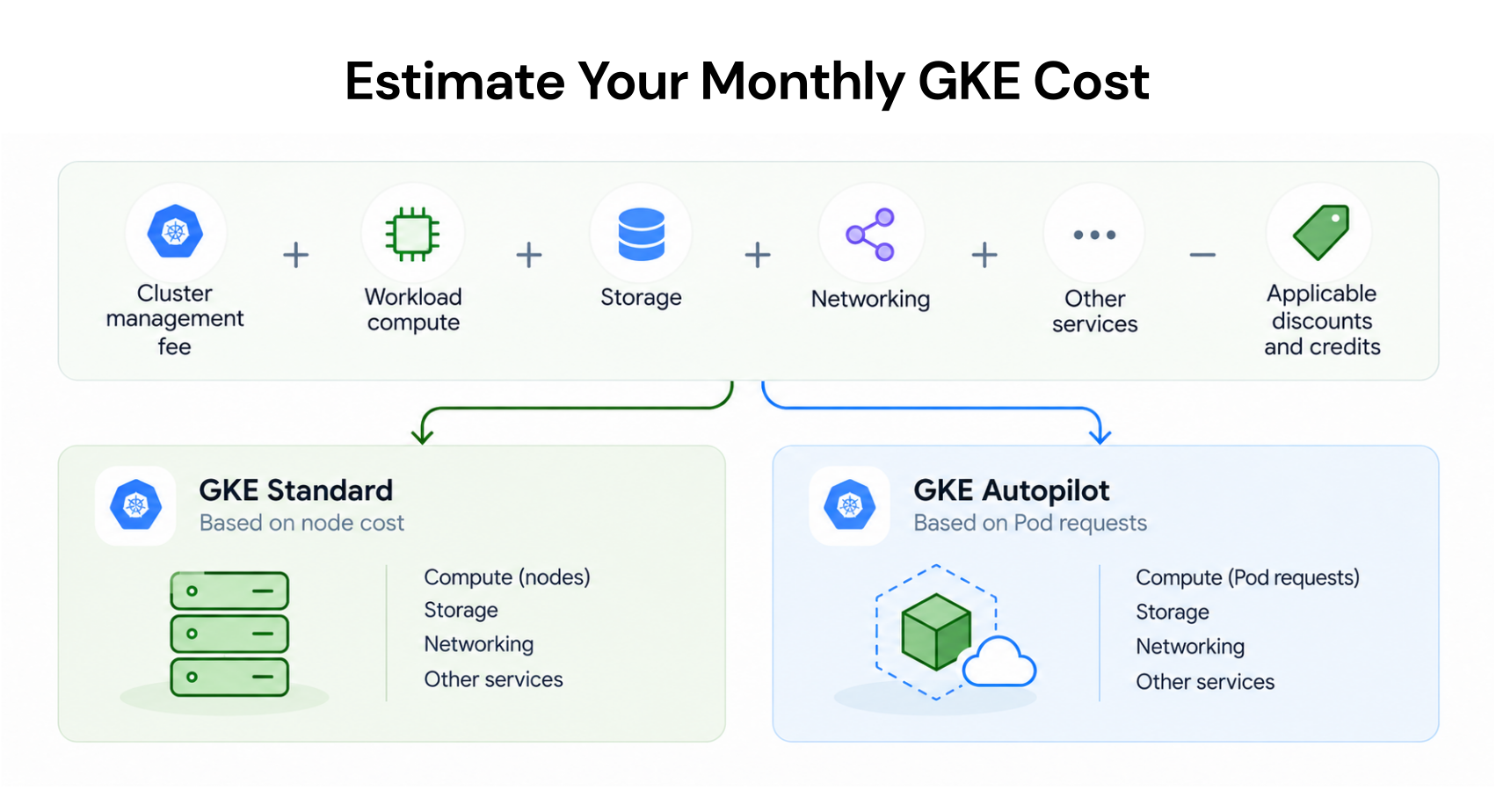
In Standard mode, you provision and pay for node pools – groups of Compute Engine VMs that run your pods. You are billed for the underlying VM instances, whether those VMs are fully utilized or mostly idle.
Key cost components in GKE Standard (verify at cloud.google – rates change):
- Cluster management fee: $0.10 per cluster per hour (approximately $73/month per cluster). Waived for the first zonal cluster in each project. Regional clusters (multi-zone) are charged this fee.
- Node compute cost: Standard Compute Engine pricing for the machine type you choose. An n2-standard-4 (4 vCPU, 16 GB RAM) in us-central1 runs approximately $0.190/hour on-demand as of May 2026 (verify as rates change).
- Persistent disk storage: Charged separately at standard PD pricing.
- Network egress: Standard GCP egress pricing applies.
The fundamental problem with Standard mode is over-provisioning. Kubernetes schedulers request CPU and memory reservations, not actual usage. A team that provisions 10 n2-standard-4 nodes for a workload that consistently uses 40% of allocated resources is paying for 60% idle capacity every month.
How GKE Autopilot Pricing Works
Autopilot flips the billing model. Instead of paying per node, you pay per pod based on the CPU, memory, and ephemeral storage requested in your pod spec.
GKE Autopilot pricing in us-central1 as of May 2026.
| Resource | Price per unit per hour |
| vCPU | $0.0585 |
| Memory (GiB) | $0.0081 |
| Ephemeral Storage (GiB) | $0.0000494 |
There is a minimum pod size of 0.25 vCPU and 0.5 GiB memory. System pods required by Autopilot are also billed.
The Autopilot billing model eliminates idle node cost in theory – you only pay for what your pods request. In practice, teams with over-specified resource requests in their pod specs pay more in Autopilot than they would with right-sized Standard nodes. Autopilot does not bill for unused capacity on a node, but it does bill fully for every milliCPU and every MiB of memory you declare in your pod manifest.
GKE Autopilot vs Standard: Side-by-Side Comparison
| Dimension | GKE Standard | GKE Autopilot |
| Billing unit | Per node (VM) | Per pod (CPU + memory requested) |
| Node management | You manage node pools | Google manages nodes |
| Over-provisioning risk | Node-level idle capacity | Pod-spec bloat |
| Cluster management fee | $0.10/hr per regional cluster | $0.10/hr per cluster |
| Spot/preemptible support | Yes – spot node pools | Yes – spot pods |
| CUD eligibility | Yes – via Compute Engine CUDs | Yes – via GKE Autopilot CUD (recently launched) |
| Custom machine types | Yes | No |
| GPU/TPU workloads | Yes | Limited (A100, L4, H100 supported in Autopilot) |
| Windows containers | Yes | No |
| DaemonSets | Yes | Limited (only specific system DaemonSets) |
| Minimum viable use case | Batch jobs, ML training, stateful apps | Web services, APIs, microservices |
| Operational overhead | High | Low |
When Should You Choose Standard Mode?
Choose GKE Standard when your workload has one or more of these characteristics:
- You run GPU or TPU training jobs that require specific machine types not available in Autopilot.
- You operate stateful applications (databases, message queues) that need persistent local SSDs or sole-tenant nodes.
- You have DaemonSets that must run on every node.
- You have batch workloads that can tolerate preemption and benefit from aggressive Spot node pools.
- Your engineering team has the operational bandwidth to manage node pools and tune autoscaling.
When Should You Choose Autopilot Mode?
Choose GKE Autopilot when you run stateless services, APIs, and microservices where the primary cost driver is over-provisioned nodes that sit idle between traffic peaks. Autopilot is also the right choice when your platform team is small, when node-level security hardening is required without custom configuration, or when you want to eliminate the “provisioned but unused” cost category entirely.
The caveat: accurate resource requests are non-negotiable in Autopilot. A pod specifying requests: cpu: 2, memory: 4Gi that actually consumes 0.5 vCPU will cost 4x more than necessary. Right-size your pod manifests before migrating to Autopilot or you will pay more, not less.

GKE Pricing: What Does a Real Cluster Actually Cost?
Abstract pricing tables do not help engineering teams make decisions. Here is a concrete cost scenario for a production web application.
Scenario: E-commerce platform running 50 replicas of a web service
Assumptions: us-central1, 24/7 operation, each replica requests 0.5 vCPU and 1 GiB memory.
Option A: GKE Standard with n2-standard-4 nodes
To run 50 replicas at 0.5 vCPU/1 GiB, you need approximately 10 n2-standard-4 nodes (4 vCPU, 16 GiB each, leaving headroom for system pods and autoscaling buffer).
- 10 x n2-standard-4 at $0.190/hour = $1.90/hour
- Monthly (730 hours) = approximately $1,387
- Regional cluster management fee = $73/month
- Total Standard (on-demand): approximately $1,460/month (verify at cloud.google.com/compute/all-pricing – rates change)
Option B: GKE Autopilot
- 50 replicas x 0.5 vCPU x $0.0585/vCPU/hour = $1.4625/hour for CPU
- 50 replicas x 1 GiB x $0.0081/GiB/hour = $0.405/hour for memory
- Cluster management fee = $0.10/hour
- Total hourly: approximately $1.97/hour
- Monthly: approximately $1,438/month (verify at cloud.google – rates change)
At this workload profile, the two modes are cost-equivalent. The Standard option becomes cheaper if you apply Committed Use Discounts to the underlying n2 nodes (up to 57% discount on 3-year resource-based CUDs, verify at cloud.google rates change). The Autopilot option becomes cheaper if those 10 Standard nodes are running at below 50% utilization for significant periods.
This is the core financial decision teams avoid because it requires actually measuring pod-level resource utilization, something most engineering teams do not do systematically.
How Committed Use Discounts Apply to GKE Workloads
This is where GKE cost optimization diverges sharply from basic Kubernetes knowledge, and where most teams leave significant money unclaimed.
CUDs on GKE Standard
GKE Standard nodes are Compute Engine VMs. Any Committed Use Discount you purchase for Compute Engine resources (vCPU and memory) applies automatically to GKE Standard node pools running on eligible machine types.
- Resource-based CUDs commit to a specific amount of vCPU and memory in a region for 1 or 3 years. Discounts: 37% (1-year) and 57% (3-year) for most N2 machine types (verify as rates change).
- Spend-based CUDs (Flex CUDs) commit to a minimum spend level and can cover multiple machine types. These are more flexible but typically deliver lower discounts than resource-based CUDs.
Applied to the Standard cluster in the scenario above: a 1-year resource-based CUD on 40 vCPU and 160 GiB of memory reduces the compute cost from $1,387 to approximately $873/month – a saving of $514/month or $6,168/year. On a 3-year CUD, the savings approaches $790/month.
The operational challenge: most GKE Standard clusters have variable node pool sizes due to the Cluster Autoscaler. Committing to a fixed CUD level on a cluster that scales between 8 and 20 nodes means underutilizing the CUD during scale-down periods. The correct approach is to commit to your baseline node count and let on-demand pricing cover burst capacity. Also read: GCP Committed Use Discount vs Sustained Use Discount.
CUDs on GKE Autopilot
GKE Autopilot Committed Use Discounts are a recently launched product from Google (verify current availability at cloud.google – rates change). Usage.ai’s Usage Flex GKE Autopilot CUD covers both GKE Autopilot clusters and GKE Standard resources, with savings of 20-46% and $0 upfront (sourced from Usage.ai project documentation).
Prior to Autopilot CUDs existing, the only way to discount Autopilot pod costs was through the underlying Compute Engine CUDs that Google applied automatically to Autopilot node infrastructure, a discount that was partially passed through but not directly purchasable by the customer.

What Are the Real Cost Drains in GKE?
The management fee and compute costs are visible. These are the costs that are not.
1. Idle Nodes from Autoscaler Lag
The Cluster Autoscaler adds nodes when pending pods cannot be scheduled, and removes nodes when utilization drops below its threshold (default: any node that has been underutilized for more than 10 minutes). The lag between scale-down eligibility and actual node removal means you are often paying for 10-20% more node capacity than your actual workload requires at any given moment.
On a cluster with an average 15 nodes at $0.19/hour each, 15% idle capacity costs approximately $315/month.
2. Per-Pod Overhead in Autopilot
Every pod in Autopilot has a minimum resource floor (0.25 vCPU, 0.5 GiB). If your application runs 200 small sidecar containers that technically require 0.1 vCPU each, you pay for 0.25 vCPU each – 2.5x more than necessary. Teams migrating from Standard to Autopilot without auditing sidecar resource requests often report higher costs in the first month.
3. Persistent Disk Orphans
PersistentVolumeClaims that are not deleted when pods or namespaces are removed continue to incur storage charges. A 100 GiB standard persistent disk in us-central1 costs approximately $4.40/month (verify at cloud.google.com/compute/disks-image-pricing – rates change). Across a multi-tenant cluster with dozens of teams and frequent deployments, orphaned PVCs accumulate silently.
4. Cross-Zone Traffic
GKE routes pod-to-pod traffic across zones by default. GCP charges $0.01/GiB for traffic between zones within the same region (verify at cloud.google – rates change). For high-throughput services, this adds up quickly. Topology-aware routing and pod affinity rules can reduce cross-zone traffic substantially, but require deliberate configuration.
5. Cluster Management Fees on Dev/Test Clusters
Teams that spin up regional clusters for development and testing pay the $0.10/hour management fee even for clusters that run at 10% utilization 95% of the time. Over 12 months, three unnecessary regional dev clusters cost $2,628 in management fees alone before any compute.
GKE Cost Optimization: A Decision Framework
Not all optimization levers apply to every cluster. Use this framework to identify where to focus first.
START: What is your primary GKE cost driver?
Is your cluster running in Standard mode?
├── YES: Are your nodes consistently above 60% CPU utilization?
│     ├── YES: Scaling strategy is healthy. Apply CUDs to baseline node count.
│     │    Are you using resource-based or spend-based CUDs?
│     │    ├── Neither: You are overpaying. Start with 1-year resource CUDs.
│     │    └── Existing CUDs: Review coverage – is commit level matched to baseline?
│     └── NO: Nodes are under-utilized.
│         Is workload bursty (peaks 2x+ above baseline)?
│         ├── YES: Migrate peak-absorbing node pools to Spot Nodes.
│         │     Apply CUDs to baseline only.
│         └── NO: Workload is consistently low – consider right-sizing to smaller machine types
│              or migrating to Autopilot.
│
└── NO (Autopilot): Are your pod resource requests accurate (within 20% of actual usage)?
├── YES: Apply GKE Autopilot CUDs to baseline pod resource commitment.
└── NO: Audit pod specs first.
Use VPA (Vertical Pod Autoscaler) recommendations to right-size requests.
Then apply CUDs.
GKE Autopilot vs Standard: Cost Optimization Strategies by Mode
Standard Mode Optimization Checklist
Node pool right-sizing. Run kubectl top nodes over a 2-week window. If p90 node CPU utilization is below 50%, your machine type is too large for your workload. Move to a smaller machine type or consolidate node pools.
Spot node pools for fault-tolerant workloads. Spot VMs on GCP offer up to 91% discount vs on-demand pricing (verify at cloud.google – rates change). Use them for batch processing, CI/CD runners, and stateless services that can tolerate interruption. Combine with pod disruption budgets to ensure minimum availability.
Committed Use Discounts on baseline nodes. Determine your P10 node count (the node count you run at least 90% of the time). Purchase resource-based CUDs to cover that baseline. Let on-demand pricing handle your autoscaling buffer above baseline.
Cluster Autoscaler tuning. The default scale-down threshold is 50% request utilization for 10 minutes. For cost-sensitive clusters, lower the scale-down threshold and reduce the evaluation window. Be aware this increases the frequency of node churn and pod disruption.
Namespace cost allocation. Without labels and namespace-level cost attribution, you cannot identify which teams or services are driving the cost. Implement resource labels on every node pool and use Cloud Billing export to BigQuery for namespace-level chargeback.
Autopilot Mode Optimization Checklist
Right-size resource requests before everything else. Install the Vertical Pod Autoscaler in recommendation mode (not update mode initially). Let it run for 7-14 days. Review VPA recommendations per deployment and update requests to match. This is the single highest-ROI action for Autopilot users.
Remove or right-size sidecar containers. Envoy proxies, logging agents, and metric collectors each consume the Autopilot minimum (0.25 vCPU, 0.5 GiB). On a 500-pod cluster with sidecars on every pod, this adds 125 vCPU and 250 GiB of memory in billed sidecar overhead. Evaluate whether every sidecar is necessary.
Use Spot pods for batch and background jobs. Autopilot supports spot pods via cloud.google.com/gke-spot: “true” node selector. Batch jobs, data processing pipelines, and async workers are natural candidates.
Apply GKE Autopilot CUDs to your baseline pod resource commitment. If your cluster sustains a minimum of 50 vCPU and 100 GiB of memory across pods 24/7, commit to that baseline level. The Usage.ai Flex GKE Autopilot CUD covers this commitment with 20-46% savings, $0 upfront, and a buyback guarantee if utilization drops.

How Usage.ai Automates GKE Cost Optimization
Most FinOps platforms stop at recommendations. They surface a finding and ask you to act on it. The GKE cost gap between “identified” and “captured” is where savings disappear.
- Usage Flex GKE Autopilot CUD is Usage.ai’s commitment product for GKE workloads. It covers GKE Autopilot clusters and GKE Standard resources, delivers 20-46% savings with $0 upfront, and includes a buyback guarantee, if usage drops and the commitment goes underutilized, Usage.ai buys it back and returns the value as cashback (real money, not credits).
- Usage Flex Compute Engine CUD also applies to GKE Standard node pools, covering Compute Engine VMs, GKE Std/Autopilot, Cloud Run, and sole-tenant nodes, with 28-46% savings.
- Zero lock-in guarantee: Usage.ai’s Insured Flex Commitments carry no multi-year obligation. Commitments adjust quarterly. Scale down with no penalty. If underutilized, get cashback paid in real money.
The setup process uses billing-layer access only – no access to your GKE cluster configuration, no infrastructure changes, 30-minute onboarding.
For teams managing GKE workloads alongside AWS EKS, Usage.ai operates across AWS, GCP, and Azure from a single platform – meaning the same commitment automation and cashback protection applies to your entire cloud portfolio.
Explore GKE cost optimization with Usage.ai.
GKE vs EKS vs AKS: How Do Costs Compare?
This is one of the most searched questions among teams evaluating managed Kubernetes services. Here is a direct comparison (all prices as of May 2026, verify at each provider’s pricing page – rates change).
| Dimension | GKE | EKS (AWS) | AKS (Azure) |
| Control plane fee | $0.10/hr regional cluster; free for 1st zonal cluster per project | $0.10/hr per cluster | Free |
| Node billing | Compute Engine on-demand or CUD pricing | EC2 on-demand, RI, or Savings Plans | Azure VM on-demand or Reserved pricing |
| Spot/preemptible nodes | Spot VMs up to 91% discount | EC2 Spot up to 90% discount | Azure Spot VMs up to 90% discount |
| Commitment discount program | Committed Use Discounts (resource-based or spend-based) | EC2 Reserved Instances or Savings Plans | Azure Reserved VM Instances |
| Max commitment discount | Up to 57% (3-year resource CUD) | Up to 66% (3-year all-upfront RI) | Up to 65% (3-year reserved) |
| Autopilot/serverless option | GKE Autopilot (per-pod billing) | EKS Fargate (per-pod billing) | ACA (Azure Container Apps, not strictly AKS) |
| Managed node group | Yes (Standard node pools) | EKS Managed Node Groups | AKS system/user node pools |
| Free tier | 1 free zonal cluster per project | None | No cluster management fee |
Key finding for multi-cloud teams: GKE has the only major managed Kubernetes service with a free control plane tier (zonal clusters). For development workloads and smaller production clusters, this is a real advantage. For multi-zone production clusters, the management fee structure is effectively identical across GKE, EKS, and AKS.
The choice of Kubernetes provider should not be driven by nominal list pricing differences – at scale, the variance in control plane fees is noise. What matters is: commitment purchase automation, utilization monitoring quality, and whether your chosen FinOps tooling can cover all three providers from one platform.
Frequently Asked Questions
1. Is GKE free to use?
GKE is not free at production scale. Google waives the $0.10/hour cluster management fee for your first zonal (single-zone) cluster per Google Cloud project. Regional clusters (multi-zone for high availability) are always charged the $0.10/hour fee, which amounts to approximately $73/month per regional cluster. You always pay for the Compute Engine VMs (Standard mode) or per-pod resource consumption (Autopilot mode) that run your workloads.
2. What is the difference between GKE Autopilot and Standard?
GKE Standard gives you full control over node pools; you choose machine types, manage node upgrades, and pay per VM. GKE Autopilot is fully managed: Google handles all node operations, and you pay per pod based on CPU and memory requests in your pod spec. Standard is more cost-effective for predictable, high-utilization workloads with tuned CUDs. Autopilot is more cost-effective for variable workloads where nodes would otherwise sit idle, provided pod resource requests are accurately specified.
3. Can you apply Committed Use Discounts to GKE?
Yes. GKE Standard node pools are Compute Engine VMs and are eligible for Compute Engine Committed Use Discounts (resource-based or spend-based). GKE Autopilot has a dedicated CUD product that was recently launched by Google. Resource-based 1-year CUDs deliver approximately 37% discount; 3-year CUDs deliver approximately 57% discount on N2 machine types.
4. How do Spot Nodes work in GKE?
GKE Spot Nodes are Compute Engine Spot VMs (formerly preemptible VMs) provisioned in node pools. They offer up to 91% discount vs on-demand pricing but can be reclaimed by Google with a 30-second notice when GCP needs capacity. Configure them via –spot flag in node pool creation or through the cloud.google.com/gke-spot: “true” node selector in Autopilot. They are appropriate for fault-tolerant workloads: batch processing, CI/CD runners, stateless web replicas behind load balancers, and non-critical background jobs. Do not run databases or stateful services on Spot Nodes without robust failover.
5. What is GKE Autopilot per-pod billing?
GKE Autopilot charges based on the CPU (vCPU), memory (GiB), and ephemeral storage (GiB) declared in your pod’s resource requests, not actual consumption. Minimum pod size is 0.25 vCPU and 0.5 GiB memory. If your pod requests 1 vCPU but uses 0.2 vCPU, you are billed for 1 vCPU. This makes accurate resource request sizing the most important cost control action in Autopilot. Use the Vertical Pod Autoscaler in recommendation mode to establish baseline request sizing before committing resources.
6. What is GKE used for?
GKE is used for deploying containerized applications at scale on Google Cloud. Common use cases include: microservices architectures where teams deploy independently, machine learning model serving (especially GPU workloads on Standard clusters), CI/CD pipeline execution environments, event-driven data processing pipelines, web application backends, and multi-tenant SaaS platforms. GKE Autopilot is particularly popular for API services and microservices due to its managed node infrastructure. GKE Standard dominates for ML training jobs, data engineering, and workloads requiring custom machine types or GPU configurations.
7. How much does GKE cost per month for a small cluster?
A minimal GKE Standard cluster in us-central1 with 3 x e2-medium nodes (2 vCPU, 4 GiB each) costs approximately $45/month in compute ($0.0206/hour per e2-medium x 3 nodes x 730 hours, verify at cloud.google – rates change) plus $73/month for a regional cluster management fee, totaling approximately $118/month before storage and networking. A zonal single-master cluster waives the management fee, reducing total to approximately $45/month. Production clusters with sufficient resources to handle real workloads will be substantially higher.