
New See exactly what you're overpaying AWS in under 60 seconds. Try the Calculator for free →

What Is AWS Billing and Cost Management? Complete Guide (2026)

Updated June 8, 2026
21 min read
What Is AWS Billing and Cost Management? Complete Guide (2026)
On this page

AWS Billing and Cost Management is a suite of tools inside the AWS Management Console that helps organizations track, allocate, analyze, and optimize their cloud spending across all AWS services, accounts, and regions. It serves as the financial control center of every AWS account giving engineering, finance, and FinOps teams the visibility they need to understand exactly what they are spending, which services and workloads are driving costs, and where savings opportunities exist.

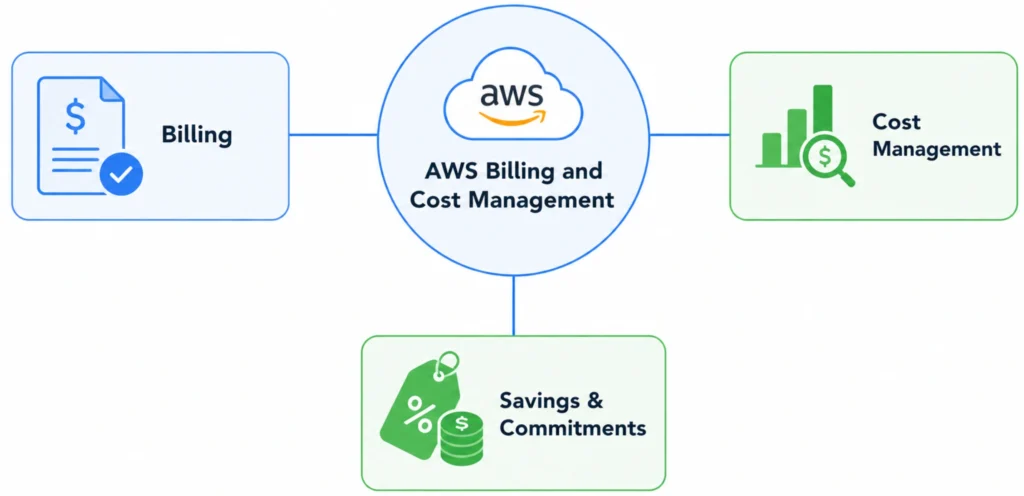
The suite is organized into three functional areas: Billing (invoices, payments, and charge tracking), Cost Management (analytics, budgets, forecasting, and optimization recommendations), and Savings (commitment-based pricing models like Savings Plans and Reserved Instances). Together, these areas cover the full lifecycle of FinOps and AWS cost visibility from understanding your bill to actively reducing it.

By the end of this guide, you will have a complete understanding of what AWS Billing and Cost Management is, how each tool works, how to access and configure the console, what IAM permissions are required, and what best practices modern FinOps teams follow to control and optimize AWS cloud spending.

The Three Pillars of AWS Billing and Cost Management

AWS organizes its billing suite into three areas. Understanding which pillar owns which problem helps teams route work correctly.

Pillar 1

Billing covers how AWS charges your account: invoice generation, payment processing, credit redemption, and consolidated billing across multiple accounts. Finance and accounting teams work here primarily.

Pillar 2

Cost Management provides tools for analyzing, forecasting, and optimizing cloud spending Cost Explorer, AWS Budgets, CUR, Cost Anomaly Detection, Cost Categories, and Right-Sizing Recommendations. FinOps and engineering teams work here daily.

Pillar 3

Savings and Commitments covers commitment-based pricing models that reduce compute costs in exchange for usage commitments Savings Plans, Reserved Instances, and Cost Optimization Hub. Cloud architects and platform engineers drive decisions here.

Key Components of AWS Billing and Cost Management

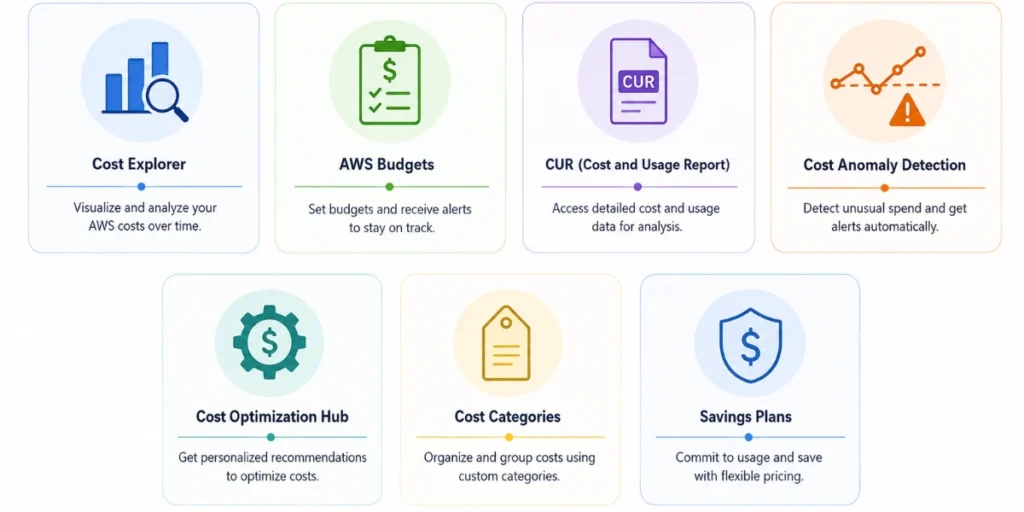
AWS Billing and Cost Management includes nine primary tools, each addressing a specific aspect of cloud financial management.

AWS Billing and Cost Management console navigation showing Billing, Cost Management, and Savings sections.

1. AWS Cost Explorer

AWS Cost Explorer is a visualization and analytics tool that allows users to interactively explore, filter, and forecast AWS spending across services, regions, accounts, usage types, and time periods.

Teams use Cost Explorer to investigate billing spikes, identify cost drivers, and forecast how spending will evolve. Key capabilities include interactive daily, monthly, or hourly cost charts; filtering by service, account, tag, region, or instance type; Savings Plans and Reserved Instance utilization reports; and spending forecasts based on historical data.

2025 update: Cost Explorer now supports natural language querying through Amazon Q Developer integration users can ask questions like “Which EC2 instance types drove the most cost increase last month?” without building custom filters.

AWS Cost Explorer daily cost chart filtered by usage type showing spending trends across services.

2. AWS Budgets

AWS Budgets is a proactive alerting tool that allows organizations to define spending thresholds and receive automatic notifications when costs approach or exceed those limits.

Budgets can be scoped to monthly total account spending, individual services (e.g., alert when EC2 spend exceeds $10,000/month), account-level spending within AWS Organizations, or Savings Plans and RI utilization and coverage. When a threshold is reached, AWS sends alerts via email or Amazon SNS. Budget Actions can also trigger automated responses such as applying an IAM policy that restricts new resource launches making Budgets an enforcement tool as well as an alerting one.

3. AWS Cost and Usage Report (CUR) Including CUR 2.0

The AWS Cost and Usage Report (CUR) is the most granular billing dataset AWS provides, containing line-item details about every resource used, every charge applied, and every discount received. CUR data includes hourly or daily resource usage, service and resource-level cost breakdowns, RI and Savings Plan discounts, resource IDs, and pricing details.

CUR 2.0 recommended as of 2024: AWS now delivers CUR 2.0 via AWS Data Exports, offering a fixed stable schema that does not change when new services are added, flat column structure replacing nested JSON, and improved cost attribution. Organizations building new cost analytics pipelines should use CUR 2.0 from the start. Existing pipelines can continue on legacy CUR but migration is recommended.

4. AWS Cost Anomaly Detection

AWS Cost Anomaly Detection is a machine learning-powered monitoring service that automatically identifies unusual spending patterns and sends alerts before costs grow out of control.

Unlike static budget alerts that only fire when a fixed threshold is crossed, Anomaly Detection learns your account’s normal spending behavior and flags deviations even if they stay below a budget limit catching misconfigured resources, runaway workloads, or unauthorized activity early. It is free to use and complements budget alerts rather than replacing them.

5. AWS Cost Optimization Hub

AWS Cost Optimization Hub is a centralized dashboard that consolidates cost reduction recommendations from across AWS services into a single prioritized view.

Launched in 2023, it aggregates recommendations from Compute Optimizer, Savings Plans, Reserved Instance suggestions, and other AWS optimization services. Each recommendation includes an estimated monthly savings amount. Opportunities surfaced include rightsizing EC2 instances, migrating to Graviton-based instances (up to 20% less expensive than comparable x86, per AWS), purchasing commitments for predictable workloads, and deleting idle resources. Available at no additional charge.

6. AWS Right-Sizing Recommendations

AWS Right-Sizing Recommendations identify over-provisioned EC2 instances and suggest smaller, more cost-efficient instance types that can handle the same workload at lower cost.

Powered by AWS Compute Optimizer, which analyzes CloudWatch utilization metrics. The default lookback period is 14 days; a 32-day lookback is also free, and a 93-day enhanced lookback is available as a paid option for workloads with seasonal patterns. Each recommendation shows current vs. recommended instance type, projected cost, estimated savings, and performance risk level.

7. AWS Cost Categories

AWS Cost Categories is a rule-based grouping tool that maps AWS costs to your internal organizational structure, business units, teams, products, or environments for reporting, allocation, and chargeback. Cost Categories extend native AWS dimensions by combining multiple filters into custom rules. They appear as filterable dimensions in Cost Explorer, Budgets, and CUR.

8. AWS Savings Plans and Reserved Instances

AWS Savings Plans and Reserved Instances (RIs) are commitment-based pricing models that reduce compute costs by up to 72% compared to on-demand pricing in exchange for a usage commitment of one or three years.

Feature Savings Plans Reserved Instances
Commitment type Dollar-per-hour spend Specific instance type and region
Flexibility Across instance families, sizes, regions (Compute SP) Tied to specific instance type or family
Maximum discount Up to 66% (Compute SP) Up to 72% (Standard RI)
Best for Dynamic workloads with predictable total spend Stable workloads with fixed instance requirements
Payment options All upfront, partial upfront, no upfront All upfront, partial upfront, no upfront

For most organizations, Compute Savings Plans offer the best balance of discount depth and flexibility. Standard RIs offer slightly higher discounts but require committing to a specific instance type and region. The optimal strategy is to use Compute Savings Plans for baseline compute coverage and supplement with Standard RIs for workloads that have run consistently on a specific instance type for more than a year.

Also read: AWS Savings Plans vs Reserved Instances: A Practical Guide

9. AWS Billing Dashboard

The AWS Billing Dashboard is the main entry point to the console, providing a high-level summary of current month spending, prior month comparisons, service-level cost breakdowns, and quick navigation to all billing and cost management tools.

AWS Billing and Cost Management Console: How It Works

The AWS Billing and Cost Management console is the centralized web interface where you access all billing tools, view invoices, manage payments, configure budgets, and analyze cloud spending.

How to Access the Console

  1. Sign in to the AWS Management Console at console.aws.amazon.com
  2. In the top-right corner, choose your account name or account ID
  3. Select Billing and Cost Management from the dropdown
  4. The Billing Dashboard opens as your default view

Alternatively, search “Billing” in the AWS Console search bar.

How to Set Up AWS Billing and Cost Management for the First Time

Complete these steps in order when setting up cost management for a new AWS account:

  1. Activate IAM billing access (root account required): see the IAM permissions section below
  2. Enable Cost Explorer: navigate to Cost Explorer and click Enable; data is available within 24 hours
  3. Configure CUR 2.0: go to Data Exports, create a new export using the Standard data export type, delivered to an S3 bucket
  4. Create your first budget: set a monthly total cost budget with alerts at 80% and 100%
  5. Enable Cost Anomaly Detection: create an account-level monitor with an alert subscription
  6. Apply cost allocation tags: define your tagging schema and activate tags under Billing Preferences → Cost Allocation Tags
  7. Enable Cost Optimization Hub: opt in to begin receiving consolidated recommendations

Usage.ai account connection screen showing AWS as a connected cloud provider alongside Azure and Google Cloud options

How to Set Up IAM Permissions for AWS Billing and Cost Management

By default, IAM users and roles including those with AdministratorAccess cannot access the AWS Billing and Cost Management console unless the root account has explicitly activated IAM billing access. This is one of the most common causes of “Access Denied” errors in billing.

Why Access Is Denied by Default

AWS treats billing data as sensitive financial information. Even full AdministratorAccess does not grant billing visibility unless the root account enables the “IAM user and role access to billing information” setting; a deliberate security design requiring explicit opt-in.

How to Activate IAM Billing Access

  1. Sign in as the root user
  2. Choose your account name → Account
  3. Scroll to IAM user and role access to billing information
  4. Click Edit → Activate IAM Access → Update

Key IAM Policies for Billing Access

Policy What It Allows
billing:GetBillingData View invoices and billing details
billing:GetBillDetails Access detailed bill line items
payments:GetPaymentInstrument View payment methods
ce:GetCostAndUsage Access Cost Explorer data
budgets:ViewBudget View budget configurations
budgets:ModifyBudget Create and modify budgets
cur:DescribeReportDefinitions View CUR report definitions

Recommended approach: create a Billing Viewer role (read-only: billing:GetBillingData, ce:* read, budgets:ViewBudget) and a separate Billing Admin role for users who configure budgets or purchase commitments.

Note: The legacy aws-portal IAM namespace was retired by AWS in December 2023 and is no longer valid for any account. All accounts must use the current fine-grained IAM prefixes: billing:, invoicing:, payments:, tax:, ce:, budgets:, and cur:. See the AWS Billing IAM migration guide for the complete action mapping.

AWS Billing and Cost Management Pricing – Does It Cost Anything?

Most AWS Billing and Cost Management tools are free. The main costs are associated with action-enabled budgets and CUR data processing infrastructure.

Tool Cost
AWS Billing Dashboard Free
AWS Budgets, monitoring only (all budgets) Free
AWS Budgets, action-enabled (first 2) Free
AWS Budgets, action-enabled (additional) $0.10 per budget per day
AWS Cost Explorer (console) Free
AWS Cost Explorer API $0.01 per API request
AWS Cost Anomaly Detection Free
AWS Cost Optimization Hub Free
AWS Right-Sizing Recommendations Free
AWS Cost Categories Free
CUR delivery to S3 S3 storage costs apply
CUR querying via Amazon Athena $5 per TB scanned

AWS Billing vs. AWS Cost Management vs. AWS Cost Explorer

These three terms are often confused. Here is how they relate:

AWS Billing AWS Cost Management AWS Cost Explorer
What it is Invoice and payment layer Full optimization suite One analytics tool within the suite
Primary purpose Track charges, generate invoices Analyze, forecast, and optimize spend Visualize and query spending data
Main users Finance, accounting FinOps, DevOps, engineering FinOps analysts, cloud engineers
Frequency of use Monthly Daily to weekly On demand

In plain terms: Billing tells you what you owe. Cost Management helps you understand and reduce what you owe. Cost Explorer is the analytics engine inside Cost Management for deep-dive spending analysis.

Also read: Cloud Cost Analysis: How to Measure, Reduce, and Optimize Spend

How AWS Billing and Cost Management Works: The 4-Step Workflow

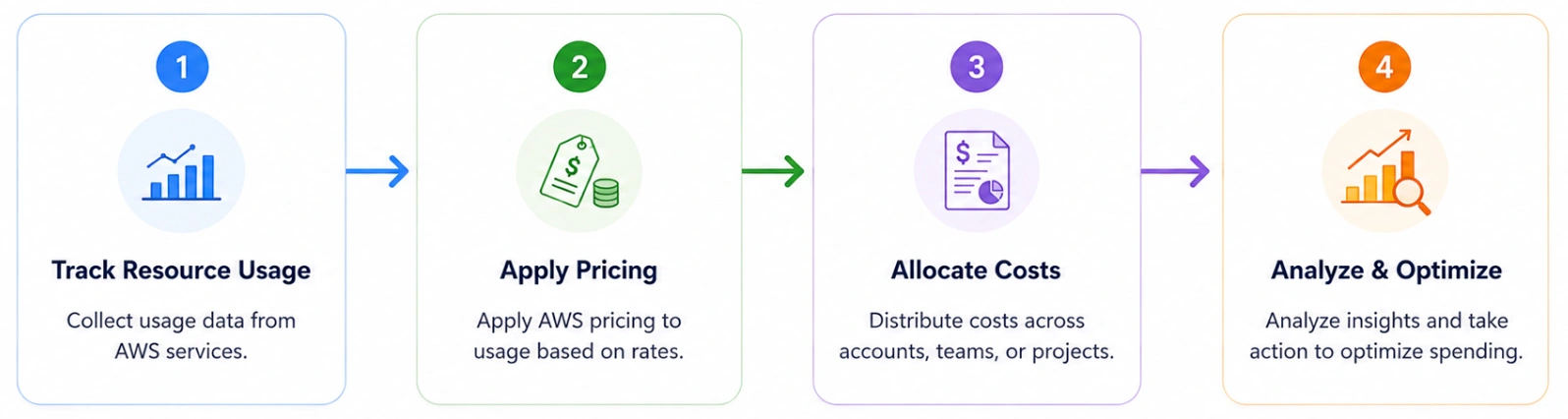
AWS Billing and Cost Management operates through a continuous four-step process.

Step 1: Track Resource Usage

Every workload running on AWS EC2 instances, RDS databases, S3 storage, Lambda functions generates usage records in real time. Usage data includes compute hours, storage consumed, data transferred, API requests, and database I/O operations. These records flow continuously into the central AWS billing system.

Step 2: Apply Pricing Models

AWS calculates costs based on the pricing model associated with each resource:

Pricing Model Description Best For
On-Demand Pay per second/hour, no commitment Variable, unpredictable workloads
Savings Plans Commit to $/hour for 1–3 years Consistent baseline compute spend
Reserved Instances Reserve specific capacity for 1–3 years Stable, instance-specific workloads
Spot Instances Bid for unused capacity at up to 90% off Fault-tolerant batch workloads
Free Tier First 12 months or always-free limits Evaluation and development

Step 3: Allocate Costs

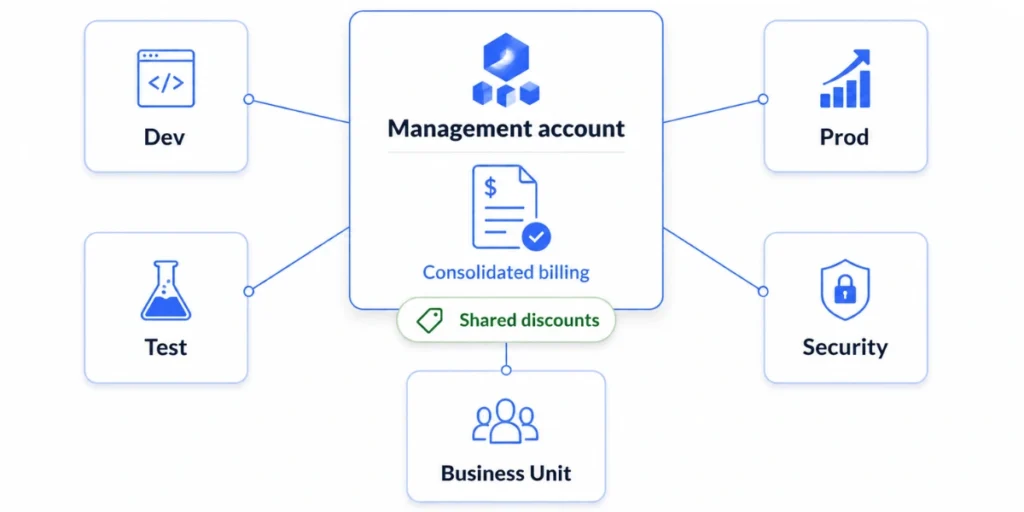
AWS provides two primary allocation mechanisms. Cost Allocation Tags are metadata labels applied to resources that group costs by team, project, or environment in Cost Explorer and CUR reports. AWS Organizations (Consolidated Billing) groups multiple AWS accounts under a single payer account for centralized invoicing, volume discount aggregation, and Savings Plan sharing.

Step 4: Generate Reports and Analytics

After usage is tracked, pricing applied, and costs allocated, AWS makes the data available through Cost Explorer, CUR, Budgets, and Anomaly Detection providing the foundation for spending analysis, forecasting, and optimization.

Best Practices for AWS Billing and Cost Management

Below are some best practices that FinOps teams commonly follow to improve cost control within AWS environments.

1. Implement a consistent cost allocation tagging strategy.

Tags are the foundation of cost attribution. At minimum, tag every resource with: Environment, Team or Owner, Project or Application, and CostCenter. Activate tags in the Billing console and use Cost Categories to create rule-based groupings for teams or workloads that span multiple tags or accounts.

2. Configure budgets and alerts before you need them.

Set up a monthly total account budget at 80% and 100% of expected spend, service-specific budgets for high-cost services, and Savings Plans or RI coverage budgets that alert when commitment coverage falls below 80%. Use Budget Actions to automatically apply restrictive IAM policies if a budget is significantly exceeded.

3. Enable Cost Anomaly Detection for every account.

Static budget alerts catch threshold breaches; anomaly detection catches unusual patterns that stay below the threshold. Enable account-level monitors and configure sensitivity thresholds to avoid alert fatigue while catching meaningful anomalies.

4. Migrate to CUR 2.0 via AWS Data Exports.

CUR 2.0 provides a stable schema that does not break when AWS adds new services. New organizations should configure CUR 2.0 from the start; existing pipelines should plan migration for long-term stability.

5. Use Cost Optimization Hub as your weekly savings review tool.

Sort recommendations by estimated monthly savings and work through rightsizing, Graviton migration, and commitment purchases systematically. Filter recommendations by resource tag to assign optimization actions to the teams that own the affected resources.

6. Adopt Amazon Q for faster cost investigations.

Use Amazon Q Developer integration in Cost Explorer to replace manual filter-building with natural language queries. This frees FinOps analysts from routine data retrieval and directs capacity toward higher-value optimization work.

7. Establish FinOps governance with regular cost reviews.

Bring engineering leads, finance representatives, and FinOps practitioners together on a regular cadence. Review Cost Explorer trends, Budget status, Anomaly Detection alerts, and commitment utilization. Assign owners to optimization actions and track savings realized over time. For organizations formalizing FinOps practices, the FOCUS 1.0 standard supported by AWS and the FinOps Foundation provides a vendor-neutral schema for cloud billing data across multi-cloud environments.

Also read: Cloud Cost Optimization Best Practices

Challenges With AWS Native Billing and Cost Management Tools

AWS Billing and Cost Management provides powerful visibility, but visibility alone does not reduce costs. Organizations frequently encounter these challenges when relying exclusively on native tools:

1. Pricing model complexity.

Multiple pricing models on-demand, Savings Plans, RIs, Spot Instances each have different discount structures and commitment terms. Determining the optimal combination for dynamic workloads requires expertise most teams do not have in-house.

2. Commitment management risk.

Savings Plans and RIs require predicting future usage and committing to 1–3 years of spend. Over-committing means paying for unused capacity; under-committing means missing savings. Managing this balance manually is operationally intensive.

3. Data fragmentation and operational overhead.

CUR data requires Amazon Athena, QuickSight, or a third-party BI tool to become actionable. Building and maintaining that pipeline consumes engineering time that most FinOps teams cannot sustain.

4. Recommendation: refresh lag.

AWS Cost Explorer refreshes Savings Plans and RI recommendations every 72 hours or more. For organizations running dynamic workloads, optimization decisions may be based on data three days old, a gap that can represent thousands of dollars in delayed savings per day.

5. No automated commitment execution.

AWS provides recommendations but purchasing commitments still requires manual approval and execution. This latency between insight and action is a primary source of missed savings.

6. Lack of AI-native querying without Amazon Q or MCP setup.

Until the Amazon Q integration in Cost Explorer and the AWS Billing and Cost Management MCP Server were introduced, querying billing data required navigating the console manually or writing complex API queries. Teams without these integrations configured still face this friction.

Because of these challenges, many organizations augment native AWS tools with third-party automation platforms that continuously analyze usage, generate recommendations, and execute commitment purchases faster than manual review cycles allow.

Also read: What Is the Difference Between Cloud Cost Optimization and Cloud Cost Management?

AWS Billing and Cost Management Use Cases

Monitoring cloud spending across services. The most common use case is tracking cost distribution across AWS services over time. Cost Explorer enables trend analysis, cost driver identification, and spending forecasts. Cost Anomaly Detection flags unusual spending before it appears in a monthly review.

Allocating costs across teams and projects. Large organizations use cost allocation tags, Cost Categories, and consolidated billing to attribute costs to the teams or products responsible — enabling accurate internal chargeback and showback, which improves cost accountability and encourages engineers to build more cost-efficiently.

Setting budgets and preventing unexpected charges. Mature cloud organizations configure account-level, service-level, and team-level budgets with alerts at 80% and 100% of expected monthly spend, supplemented by Cost Anomaly Detection for pattern-based detection of misconfigured resources or unauthorized usage.

Managing GenAI and Amazon Bedrock costs. As organizations adopt Amazon Bedrock for generative AI workloads, cost management for AI inference has become a growing use case. CUR 2.0 includes operation-level cost attribution for Bedrock allowing teams to see costs broken down by model, inference type, and application. AWS also supports IAM principal-based cost allocation for Bedrock, enabling accurate chargeback for AI usage across teams.

The AWS Billing and Cost Management MCP Server

The AWS Billing and Cost Management MCP Server is an official AWS integration that connects AWS cost and billing data to any MCP (Model Context Protocol) compatible AI assistant, enabling natural language queries against your AWS cost data from tools like Claude Desktop, Amazon Q CLI, and other MCP-enabled applications.

AWS launched the MCP Server in August 2025. It allows AI assistants to directly query AWS cost data using the same APIs that power Cost Explorer without requiring manual console navigation or custom API queries. Use cases include asking an AI assistant for a breakdown of top-spending services, generating cost summaries through natural language, and building AI-powered cost management workflows that combine billing data with organizational context.

The MCP Server is available in the AWS GitHub repository and can be configured to work with any MCP-compatible client.

How Usage.ai Extends AWS Billing and Cost Management

AWS Billing and Cost Management provides the data foundation for cloud cost visibility but translating that visibility into consistent savings requires additional processes, expertise, and tooling that many organizations struggle to maintain at scale.

Usage.ai extends AWS’s native billing capabilities by automating commitment optimization and helping organizations safely increase their Savings Plan and Reserved Instance coverage. Customers typically achieve 30–50% reduction in AWS compute costs without any code changes, infrastructure modifications, or upfront payment. Setup takes 5–10 minutes using read-only billing-layer access.

Usage.ai cost optimization dashboard showing $60.75K in February 2026 savings, 12-month gross savings chart, and active AWS commitment ledger with RDS and Redshift entries.

Key capabilities:

  • Automated commitment recommendations updated daily, not weekly
  • Commitment purchase automation review and approve directly in the platform
  • Cashback protection: if usage drops and commitments underutilize, Usage.ai provides cashback
  • Increased commitment coverage by eliminating lock-in risk, organizations safely increase coverage to target levels

The practical result: organizations use AWS Billing and Cost Management for visibility and monitoring, and Usage.ai for automated commitment optimization capturing the savings that native visibility alone does not deliver.

Discover how much you could save. Run a free AWS Savings Test to uncover optimization opportunities in your cloud spending.


You’re Overpaying AWS. See by How Much in 60 Seconds.Upload your AWS bill and get your exact overspend number for free. No account access, or commitment required.FIND MY SAVINGS


Frequently Asked Questions

1. What is AWS Billing and Cost Management? 

AWS Billing and Cost Management is a suite of tools inside the AWS Management Console that helps organizations track, analyze, forecast, and optimize their cloud spending. It includes the AWS Billing Dashboard, AWS Cost Explorer, AWS Budgets, Cost and Usage Reports (CUR), Cost Anomaly Detection, Cost Optimization Hub, Right-Sizing Recommendations, Cost Categories, and Savings Plans and Reserved Instance management. The suite is organized into three pillars: Billing, Cost Management, and Savings.


2. What tools are included in AWS Billing and Cost Management? 

The suite includes: AWS Billing Dashboard, AWS Cost Explorer (with Amazon Q integration), AWS Budgets, AWS Cost and Usage Reports (CUR 2.0), AWS Cost Anomaly Detection, AWS Cost Optimization Hub, AWS Right-Sizing Recommendations, AWS Cost Categories, and Savings Plans and Reserved Instance management.


3. What is AWS Cost Explorer? 

AWS Cost Explorer is a visualization and analytics tool within AWS Billing and Cost Management that allows users to explore spending trends, filter costs by service, account, region, and tag, forecast future spending, and analyze Savings Plans and Reserved Instance utilization. It supports natural language querying through Amazon Q Developer integration as of 2025.


4. What is AWS Cost and Usage Report (CUR)? 

The AWS Cost and Usage Report (CUR) is the most detailed billing dataset AWS provides, with line-item data about resource usage, service costs, pricing details, and applied discounts. AWS now recommends CUR 2.0 delivered via AWS Data Exports, which provides a stable schema and improved cost attribution.


5. What is the difference between AWS Billing and AWS Cost Management? 

AWS Billing handles invoice generation, payment processing, and charge tracking. It tells you what you owe. AWS Cost Management provides tools for analyzing, forecasting, and optimizing cloud spending. It helps you understand and reduce what you owe.


6. What is the difference between AWS Billing and Cost Management and AWS Cost Explorer? 

AWS Billing and Cost Management is the full suite of cloud financial management tools. AWS Cost Explorer is one specific tool within that suite focused on interactive visualization and analysis of spending data. Billing and Cost Management is the system; Cost Explorer is one feature inside it.


7. What IAM permissions are required to access AWS Billing and Cost Management? 

By default, IAM users cannot access billing information even with AdministratorAccess. The root account user must activate IAM billing access under Account Settings. Key permissions include billing:GetBillingData for invoice access, ce:GetCostAndUsage for Cost Explorer data, and budgets:ViewBudget for budget visibility. The legacy aws-portal namespace was retired in December 2023, all accounts must use current fine-grained IAM actions.


8. What is AWS Cost Anomaly Detection? 

AWS Cost Anomaly Detection is a machine learning service that automatically monitors AWS spending patterns and alerts teams when costs deviate unexpectedly from normal behavior. Unlike static budget alerts, it learns your account’s baseline and flags unusual changes even below a budget limit. It is free to use.


9. What is AWS Cost Optimization Hub? 

AWS Cost Optimization Hub is a centralized dashboard that consolidates cost reduction recommendations rightsizing, Graviton migration, Savings Plans and RI purchases, and idle resource deletion into a single prioritized view with estimated monthly savings amounts. Available at no additional charge.


10. How often does AWS update billing data? 

AWS billing data updates multiple times per day for near real-time monitoring. CUR delivery schedules depend on configuration and may be hourly or daily. Cost Explorer refreshes Savings Plans and RI recommendations every 72 hours or more. Cost Anomaly Detection runs continuously and can alert within hours of a spending deviation.


11. What is the AWS Billing and Cost Management MCP Server? 

The AWS Billing and Cost Management MCP Server is an official AWS integration launched in August 2025 that connects AWS cost data to MCP-compatible AI assistants such as Claude Desktop and Amazon Q CLI. It enables natural language querying of AWS cost data without manual console navigation or custom API development.

Cut cloud cost with automation
Latest from our blogs